 MCPE-8054
Texture glitch for stairs
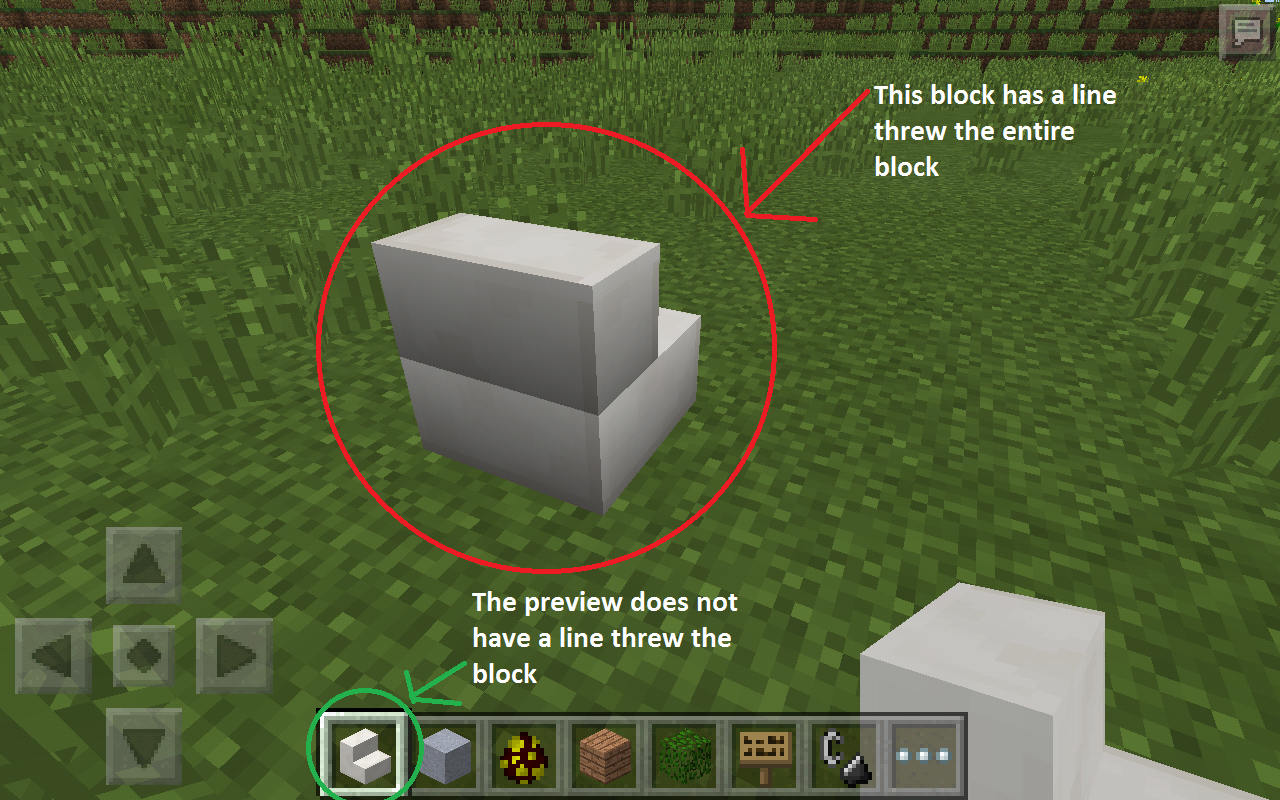
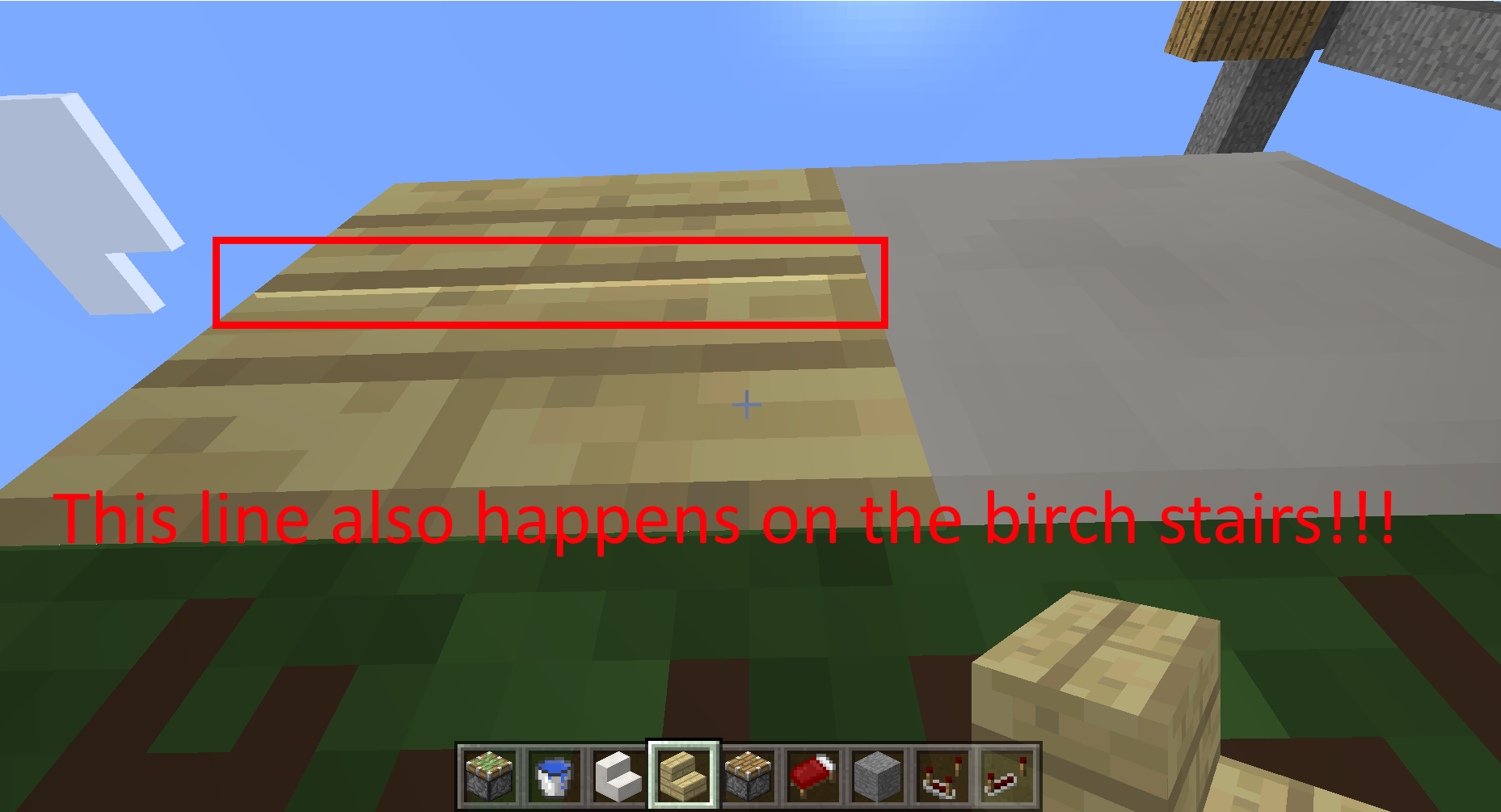
When stair blocks are placed on the ground they display a line through them. The stair block also doesn't match their preview in the item hotbar. Note this doesn't happen in PC. With newer snapshots, now it only happens when you hover over the block, but it still does happens!
Linked Issues
is duplicated by17
MCPE-8403Quartz stairs texture bug back sideDuplicateMCPE-9172Lightining and Texture Bug on stairsDuplicateMCPE-9179Back of stairs block shadow/texture bug, does not match previewDuplicateMCPE-12557The stairs are dark when placed in a certain manner.DuplicateMCPE-12916DiscolorationDuplicateMCPE-13058Stair texture darker than the block itselfDuplicateMCPE-13124Blocks with the stairs not matchDuplicateMCPE-13353Light levelDuplicateMCPE-13385dark stairsDuplicateMCPE-13585Dark StairsDuplicateMCPE-13627The stairs backs are darker making it harder for me to make in wall shelvesDuplicateMCPE-13760All stair types have a lighting glitchDuplicateMCPE-13814Stairs lighting problemDuplicateMCPE-13843Annoying shadow bug with stairs in 0.14DuplicateMCPE-13893Staircase colour changed?!DuplicateMCPE-13931Mcpe 0.14.0 shadow bug with stairsDuplicateMCPE-13962Stairs turning black when putting a block next to itDuplicaterelates to35
MCPE-7903Cactus on hotbar has broken textureFixedMCPE-11365Button model position as an item is incorrectFixedMCPE-12922Water is invisible when you reload the worldFixedMCPE-12975Texture bug blocks placed on the side of glass or leaves hides textureFixedMCPE-14432Nether Brick block side texture is darker than the stairs and slabFixedMCPE-7990Ender, Trapped and Regular Chest in inventory uses incorrect modelConfirmedMCPE-10236Entity overlays are not rendered when effected with invisibility.ConfirmedMCPE-20515Stairs have an odd lighting quirk due to their multiple-cuboid modelConfirmedMCPE-8868Textures on edges of door are incorrectFixedMCPE-10760Furnace placed facing West or North emit fire particles from the back instead of the frontFixedMCPE-10841Leaves on hand are in "Old Graphics"FixedMCPE-12103Monsters do not render armour properlyFixedMCPE-12501Minecarts with hoppers have texture z-fighting (or y-fighting?)FixedMCPE-12881Items in Item Frames are not correct postionFixedMCPE-13801Bats don't have earsFixedMCPE-13802Clocks in item frames have extra pixelsFixedMCPE-13995Stone-Type Block Texture in MapCannot ReproduceMCPE-14544When you are next to button you suffocateFixedMCPE-14613Strays and husks have only one skin layerFixedMCPE-14635Item models for droppers and dispensers are incorrect (still incorrect when dropped and in item frames)FixedMCPE-14757Cake texture is incorrect for some states (when partially-eaten).FixedMCPE-14766Nether wart texture doesn't change upon growingFixedMCPE-14801Furnace texture bugFixedMCPE-14856Texture on a lead attached to a fence is wrong.Cannot ReproduceMCPE-15198Peony Flower texture sprite shows a white pixelFixedMCPE-16146Fire texture shows white lines above itCannot ReproduceMCPE-16195Quartz slab has the wrong textureFixedMCPE-16505Jungle Leaves are in Old Graphics - Not transparent, even on high end Android devicesWorks As IntendedMCPE-16506Ice block is in Old GraphicsWorks As IntendedMCPE-17078Jack o'Lantern pumpkin texture bugFixedMCPE-17515Bottom texture missing for repeater and comparatorFixedMCPE-17837Horizontal Button Texture BugWon't FixMCPE-17949Glass panes texture bugWorks As IntendedMCPE-18170End Crystal generates/spawns too highFixedMCPE-18291Flowing water block uses still water textureFixedAttachments5

Comments39
History148
Assignee:  tommo → Daniel Wustenhoff
Added is duplicated by link: MCPE-8403Quartz stairs texture bug back sideDuplicate
Added affects versions: 0.10.5 0.11.0 Beta 9
Added affects versions: 0.11.0 Beta 10
Removed affects versions: 0.11.0 Beta 10
Added is duplicated by link: MCPE-9172Lightining and Texture Bug on stairsDuplicate
Added is duplicated by link: MCPE-9179Back of stairs block shadow/texture bug, does not match previewDuplicate
 stairs.png
Added affects versions: 0.12.1 Pre-release 0.11.0 0.11.1 0.12.1 Beta 2 0.12.1 Beta 3
Added affects versions: 0.12.1 Beta 6
Added affects versions: 0.12.1
Added labels: awaiting_confirmation
Added affects versions: 0.12.2
Added affects versions: 0.12.3
Added labels: textures
Changed description:
Added affects versions: 0.13.0 Beta 1
Added affects versions: 0.13.0 Beta 5
Added affects versions: 0.13.0 0.13.0 Beta 4 0.13.0 Beta 3 0.13.0 Beta 2
Added affects versions: 0.13.1
Added affects versions: 0.14.0 Beta 1
Added is duplicated by link: MCPE-12557The stairs are dark when placed in a certain manner.Duplicate
Added affects versions: 0.14.0 Beta 3 0.14.0 Beta 2
Added is duplicated by link: MCPE-12916DiscolorationDuplicate
Added is duplicated by link: MCPE-13058Stair texture darker than the block itselfDuplicate
Added affects versions: 0.14.0 Beta 4
Added is duplicated by link: MCPE-13124Blocks with the stairs not matchDuplicate
Added affects versions: 0.14.0 Beta 6 0.14.0 Beta 5
Added affects versions: 0.14.0 Beta 7
Added relates to link: MCPE-8868Textures on edges of door are incorrectFixed
Added affects versions: 0.14.0
Added is duplicated by link: MCPE-13760All stair types have a lighting glitchDuplicate
Added is duplicated by link: MCPE-13814Stairs lighting problemDuplicate
Added is duplicated by link: MCPE-13353Light levelDuplicate
Added is duplicated by link: MCPE-13385dark stairsDuplicate
Added is duplicated by link: MCPE-13585Dark StairsDuplicate
Added is duplicated by link: MCPE-13627The stairs backs are darker making it harder for me to make in wall shelvesDuplicate
Changed description:
When stair blocks are placed on the ground they display a line through them. The stair block also doesn't match their preview in the item hotbar.
Added is duplicated by link: MCPE-13843Annoying shadow bug with stairs in 0.14Duplicate
Added is duplicated by link: MCPE-13893Staircase colour changed?!Duplicate
Added is duplicated by link: MCPE-13931Mcpe 0.14.0 shadow bug with stairsDuplicate
Added is duplicated by link: MCPE-13962Stairs turning black when putting a block next to itDuplicate
Added affects versions: 0.14.1
Resolution: Unresolved → Fixed
Added affects versions: 0.15.0 Realms Alpha build 2
Resolution: Fixed → Unresolved
Added affects versions: 0.15.0 Realms Alpha build 2
Changed description:
When stair blocks are placed on the ground they display a line through them. The stair block also doesn't match their preview in the item hotbar. Note this doesn't happen in PC.
Added affects versions: 0.15.0 Realms Alpha build 4 0.14.2 0.15.0 Realms Alpha build 1
Added affects versions: 0.14.3
Added relates to link: MCPE-14432Nether Brick block side texture is darker than the stairs and slabFixed
Added relates to link: MCPE-7903Cactus on hotbar has broken textureFixed
Added relates to link: MCPE-13995Stone-Type Block Texture in MapCannot Reproduce
Removed relates to link: MCPE-13995Stone-Type Block Texture in MapCannot Reproduce
Added affects versions: 0.15.0 Beta build 1
Added relates to link: MCPE-14613Strays and husks have only one skin layerFixed
Added relates to link: MCPE-13801Bats don't have earsFixed
Added relates to link: MCPE-11365Button model position as an item is incorrectFixed
Added relates to link: MCPE-14801Furnace texture bugFixed
Added relates to link: MCPE-15198Peony Flower texture sprite shows a white pixelFixed
Added relates to link: MCPE-12501Minecarts with hoppers have texture z-fighting (or y-fighting?)Fixed
Added affects versions: 0.15.0 Beta build 3
Added relates to link: MCPE-12975Texture bug blocks placed on the side of glass or leaves hides textureFixed
Added relates to link: MCPE-12922Water is invisible when you reload the worldFixed
Added affects versions: 0.15.0
Added relates to link: MCPE-10841Leaves on hand are in "Old Graphics"Fixed
Added affects versions: 0.15.1 Beta 1
Added relates to link: MCPE-14856Texture on a lead attached to a fence is wrong.Cannot Reproduce
Added relates to link: MCPE-14766Nether wart texture doesn't change upon growingFixed
Added relates to link: MCPE-14757Cake texture is incorrect for some states (when partially-eaten).Fixed
Added relates to link: MCPE-7978Texture offset on mooshroom udder layerFixed
Added relates to link: MCPE-13995Stone-Type Block Texture in MapCannot Reproduce
Added relates to link: MCPE-7990Ender, Trapped and Regular Chest in inventory uses incorrect modelConfirmed
Added relates to link: MCPE-12881Items in Item Frames are not correct postionFixed
Added relates to link: MCPE-15673Enchantement Table don't show letter particles.Fixed
Added relates to link: MCPE-13802Clocks in item frames have extra pixelsFixed
Added relates to link: MCPE-10236Entity overlays are not rendered when effected with invisibility.Confirmed
Added relates to link: MCPE-14544When you are next to button you suffocateFixed
Added affects versions: 0.15.1
Removed relates to link: MCPE-15673Enchantement Table don't show letter particles.Fixed
Added relates to link: MCPE-15964Furnace, Dispenser and Dropper placed in item frames textureDuplicate
Added affects versions: 0.15.2
Added relates to link: MCPE-15962Pressure plates placed on fences show in your faceFixed
Added relates to link: MCPE-16146Fire texture shows white lines above itCannot Reproduce
Added relates to link: MCPE-16195Quartz slab has the wrong textureFixed
Added affects versions: 0.15.3
Removed relates to link: MCPE-15962Pressure plates placed on fences show in your faceFixed
Added affects versions: 0.15.4
Added relates to link: MCPE-14706Strays iron helmet armor texture bugDuplicate
Removed relates to link: MCPE-15964Furnace, Dispenser and Dropper placed in item frames textureDuplicate
Resolution: Unresolved → Fixed
Added affects versions: Future Release
Resolution: Fixed → Unresolved
Added affects versions: 0.15.8
Added relates to link: MCPE-17078Jack o'Lantern pumpkin texture bugFixed
Added affects versions: 0.15.9
Added affects versions: 0.15.10
Added affects versions: 0.15.90.8
Added affects versions: 0.16.0
Added labels: stairs
Added relates to link: MCPE-17515Bottom texture missing for repeater and comparatorFixed
Removed labels: awaiting_confirmation
Added relates to link: MCPE-17837Horizontal Button Texture BugWon't Fix
Added relates to link: MCPE-17949Glass panes texture bugWorks As Intended
Added relates to link: MCPE-18170End Crystal generates/spawns too highFixed
Removed relates to link: MCPE-14706Strays iron helmet armor texture bugDuplicate
Added relates to link: MCPE-12103Monsters do not render armour properlyFixed
Added relates to link: MCPE-18291Flowing water block uses still water textureFixed
Added affects versions: 1.0.0.0
Removed relates to link: MCPE-7978Texture offset on mooshroom udder layerFixed
Added relates to link: MCPE-16506Ice block is in Old GraphicsWorks As Intended
Added relates to link: MCPE-16902Breaking Ice produces water in creativeFixed
Removed relates to link: MCPE-16902Breaking Ice produces water in creativeFixed
Added affects versions: 1.0.0
Added affects versions: 1.0.2
Added affects versions: 1.0.4.0
Resolution: Unresolved → Fixed
Added affects versions: 1.0.4.11
Added relates to link: MCPE-20515Stairs have an odd lighting quirk due to their multiple-cuboid modelConfirmed
- Fixed
- David R
- 14
- 16
- Confirmed
- 25358
- lighting model stairs
0.10.4 - 1.0.4.0
0.10.4 0.10.5 0.11.0 0.11.0 Beta 9 0.11.0 Beta 10 0.11.1 0.12.1 Pre-release 0.12.1 Beta 2 0.12.1 Beta 3 0.12.1 Beta 6 0.12.1 0.12.2 0.12.3 0.13.0 Beta 1 0.13.0 Beta 2 0.13.0 Beta 3 0.13.0 Beta 4 0.13.0 Beta 5 0.13.0 0.13.1 0.14.0 Beta 1 0.14.0 Beta 2 0.14.0 Beta 3 0.14.0 Beta 4 0.14.0 Beta 5 0.14.0 0.14.0 Beta 6 0.14.0 Beta 7 0.14.1 0.15.0 Realms Alpha build 1 0.15.0 Realms Alpha build 2 0.14.2 0.14.3 0.15.0 Realms Alpha build 4 0.15.0 Beta build 1 0.15.0 Beta build 3 0.15.0 0.15.1 Beta 1 0.15.1 0.15.2 0.15.3 0.15.4 0.15.6 0.15.90.0 0.15.7 0.15.90.1 0.15.90.2 0.15.8 0.15.90.7 0.15.9 0.15.10 0.15.90.8 0.16.0 0.17.0.2 0.16.2 1.0.0.0 1.0.0 1.0.2 1.0.4.0- 1.0.4.11
This isn't a texture glitch, it's a lighting bug.
Look at the weird line in the middle. That wouldn't be caused by a lighting glitch
David, can you describe exactly where in the screenshot you are seeing this "weird line in the middle" and explain what you expected should be there instead?
back of any stairs blocks shows.
This texture bug is still a problem I have confirmed that this is still a bug in build 10 and has NOT been resolved. What was expected? No shadowy line threw the block. The texture is probably offset. It doesn't effect just one block, it effects ALL stair blocks. See? http://imgur.com/vYP6HgR
Affects Version/s needs updating to 0.12.1 build 1 and build 2 as this is still an issue.
There is a shadow/texture bug that still displays a line threw the middle of stair block types.
The stair blocks placed by the player do not match their preview.
Confirmed in 0.12.1 build 6.
Confirmed this in 0.12.1 build 7
Confirmed bug in 0.12.1 build 11.
Confirmed For 0.12.0 Win 10
Affects 0.12.1 build 13. See photo attached.
Affects 0.12.1 final release.
Affects 0.12.2 bug fix release.
Confirmed bug fix update 0.12.3
Affects 0.13.0 build 5.
Affects 0.13.2
my experience: All stair types are darker than the type of block they were made from. In other words, they have a lighting glitch. My picture: https://bugs.mojang.com/secure/attachment/112000/IMG_2257.jpg
Still a major bug in 0.14 update, needs some attention.
Can Confirm for iPod Touch 6G, iOS 9.2.1, MCPE 0.14.0
Fixed in 0.15.0 realms alpha build 2. Comment below if you can still duplicate the issue.
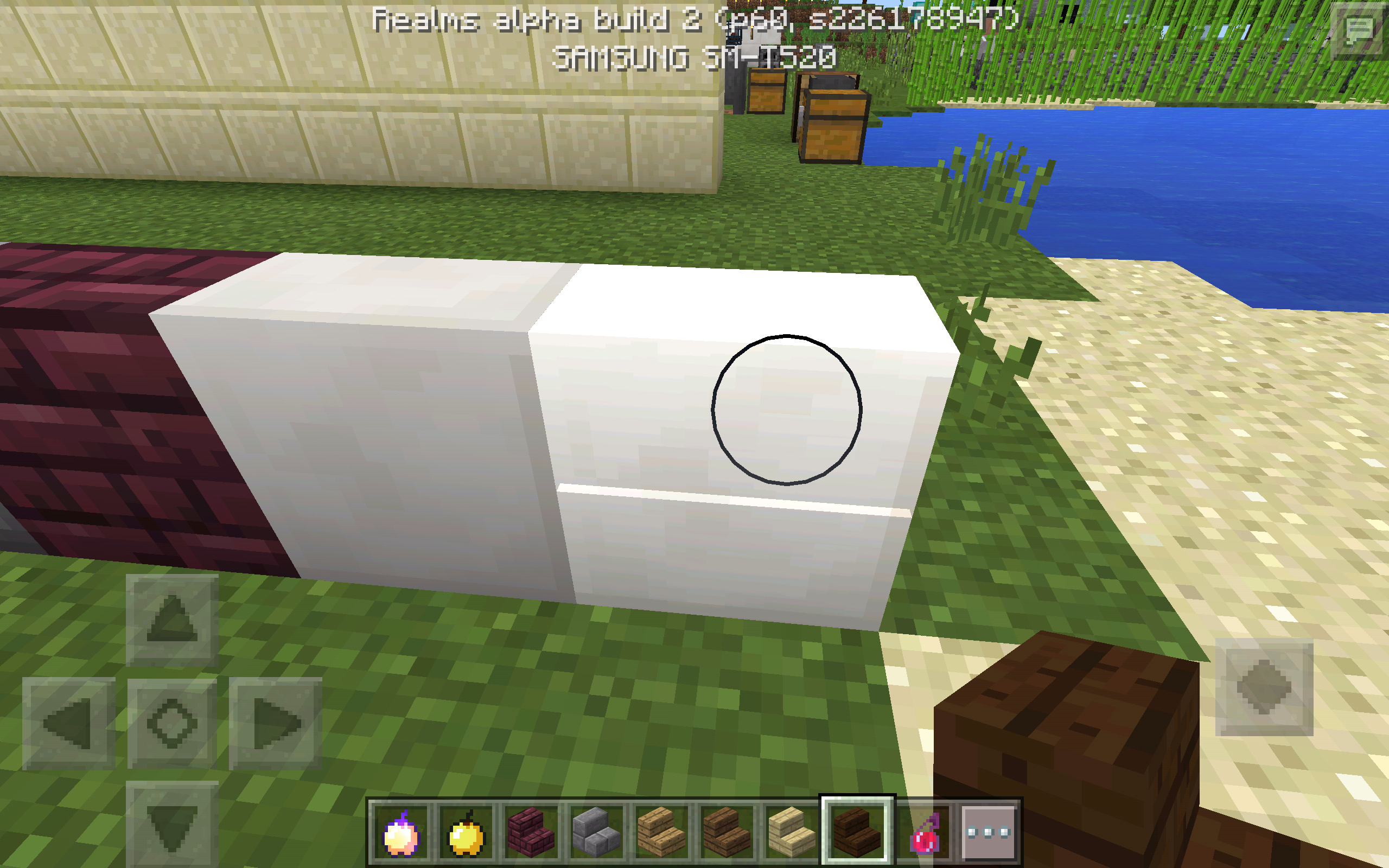
The line texture glitch can still be seen if you are highlighting the block by touching it. (See screenshot)

(0.15.0 Realms Alpha build 2 )
[Mojang] Mega_Spud (Jay Wells) The block was programmed into the game as a half slab with an extra piece connected to it unlike the PC version where it was a full block. It's hard to say if that is a bug or not but will reopen for further input.
Even if that's how they implemented stairs, there's no good reason for revealing such an internal nature to the rendered graphic. So I still consider it's a glitch.
PHO Correct.
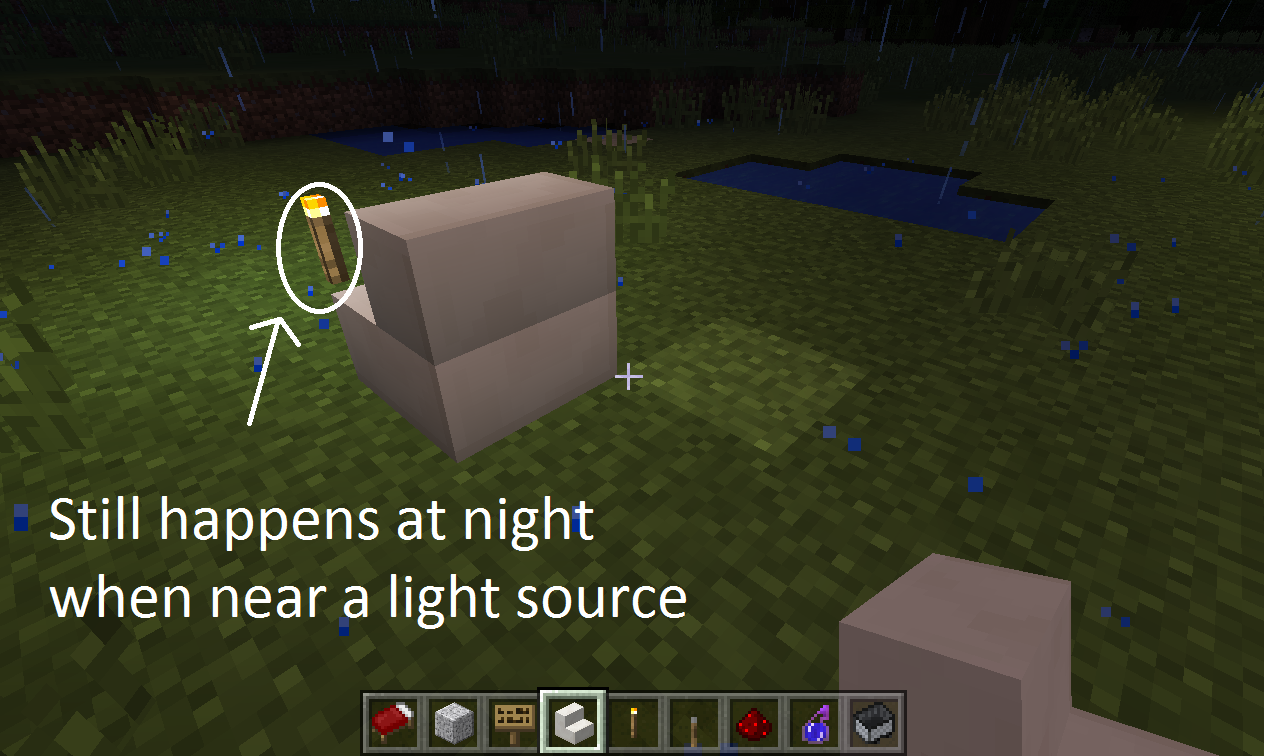
Also, please mark this issue as fixed.Oops, didn't see the screenshot in the comment.The line through the block alone when highlighted can easily be overlooked. Then I discovered something else. The lighting glitch is back! At least when the block is near a light source at night: http://screencast.com/t/zXgiCyQPvt3 It's even more noticeable in Minecraft Windows 10 edition.
Affects 0.15.0 build 1
Confirmed for 0.15.0 on Windows 10.
Confirmed for 0.15.1. (Tested on Windows 10.)
This has been in the game so long i just assumed it was a MCPE exclusive texture
I dont often use Quartz so it dosent bother me but i do see how it can be very annoying. I tested it and it still happens to me on 0.15.0 iPad Pro 12.9"
Reported to VSO: 25358
Milestone: 0.18.0
I feel like it is worth considering that although it is most noticeable on the quartz block, this does affect all stairs. I've been getting back into windows 10 edition because of add-ons and I tested it on some other stairs. Now this bug was first created because there was a literal line through the stairs but now it is just when you hover it. Though this issue is has gone a different direction, it still needs to be fixed. Also confirmed Win10 edition 0.15.9 if that has not been said
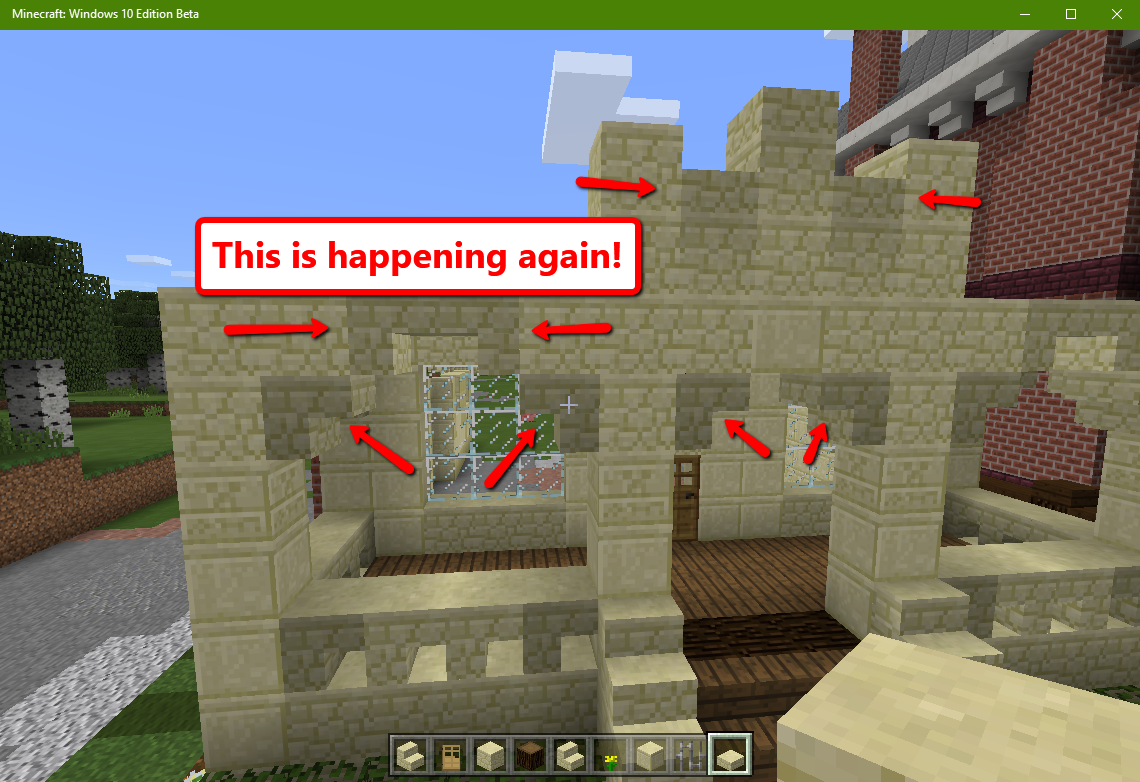
The shadow glitch for stairs is back again in 0.16.0!
Confirmed for 1.0.0 but it has been changed so that it appears to have two separate light levels for each part instead of two gradients.
Added Some Labels. This issue has lasted very long and I would like to see this what I think is a simple issue to be fixed. Here is what I think the issue is: the block model has a space in between the bottom part (the stair base) and the top part. Don't fully know if this is true, but I felt like mentioning it.
Affecting 1.0.2.
Affects 1.0.4.0.
For a long time, this bug report has included 2 technically different issues. The first was that when highlighting stairs, the different parts of the model were highlighted separately, causing a line to appear on the seam between the 2 parts. This was fixed in 1.0 build 4, AKA 1.0.0.1. However, this bug report was kept open because of the other bug listed in this report: there is a weird lighting quirk with stairs when a light source is placed behind them in a dark room or at night.
But it gets worse. It appears that this bug report technically wasn't even originally about either of these bugs. As you can see in https://bugs.mojang.com/secure/attachment/94964/Screenshot_2015-07-08-15-05-05.png, this report was originally about stairs having a weird lighting quirk in any lighting. This was fixed at some point a while back.
It has been decided that this issue should be resolved as fixed due to both the original bug and the highlight-overlay bug being fixed. The remaining lighting quirk has been reported separately as MCPE-20515.