 BDS-12349
Ubuntu bedrock server 1.16.210.06 crashes before starting - appears to not be reading server.properties
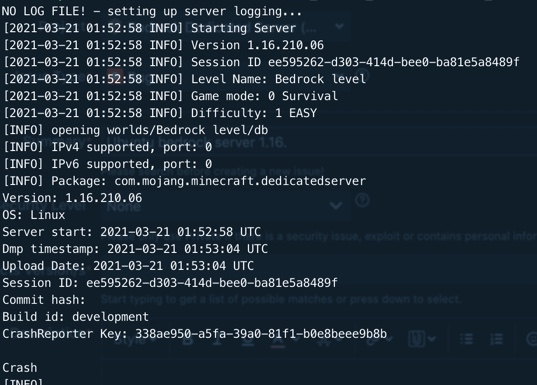
Typing LD_LIBRARY_PATH=. ./bedrock_server crashes immediately. It appears from the picture below of the output that it is not reading the server.properties file, for example the ports, the name, hardness are all not what the server.properties file has.
Environment
Running on Ubuntu 20.04
Attachments1

Comments7
History4

Resolution: Unresolved → Awaiting Response
Resolution: Awaiting Response → Unresolved
Resolution: Unresolved → Incomplete
Hello, I saw this issue when IPv4 and IPv6 were set to the same port, make them different and the server will start. Hope this helps you.
you need to assign the server in ipv4 the port 19132 and in the ipv6 the 19133
Exactly the same issue as mine.
Was working previously and suddenly stopped working. Did you resolve this issue?
I have this same problem (see
BDS-12126). My server.properties does have the ports set appropriately:server-port=19132
...
server-portv6=19133
so I don't think that is the issue. There seem to be 3 reports of this issue:
BDS-12126,BDS-12349, andBDS-12485, but none of these issues have been assigned yet.Thanks Who, making the ports different values seems to have fixed the issue.
Thank you for your report!
However, this issue has been temporarily closed as Awaiting Response
Is this still an issue in the latest version (1.17.11)? If so, can you please add it to the affected versions (or mention it if you are not the reporter).
This ticket will automatically reopen when you reply.
Quick Links:
📓 Issue Guidelines – 💬 Mojang Support – 📧 Suggestions – 📖 Minecraft Wiki
Cleaning up old tickets: This ticket had been set to 'Awaiting Response', but has not received a response from the reporter (~3 months+) so is being closed as Incomplete. If you feel this is still a valid issue then please comment, or create a new ticket following the Issue Guidelines which includes steps to reproduce the problem.
Quick Links:
📓 Issue Guidelines – 💬 Mojang Support – 📧 Suggestions – 📖 Minecraft Wiki