 BDS-92
MSVCP140.dll not found / Application error (0xc000007b)
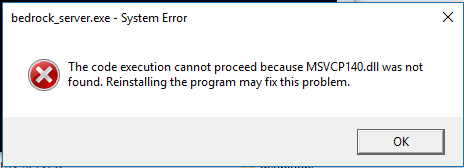
I installed the .zip file and then unpacked it into a new file on the C: drive of my computer. I did as the instructions stated on the bedrock_server_how_to.html and opened the bedrock_server.exe file as stated. It came up with an error message which read: The code execution cannot proceed because MSVCP140.dll not found. Reinstalling the program may fix this problem. I did as i was instructed and reinstalled it to see whether it would work and again, it didn't. Please try and fix this issue as i am wanting to set up my server, but i haven't even been able to get to the 'first' step.
Environment
Windows 10
Linked Issues
Attachments1

Comments2
History7

Resolution: Unresolved → Invalid
Added is duplicated by link: BDS-98Application error (0xc000007b) upon running the .exeDuplicate
Added is duplicated by link: BDS-451Won't start missing filesDuplicate
Added relates to link: BDS-293Chakra.dll not foundWon't Fix

Added is duplicated by link: BDS-163510xc000007b Application ErrorDuplicate
You have to install the Visual Studio 2015 C++ Redistributable. (likely the x64 version)
Thanks zmx!