 BDS-1094
Additional IPv4 and IPv6 port opening upon starting server
Upon starting my server, additional and unspecified IPv4 and IPv6 ports were opened. I have specified and forwarded the default IPv6 port and a chosen IPv4 port. Two additional ports opened; one being default IPv4, but the IPv6 was chosen at random.
Environment
Using BDS 1.12.0.28
Linked Issues
is duplicated by7
BDS-1808Random second port needed on Bedrock serverDuplicateBDS-2824Unable to Change IP PortDuplicateBDS-3397Server ignores ports set in server.propertiesDuplicateBDS-4620Server listens on more than 2 ports when server.properties is configured to use non-default ports.DuplicateBDS-11824BDS Opens 2 portsDuplicateBDS-12750Server opens undesired portsDuplicateBDS-14257Can only control two ports, but server creates four. Also multiple instances on windows work with hackDuplicateAttachments4

Comments28
History23
Removed Security Level: Minecraft - Private

Added is duplicated by link: BDS-3397Server ignores ports set in server.propertiesDuplicate
Added is duplicated by link: BDS-1808Random second port needed on Bedrock serverDuplicate
Added is duplicated by link: BDS-2824Unable to Change IP PortDuplicate

Added Confirmation Status: Community Consensus
Added affects versions: 1.14.32.1

Added relates to link: BDS-3989Default server port is used even if another port is definedFixed
Added is duplicated by link: BDS-4620Server listens on more than 2 ports when server.properties is configured to use non-default ports.Duplicate

Added affects versions: 1.14.60
Added is duplicated by link: BDS-11824BDS Opens 2 portsDuplicate
Added affects versions: 1.16.201.03 Hotfix
Added is duplicated by link: BDS-12750Server opens undesired portsDuplicate
Added affects versions: 1.16.220
Added affects versions: 1.17.10
Resolution: Unresolved → Fixed
Added affects versions: 1.19.50
I have the same problem
I noticed this when trying to connect with a custom client.
The server's main ports (19132 and 19133) are facades which don't allow anyone to join but contained within the MOTD ping response is the real ports which the client uses to redirect and connect with. The problem comes with the fact that the second set of ports are random and cannot be specified in the configuration file so you have to keep updating your firewall settings.
This behaviour is found within the client for LAN servers as well so it's likely the changes were not noticed by the BDS team.
I've only opened the default 19132 on IPv4 and 19133 on IPv6 and I can connect on either and play. I need to use a different hostname, or enter the IP addresses directly, which is a Bad Thing, but the extra ports don't seem to be needed. Not sure what they are for.
I had the same question about the "extra" ports that show up in the console. Looking at a "netstat -ano" on my machine after starting the server, the two ports (19132 and 19133) defined in my server.properties file are open as TCP ports, while the two other, random ports (usually "5XXXX" or "6XXXX") are open for UDP.
It might be useful to at least indicate this in the console to clear up any confusion. For example:
[2020-03-17 16:07:58 INFO] IPv4 supported, port: 19132 (TCP)
[2020-03-17 16:07:58 INFO] IPv6 supported, port: 19133 (TCP)
[2020-03-17 16:07:58 INFO] IPv4 supported, port: 60896 (UDP)
[2020-03-17 16:07:58 INFO] IPv6 supported, port: 60897 (UDP)
or some other arrangement of the information, but at least showing what protocol each port is using would be helpful.
As for firewall configuration, if these UDP ports are at least selected from a specific, defined range (i.e., 50000-65535), you may be able to set up your port forwarding for that range for just UDP traffic while setting up a TCP-only forwarding rule for just the ports specified in your server.properties file.
So is this necessarily a bug, or just poor documentation?
To be fair, a "bug" is, by definition, any programming "flaw" - whether intentional or not - resulting in behavior that is unintended or unexpected and the term can be applied to include anything from a simple typo on a dialog box to a severe memory leak, etc. Because the UDP ports are not explicitly configurable, nor is there any indication of what they are in the current console display, I would suggest that this would be considered both a bug and a documentation issue. I believe it's a good thing that this information is displayed to the user so that the ports that are actively in use by BDS can be seen, but not clarifying the intention and/or implementation for the use of these ports is, perhaps, an oversight that can cause confusion, as well as potential connectivity issues since the "random" UDP ports have to be open/forwarded in addition to the TCP ports in order for the client to properly and fully communicate with the server.
More complete documentation - both "internally" (displaying the protocol in the console) and externally (in the "HOWTO" or other implementation guide(s)) - would help to clarify the issue and take it from a "bug" to a "feature", but as there is currently no such documentation (that I've seen), this behavior is "unexpected" and potentially "breaking" for new BDS administrators.
I would agree with you, except that on the original issue (listed above), the concern was it creating/choosing a random port to open. I have both the configurations that were specified as well as the result when running BDS. The bug would be a security flaw, when it opens a port (regardless of TCP or UDP) for the express intent to allow traffic. Additionally, the port is chosen at random when you start BDS, thus making it difficult to prevent. This is a security bug and should be patched, to ensure no user inadvertently exposes their networks to unwanted incoming traffic.
TL;DR: The bug is a security risk, by requesting the computer to communicate through a port not specified or directed by the server owner.
Agreed. I over-simplified and unintentionally down-played the issue in my previous comments, but randomly opening arbitrary ports of communication absolutely presents an unnecessary security risk. It may be mitigated through other security measures, but not having clear documentation of what ports are being used, how they are "selected", and their purpose makes doing even that difficult. Not to mention the fact that there are likely a significant number of users who would be unaware of the potential risks involved in simply opening up a range of ports - possibly to both TCP and UDP traffic, "just to be sure" - which could result in even more damage done.
The random ports are the ones which the connection takes place over. I believe it's a "hack" of sorts to allow players from the IPv4 port to join with IPv6 and vice versa if preferred by the client. The reason not all people are having problems connecting to their servers may be due to Minecraft's network implementation using UPnP to open the firewall however not all routers, ISPs or firewalls will allow this.
UPnP may indeed be the "culprit" here. However, without documentation of any UPnP "requirements" for BDS, this remains a potentially significant security issue and a problem for some BDS admins. If the admin's router/firewall does not support UPnP, they will have to manually open the randomly chosen/assigned UDP ports for IPv4 and IPv6. Without knowing how BDS is choosing these port numbers or the ability to manually assign them, such users would possibly have to open a wide range of ports for UDP traffic, or be forced to close/open these ports for each BDS restart. Inexperienced admins may open a much wider range of ports than necessary, and may even open both TCP and UDP traffic on those ports.
I came across the same bug too. Hope it would be settled.
It is noteworthy that the additional ports tend to be default ones if the ports set in the "server.prosperities" are not default ports.
This bug also makes it impossible to run a second instance of Bedrock on the same host server. No matter what port is defined in server.properties, it always says the requested port is in use when it is not.
I've not encountered that in my testing. Admittedly, that testing has been extremely limited, but as long as I've got two separate copies of the entire BDS directory structure - including a separate copy of bedrock_server.exe - in individual folders and set the specific ports to different values in each of their respective server.properties files, I was successfully able to get two instances running concurrently on my machine.
OS: Ubuntu 18.04.4 LTS
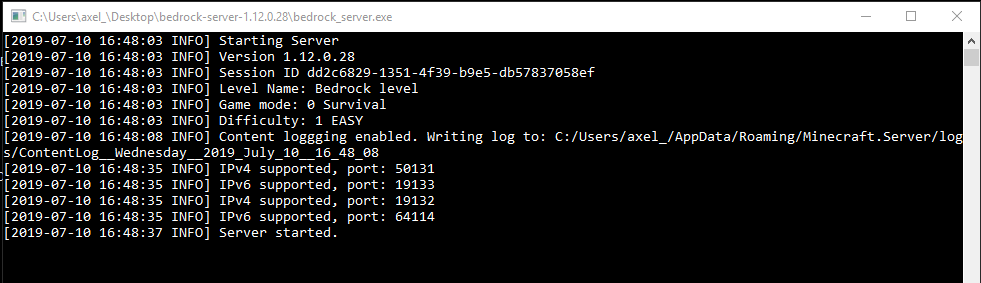
This is what I'm seeing...
So some part of the code is hard-coding those port values - at least in the linux branch of the code.
As was identified in the original posting, ports 19132 and 19133 are expected. The problem is, after specifying a new port for IPv4, a new, unspecified and random port was opened for IPv6 on (for me) 64114. This port is not the same port that opens every time, but is chosen at random and can be used as a means to backdoor an unwitting server owner and infiltrate the hosting system. This issue either needs to be addressed by Mojang as intentional or fixed, in order to prevent server hosts from malicious attacks due to poor coding.
@Rebecca Reed - there are two bugs here that have been merged into one (IMHO, wrongly). I came here because
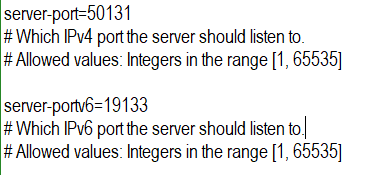
BDS-2824andBDS-3397have been marked as duplicates of this one. But I am working with what I've got so....According to the documentation (https://minecraft.gamepedia.com/Server.properties):
Ergo, per the documentation, if I change those values to something other than the default, then the server should listen on those ports.
But... according to the output, above, the server is, first, binding to my custom-defined in server.properties ports (ipv4: 19232, ipv6: 19233),. Hurray!
... And THEN it is binding to the default ports (ipv4: 19132, ipv6:19133). Booo!!!
This means I can only run a single bedrock_server instance on my hardware And because I can only serve a single world from a bedrock server instance, that means that I can only have a single world running on my home server (which is a real ballache when you have multiple kids that each want their own world).
Okay, I have to take back my original statement about the ports being open for TCP vs. UDP. I just ran another test running two instances of the bedrock_server.exe on my local machine, then took a new netstat -ano snapshot. All eight ports - the two specified in each of the two server.properties files, as well as the two "random" ports automatically assigned by BDS - are listed as UDP ports. I must've looked at it wrong the first time, so I apologize for the confusion.
Here's what I'm seeing:
SERVER 1
SERVER 2
netstat -ano (heavily redacted)
So, again, I deeply apologize for spreading inaccurate information without fully testing and reviewing it first.
As for running multiple instances of bedrock_server.exe from the same hardware, as I stated above, these results are on the same machine (my local computer) at the same time. As the copy/paste should indicate, there are two complete copies of the BDS directory structure - including individual copies of the bedrock_server.exe and server.properties files - both running different versions of the BDS software and with different ports specified for communication.
SERVER 1 - server.properties
SERVER 2 - server.properties
I believe that, as long as you have the complete directory structure duplicated for each instance of BDS you want to run, the only time you'd run into a problem running multiple instances would be if the randomly selected ports were the same as the specific ports set in the server.properties file of another instance.
For example, if I started SERVER 2 first - where the ports in the server.properties file are set to 19134/19135 - as mentioned by @MiHu and @David Fidler have noted in their comments above, the "random" ports selected and opened by BDS actually end up being the "default" ports of 19132/19133.
If I then tried to start SERVER 1 - where the ports in the server.properties file are still the "default" - the BDS startup would fail because those ports are already in use by the first instance.
Here's what I got when I tested this scenario:
SERVER 2
SERVER 1
Exactly as expected. So, the moral of the story there is to start up any BDS instance that's using the default ports before any instances that are using "custom" ports.
Of course, all of that still doesn't address why BDS is opening these extra ports in the first place. Especially now that I've gone back and looked more closely at the information and found that all of the ports are opening over UDP. As @SupremeMortal mentioned, I'm guessing that it has something to do with UPnP, but that's still not really an acceptable answer. The application is opening up ports that haven't been explicitly set by the admin, and, as @Rebecca Reed has pointed out a couple of times, that opens up the potential for all sorts of dangerous activity "piggy-backing" on connections over which the admin has no direct control.
Of course, the "goal" of this post is to ensure that BDS doesn't open random ports without explicit permission from the server admin. Perhaps there should be an additional option in the server.properties file to enable/disable UPnP?
@Jeremy Gamble - thanks for your previous post, it caused me to go back and take another look and things make a lot more sense now. I think that the reason that an instance opens the default ports is so the client (game) can auto-discover the server.
I tried starting two servers (as you suggest) and they do both start. However, only one server is discovered by the client.
To test this I did the following....
1. As root: disable firewall on server
2. As root: create user "minecraft" in /home/minecraft
3. As root: become user minecraft:
4. As minecraft: create server directories
5. As minecraft: unzip server to ~/s1
6. As minecraft: Unzip server to ~/s2
7. Change server-name, levels-name and ports per the following:
8. Start server in ~/s1
9. Start server in ~/s2
10. Look at the open ports:
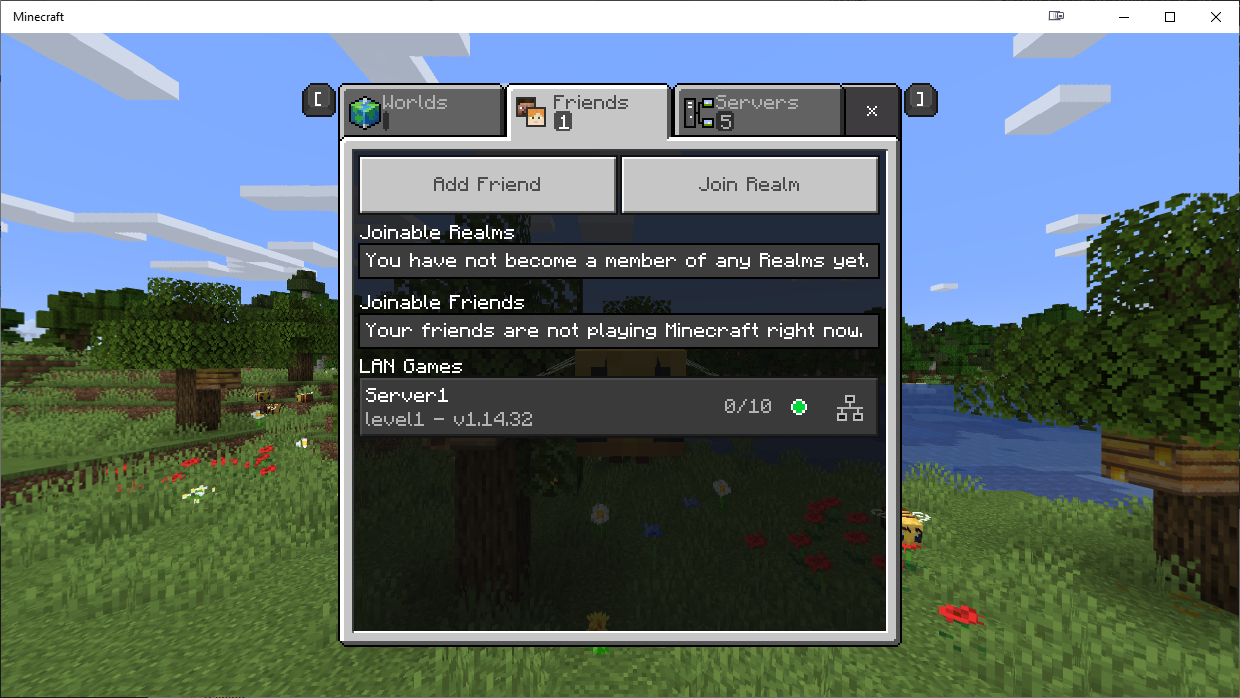
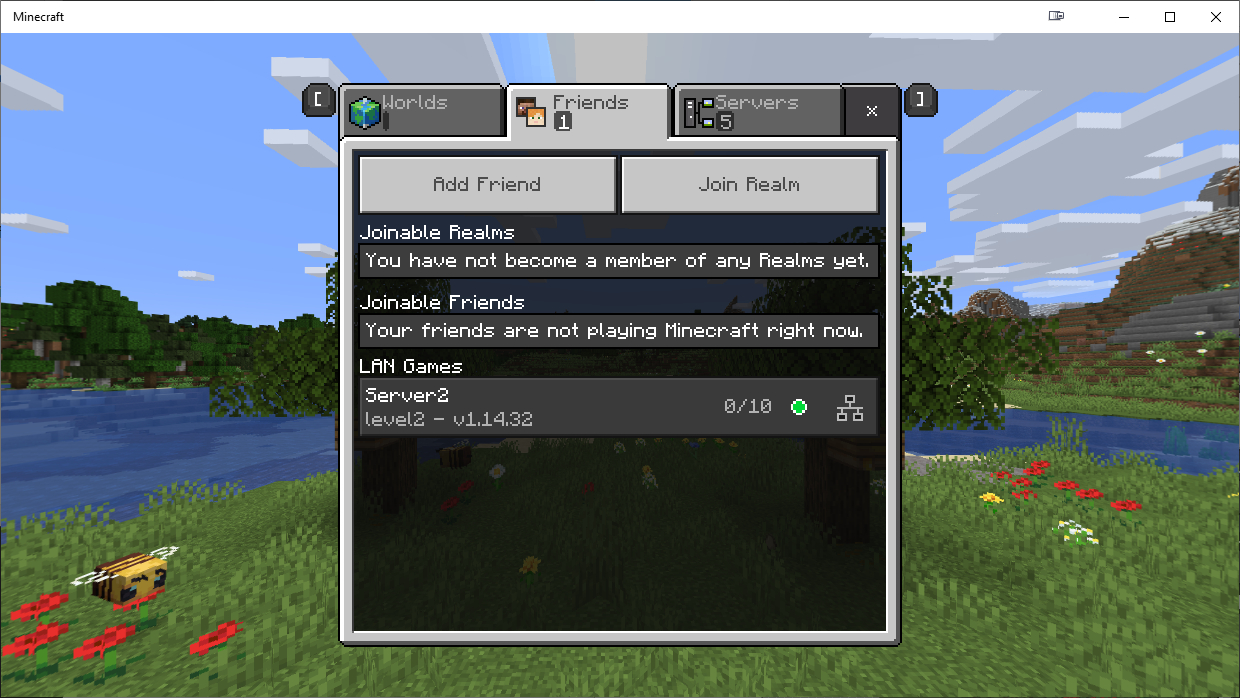
11. Try to join the servers....

12. Kill Server1 process - Server 1 disappears from the list and server2 does not appear.
13. Kill Server2 process and then start ONLY Server 2
14. Start Server 1 Process:
16. Check minecraft again....
So only one server is automatically discoverable at a time and this is probably because the first server that starts binds to the default ports 19132/19133.
You can go to the third tab in the client (Servers) and click "Add Server" and manually add the IP/port in there.
Note: The screenshots, above, are taken from the windows client. However, I also tried this on the Android client as well.
So, actually, in terms of being able to do what I wanted to be able to do (run multiple servers / worlds) from the same server, it turns out that I can do that. I was simply assuming (you know what they say about assumptions) that because the first process was binding to the default ports, that the second one would not start - which turns out not to be the case as the server just "picks different ports" to randomly open.
I do agree that randomly opening LISTEN ports is both undocumented and undesirable. It would be beneficial for us to understand why those ports are being opened, and what they are used for. (others have mentioned UPnP as a possibility).
Similarly, it would be beneficial for the auto-discover mechanism to be a bit more intelligent. I don't know how it works but based on what I'm observing here (and please note, I've not done any kind of deep packet inspection see what's happening), I'm guessing that the server does a network broadcast saying "I am a minecraft server - this is my IP" and the client checks that IP against the default ports, rather than the server saying "I am a minecraft server, this is my IP and port". Or maybe it does and the client's have a bug in them that they only check the default ports - I'm not sure. Either way, this process could be improved.
@David Fidler - I'm glad the information was useful/helpful. I'm a firm believer that the more detail we can provide, the better the bug report will be received. Even if the information is superfluous, for a programmer (like me), the more detailed the explanation and definition of the problem, the easier it is to find a solution.
Well, that makes sense, actually. For an extremely simplified example, I liken it to trying to host a Web server on a residential Internet connection. Many ISP's have port 80 blocked to prevent their customers from doing that for a variety of reasons (excess traffic, security concerns, etc.). Still, with a bit of creative port forwarding and communication, one can host a simple Web site on a non-standard port. Since pretty much every Web client defaults it's communication to port 80 for HTTP, the client has to be explicitly told to use a different port (for example, 8080) when trying to access that particular resource. Obviously, with DDNS and even more creativity, it's possible to even get around that, but that goes well beyond the scope of this example.
This is basically what I am assuming (yep ) is going on with the Minecraft client. It will only look for servers on the default ports when trying to auto-discover servers. If the server is running on a "non-standard" port, the game client must be explicitly told which port(s) to use for the connection. An admin that wants to run the server on a different port will require the player to go through the "Add Server" dialog to actually connect. Personally, I'm okay with that. I'm not sure how the client would be able to automatically detect servers running on non-standard without scanning all 65K ports in existence (which would open up a whole different set of potential security issues).
Now, it's just a matter of identifying the purpose and function of the two extra "random" ports.
It's not actually that hard of a problem to solve (I too, am a programmer). Auto-discovery systems function in one of two ways - either they do an L2 broadcast stating that the exist (as is the case with DHCP) or they do an L3 broadcast (IP-level on the broadcast IP of the current network). Clients listen for certain packet patterns.
That broadcast traffic can contain any kind of information - the client just has to be looking for it and it has to know how to interpret the contents.
So either the server is only broadcasting the IP and the client is responsible for trying to connect to the default ports on the target IP, or the server is already broadcasting IP:port and the client is not gathering the "port" part and is only trying to hit the default ports.
But you're right, it's a minor inconvenience. Having the output of this discussion, though, in the documentation would be useful.
Still having two of each IPv4 and IPv6 opening up on version: 1.17.10.04
[INFO] IPv4 supported, port: 21212. <- My chosen port
[INFO] IPv6 supported, port: 21213 <- My chosen port
[INFO] IPv4 supported, port: 19132 <- Not one I setup
[INFO] IPv6 supported, port: 19133 <- Not one I setup
Active Internet connections (servers and established)
Proto Recv-Q Send-Q Local Address Foreign Address State
udp 0 0 0.0.0.0:21212 0.0.0.0:* <-- My chosen port
udp 0 0 0.0.0.0:19132 0.0.0.0:* <-- Not my chosen port
udp6 0 0 :::21213 :::* <-- My chosen port
udp6 0 0 :::19133 :::* <-- Not my chosen port.
Correct, that's the conclusion that we've come to...
The first server that you start, no matter which ports you choose, will always open up on UDP:19132/19133 because these are the ports that are used for game discovery on the local network. You have no choice.
You can block them with a firewall [if you like] and it just means that you won't be able to discover the game automatically through the client - you'll need to specificy the IP:port in the "custom server" screen.
If you are hosting multiple servers on your system (like I do) and you do want ONE of them to be auto-discoverable, you must start that instance before any others (so it grabs the ports).
Unfortunately, there really is no way to work around this... bedrock server has no "server-ip" config (like Java edition did) to force binding to a single IP (ie - if your server had a bunch of VIPs, one for each server instance).
In java edition, you could specify "server-ip=10.1.1.10" ; but bedrock forces a bind of the port to 0.0.0.0.
From a product perspective, a better solution for this would be to have a registry process (which is independent from the server) listen on those ports and then have the mc servers register their existence with the that port at startup. However, having not seen the code, I suspect that would be an architectural change and my guess is that the client only expects to have a single server per host. It would also open up some security issues/concerns if that registry process didn't do some kind of IP authentication before accepting the record.
However, at the end of the day, not that many people have participated in this thread and highlighted it as an issue. My guess is that the PM/Dev team have marked this as "low priority - do not fix" because it will not end in global thermonuclear meltdown, and it's really only inconveniencing a few of us.
Still the problem in v1.17.11.01
[2021-08-16 04:01:15] [2021-08-16 04:01:15 INFO] Starting Server
[2021-08-16 04:01:15] [2021-08-16 04:01:15 INFO] Version 1.17.11.01
[2021-08-16 04:01:15] [2021-08-16 04:01:15 INFO] Session ID 9876543-cccc-bbbb-aaaa-123456789
[2021-08-16 04:01:15] [2021-08-16 04:01:15 INFO] Level Name: reiWelt
[2021-08-16 04:01:15] [2021-08-16 04:01:15 INFO] Game mode: 1 Creative
[2021-08-16 04:01:15] [2021-08-16 04:01:15 INFO] Difficulty: 0 PEACEFUL
[2021-08-16 04:01:15] [INFO] opening worlds/worldName/db
[2021-08-16 04:01:16] [INFO] IPv4 supported, port: 19332
[2021-08-16 04:01:16] [INFO] IPv6 supported, port: 19333
[2021-08-16 04:01:16] [INFO] IPv4 supported, port: 35776
[2021-08-16 04:01:16] [INFO] IPv6 supported, port: 33455
[2021-08-16 04:01:16] [INFO] Server started.
This still affects 1.18.0.02
[2021-12-06 21:03:24:701 INFO] IPv4 supported, port: 12794
[2021-12-06 21:03:24:701 INFO] IPv6 supported, port: 12795
[2021-12-06 21:03:25:123 INFO] Server started.
[2021-12-06 21:03:25:346 INFO] IPv4 supported, port: 19132
[2021-12-06 21:03:25:346 INFO] IPv6 supported, port: 19133
Try update your BDS Vision
This still affects 1.18.11.01
[2022-02-10 11:21:46:646 INFO] Starting Server
[2022-02-10 11:21:46:646 INFO] Version 1.18.11.01
...
[2022-02-10 11:21:50:547 INFO] IPv4 supported, port: 12794
[2022-02-10 11:21:50:547 INFO] IPv6 supported, port: 12795
[2022-02-10 11:21:50:981 INFO] Server started.
[2022-02-10 11:21:51:165 INFO] IPv4 supported, port: 19132
[2022-02-10 11:21:51:165 INFO] IPv6 supported, port: 19133
This still affect 1.18.12.01
Can we have an ETA on this old but blocking port issue ?
[2022-03-12 09:49:26:096 INFO] Starting Server
[2022-03-12 09:49:26:096 INFO] Version 1.18.12.01
...
[2022-03-12 09:49:27:642 INFO] IPv4 supported, port: 19134
[2022-03-12 09:49:27:642 INFO] IPv6 not supported
[2022-03-12 09:49:27:927 INFO] Server started.
[2022-03-12 09:49:27:944 INFO] IPv4 supported, port: 19132
[2022-03-12 09:49:27:944 INFO] IPv6 not supported
it appears preview 1.19.50 has code intended to resolve this issue by allowing the disabling of LAN Discovery for server instances:
BDS-1094)What's curious is that there is a new BDS server log message in 1.19.40.02 related to this feature, but the flag doesn't work in that release:
[2022-10-29 00:01:04:304 INFO] Server started.
[2022-10-29 00:01:04:537 INFO] Please note that LAN discovery will not function for this server.
[2022-10-29 00:01:04:537 INFO] Server IP must be specified in Servers tab in game.