Yeah, I would like a setting where I can turn off web searches. I just want to search for items on my computer, not the web. If I wanted to search the web, I could just open the browser.
Correct - it was like that in Win7 as well. Prior to that you might have had to actually click in the Search field in the Start Menu, but it was still there.
tgp1994 · 38 points · Posted at 18:41:06 on November 27, 2017 · (Permalink)
Chrome doesn't support Vista either, but I've been using Firefox and I think it still has some support going for it. If I remember correctly, it just updated a few days ago.
tgp1994 · 1 points · Posted at 23:50:32 on November 27, 2017 · (Permalink)
I have Vista on my "side" laptop that I use for random things. It always works when I need it to, ironically. Gave the machine an upgrade from 1GB to 2GB of RAM, that was like night and day!
Agreed. Amazing how easily Windows 7 and 10 stuck down the RAM.
tgp1994 · 1 points · Posted at 03:30:01 on November 28, 2017 · (Permalink)
Even my mom's computer with Windows 7 and 4GB of RAM is really struggling. She typically has no more than 3 tabs open in Firefox, Office Outlook and an instance or two of Word. Like, honestly, I can see how that would be a stretch for 2GB of RAM. But 4? I think there's been some pretty big software bloat especially over the last decade.
Because shit drivers gave it a bad name and now people think it's a bad OS because of their experiences caused by other software?
Zefirus · 1 points · Posted at 01:39:14 on November 28, 2017 · (Permalink)
Vista was and is fine. All of its problems were entirely with third parties. Hardware didn't have proper drivers, and OEMs put it on computers that didn't have high enough specs to support it.
If you just flat out deleted Windows Vista from existence and put Windows 7 in its place, it would have almost the EXACT same problems that Vista had.
This was part of it, but I think the bigger problem was that it was simply too reaource intensive for the majority of machines that had it installed from the factory. I never had any problems with Vista, I loved it to tell the truth. My friend with a Celeron laptop that came with Vista on the other hand? Not so much.
Zefirus · 1 points · Posted at 13:54:45 on November 28, 2017 · (Permalink)
Uh, I said that.
OEMs put it on computers that didn't have high enough specs to support it.
Basically intel started throwing their weight around and forced Microsoft to "approve" of low quality computers that could barely run it. That's what those "Designed for XP, Windows Vista Capable" logos were.
[deleted] · 1 points · Posted at 19:17:19 on November 27, 2017 · (Permalink)
That would make sense, but i thought the start menu search function was a separate application altogether?
Losicta · 0 points · Posted at 18:55:04 on November 27, 2017 · (Permalink)
Which they copied from Mac OSX, iirc
radwic · 6 points · Posted at 19:38:31 on November 27, 2017 · (Permalink)
Which was ripped from DOS, tbh
trznx · 22 points · Posted at 20:02:07 on November 27, 2017 · (Permalink)
Not it's not. yes you can just press start and type, but Win7 has a field you can see when you press start. I started typing in w10 because I assumed it should be there and funnily enough it is, but it's hidden. In Win7 it's not hidden. Huge difference if you ask me, the people who won't try will never know there IS A SEARCH BAD in there
Considering the amount of time it takes indexing my files it would be nice if it could find some things. I guess I'm just grateful that searching in file explorer works so long as it's it a format Windows likes. I backup all my technical LibreOffice documents as .docx in an archive folder just to be able to search inside the documents and ever find things again. And I did do a few other hacks to try to bypass this step and make Windows think it was one of their precious Word documents, but to no avail.
alrf536 · 10 points · Posted at 20:10:05 on November 27, 2017 · (Permalink)
It is another setting. You have to enable Background Apps. Just the main switch, disable all the apps. I had the same problem as you and was about to give up until I found it. Now I can find programs again.
[deleted] · 5 points · Posted at 22:14:24 on November 27, 2017 · (Permalink)
This is part of the problem. Disabling background apps should notify you of the change or not disable it at all. Let the main disable be a regedit or gp edit.
It's profitable when it defaults to a web search on your own service and isn't preventing any users from buying your product. "fuckup" implies it was a mistake. This was on purpose.
For years I keep telling people to stop searching all over their screen for something to click on.
"Just hit the little flag button on your keyboard, then type the first word of what you want and wait a few seconds to see the results"
BUT the search is pretty shitty as shown in OP, since it often does not work for partial matches. Nevertheless I don't understand how you can claim it is malicious that they don't force you to click a search button. Why do you want the process to be MORE complicated?
[deleted] · 24 points · Posted at 19:16:09 on November 27, 2017 · (Permalink)
The search field doesn't even show, though, and web searches likely to try to sell you something pop up first. I don't think malice is exactly a leap.
Did you know that every iPhone or Mac does the same thing? It has a web search too when you use Spotlight. The only difference is that their search of the local computer isn't total hogshit, so you get the results you want before the web results.
I wouldn't be surprised if Android does the same thing, but I don't have one so I'm not sure.
Microsoft is just too incompetent to search the local computer in a reasonable amount of time, so you get web results instead.
I wouldn't be surprised if Android does the same thing
It do
tojoso · 11 points · Posted at 20:55:45 on November 27, 2017 · (Permalink)
Being forced to click a search button is different than showing a search bar with a blinking cursor indicating that you can start typing right away. It is not at all intuitive to just start typing when there is no visible text input box. It doesn't have to be more complicated, but it should be more clear and intuitive.
That's fair, for new users it is not intuitive. Microsoft probably felt that since this was the fourth major OS they've sold that offers this functionality (that's right, you have been able to do this since Vista), they could finally get rid of the training wheels.
tojoso · 10 points · Posted at 21:07:25 on November 27, 2017 · (Permalink)
An intuitive UI is not training wheels. That's like removing the X from the top of every window and saying "well you can still click the top right corner to close a window, it's been that way since Windows 95! When can we take these training wheels off?!"
I am always giving Apple a hard time "How was I supposed to know that holding Ctrl + Shift while swiping with 8 fingers was the secret password to unlock extra ammo?!"
If you disable cortana so web search is not on you cannot search in the start menu.
Demaun · 5 points · Posted at 18:40:23 on November 27, 2017 · (Permalink)
Nopenopenope. You can still search apps and files much like Win7 without the bullshit that is Cortana. The bar is hidden until you start typing, though.
How?
In Regedit, find the registry key:
HKEY_LOCAL_MACHINE\SOFTWARE\Policies\Microsoft\Windows\Windows Search
Add the Windows Search key if it is not present.
In this key, add a DWORD value. name: "AllowCortana" data: 0
A restart is necessary for any change to take effect.
Here's another step-by-step that I just followed. Quickly tested, and this works sweet, just like searching in file explorer as opposed to Bing!:
Here is how you revert back to on-device Windows Search and disable Cortana:
Open up the Registry Editor by searching for “regedit” in search field at the bottom of the screen. This will be the last time you use Cortana before waving her goodbye.
Click at the location bar, right underneath the toolbar, type in the following, and press Enter: Computer\HKEY_LOCAL_MACHINE\SOFTWARE\Policies\Microsoft\Windows
From the toolbar, go to Edit: New: Key. You should see a blue border and a blinking cursor indicating a text input field to the left in the window; in the folder tree underneath the Windows folder.
Type in “Windows Search” in the selected field and press Enter to confirm.
From the toolbar, go to Edit: New: DWORD (32-bit) Value. You should see a blue border and a blinking cursor indicating a text input field to the right in the window.
Type in “AllowCortana” to this field and press Enter. Leave the key’s default value (0) as-is.
Reboot your Windows device.
For reference, the end result in the Registry editor should look like the below screenshot:
You can still search without Cortana. The search button disappears but if you press the start button and start typing, it will pull up the search thing.
Yes, I turned off Cortana and thought I lost the ability to search but then I accidentally pressed a button after opening the Start menu and it searched. I was confused at first but then I realized it was just horrible UI decisions.
Ever since windows vista, you have had the ability to just press the windows key and start typing to search.
Nothing has changed in windows 10, other than that they have added win+s for the cortana search.
No need to press any additional buttons after opening start. just click the start button (or windows key) and start typing.
[EDIT] corrected windows 7 to vista, since the windows key search was added then.
tojoso · 4 points · Posted at 20:58:32 on November 27, 2017 · (Permalink)
Nothing has changed in windows 10, other than that they have added win+s for the cortana search.
Pretty sure in Windows 7 the text input box with a blinking cursor showed up as soon as you pressed the windows key, as opposed to Windows 10 where it only shows up once you start typing a word. To generations of people trained to only type when there's a text box active on the screen, this is highly unintuitive.
Well, you did it wrong. You don't disabled Cortana then. You hide. To disable Cortana, you can go to Group Policy and fully disable it, or on Cortana settings, just sign-out of your account.
[deleted] · 1 points · Posted at 20:52:47 on November 27, 2017 · (Permalink)
Then include any folder like Program Files that you want to be found when you search with Windows. Whenever you search for something, it will look in those folders. I feel like it should index Program Files by default, but it doesn't.
jothki · 1 points · Posted at 21:53:11 on November 27, 2017 · (Permalink)
Is that new to the FCU? I'm running an earlier version and can see the search button fine. It even changes to a magnifying glass instead of the Cortana logo.
I remember the magnifying glass but I don't have it anymore. I can't figure out how to get the magnifying glass back, but I'm sure the option is there. I'm running build 16299.
Solarbro · 16 points · Posted at 17:05:23 on November 27, 2017 · (Permalink)
This won’t be all that helpful, but you can add a Windows Search value in the registry somewhere to replace Cortana. I’d look it up but I’m at work doing crap like this for clients.
A lot of Cortana and search item suggestions may not work anymore. It seems like they disable a work around per update. You used to be able to uninstall Cortana, now you can’t. Powershell warns you about “uninstalling essential OS materials is not allowed” or some odd thing. That’s why I mostly do it through the registry, cause at least then it works. Until they do a big update and reset your OS registry values....
felio_ · 2 points · Posted at 17:16:37 on November 27, 2017 · (Permalink)
If you have a pro version of windows, you can use the group policy editor to solve this. You need to disable(disallow) cortana and web search results.
You can find the settings in: Computer Configuration->Windows Components->Search. Set "allow cortana" to disabled and "Do not allow web search to "enabled".
pohuing · -1 points · Posted at 18:21:24 on November 27, 2017 · (Permalink)
That is absolutely overkill. Just open the start menu and start typing, the search will come up even with cortana disabled
I never had Cortana cause I'm in NZ, and not a single issue people have in Windows 10 has affected me. I love the OS and really hate eveything before it.
SpcK · 1 points · Posted at 16:53:28 on November 27, 2017 · (Permalink)
That would be fine, but It also disabled the Start menu pinned apps, Which I really liked.
antabr · 8 points · Posted at 17:03:18 on November 27, 2017 · (Permalink)
Such a ridiculous interconnected weaving of settings. I just want my windows 7 search bar back!
jantari · 7 points · Posted at 18:13:50 on November 27, 2017 · (Permalink)
It's not interconnected in the slightest, he's either just trolling or messed up other settings too
I disabled Cortana but I think she still does the searches just doesn't talk
alrf536 · 1 points · Posted at 20:13:40 on November 27, 2017 · (Permalink)
Posting for you too:
It is another setting. You have to enable Background Apps. Just the main switch, disable all the apps. I had the same problem as you and was about to give up until I found it. Now I can find programs again.
[deleted] · 6 points · Posted at 18:09:58 on November 27, 2017 · (Permalink)
Yep, I
Disabled Cortana, forced updates, location, one drive, etc etc
Fuck the cloud, stop shoving shit down my throat, I have a workflow that works most of these options just eat CPU or add extra steps to do the same fucking thing I always do.
ESPECIALLY in a corporate environment where every update wipes out my office settings, (fuck trust center too)
I disabled web searches/Cortana from day one of using Windows 8 and then 10. It was obvious to me from the start how much worse the search was with those enabled.
I don't know how some of you lasted this long with Cortana enabled.
frikin8 · 54 points · Posted at 17:13:13 on November 27, 2017 · (Permalink)
There is a setting for that. Look for the "Disable web search results on a local computer" section for pictures. Just click on the search box, then select the settings cog to adjust search settings.
[deleted] · 3 points · Posted at 18:23:45 on November 27, 2017 · (Permalink)
That must've been disabled in an update--"Cortana & Search Settings" is the same place in the 2nd link. :( Nothing at alll mentions "online" or "web results".
I disabled "Windows Cloud Search", but that seems to search mobile devices? I've disabled everything and I'm still getting web results.
Let me Google further. If I'm successful, I'll post back.
EDIT: Thank you for the screenshots, but that's not coming up for me. :( I'm on the Fall Creators Update, version 1709 via the Run "winver" command). Once I click "Settings", I get to this screen: https://prnt.sc/hfzfs4 I used to have that little menu built-into the Start Menu, but now it opens the full-fledged Settings app.
EDIT2: This .reg file worked, from TenForums, after merging the edit and restarting!
Ah, I'm on 1607. Not sure how that happened, I thought I was getting automatic updates.
[deleted] · 1 points · Posted at 18:55:21 on November 27, 2017 · (Permalink)
Ah, no worries. The rollout of the updates...is weird. I was waiting for the update and it came up after specifically tapping "Check for Updates"? I think /u/jenmsft said that should work now.
[deleted] · 6 points · Posted at 18:50:26 on November 27, 2017 · (Permalink)
Seriously. They make it seem like it’s so convienent, because it’s so difficult to use google right? And it’s useless anyway because it automatically uses bing
Worst part is, it often can't even be relied on to find regular old documents. I have a Word document where I keep baking recipes I tried and liked, it's sitting in a folder in "My Documents", and the search function is literally unable to find it, even when I type the exact file name ("recipes.doc"). I tried other files, and there are a bunch that apparently don't exist as far as the search function is concerned. I can browse to the correct folder and open the file just fine, but Windows search can't see them.
Not mention the opportunity for unwanted results, I was sharing my screen in a committee meeting with a client and wanted to spin a VM to show something, I hit WINKEY and typed Oracl and hit enter (Oracle VirtualBox), only I missed the C and it instantly open the web images results for "Oral", luckly nothing NSFW showed.
You’ve gotta turn off “safe search” in bing to get to the fun stuff. Personally I’m glad they have safe search. when you turn it off you get the filthiest browser in existence.
Don’t get me wrong, I’m enjoying Windows 10. I think they did a fine job. It’s just not exactly perfect, and they’re trying so damned hard to expand their bing and store user base
Download 'everything' from ninite. You can also pair it with wox and get a decent spotlight clone.
[deleted] · 1 points · Posted at 20:58:11 on November 27, 2017 · (Permalink)
I totally agree. I think Microsoft needs to quit pushing Microsoft Edge in our faces. I simply just want to search items in my computer, not search the web and or sure Edge to search the web with.
[deleted] · 1 points · Posted at 21:22:03 on November 27, 2017 · (Permalink)
Ya agreed, anything I type into the damn search bar to try and find something on my pc brings up internet searches of people asking where do they find the same thing on their pc... what's the God damn point of a search function if it's best use is to just inform me that no one else can find it on theirs either....
Unfortunately, most users of PCs are clueless and this probably benefits them more than the rest of us that actually know how to use a computer. This should be an option on Pro versions of Win10 at least.
It's been driving me crazy how I can search with the same exact terms, even for Microsoft Office programs, and one day it will work and the next it won't find anything.
[deleted] · 2 points · Posted at 21:48:41 on November 27, 2017 · (Permalink)
That might be an issue with your search index. It either doesn't include the right folders or it is corrupt. Or the third option, maybe windows is just that bad.
I'd try rebuilding your search index, and look for what folders are included by default.
I understand what you said, but I don't knowhow to do that. However I could figure that out by searching. But not everyone has a background in software, and this is really softwaregore
[deleted] · 2 points · Posted at 02:11:59 on November 28, 2017 · (Permalink)
Okay so, quick and easy version (it is pretty simple, difficulty is another matter :)
Search for indexing options in start menu and open it.
or
Open your file browser.
In the address bar, type 'Control Panel' and hit enter.
Change the 'view by' selection to large or small icons.
Find indexing options and open it.
next
Click Modify
Click to expand the C drive folder
Make sure these have a check: ProgramData, Program Files, and Program Files (x86).
I get to "update" with "Check for Updates" as the result, once I add the s at the end, it suggests Java "Check for Updates" as Best Match, listing 5 other results, all Windows related update links under the heading "Settings"
All I can recommend is watch the results as you type each letter. If search displays your result after three letters but you don’t click it, it will assume that’s not your result.
It’s an attempt at a smarter search function. While the function lacks scope, it is an interesting concept. If people knew how it worked they would be less frustrated.
The idea is to make commonly used functions accesible more quickly. So, if you search for something starting with “A” very frequently, but have hundreds of items that also start with “A” the system will suggest the frequently clicked one earlier, lessening the time to get to that item.
Not sure why I’m being downvoted. I’ve said multiple times now that it isn’t a complete concept, doesn’t work well in all cases. I’m just explaining why search is like this.
If search displays your result after three letters but you don’t click it, it will assume that’s not your result.
If true, that is an astonishingly stupid design.
zopiac · 4 points · Posted at 18:24:29 on November 27, 2017 · (Permalink)
It definitely seems to happen to me. Might be some sort of selection bias, but I'll watch as I type and halfway through I see my result, but by the time I get my fingers to stop typing it switches to something else and what I'm looking for is gone completely.
It’s definitely incomplete. It’s an interesting concept, though.
Gadsden · 1 points · Posted at 18:03:06 on November 27, 2017 · (Permalink)
I could maybe see that for online content matching, but there's no excuse for 'regedi' not matching regedit, but reged or regedit do. Sometimes, hitting backspace to remove a letter will show you what you're looking for.
[deleted] · 865 points · Posted at 15:32:50 on November 27, 2017 · (Permalink)
I swear "programs and features" didn't get me to the place to uninstall things the other week but I just checked since I was going to complain about it too and it works now so... Eh. Thanks to whomever for the stealth fix I suppose, lol.
I put mine on the left side, so you're not the only weird one out there lol. It really threw off a tech at work one day when they had to fix something on my machine.
mavvv · 2 points · Posted at 18:44:54 on November 27, 2017 · (Permalink)
"Uninstall" takes you to the apps and programs for u installing everything on a fresh os. If, however, you have any thing downloaded that has an Uninstall file with that word in it, search will then grab that forever and you can't just type Uninstall to find that anymore
Windows 7 search worked perfectly for me. How the fuck did they go and take something that worked as well as that and turn it into a completely useless steaming pile of shit. 90% of the time i use search in Windows 10 it doesn't work.
It's more important to direct as many users as possible to online purchasable options for the 0.01% that will actually buy something from their start menu than it is to give a decent user experience to everyone else.
I think it's more to push people towards edge than it is to push them to the app store.
Deto · 4 points · Posted at 20:26:14 on November 27, 2017 · (Permalink)
Must have been feature creep. Bosses demanding "Oh, it should also search the internet and if they type in a football team it should bring up their win/loss record and if they type in something that relates to something in their email it should show the email and if it's a date it should show their calendar entry and ifitsa....."
All while losing site of the main useful way to use search....as a convenient application launcher!
kenpus · 4 points · Posted at 19:04:39 on November 27, 2017 · (Permalink)
Win7 also had pinned apps that could actually be accessed with Win, Down. Initial version of Win10 made it something like Win, Down, Right, Down. After the Anniversary Update, it's Win, Shift+Tab, Down. At this point I started to just mouse-click it, but fucking hell...
[deleted] · 1 points · Posted at 22:02:38 on November 27, 2017 · (Permalink)
The classic shell start menu works exactly like windows 7 and looks integrated into the Windows 10 design.
chylex · 1 points · Posted at 19:51:32 on December 12, 2017 · (Permalink)
How the fuck did they go and take something that worked as well as that and turn it into a completely useless steaming pile of shit
They took calculator and broke decimal points in european locales. Still one of the most ridiculous findings I've had in Win10, leading me to immediately replace it with Win7 one.
Na. I've tried that. It's said index is up to date or whatever when I've attempted to update it. I could try to delete it and have it rebuilt from scratch? It literally works for nothing other than core commands. Like if i need control panel, or devices, or run, and maybe only 30% of programs. If it's not something I have pinned I often need to go to program files to find the .exe. But it will not find a file or folder the life of it. It defaults to the bullshit web search. It will NEVER find "the mayor's porn" folder, teentakesbigload.mp4, or anything along those lines.
mka696 · 3 points · Posted at 16:05:08 on November 29, 2017 · (Permalink)
I've rebuilt my search index probably 30 times and it has never, ever worked in the slightest. Ever time I got a search issue I'd try it and zilch. I just switched to Classic Shell and that actually works.
This is partially because it customises the results to what you've selected in the past.
If you typed 'bluetooth' and selected a web search option (intentionally or otherwise) then it will put that option at the top of the search results. Similarly if you type 'blue' and selected the Bluetooth settings option.
This is why if it gives you a suggestion and you keep typing the same the suggestion can jump away to something else.
sbabster · 12 points · Posted at 18:27:27 on November 27, 2017 · (Permalink)
save the below text in a text editor, then save as controlpanel.reg to anywhere locally, then run it. It will add the control panel to the right click context menu when you right click the desktop, above display settings and personalize, and even includes the icon:
The nice workaround is that you can open the start menu and still no not find it manually. So even though search is slow as hell, it's still faster than using the start menu.
I installed the Everything search tool.
[deleted] · 3 points · Posted at 18:08:56 on November 27, 2017 · (Permalink)
psivenn · 2 points · Posted at 17:52:21 on November 27, 2017 · (Permalink)
Control Panel sometimes brings it up but half the time it lists the joysticks and gamepads Control Panel first, with the same name but a little joystick icon.
Nvidia Control Panel seems to hide itself entirely from search 90% of the time when I update the drivers...
[deleted] · 1 points · Posted at 19:01:48 on November 27, 2017 · (Permalink)
protip for nvidia control panel just right click on the desktop and its in the context menu
Cannot confirm, I tried control panel and several control panel options and they all showed up.
Same for the tablets I use for work, some bugged versions of windows, or updates maybe? Who knows.
xW4RP · 2274 points · Posted at 13:45:48 on November 27, 2017 · (Permalink)
I see everybody saying this is because regedit isn’t supposed to show up unless you know what you’re looking for and all that, but this regularly happens to me when looking for things that aren’t potentially system destroying.
I really dislike that my OS gets to decide what I can look up in the search. It is annoying and that search fonction is, IMHO, really bad most of the time
Yep really ! I didn't realised that until I installed my first GNU/Linux distro, where you have all the freedom you could dream of.
I think it would be cool if all the schools presented all the OSs that exist instead of just Windows.
Anyway, if anyone reading that is into computer and have some free time, I'd reccomend you to install a Linux distro, it is really fun and you can learn a lot of stuff about computers!
[deleted] · 77 points · Posted at 16:05:09 on November 27, 2017 · (Permalink)
University will absolutely expose you to Linux, at least if you're taking any subject that touches on computer science.
My high school was using Linux on every machine in 1995. It was ready for the desktop then and it's ready now. The problem is the inertia in people to keep using what is familiar instead of being brave and trying something new.
Actually, it's the other way round: For most people, there's no reason for running Windows (except that it's preinstalled). ChromeOS and Ubuntu/Fedora/Debian/... can run Facebook and email just fine.
That's pretty subjective. I'd argue that most people will be fine with Libre/Caligra Office or Google Docs. Perhaps many of them won't even notice a difference.
Well for some people the reason can be the price or the need to protect their privacy. I had a teacher who was really bad at IT but she used a Ubuntu distro.
But yeah for most people there is no difference, they just keep using Windows because it's what they're used to
[deleted] · 29 points · Posted at 17:50:33 on November 27, 2017 · (Permalink)
Well people already do do that. Redhat/CentOs are huge in the corporate environment. A ton of business applications run on, and are built for Linux.
From a desktop users point of view, applications are written for where the money is. The consumer market for Linux is tiny so there's not a whole lot of money to be made. Likewise Linux users go crazy if something isn't open source which makes the ability to sell them closed sourced software even harder. To be frank it's not really worth it.
For gaming Linux might be a more realistic platform in the near future. Microsoft really gimped other platforms via DirectX. If vulkan actually takes off you should see a lot more cross platform titles.
[deleted] · 1 points · Posted at 18:57:35 on November 27, 2017 · (Permalink)
OS is almost there, but hardware... not so much. Macs just don't have the power to play AAA titles on full graphics. Also the fact that you can't upgrade the hardware, so the only way would be to run Hackintosh on a PC and that can have lots of problems depending on the hardware being used etc.
I set up a Hackintosh machine few years ago (second PC with Q6600), it worked for 2 days and then kernel panicked out of nowhere. Didn't boot after that and I couldn't be bothered to start figuring out the issue because I had just fiddled with kext files for many hours to even get the video card working (it showed only half the picture, the top bar was at the middle of the screen and the dock etc went way outside of the bottom), so I just installed Windows back.
Sort of. I actually exclusively use MacOs and Linux at home. They're pretty diffent. In regards to games Macs have very few major titles available. The majority are older games, and of those most of them run on OpenGL which works on both Linux and Mac. That API isn't very efficient and leads to poor performance. Apple's preferred API is metal which offers way better performance, but is exclusive to MacOs.
Metal is rarely implemented in games, and even when it is it tends to be buggy. I play quite a few Blizzard games on my Mac, and those all list Metal as Beta (even though it's been out for a bit) and you get some graphical bugs through using it.
Macs have definitely solved the consumer market issue (to an extent. It's still small) that Linux has. However MacOs isn't open source and the insistence on OSS isn't a demand of their consumer base.
Likewise I don't see the Mac gaming market expanding easily in the future. Computer gamers tend to gravitate towards either towards prebuilts with big numbers or custom rigs. Apple has always marketed itself around providing exceptional built quality and reliability. They would need to compete on price and raw numbers to beat out the prebuilt desktop market, which is dominated by behemoth glowing machines marketed specifically to gamers.
I could see it growing if Apple stuck a new CPU and an AMD 580/Vega 56 in the Mac pro chassis, and then sold it at a competitive price to gamers (whereas prosumers using it for production care much less about value), but I highly doubt apple wants to compete on price.
The problem with AMD is the TDP. Apple likes small and sleek. That design isn't great for heat dissipation, and AMD GPUs tend to run pretty hot. I recently built a hackintosh in a streacom DB4 chassis. I wanted an AMD card for native support, but had to pass on it since there was no way I could adequately cool the cards.
[deleted] · 0 points · Posted at 20:02:22 on November 27, 2017 · (Permalink)
For a comparison of big titles go to Steam and compare windows top sellers to Mac. Most of the games listed are either not too popular or older.
I've got nothing against older games. I frequently play them. A good chunk of people who identify as gamers though want to play the latest and greatest. Until you start to see more of an overlap between top games between windows and Mac I would hesitate to recommend it for anyone interested in games. At the very least it would need to have proper attention given for metal implementation.
Even though I like metal I think Apple would have been better off supporting vulkan along with windows and Linux.
[deleted] · 3 points · Posted at 19:04:07 on November 27, 2017 · (Permalink)
Con confirm. Work at an MSP. Roughly 90% RHEL, 5% other Linux/Unix distros and 5% Windows installed on ~10.000 hosts.
bHarv44 · 1 points · Posted at 04:08:05 on November 28, 2017 · (Permalink)
If I remember correctly, back around 2006-2008ish Dell tried this with Ubuntu (hell maybe they still do, I don’t know). They had great drivers and support for laptops/desktops and advertised it as a cheaper alternative - thinking it was around $100 less than their Windows counterpart. Problem was, it didn’t feel as familiar and people still bought Windows machines because the price was justifiable if they were already spending $500+.
Would have been great if it would have taken off but it was just too “out of the norm” for your general users.
Side note: I’ve seen a massive amount of adoption with Chromebooks and your basic users (mostly driven by the cheap prices). At least it’s something of an alternative to Windows-based everything I guess?!
While I agree, I'd also argue that, for most people, there's no reason not to use linux for a desktop environment. Unless you're gaming, or have a specific need for software that is explicitly made for Windows, most users wouldn't run into any more issues than they would in a typical Windows environment. Most hardware works out of the box, and mainstream distros are far more user-friendly than they get credit for.
I work IT. its a gigantic pain in the ass to fix linux desktop issues (which happen just as frequently if not more frequently than windows issues.) windows desktop issues i will eventually get it working if given enough time
[deleted] · 1 points · Posted at 00:44:41 on November 29, 2017 · (Permalink)
I personally use a Mac, but I write software that runs on Linux servers that people on any OS can use through the browser. We no longer live in a world where you can be anything other than a platform agnostic if you want to get ahead in IT.
alienith · 17 points · Posted at 16:25:07 on November 27, 2017 · (Permalink)
I don't think I did any windows-specific programming when I was at my university. Even my operating systems course pretty much just talked about Linux (or rather POSIX systems). When you first start with computers and programming, Windows seems standard and everything else seems like the odd-ball. The more you learn, the more you realize that everything else is standardized, and windows is the complete oddball.
[deleted] · 3 points · Posted at 00:45:08 on November 29, 2017 · (Permalink)
Windows is bloody weird. Sometimes in good ways, sometimes in ways that only make any sense at all with a lot of historical context.
Well that's what I thought, but after two year in a french university (Debian on all the computers) I moved to Canada and in my class, nobody had ever used Linux! (they did a 2 years IT diploma just like me)
Well maybe it's just pure luck but they all did only Microsoft stuff (.NET, C#,...) on Windows. So during the labs I'm the only one booting Linux on the school computers.
But once again maybe it's just luck, and I'm not saying that everybody should use Linux: just that people should know what exists and then make a choice
[deleted] · 6 points · Posted at 16:16:59 on November 27, 2017 · (Permalink)
[deleted]
[deleted] · 2 points · Posted at 00:46:32 on November 29, 2017 · (Permalink)
As mentioned, Debian Buzz, and before that I think Slackware, though I wasn’t there at the time. By grade 12 in 2000 I was helping with deploying diskless PXE boot to the machines.
It was an exciting time. Far more fun for a learning IT nerd than windows would have been. We had Blender on the desktops as our art class in 99.
I'd disagree with that first paragraph. Seems like a gross over simplification. I've taken VB.NET and some PLC programming and never touched Linux
[deleted] · 1 points · Posted at 00:42:40 on November 29, 2017 · (Permalink)
Well, if you’re still in the university environment, I’d definitely recommend you get some exposure. Microsoft treats Linux as a first class citizen these days on the server side - witness the Linux subsystems for Windows, Docker support, Linux on Azure, MS SQL server for Linux, etc.
Not really. Linux distributions have been really good for years - the problem is there is zero software for Linux, at least nothing useful.
[deleted] · 1 points · Posted at 00:43:45 on November 29, 2017 · (Permalink)
The definition of software is changing from desktop applications to browser apps. Those run fine on Linux in the same browser you’d use on any other platform. Office and games are the only things missing; for many people that is no longer a deal breaker.
[deleted] · -1 points · Posted at 16:42:08 on November 27, 2017 · (Permalink)
It was ready for the desktop then and it's ready now. The problem is the inertia in people to keep using what is familiar instead of being brave and trying something new.
was the original post I replied to. Note the use of the word 'desktop'. I am well aware that the internet is powered by linux farms but for the average Joe who wants a DESKTOP computer, there is no software for them, or not enough to make them switch from Windows or OSX, even if they wanted to.
Yeah, bullshit. X barely functioned in 1995 on Linux, and many of us (such as me) were patching the kernels at that point in time, just to make networking or other absolute basic things function. I'd believe you if you'd picked any other Unix like system in existence, but Linux, in 1995, wasn't being used by pretty much anybody who wasn't a kernel or other systems-level hacker - because at that point you had to be just to get it to boot on hardware outside of what Linus himself had.
[deleted] · 1 points · Posted at 17:22:48 on November 28, 2017 · (Permalink)
I too built the kernel on boxes where it took eight hours. Nevertheless, if you were smart and bought hardware specifically for compatibility rather than whatever was cheap at your local store, you could get XFree86 working really really well even in ‘95.
I swear to god it was on a hundred computers across a high school with a 10mb LAN in 1996. Floppy disk booting to read-only root on NFS, X, Netscape 3. Debian Buzz. Custom kernel with a RAM disk built for just those machines. It was great, and it’s the reason why I’m a senior cloud engineer now.
Though I like Linux distributions and I use them sometimes, I can't stand some pieces of software like LibreOffice/OpenOffice when compared to the "real thing."
[deleted] · 1 points · Posted at 17:18:01 on November 28, 2017 · (Permalink)
They’re usable. Just like how Google Docs is usable. I too prefer Word.
I love linux, my problem was that it wasn't great for gaming. And I'm not talking about the selection of games, I'm talking about hardware support. I couldn't get things like my drive bay LCD screen working, or anything to do with RGB. There's only one program in the whole world of linux that can measure temps, lm-sensors, and if it doesn't support your chipsets, you're SOL. Same goes for fan speeds. And the graphics drivers always seemed like they were 2 steps behind - while nvidia in Windows was just getting support for "fast" lag-free v-sync, nvidia in Linux just got the ability to let you change the default anti-aliasing settings - that sort of thing.
Yeah gaming on Linux is very limited right now, and any support of modern hardware support of Nvidia graphic chips and optimus architecture is difficult. Though I really hope it gets better with time.
[deleted] · 6 points · Posted at 17:05:33 on November 27, 2017 · (Permalink)
[deleted]
jantari · 2 points · Posted at 18:19:17 on November 27, 2017 · (Permalink)
That heavily depends on the exact kernel version you're running. Until 4.13 (which is not gonna be in any LTS distro), my bog-standard Realtek wired Gigabit Ethernet chip wasn't supported. L M F A O @ not supporting every possible ethernet chip in 2017, as if there's more than 3 manufacturers - that was pretty embarrassing.
Yeah that's the only think I thought of. My phrasing isn't good on this one. There is also issues with some distros on modern laptops. But yeah "modern" is definitely not right I'll correct it
Multi-head / multi-video-card display setups range anywhere from "extremely difficult" to "nigh impossible". Modern distributions no longer work on systems with Nvidia Quadro. High-DPI systems are basically fux0red, even more so if you have a mix of High-DPI and standard displays. Sound hardware support is basically like revisiting 1990, if even that.
If it's hardware that a server would use, or a mobile device, you're probably in good shape.
okmkz · 6 points · Posted at 16:24:27 on November 27, 2017 · (Permalink)
indie gaming on Linux is pretty great, steam makes it really easy
yeah but that's when you have your nvidia drivers installed and correctly configured. On some distro it is really difficult. But yeah I enjoyed some KSP, darkest dungeon, ... Games on linux
okmkz · 3 points · Posted at 16:40:42 on November 27, 2017 · (Permalink)
I guess that's probably more of an issue with laptops, I buy cards that have known Linux support and never have an issue
Oh ok, I thought AMD was more supportive for Linux platforms, so I imagined you got an AMD
okmkz · 2 points · Posted at 17:50:02 on November 27, 2017 · (Permalink)
I've had it for a few years and AMD has definitely improved in the meantime. When it comes time to upgrade in another year or so I'll definitely check out their lineup
Yeah, these days AMD has a high-quality fully open source driver stack, so their cards work perfectly right out of the box in Linux for the most part. Nvidia refuses to release open source drivers, so there are two different sets: their proprietary drivers (which usually work well, but can be weird in various ways and aren't kept up to date automatically) or the open source drivers that the community has reverse-engineered, which aren't as good.
Until Nvidia starts supporting open source, I'll just be buying AMD.
jantari · 1 points · Posted at 18:17:12 on November 27, 2017 · (Permalink)
Steam is not FOSS though and you don't own the games so you might as well run it under Windows and enjoy the full selection of games
okmkz · 1 points · Posted at 18:19:19 on November 27, 2017 · (Permalink)
I don't see how that was even implied, but you're right. I don't want to run windows because I like using Linux. I don't mind non-libre games, however.
Actually, support of Nvidia and Optimus is quite good right now, just that it doesn't work out of the box and, well, the information how to configure it properly is hard to find (and most people on the internet have no clue, so they give you answers that don't work).
But yes, the software support is there, just nobody cares that it takes a good week to set it up if you don't already have the knowledge and get unlucky.
Ok I didn't know it was ok. I tried when I was on Debian (not the best for that I'll admit it) and I just couldn't get it working, after countless crashes of the X server :)
But I'm curious how you managed to make it work (I'm obviously not asking an in-depth explanation, just the idea) because I was directed to Bumblebee but the software is not maintained anymore
Yeah, when I first installed Debian I just gave up trying to get the Nvidia card to work. I didn't get X crashes though, so maybe there's a bug related to your setup specifically.
I don't remember what exactly I did last time when I installed bumblebee, but roughly what worked on Debian Jessie:
Remove anything related to nouveau drivers from your system. They don't work with Optimus, and their configs fuck up X, causing optirun to exit with really strange error messages.
Install bumblebee-nvidia, not bumblebee and then bumblebee-nvidia. Mismatched configs again.
Optionally install primus.
If optirun/primusrun still don't work, there's likely some leftover config file that you have to remove (and possibly recreate), and then reinstall Bumblebee so it generates its own configs correctly. It didn't happen for me on a fresh installed system.
BTW, don't bother visiting forums, and take advice from stackoverflow-like sites with grain of salt. They're clueless and repeat the same answers that worked for someone but obviously don't work in general. ArchWiki is helpful, but it answers maybe 50% of the questions I had.
Well, the nouveau driver is supposed to have limited support of Optimus (without Bumblebee installed, otherwise it conflicts). Supposed, it seems that programs get the OpenGL 2 context from the Intel card no matter what I do.
Having been a Linux user for more than 20 years at this point, I hate Linux with a passion now. Add on top of that, that there's not a single machine in my house, of which we have about a dozen, that it actually works right on.
GNU is more likely to work on Windows than on Linux now.
I love the idea of open source software, but the zealous community is disgusting to deal with, it's very limited in innovation (a lot of software wouldn't have half the functionality if it's proprietary counterpart didn't introduce the idea) and has too much draw the rest of the fucking owl about it.
Also I don't want to learn a lot of stuff about computers, I want computers to make my life easier, and as much as I dislike microsoft and apple, their convenience still trumps the things I have to give up by not using an open source based system.
But the free software community is (i think i'm not a pro) not always zealous
[deleted] · 3 points · Posted at 19:05:45 on November 27, 2017 · (Permalink)
That's great that you found an OS that suits you as a user. Whenever I see people complain that an OS doesn't do X, I suggest Linux. Make it however you want it to be.
I am a very lazy person. I also am decent with finding my own answers to things or dealing with how things work. Win10 is fine for me. I like the homogenized OS environment. Someone has likely had my issue before and aside from a few hardware/software differences I can bet that the solution is at least somewhat relevant. I dislike Linux because I don't want to solve problems constantly. That and I game. Linux probably has some application that can run Windows in a virtual machine but why add more to the Rube Goldberg machine that is the PC.
I'm sorry, what's a backhanded compliment ? (am not english)
10art1 · 2 points · Posted at 18:19:18 on November 27, 2017 · (Permalink)
Are there any Linux-based OSs that look and feel like Windows 7? I really like Windows 7 but it's going to be obsolete one day and I don't have high hopes for Microsoft at this point.
The fun thing with Linux distros is that they don't have a look. they come with a default DE (desktop environment), which is their look, but you can install an other one later, and some are made to look like Windows.
However, the feel will be different. You don't install software the same way, ...
unampho · 1 points · Posted at 19:46:13 on November 27, 2017 · (Permalink)
Yep ! I use Windows for gaming and some softwares, and Linux for all the fun and programming (and some games as well)
Although it works just fine, some Windows updates broke my boot on the past. I just had a black screen with nothing when booting. It is very unlikely it happens to you but it's an outcome you mist considerif you wanna make a dual boot.
What is your problem with your dual boot ? I'd be happy to help if I can.
Amj161 · 2 points · Posted at 19:12:40 on November 27, 2017 · (Permalink)
Cool! That's basically what I'm trying to do but my laptop is being uncooperative...
My main issue is that when I install Linux, it installs fine and boots fine. But as soon as I reopen windows, it kills my grub boot manager and I can't boot into Linux again. Not sure how or why this is happening, but windows isn't playing nice
But you actually are free to change to a desktop environment to find one that fits your need. And if you don't find one, you can tweak an existing one or create your own (if you're talented)
By free I didn't mean that everything is done easily, I meant that you have the freedom to customize as you will (but yeah it takes time)
[deleted] · 2 points · Posted at 20:38:42 on November 27, 2017 · (Permalink)
Intel has dropped support for Win7 on 7th gen processors so you may run into driver issues depending on how modern the computer is - especially if you have integrated Intel graphics.
DHermit · 2 points · Posted at 16:46:25 on November 27, 2017 · (Permalink)
You can't use some features like WSL and I think DirectX 12 (please correct me, if I'm wrong).
The 32bit version is always not able to detect more than 4GB of RAM, no matter what version you have.
[deleted] · 3 points · Posted at 16:48:40 on November 27, 2017 · (Permalink)
I use both 7 and 10 on a daily basis, and always install 7 wherever possible, it's just so much better. Really annoyingly though, it is getting harder and harder. The main issue is drivers, if you've got a piece of hardware that doesn't have W7 drivers, you're out of luck. I couldn't get any W7 drivers for any of my laptop's trackpads... so I'm forced to use 10.
On the desktop front you've got a much better chance, all my desktops run 7. If you don't have any USB 2 ports you need to bundle the USB 3 drivers into the Windows installation, or you won't be able to go through the installation, because you won't be able to use your keyboard and mouse.
Microsoft has starting feeding us some bullshit that newer intel CPUs arent compatible with 7, this is horseshit, I'm typing this on an i5 8400 running 7 right now.
Also, I got an Asrock motherboard for this desktop, and had no trouble getting all the W7 drivers for the lan/wireless/sound from the Asrock site when I was setting up. But now - there's no sign of them at all, it looks like they've been removed. So the tide is against you, we're all being forced onto 10 and it fucking pisses me off.
mungu · 5 points · Posted at 17:21:11 on November 27, 2017 · (Permalink)
Microsoft tried to cut off support to skylake CPUs in windows 7, but reversed that policy. I bet they will try it again with newer gen intel CPUs.
Also Windows 7 is in extended support right now (i.e. security updates only). Come 2020 it will be fully out of support
This is also a blessing, less crap to sort through when it comes time for the monthly updates; you just have to hide maybe one or two telemetry updates that re-enabled themselves, and you're good to go.
As long as the modern machine has drivers available for 7. If it was released with 8 or 10, it very well might not. Without proper drivers installed, the computer will be worse than before.
Found this out last night: 7 can't support more than 8000~ pixels in either direction. In other words you can't have three 4K monitors, or in my case 1080p and 1440p monitors and a 4K TV. It's actually a limitation of dx10 that 7 is built on, so Microsoft can't do much to fix it. If you have that many pixels Aero will crash, but the system will still work, you just lose window preview and all those improvements since windows xp
Edit for accidentally posting before I finished typing
I actually went back to 8.1 recently and even that seemed like a revelation. Sure it still has that half-baked "some settings are here in the modern UI control panels, and some are not" BS but search at least seems significantly more dependable and the whole system felt far more peppy overall.
Honestly there's some great ideas in Windows 10 but I'm just sick of feeling like fighting it all the time to stop doing things you don't want.
[deleted] · 2 points · Posted at 18:06:48 on November 27, 2017 · (Permalink)
Oh please OSx is far faaar worse in that regard. I've got to go through hoops just to install software that apple can't "identify" Heck I had an issue with iTunes where I couldn't update it nor could I uninstal it. Which is crazy, iTunes refused to uninstall itself I had to find a program online to do it
I remember the days of typing a letter in the search and watching as Windows pulled up literally every file and folder that had that letter in it. It'd take hours, too.
Cause I opened search, entered "a", and it has now been searching for 5 minutes (and still going) and has found 166k files so far.
Everything from wow64_microsoft-windows-a..ence-mitigations-c3_31bf3856ad364e35_10.0.16299.15_none_39650f0297cfd3a0 in the C:\Windows\WinSxS folder, too a003.png in a folder that i will not name ehem.
Default Windows 10 (and 8.1 and 8 and 7) will exclude ProgramData, AppData, Windows and CSC from search results, since most users have no reason to find anything in those folder so results from them will just be clutter.
If you want to search in these folders as well, just open the Indexing Options (search for indexing) and then remove the exclusions.
Koutou · 2 points · Posted at 00:15:32 on November 28, 2017 · (Permalink)
Good tips. Another one I like is to manually create shortcut in %appdata%\Microsoft\Windows\Start Menu\Programs for portable software so they show up in the start menu.
Sorry I didn't mean to offend you. It's just that I don't really like Windows update. One time the update erases my linux partition and erases the boot sector, making the computer unbootable, and the rest of the time it just consumes my Internet when I need it the most !
Sorry I didn't mean to offend you. It's just that I don't really like Windows update. One time the update erases my linux partition and erases the boot sector, making the computer unbootable, and the rest of the time it just consumes my Internet when I need it the most !
Sorry I didn't mean to offend you. It's just that I don't really like Windows update. One time the update erases my linux partition and erases the boot sector, making the computer unbootable, and the rest of the time it just consumes my Internet when I need it the most !
Sorry I didn't mean to offend you. It's just that I don't really like Windows update. One time the update erases my linux partition and erases the boot sector, making the computer unbootable, and the rest of the time it just consumes my Internet when I need it the most !
As much of a windows hater as I am(and I barely use it, unless I'm specifically booting my pc for LoL, MySQL or msvc stuff). this is just because the search function from the start menu is not a filesystem wide search for any file recursively starting at / (or c:/ in Windows) that contains, *searchterm*. (*=wildcard). That takes much longer. From my personal experience (I obviously don't have the source code for the search/cortana package) It searches through certain predefined directories, installed applications, and then predefined search terms bring up certain results.
Ie, from what I can tell, If you search up "Poop" it will search my docs(and other commonly used folder), then look for applications installed with the name *poop*, then check if poop is a string known to windows (like "control panel") and Display the results. Something like "control pane" is just probably not added as a "known search term".
Searching everything recursively to get any possible matching results is slow. Our 2nd term c++ project does this, and the difference between searching a whole fs and a few directories is night andday. Searching from / for "a" takes hours, searching from /media/user/code takes 0.28 seconds. Tbf, we don't run our compilers with optimization enabled, but still.
Edit:my knowledge of markup sux,and in mobile. Sorry.
You can actually do a fs wide search for anything, from within file explorer (not sure how in Windows, find in Linux) or powershell.
The OS isn't deciding what shows up. For programs the search only really considers what links it has from the Start Menu, as well as Control Panel/Settings. "regedi" doesn't match to anything on the Start Menu so there is no suggestion. When you type "regedit" in full then search recognises that's a valid command and gives it as an option - it doesn't actually know what that program is, it just knows that something will run. If OP wanted it to recommend the registry editor earlier then they should make a link to it.
Only because you're computer literate and/or not an idiot. Neither of those things is actually the default state for the majority of the population, let alone the majority of users. Ask any sysadmin.
Right. The user doesn't need to see everything unless he wants or need to, I totally agree.
But the problem with this kind of search is that it doesn't always display program that are installed and should be accessible by any user. So the only solution is to browse the files or create a shortcut on the desktop.
Actually I use Windows rather casually so I'm a basic user in that sense.
And I also find it really slow. If you're looking for a file, it takes ages ! Compared to Unix-like commands like find, I find it uncomfortably long.
[deleted] · 126 points · Posted at 15:21:48 on November 27, 2017 · (Permalink)
"VMWare" doesn't show up in search, I have to go into applications and scroll down.. wtf?
Edit: I've started using a search utility called "Everything" and I've been having good results with it. Especially at finding documents really quickly. It has a cache database of your filesystem it filters. I have Windows search index enabled and it still can't return results as fast.
JJakc · 5 points · Posted at 17:10:29 on November 27, 2017 · (Permalink)
Do you know if its poosible to bind it to windows+s or another hotkey? I have this programme too but its a little annoying to double-click on the tray icon when i want to search.
Try AutoHotkey ("#" is the Windows key in AutoHotKey-scripts, so I mapped it to Windows+S - but you could also map it just to the Windows-Key by deleting the "s"):
Just installed that. Very slick integration with the OS! I'll give it a go.
fanboat · 1 points · Posted at 19:02:52 on November 27, 2017 · (Permalink)
I started using everything recently, and I like it so far, too. If you know a file name, you can type that name in and it will tell you where that file is. God knows why Microsoft thinks this is a niche function. It's nice being able to search my own files like google rather than like reddit search.
mka696 · 1 points · Posted at 16:01:51 on November 29, 2017 · (Permalink)
I'd suggest trying Windows Classic Shell as well. Brings back the Windows 7 or XP start menu and the search is amazing. I could never go back to the Windows 10 start menu
My favorite is when you expect search to not work but it does (sort of). If I'm searching for a program, sometimes search will show the program before I finish typing (havent tried it with Steam but if I typed something like Ste for example) and then when I finish typing the full name the program disappears from the search
lydocia · 15 points · Posted at 17:41:38 on November 27, 2017 · (Permalink)
I believe they just do it to make Win32 inconvenient. Bc it's fine at searching shit that aren't .exe's. There's no way after 4 feature updates they couldn't 'figure it out'. It's working as designed.
100% I have text files handy that I need and they literally do not show up in the results until the first letter of the second word is typed! "Network P...."
regularly happens to me when looking for things that aren’t potentially system destroying.
Well they too are system destroying!
In all seriousness though have you tried running the search troubleshooter? For some odd reason some installations get fucked up and the troubleshooter sorts it out. Others run "botnet" disabling scripts and that also fucks with things, but I generally assume they won't be posting on a subreddit dedicated to a "botnet". Or there are little weird issues like disabling the main "Background Apps" toggle fucks with searches.
In 12 years of using Microsoft products, I've not once had a Windows troubleshooter fix a problem for me. Just ran the search troubleshooter and it did nothing for me.
xW4RP · 24 points · Posted at 16:15:47 on November 27, 2017 · (Permalink)
I swear MS troubleshooters are built to tell you six different ways to not fix your problem.
The network troubleshooter at least deserves a little credit. Works like 90% of the time. Sure, all it's doing is saving me a few clicks to enable/disable the network adapter, but it does technically do its job.
That's odd. At the very least it should point you into the right direction. I've had to use WU troubleshooter a couple of times in the past and they've solved that mess.
regedit isn’t supposed to show up unless you know what you’re looking for
If you type "regedi", you know what you're looking for.
zopiac · 13 points · Posted at 18:22:34 on November 27, 2017 · (Permalink)
What if I'm looking for documents pertaining to my aunt, Regedine??
ameoba · 1 points · Posted at 01:04:02 on November 28, 2017 · (Permalink)
It's nothing about the effects of that application, it's that the Start Button search dialog only searches programs with start menu entries. It clearly wasn't intended to search all executables that may be in the path unless you typed out the full name.
Let's compare this to everyone's darling, Windows XP. For starters, there was no search for start menu items - you had to pour of the list visually to find it. After going over everything twice, just to make sure you didn't miss anything, you then had to abort what you're doing and pull up a separate dialog to run a command.
If you're smart enough to know what regedit is, why aren't you using the proper mechanism for starting it? Win+R still pulls up the "Run" dialog.
More annoying. I search for something, the result shows up below in "other results" but the top suggested one is some web search bull shit or store link.
I want to WinKey+type+Enter my most used programs.
Most annoying. The result shows up at the top while I'm typing, and just before I click on it some other result jumps to the top, resulting in me clicking the wrong result.
The search bar often doesn’t want to find anything for me and it will be like, “uh search bing?”
OSX’s search isn’t perfect but at least it knows what programs I have installed and quickly finds files. I did notice though after installing word on my Mac that if I search for pages it will find word instead.
Rosetti · 1 points · Posted at 19:18:33 on November 27, 2017 · (Permalink)
Yeah, this happens to me at work when I try to open Outlook. I usually have to type the whole word before it pops up - but I could swear it's intermittent. With some apps it works fine, and with others it sucks.
That would make sense if the problem only happened on the Desktop OS. Windows server 2016 has the same problem, where daily you may have to go into dangerous settings.
Well. It's built for the lowest common denominator with the expectation that if you are a power user you will know exactly what to type. Even with things that are not system destroying you wouldn't exactly want grandma to change the color scheme to gray and start freaking out if she has one of those virus thingys.
Windows 7 and 8 both do it too. There are a bunch of tools that windows treats like that, and i agree with what other people are saying it can be somewhat damaging if you don't know what you are doing with it.
I've been using some version of Windows or another since 3.11 and I have never, in the entire time I've used it, had any implementation of their search function be useful. I lost a couple of Diablo 2 hardcore characters during the Win2000/XP days because searchindexer.exe would suddenly fire up in the background and lag me at a critical moment. It's always baffled me how consistently, for decades now, MS's search function manages to consume so many system resources and still remain utterly useless for its intended purpose. They've had over twenty years to get this right and it's still just as much of a disaster as it was when I started working in this field.
windows 10 search is the most inconsistent function that i ever had the displeasure of using . you can have 2 computers with the exact same hardware and both freshly imaged with the exact same image ,will return very different results when you search for the word "printer" , its infuriating, since search is my go to ever since the start menu disaster .
Can acces android studio, but not Visual studio. Still wanna know why.
Muezza · 72 points · Posted at 17:22:08 on November 27, 2017 · (Permalink)
I like when I type something halfway and it shows up and I go up to click it and a second before I hit the button the result updates to some random ass dll file.
algag · 2 points · Posted at 17:57:42 on November 27, 2017 · (Permalink)
Interesting. Recently, I was searching for something and in between me seeing what I wanted and my pressing enter, it changed. However, it still opened what I wanted, not what was highlighted.
DonzaMac · 347 points · Posted at 13:59:18 on November 27, 2017 · (Permalink)
Try searching for Bitlocker if you type the whole word it will show no results but if you type bitlocke you will get Bitlocker.......
[deleted] · 26 points · Posted at 15:34:10 on November 27, 2017 · (Permalink)
[deleted]
jonesRG · 3 points · Posted at 21:53:25 on November 27, 2017 · (Permalink)
This fucking shit started like last week! I have several output cards for different devices so this gets typed in a lot. It is shit. Searching should not require finesse
It always results in sound recorder for me, the only way to get the "Sound" option is to incorrectly type "Sound" try "Saund" or "Souind" I shit you not.
DonzaMac · 12 points · Posted at 15:09:58 on November 27, 2017 · (Permalink)
They must have fixed it. 3 months ago I rolled out 400 windows 10 laptops and had to enable Bitlocker on every one and none of them found Bitlocker in Search. Anyway it was faster to not search the whole word anyway.
They probably had an image they used plus additional software for certain users.
Where I worked we couldn't just update images when needed, we had to get authorized with a good amount of red tape (US gov't). We'd have to resort to installing shit on every PC on certain rollouts. "Why not have it just get pushed to the pcs after getting on the network?" Our push application, can't remember the name since it was a few years ago, but it was shitty af and wouldn't work sometimes. Fun times.
So is it an issue with the search function (yes), or is it an issue with consistency? (yes).
Well, kinda neither. How search works, since 8 at least, it's to try to see which apps you search and open most. So he result will always be different.
For me it would only show when I typed bitlocke and nothing shorter or longer would work. It was on 400 devices every single one. That was 3 months ago and it works now so they must have fixed it.
[deleted] · 1 points · Posted at 11:01:21 on November 28, 2017 · (Permalink)
[deleted]
[deleted] · 1 points · Posted at 11:47:47 on November 28, 2017 · (Permalink)
Awesome man, Its ridiculous, I am not programmer or anything, but I would assume, that this should be the most basic feature to get right if you can create this fantastically complicated OS that can handle, media decode high res images, run complex processes but you cant handle finding files in a database? Tin foil hat on I would almost say its purposefull so you can get o there and use Cortana more instead somehow
Pro tip, for some stupid reason Program Files and Program Files(x86) aren't part of the search index. You need to manually add them in windows 10, and then wait a bit for the index to rebuild to be able to type in applications and have it find them
Thanks. But, no, just no. What needs to happen is Microsoft getting their act together on basic functionality. Search is beyond ridiculous at this point. And preview options on files are also stuck somewhere in the middle ages for some reason.
jakegt1 · 3 points · Posted at 00:30:07 on November 28, 2017 · (Permalink)
I always found that the windows 8 search was really good, never had any problems with it
asm8086 · 2 points · Posted at 01:22:59 on November 29, 2017 · (Permalink)
i seriously can't wrap my head around how incredibly bad the search function of windows 10 (and 8) is.
That's bullshit. Windows 10 search is awful, but Windows 8's search was by far the best and fastest in any Windows version. I could type one or two letters and find any program and setting instantly. It was much better than Windows 7's.
But they ruined the search experience in Windows 10 by moving from the native rendering of the Windows 8 Metro Start Screen to an XAML-based clunky Start Menu/Screen hybrid of Windows 10. That's when the search really started to suck.
This is because windows doesn't add a lot of directories to the search index or else you will get 100s of unrelated files. Remember the old days when searching for 1 file took like 10 minutes.
I frequently get the opposite. I type like three letters of the word, and it pulls it up right away. But, if I type one more letter, the suggestions disappear and I have to type the entire fucking thing.
algag · 7 points · Posted at 18:04:23 on November 27, 2017 · (Permalink)
In my understanding, it will assume that if you continue typing x much after a suggestion appears, that you don't want whatever had appeared. Great idea imo, very poor execution right now.
It would be great in Chrome, for example, in some cases. If I want 192.168.0.1:9999, I'd have to move my hands or type the whole thing out, even if 192.168.0.1:999 has been highlighted for 6 characters already.
From what I've seen, it sometimes depends on which patch of Windows 10 you are on. From 1703 and on, since they are really pushing the newer windows 10 settings menu, everything control panel related seems impossible to find in search.
[deleted] · 2 points · Posted at 22:22:12 on November 27, 2017 · (Permalink)
Network settings, just beyond belief. How they even thought of putting that into metro is unbelievable.
Most of the control panel items are now 3-4 weird and wonderful clicks away
[deleted] · 3 points · Posted at 19:44:34 on November 27, 2017 · (Permalink)
Man.
I don't even have a devices and printers.
Devices shows up and Printers and Scanners shows up.
But I can't get devices and printers no matter what I type
Sezhe · 3 points · Posted at 22:23:26 on November 27, 2017 · (Permalink)
I get the exact same. I think it's part of their bullshit redesign forcing you to open another window and then click a link to open the old, more functional window that you're after.
Eg - Programs and Features. Have to go into Apps & Features, then click to open Programs and Features. Never had to a few versions ago. W7 you can type "pro fea" and get it, not in W10 though ....
It’ll MAYBE start showing up if you manually go to control panel then to devices and printers, and do it a few times. It SHOULD eventually remember and start showing up on searches.
This does not always happen, hence the caps lol
[deleted] · 2 points · Posted at 16:54:33 on November 27, 2017 · (Permalink)
[deleted]
__gt__ · 2 points · Posted at 20:36:13 on November 27, 2017 · (Permalink)
Search is so inconsistent on each Windows 10 system, that I've instructed techs to just type "control printers" instead. It does seem like the legacy interfaces are being suppressed in the search results. But I can't attribute malice to what is likely incompetence.
Also what type of cereal you ate for breakfast. Seriously, there’s apparently zero rhyme or reason to what the search puts out. Two identical computers could give two completely different results for the same search.
[deleted] · 2 points · Posted at 22:27:15 on November 27, 2017 · (Permalink)
You're being downvoted because you don't realise win10 will show everyone different things. I can search for something and find it but you might not.
jonesRG · 2 points · Posted at 21:57:03 on November 27, 2017 · (Permalink)
My experience is different so you are obviously very clearly wrong /s
While I and I'm sure others appreciate the suggestion, the fact I have to install a program on these new UWP WaaS OS's to get an actual file explorer/search worth a damn is not just a step-back from the revolutionary changes of Windows 95/XP and 7, it is completely and utterly pathetic MS has done this 180.
You can still get 7 like I did. Will never touch Windows 10 again unless they make some SERIOUS amounts of changes! (Luna and Classic theme options for the HUD please?) Instead they removed a lot of the useful functions and replaced them with garbage and BS. Windows 8/10 are the most horrendous OS's I've had the displeasure of using.
asm8086 · 2 points · Posted at 01:26:13 on November 29, 2017 · (Permalink)
Complete bullshit. Don't mix Windows 10's search with Windows 8's.
Windows 8's search was fucking amazing. I could type one or two letters of any app or settings and it would INSTANTLY find it. It was MUCH MUCH faster than Windows 7's search.
But they really ruined the search experience since moving to XAML based Start Menu in Windows 10. Windows 8's Metro Start Screen was written in native C++. But in Windows 10 they moved to managed code for the Start Menu and ruined everything.
[deleted] · 1 points · Posted at 19:46:50 on November 27, 2017 · (Permalink)
Can we still use Windows 7 for everything? It's dirt cheap...
crosph · 1 points · Posted at 22:07:57 on November 27, 2017 · (Permalink)
Even "registry editor" yields nothing as you type it, even once the whole thing's typed. Yeah, W10's search is pants, but OP's example isn't unique to it.
There are some default filters, which you can hotkey to apply. I have alt-V assigned to only show .exe in everything. So until I disable the filter the only thing it will show is exe, even when I minimize everything and bring it back.
enenth · 1 points · Posted at 18:17:05 on November 27, 2017 · (Permalink)
It's a great tool, but requires some configuration to fully appreciate it (by default it indexes directories and non-executable files as well, which I find to be badly overkill — once you configure it to only index executables, it's great).
Rhysk · 1 points · Posted at 19:58:17 on November 27, 2017 · (Permalink)
Two things that made Everything way better for me:
Okay, I am one of "those" guys who trash Windows 10 for every single detail (the majority I believe are perfectly valid), but this actually for once makes sense.
It's not searching for a regedit file, it's executing the Run command "regedit". It does makes sense, and I don't believe it should show up in the first image.
HOWEVER, why the FUCK does Windows 10 not get any sensible results when I type "Device Manage"?
Why the FUCK does Windows 10 say there's no results for "Visual Stud", while "Visual Stu" gives me Visual Studio 2015, and "Visual Studio" gives me Visual Studio 2017?
Why the FUCK does start search for tasks to do in the settings, rather than the settings cathegory?
If it makes it any better, it does seem to proritize what you use the most often. I have two pycharms on my pc, commnity edition and the full version. In the beginning it picked community because i picked that, now full version is always suggested first.
Now, if you use both regularly, then that's another issue...
Nertez · 109 points · Posted at 14:09:17 on November 27, 2017 · (Permalink)
Welcome to Windows 10, prepare yourself to be miserable and frustrated, everyone.
[deleted] · 43 points · Posted at 16:58:57 on November 27, 2017 · (Permalink)
[deleted]
algag · 26 points · Posted at 17:50:35 on November 27, 2017 · (Permalink)
I agree that the comments are often overzealous, but I'm far from saying Win10 search "just works" as expected. I think they're trying for something better than expected, but they're not there yet, and utility has gone down in many cases.
[deleted] · 15 points · Posted at 17:59:20 on November 27, 2017 · (Permalink)
Windows search is arguably one of the most important features for usability and user sanity but they broke the shit out of it. That and their ridiculous update policy is why I switched to OSX and haven't looked back.
algag · 2 points · Posted at 18:26:52 on November 27, 2017 · (Permalink)
I was stuck on Yosemite for work, so I didn't have some of the newer features, but the window management on OSX just frustrated me to no end.
That would be exciting lol. I really do hope Microsoft gets their shit together though, Win10 does have many neat features and it is definitely fast. I've been using Windows ever since I first learned how to use a computer, and I don't remember an OS being as clunky as Win10 since WinVista. I still come back to my PC whenever I need to do something that can only be done in Windows of course. I just can't really think of any single company that would create a new OS, I don't see how they could really profit from that without also being a hardware company (not to mention how hard it would be to even enter that market). I could see a non-profit tackling this though, maybe Mozilla.
Interesting, I'm using linux since 2 years and as soon as something works, it always works. If it breaks, it's because I started fiddling with it, and getting it back to the previous state always worked.
Can't say the same for windows. Even the ltsb version I'm using randomly craps out sometimes, the windows explorer program is unstable as fuck, buttons can't be clicked, everything hangs until I restart windows. Or try to click the filter button in the group policy editor, I dare you.
Windows only barely works as long as you literally don't even look at system settings, and even then sometimes things randomly don't work until you restart.
I'm going to be honest and say no, I don't remember that. I was born in 97.
But yes, you do have a valid point that giving side by side comparisons right now might be unfair since Windows 10 is new, and they are not.
But valid or not, it still annoys the hell out of me. I went back to Windows 7 for almost a year and it felt like a complete upgrade. Much more responsive, vastly better UI (with exceptions) and not nearly as many hitches and bugs. Sadly I had to switch back in order to be able to work with the DX12 API.
[deleted] · 3 points · Posted at 18:18:09 on November 27, 2017 · (Permalink)
[deleted]
StarkyA · 3 points · Posted at 18:52:41 on November 27, 2017 · (Permalink)
Windows new kernel release: Garbage for all but the lucky few.
Service Pack 1: Acceptable for most, still garbage for the unlucky few.
Service pack 2: Now we're talking - this is how it should have been on release.
Service Pack 3: (or 2+6 months of updates) Best OS ever.
Worth noting that windows 7 was literally Vista service pack 3 (very little difference between win7 and vista after the "platform update").
Much like windows 10 was basically windows 8.2.
Soof49 · 2 points · Posted at 19:32:39 on November 27, 2017 · (Permalink)
I dunno, Windows 10 has felt almost entirely like an upgrade for me. I don't mind these little quirks like that bullshit search issue (please god tell me why it doesn't always open programs and features), when in comparison the OS seems so much faster.
It may vary. I know that Windows 10's first build to more later builds (I think my workplace uses 1607.1 right now) is a massive difference. It feels like people who have problems with 10 are not updating consistently.
Switch OS’s and you’ve got it right. The only time I and many others have problems with Linux is when we start messing with something we don’t know about and do it wrong. Of course it won’t work then, and if you don’t know about it, of course it’s going to be hard to fix. And you as well, are hilariously exaggerating on the time it would take to fix something in the first place.
Install Classic Start. You get an old style start menu with proper search. Free and works great.
[deleted] · 1 points · Posted at 18:10:03 on November 27, 2017 · (Permalink)
I must be the only person who doesn't constantly have issues with Windows 10. Just disable all the useless crap when you install and it'll basically be like using Windows 7.
Nertez · 0 points · Posted at 18:29:32 on November 27, 2017 · (Permalink)
You like, for example, the info/details panel in Explorer taking so much space on the right? I cannot stand it, I even installed something to fix that and have it at the bottom like Windows 7, but after few hours (in the evening) it will go back to "normal". And that's one of hundred smaller things that pisses me off to absolute rage. I regret the day I decided to "upgrade", Windows 10 is an absolute nightmare designed by complete idiots. Everything is super slow and even Calculator takes few seconds to load. It's like everything must be "an app" that needs to load or some shit. Hell even the Win+P setting (project screen) is loading for a second or two. All you do is wait in this piece of shit OS.
[deleted] · 3 points · Posted at 18:35:33 on November 27, 2017 · (Permalink)
I don't know what info panel you're talking about but there's nothing taking up space on the right when I'm in the File Explorer. I have also not experienced the lag you are talking about here, it has always run completely smoothly. Seriously, spend an hour disabling things and it is essentially an updated Windows 7.
Pretty sure this particular case has been around since at least Windows 7, almost certainly longer. System commands (like regedit) only show up if you type the full name, and it’s by design. It’s annoying and frustrating, but it’s not new.
Hmm, I just tried it on an old Win 7 laptop, if I type “regedi” into the start menu nothing comes up but then if I add the “t” on the end then regedit.exe shows up.
Apparently they're currently testing said improvements in Cortana markets and will expand to others if they end up satisfied with the results. If your market isn't a Cortana one, hold tight.
I absolutely despise the Windows start menu. The number of times it needs to wait a minute just to let me start entering text, only to have that text not bring up the thing I want is just mind-blowing. I have no idea how you guys in windows-land deal with it.
Something that drives me mad is the logon screen. The first button is alway ignored, and I am a fairly fast typer so I usually enter my PW before the screen has turned on.
And when the screen turns on, it usually shows "wrong password", because the first letter was ignored.
I like when I start typing, expecting it to fill it in, and then it doesn't fill it in until later, then it fill sin that plus what I was already typing elsewhere so I have to erase it all and type it in again.
Believe it or not, those mild inconveniences, piled on top of each other, are why I use linux. Linux has it's own set of mild inconveniences, but they're much easier to deal with in my opinion.
Simple things, like if I'm filling out something on a document, but I have to reference another window, I can't hover over the other window, scroll, and expect it to scroll without actually having to click on it to raise it's focus. There's no reason why I shouldn't be able to do that, focus should somewhat follow mouse, but windows shouldn't raise until I click, but on windows it's an unnecessary annoyance that I just kinda have to deal with.
Or the volume bar. Why can't I just hover on the little audio icon, scroll, and turn up or down the volume? Why do I have to click on it first? Makes no sense.
Cirevam · 3 points · Posted at 20:02:35 on November 27, 2017 · (Permalink)
Simple things, like if I'm filling out something on a document, but I have to reference another window, I can't hover over the other window, scroll, and expect it to scroll without actually having to click on it to raise it's focus.
Scrolling unfocused windows works for me in Windows 10. I tried it just now with multiple windows overlaid on each other, and across two monitors. Then again, I'm using an enterprise build that cuts the fat. Maybe the non-enterprise versions are different. It would get really annoying if I had to be in your situation, I tell you what...
Of all the things you could have picked, the stuck-in-the-80s, user-hostile shell commands is something I'm itching to argue about.
I googled how to use regex to specify files to copy and StackOverflow handed me some intuitive and convenient pipe through grep and xargs which relies on knowing that the destination parameter for cp is -t. Exactly the kind of thing which is powerful but inconvenient. Unhelpful names, not discoverable commands, annoying options, and leads everyone into writing scripts that don't take into account the poor filesystem design and introduces bugs and security flaws in simple file copying scripts.
All of which are addressed in large measures of convenience, readability, syntax consistency, command chain consistency, and easy bug-avoidance and testing code before running it in huge amounts by PowerShell.
Well, frankly, power shell commands are stupid, long, and hard to remember. Unix commands are short, sweet, easy to remember, and tab completed. Unix shell is so good Microsoft stole it.
Unix tab completion can't complete command parameters, that's partly why Unix commands are hard to remember, because they take meaningless single character parameters to be short to type, which you can't guess, and just have to memorize. Unix shells have nothing like typing measure-object -<ctrl-space> and having a popup menu of parameters that it takes, named consistently with other tools.
Unix shell is so bad, Microsoft tried to use it, couldn't, reinvented it better.
Now PowerShell is available on Linux - the best, most innovative, most user-friendly shell in the past twenty years came out of Microsoft.
Run ip addr and realise that you're looking at a programming language grammar dumped into stdout because the shell is so weak it can't do anything to help you use the tool at all, no parameter sets, no syntax highlighting based on parsing what you type as you type it, no parameter typing, no per-command output formatting at the shell level.
The only convenient Linux has is the CLI tool world - being able to run real interactive programs over SSH, and a pricetag of $0. Being open source is why Google loves it (but that's not convenient). But the shell (Bash (RedHat/Ubuntu default settings)) is awwwwfuulllll.
the simple fact of the matter is that, despite working with windows shells and linux shells regularly, I have an easier time remembering unix commands. I don't know, nor care, why this is, though I would guess it's because they're shorter. All other points are moot, because the superiority of bash has already been recognized by microsoft, which is why they're incorporating it into Windows. They lost. Their shell is not as good as the Unix shell, so they are adopting it. In fact, they're adopting all of linux.
I would be surprised if the commands you find easy to remember are the ones which address all the inherent bugs in shell script handling of filenames: https://www.dwheeler.com/essays/filenames-in-shell.html - even the POSIX standards people can't / won't deal with them.
Fact is, PowerShell fixes all those filename parsing security-bugs-in-waiting once and for all with the object pipeline, same way managed code fixed buffer overflow bugs once and for all.
PowerShell helps more with commands that you haven't used before; clear, consistent naming and parameter naming, and it's a scripting language so if you need more power you don't have to reach for a completely different tool with its own syntax like Perl or Python.
They lost. Their shell is not as good as the Unix shell, so they are adopting it. In fact, they're adopting all of linux.
When a whale eats plankton, it doesn't mean the plankton wins. They're simultaneously pushing PowerShell for Linux and PowerShell for macOS. Soon PowerShell DSC will be the way to configure Linux servers in the Azure cloud - the second largest cloud, the only Microsoft cloud. The only reason they're adopting Ubuntu is to give die-hard Linux users the excuse they've been craving to run Windows without having to feel weak. "I just do it for the games, look I can still get to a real terminal. Somewhere here. I haven't used it in a while but I'm sure it's still here".
>your repository doesn't have the latest version of something so you compile it yourself and now all your dependencies are broken and you can never update anything anymore
See, that's the sort of mistake that takes work to accomplish. Also, it's valuable to do that occasionally so you learn how not to break your computer.
It's like that time on Windows where a customer ran a Windows Update and it broke her network library somehow so I had to factory restore her computer and now she never installs security updates unless I tell her it's okay first and if this ever happens again it'll be my fault.
See, that's the sort of mistake that takes work to accomplish. Also, it's valuable to do that occasionally so you learn how not to break your computer.
True, and you can definitely break every OS by tinkering enough, but it's just frustrating that Linux doesn't have the equivalent of Windows' WinSxS for shared libraries. I guess I need to make sure to compile everything statically, but of course sometimes that just doesn't work for some arcane reason.
Recently, a solution in the form of Flatpak seems to be gaining popularity. It's purpose is not just to function on all distros regardless of how they work, but also to sandbox the application so it has no access to anything outside of what it's supposed to have. It seems to be getting heavy distro support, and all you need is the 'flatpak' package to be in the repositories for it to work. I recently installed Cuphead with it, it works great.
asm8086 · 2 points · Posted at 01:30:41 on November 29, 2017 · (Permalink)
Windows 8's Start Screen was incredibly fast (as was Windows 7's). But in Windows 10 they moved the Start Menu code from native C++ to managed XAML. That's when the Start Menu became really slow and extremely buggy. Please ask Microsoft to go back to native code for the Start Menu.
Classic Start is the fix for all these problems yeah!
gpia7r · 4 points · Posted at 16:11:20 on November 27, 2017 · (Permalink)
I constantly get mixed results when searching for "control panel", or "devices and printers" when setting up machines at work.
Sometimes it shows. Sometimes there are no results.
[deleted] · 4 points · Posted at 17:48:56 on November 27, 2017 · (Permalink)
I literally get wordpad instead of microsoft word anytime I search for word
caz- · 3 points · Posted at 22:07:16 on November 27, 2017 · (Permalink)
Sometimes I start typing a program name, and after three characters it pops up, highlighted. So I hit "enter", but about 50ms before my finger hits the key, a different program pops to the top and is highlighted. Really annoying if it's something that takes a little while to load. This shit happens in every browser I've ever used too. It's just much more frustrating when it results in a program loading.
[deleted] · 7 points · Posted at 14:18:36 on November 27, 2017 · (Permalink)
Worse.
If you have a regedit.exe in a place that's been indexed, it may suggest that as best match rather than the regedit.exe that you actually want to run.
serosis · 10 points · Posted at 16:18:40 on November 27, 2017 · (Permalink)
Why would you have a second one if you don't intend to use it?
When I go to search for windows update, typing everything up to updat gives me HP Updates. When I complete update it gives me windows update Check for Updates, but if I add the S for updates it then change again and gives me Java check for updates. It makes no sense why it divides them up and selects them at specific points in the same word.
Shywim · 55 points · Posted at 12:53:04 on November 27, 2017 · (Permalink)
I think it is working as intented for this particular case, as this is an administration tool which can break your system if you don't know what you are doing.
There's the same behavior for other "sensible" tools.
EDIT: I don't mean it as "it is a good thing" but as "the search tool is designed like this".
But it's not like you're going to accidentally type "regedi" or even "reged" and want something else, then accidentally click on the regedit.exe because it showed up in the search results even though you wanted something totally different, then accidentally navigate to a registry key, select it, modify it and ignore the prompt about saving changes. That isn't all going to accidentally happen, and it's pretty damned unlikely that even one of those many steps is going to accidentally happen.
Can confirm that the behavior is the same on server 2016. I dont know why the took the windows search of 7 which was amazing and just fucked it all up for no good reason.
Oh man, it is almost like there is a way to turn of this behaviour.
But you are a techincal users, you have probably figured that out allready.
For the wast majority of users that will use windows 10 however, accessing regedit and gpedit and other similar tools is useless, and having them show up in search results will just be clutter.
[deleted] · 1 points · Posted at 15:14:19 on November 27, 2017 · (Permalink)
[deleted]
Artyloo · 4 points · Posted at 18:25:37 on November 27, 2017 · (Permalink)
You see, the kind of people who live 24/7 in front of glowing screen(big screen kind, not smartphone), tinkering with our system, master hundreds of keyboard shortcut and macro, explore every nook and cranny of our computer, and broke our machine once in a while, for science of course, and don't afraid to format our rigs and reinstall everything again. It's cakewalk for us.
let me know if you need some more help jerking yourself off
How do Windows know if you know what you are doing? If you know, I don't think people will care if you type just + one character?
I agree Windows search is not good, but regedit is definitely not the problem here. Yes, it should be hidden. It should even ask for password (this is how macOS, Linux already do when you are trying to modify sensible things)
Also, I believe you can just go to Index option, and select to index Windows folder (if you do that, it will get regedit.exe, likely).
It's for the other 98% of the population who doesn't. I too, know what I'm doing, but understand a lot of people can really fuck things up by accident.
[deleted] · 25 points · Posted at 14:06:36 on November 27, 2017 · (Permalink)
If that's the case, a toggle for showing admin tools in search could be nice.
But it shows admin tools. You just need to explicitly show you actually know their name.
What it could do is learn based on your usage and if you open it several times it shows it immediately as a search result - same as touch keyboard learn you want to say "fuck" or "shit" after you enter them manually couple times.
Toribor · 9 points · Posted at 15:50:28 on November 27, 2017 · (Permalink)
Super annoying as an administrator though considering I'll touch thousands of installations that require me to access these tools but it'd never learn them from analyzing search behavior since I wouldn't work on each one regularly.
That being said, any default windows setting that I disagree with is basically going to haunt me for eternity considering how many fresh installs I'm going to have to touch.
Why don't you create your own image of Windows with defaults that you want if you are touching so many fresh installs?
Toribor · 2 points · Posted at 18:10:57 on November 27, 2017 · (Permalink)
I work at a large company so I don't make the images that I use, so a lot of stuff is fixed already, but a lot of it is just things that bother me personally. I write a lot of Powershell to fix common nuisances, but nevertheless I still end up touching a lot of fresh Windows installs professionally and personally so even just a minor thing ends up being something I end up changing or dealing with over and over and over again.
Edit: Also, working on hundreds of different clients servers/workstations, so all bets are off.
umar4812 · -1 points · Posted at 19:43:53 on November 27, 2017 · (Permalink)
And then everyone would enable it. Just like everyone disabled Windows Update.
Everybody is an admin - even my grandma on her laptop she is an admin. Until Windows 10 S becomes the default and admin profile is created manually, by choice, no admin profile will be treated as power user.
Everybody is an admin - even my grandma on her laptop she is an admin.
This is bad practice. I put together my parents' machine and since they have no clue about how IT works, both of them are just regular users.
Until Windows 10 S becomes the default and admin profile is created manually, by choice, no admin profile will be treated as power user.
This makes as much sense as a glaucoma surgery through the anus. It doesn't matter if it is a server or granny's laptop, the admin is an admin with all the rights and privileges.
Also, if Windows 10S will ever be the default, it won't solve anything. In fact, security will be a non-issue, since your main problem will be surviving on the Microsoft Store apps only.
Search is crap, it needs to be fixed and not explained.
This is bad practice. I put together my parents' machine and since they have no clue about how IT works, both of them are just regular users.
This is the default and that was my point.
[deleted] · 43 points · Posted at 13:14:57 on November 27, 2017 · (Permalink)
I think it is working as intented for this particular case, as this is an administration tool which can break your system if you don't know what you are doing.
In which case we need to emphasize again that we don't want Windows being dumbed down just because some dude somewhere may break his computer. You don't make cars artificially go at 10 km/h just because someone might cause an accident.
Wellllll that's a bad comparison because a lot of cars are electronically limited. Japanese cars are usually limited to 120mph, German cars 160mph, etc...
Though, it's not tooooo difficult to get rid of the limiter. On my Lancer, it involves cutting a wire from the ECU, in case you want to take it to a track. But for general use, those safeguards/restrictions are in place
Microsoft does not make money from people like you who know what they are doing, they make from having the largest marketshare possible, so if they don't make it very accessible for the average joe, they won't be able to afford making windows at all.
Even lusrmgr.msc, gpedit.msc, fsmgmt.msc and appwiz.cpl are hidden from search results unless you know what you are searching for.
MS knows what it's doing, and thus you have powerful system softwares tucked behind a neat GUI to cater to all kinds of people. From regular Joes to GI Joes.
Koooooj · 3 points · Posted at 16:09:18 on November 27, 2017 · (Permalink)
Meh, in this case I'd say they made a good call.
This isn't making the car go 10 km/h. It's putting a child resistant cap on a medicine bottle. If you are someone who has a legitimate need to open that bottle then the cap poses only a trivial inconvenience, but if you're not then it can prevent serious harm.
If Windows were locking regedit behind serious barriers then I'd be inclined to agree with you and I think in general your sentiment has a lot of merit, but in this case I'm on Microsoft's side (assuming that this was an intentional attempt to hide system tools from casual users). I'm fine with trivial inconveniences if it makes it a little less likely my friends and family will come to me with a horribly broken OS they want me to fix.
this also happens with apps on mmy windows, like "origin", is installed, i can see it in the "app" section in option, but if i search for it it doesn't appear
ImSoDan · 2 points · Posted at 16:21:52 on November 27, 2017 · (Permalink)
I've been meaning to make a post about this forever. I work in IT and you can't use the search function for anything reliably. Do you want system properties? Users and computers? Device Manager? Good luck.
These are base windows features than never change but sometimes they just don't appear at all, especially on fresh images.
I've been working on macs a lot lately for work, and one thing I can say is that spotlight search is not like this at all. Type "acti" and you get 'activity monitor' right away every time, it works for basically anything on the machine and it's nearly flawless. Command + Space and then any program or setting is available. Windows should have this totally basic ability.
ihadisr · 1 points · Posted at 18:33:45 on November 27, 2017 · (Permalink)
Same boat, I like how there is a built in synonym map for when you're making a wildish guess as to what your looking for: ex, config -> mac system properties
This happens because regedit is not available in the indexed locations and therefore it cannot be found by the search function. It is only shown because you can not only do searches in the search box but also execute commands such as regedit. Commands have to be fully typed just like you have in the run dialog (Win + R).
AFAIK all exe files in the windows folder can be started as a command when typing its exact name into search or the run dialog. I just tried with some obscure exes found in the system32 folder and it worked for all of them.
It happens because Windows 10 search finds it thru App Paths, which requires the full executable name to be typed. Install Classic Shell which directly searches EXEs in system paths.
To be fair, it would make sense why they wouldn't want regedit to show on just any search. If you're using regedit you need to know what you're doing, so if someone opens it, it needs to be someone that didn't accidentally open it through a search term
Kir4_ · 2 points · Posted at 18:44:41 on November 27, 2017 · (Permalink)
I don't know how, but I've never had any problems with the search function. Just been testing everything people say and even '.txt' works. 'un' for uninstall works.. etc.
regedit should behave like this on the other hand.
While I'm not praising Win10 cuz I see how many people have problems with it, personally I've never had any. Not even force update. So I'm happy that I updated. (before that shitstorm with some update notification or whatever it was)
Anyway I realised the post might be an excellent joke.
catdem · 2 points · Posted at 19:01:07 on November 27, 2017 · (Permalink)
It's not really a bug, as much as intended. Maybe not in all cases, but it's been pretty standard for some of the more "advanced" user programs. Even back in windows 7 from what i can remember.
Not to say the search is bad, it definitively is. However, there are a important thing to notice:
It only searches places it's given(well indexed, because everything else takes too long i gues), so whatever that's the default because no one even knows where to change that. I had some folders that popped-up when searching, which warranted a hasty change of settings...
This probably applies to other stuff too, like programs that simply won't show because the .exe is hidden in a folder that's out of view.
Edit: It straight up can't find a .exe if it's not indexed. So people should really add the correct folders to the indexing! And you can remove filetypes from indexing, if you aren't intersted in getting .dlls for example.
To do so open up any search of choice, choose the top left button to filter, go to bottom and click the button for changing for windows searches. Now you can pick folders and drives to index! And under advanced you can change how it indexes filetypes under the corresponding tab. Even if it's shit, improve your experience a little by configuring this!
Just tested on my Windows XP laptop and it does the exact same thing. It won't find Regedit using "Reg", "Rege", "Reged", or "Regedi". It will only pull it up if you fully type "Regedit".
Win 10 is nice. It just needs a single mod to work just as good. Try classic shell. I was VERY skeptical for a long time. Then i decided to try it on a spare hard drive with a legit Win 7 copy on it. Then I used the upgrade that is still available (Win10 for impaired). Dropped classic shell on top of it. Works better than W7, IMO it is more stable, and if i manage to crash my PC due to overzealous overclocking, it will automatically revert to the previous working overclock.
After windows 7, accidentally opening the search felt kinda like opening internet explorer. Just like aahh shit now I gotta wait for this guy to open so I can quit it.
CY4N · 2 points · Posted at 21:44:43 on November 27, 2017 · (Permalink)
Windows + R then regedit or install ConEmu windows terminal with Quake style dropdown.
Is it possible that they make some functions, like regedit, only show up if you type it in full so that non-power users don't accidentally screw up the system with it?
I don’t understand the W10 start menu at all. I just got a first class degree in Comp Science and can’t figure it out
Why doesn’t it show all the programs? Why can’t I have Search and Run there?
Thank God for classic shell, I have to install it on every pc I use else I’m fucked, I don’t know how to find anything
[deleted] · 2 points · Posted at 22:54:28 on November 27, 2017 · (Permalink)
I wonder why people are still dealing with this steaming pile of shit that Microsoft is calling an OS. I downgraded to 7 and I feel like my PC makes my work easier again instead of it fighting me all the time. They first need to fix this mess before I will take a look at 10 again.
because you are forced to..windows 7 is not supported by the newer intel/amd chipset
[deleted] · 1 points · Posted at 09:18:33 on November 28, 2017 · (Permalink)
I am running it on my Ryzen machine with wufuc. I know that's not an option in an Enterprise environment but it works well in my situation.
Cartina · 1 points · Posted at 23:38:43 on November 27, 2017 · (Permalink)
But in 7 you also need to search the whole word "regedit" for it to work
[deleted] · 2 points · Posted at 10:33:11 on November 28, 2017 · (Permalink)
Absolutely true, however I wasn't talking about the search particularly. In general, Windows 10 is giving me issues and I noticed I don't have these issues in 7 (or ever had them in 8.1 for that matter). It wasn't always this bad, I was happy with 10 until the FCU, which messed a lot of things up badly. I just want MS to fix this stuff. If it's fixed, I will happily use 10 again.
dean_L · 2 points · Posted at 23:10:20 on November 27, 2017 · (Permalink)
I can find the VPN setting if I type "VP" but it goes away if I type "VPN"... So, yup.
Gives you a windows 7 style menu and the classic search.
TPXP · 2 points · Posted at 09:11:36 on November 28, 2017 · (Permalink)
People have been complaining about windows 10's for years on this subreddit, and still nothing has been done. This is definitely a joke, as a technician I'm used to swear when someone needs help with windows and I can't find fastly what I'm looking for.
Thank you for wasting my time, it's a pleasure
ldAbl · 2 points · Posted at 10:04:52 on November 28, 2017 · (Permalink)
This is why I use classic shell. The search actually works as intended.
[deleted] · 2 points · Posted at 14:58:45 on December 14, 2017 · (Permalink)
I was getting death threats already for complaining about this issue happening me, (not a copy of this thread) to 4Chan /g/. Now I see it here. Am I retarded?
Honestly what's the point of these threads? There are so many. We get it.
Win 10 search fails hard for many people.
Other people will have no problem searching the same thing.
MS needs to improve it (they've talked about it)
I just don't see the point in posting here instead of the feedback hub, except for the karma and circle-jerk. Why not post a concept of a tabbed file explorer while you're at it?
Sorry for being so bitter.
[deleted] · 9 points · Posted at 17:49:27 on November 27, 2017 · (Permalink)
[deleted]
[deleted] · 10 points · Posted at 15:20:31 on November 27, 2017 · (Permalink)
Fuck! Tabbed Explorer sounds awesome. Why the fuck don't we have that?
B3yondL · 0 points · Posted at 20:01:47 on November 27, 2017 · (Permalink)
It's better than Explorer in pretty much every way when you turn off the default 'show all my files' and make the path bar visible. And the toolbar is customizable.
Apart from tabs, explorer does everything finder does and more. Finder is incredibly painful to use; much easier to just use the terminal for any serious file management.
There's a tabbed file explorer replacement called Clover. Seems to be based on chrome. Don't expect it to be bug-free or anything, but it does pretty much what you need
[deleted] · -4 points · Posted at 17:01:05 on November 27, 2017 · (Permalink)
[deleted]
sh1ggy · 9 points · Posted at 17:53:36 on November 27, 2017 · (Permalink)
Because Windows is an absolute shit show of an OS. Some of us literally have no other choice than to use it and it's just so incredibly frustrating to see it getting worse and worse every freaking year. Some people just feel the need to vent, and I absolutely understand that.
If I could, I would gladly say goodbye to Microsoft. Can't.
[deleted] · 1 points · Posted at 18:02:42 on November 27, 2017 · (Permalink)
[deleted]
sh1ggy · 3 points · Posted at 18:28:48 on November 27, 2017 · (Permalink)
Thanks. I absolutely agree: We need a new OS. Microsoft is constantly adding more and more shit with an absolutely outdated foundation beneath it. Unfortunately they HAVE to do that because a lot of programs are based on those old things. It's a downward spiral.
[deleted] · -1 points · Posted at 18:28:16 on November 27, 2017 · (Permalink)
If you're tired of microsoft's bullshittery, you can try classic shell.
Lets you get a start menu similar to windows7/vista/xp, and you can customize the shit out of it. Also fixes the search function.
I wasn't paid by them, it's just a great tool. It's also free.
The irony here is, that thread has become the Most Upvoted Post of All Time in this sub despite the fact that:
It's not a bug and Windows search is actually working as intended for this particular case to prevent casual users from messing up with registry.
This behavior is not even exclusive to Windows 10, if you want to search for "regedit" on Windows 7, you'll need to type the whole word too like Win 10.
I'm currently using Wox to replace the search. Seems to work okay.
8xrx8 · 1 points · Posted at 15:51:16 on November 27, 2017 · (Permalink)
I'd recommend installing Everything, it's indexing speed is amazing. Also you can map hotkeys to open it, I have Win + S disabled in registry to not trigger Windows search and mapped to show Everything window
It learns your searches which is comically annoying. Now when I type, "appwiz.cpl" in search from the moment I finish "app" it fills it in as appwiz.cpl as a Google search, when I finish typing it out it changes to opening the control panel
on windows 10 home edition I've had to reinstall a few programs including Malwarebytes and then Windows Defender freaks out and tells me to enable the firewall again
Sometimes you type the whole thing in and it just doesn't recognise what you are searching for but then you do it again later and it does show the correct result.
tl;dr the old Run dialog never did it, is it that unreasonable search doesn't do it either?
This is probably because search is intended to look through it's local databases for results for you from the Start Menu, your Documents/Pictures/Videos/Music, the web, control panel, etc.
It can also act as a Run replacement but for it to search in that context it would need to look through all the executable search paths for a match, and most of those paths are probably not in the search index which means a slightly slower search though I would think it would still be quite usable. Maybe they felt it wasn't worth the effort to implement that just for running commands.
Anyway if you type the full path (so no searching needed) it should show autocomplete options I think. Not sure, not on Windows 10 at the moment.
kougan · 1 points · Posted at 16:55:47 on November 27, 2017 · (Permalink)
Search cant even find the folders or files in my pc it just shows internet results...
outadoc · 1 points · Posted at 17:02:13 on November 27, 2017 · (Permalink)
That’s because you’re typing the name of the exe. Same behavior for all executables in system32, unless you type their “friendly name” which is listed in the startup menu.
For some reason, post-XP, the search function just grew to be completely broken.
I'm still on W7 and it constantly refuses to find things that I know are there. I've ctrl+F'd for files in specific folders that I can actually see right there and it'll still refuse to show them sometimes. Sometimes I'll hit the windows key and start typing a program name that I forgot I added to the start menu and it won't appear. Even worse, sometimes I'll search for a specific filetype by typing "filetype: .mp3" or whatever and it'll give me miscellaneous non-mp3 files.
I'm not sure how it got to be so fucked up, whether it was some difference in how files are stored and indexed, but it's just so goddamn broken and inconsistent. And yes, I've indexed all my drives and all folder locations.
[deleted] · 1 points · Posted at 17:06:53 on November 27, 2017 · (Permalink)
The other day I put in "Printers" and, as I typed, I noticed "Printer" gave me the "Printers and Scanners" link, but as soon as I put the "S" at the end, it went to a web search and got rid of the direct "Printers and Scanners" option.
Worth noting, it appears that Win10's search makes an attempt to keep high system level tools out of the hands of those who are simply click-happy. Meaning it won't suggest them til its sure that's what you're looking for. After all, this is an OS for the masses.
Like a couple others on this thread, I prefer Linux (mostly Fedora as of late), with W10 for the games that demand it.
zebedir · 1 points · Posted at 17:28:49 on November 27, 2017 · (Permalink)
If they would bring back the Winkey + X then 'P' for control panel I would be a happy dude. Or if they just had the control panel as an option right from clicking the start key, I would be a happy dude.
Pretty much. I only updated to win10 for directx12 which I really don't even know what the difference is so I guess that wasn't really a good reason to update.
I don't even use the search function unless I know exactly what I'm looking for and even then only if I'm somehow too lazy to find the shortcut I made specifically to avoid using the search function in the first place.
I ran a search for something (application launcher for python environment used for homework assignments) and it came up. Went to look for it again 10 minutes later to make a shortcut and it didn't show up.
I know the feeling. I use bitlocker for every asset at work and I know I can get to it other ways, but I still try to use search and it will only recognize it if I type it all out, then backspace a couple of letters.
[deleted] · 1 points · Posted at 18:12:55 on November 27, 2017 · (Permalink)
For me it just doesn't find things, at all.
I installed Origin, and while installing I hit "don't create desktop icons or start menu icons".
So then I wanted to start it, typed "origin" into this search to open it quickly. It didn't find anything, except for the installer.
So then I went into C->Programs and there was a folder "origin" with in it a program "origin" and a thousand other files all named "origin...". Which the search function apparently refuses to find.
This is Windows 10 search function being garbage. I had to download an app just to search files. Trying to find specific objects in my Sims 4 mods folder- something like, for example,
kittykat_cat_ears_headband_MALE
No results for kitty. No results for kittycat. No resoluts for cat. No results for kittykat_cat. No results for cat_ears. No results for headband.
With the app I got to search? Instant results for all of those.
I just thought about this. Had a paper called "Final Paper for FAM 2049" and I searched "FAM 2049" and nothing came up...I thought I had lost all my progress or something
If you make a typo in this window, don't bother manipulating your cursor position or hitting ctrl+a cause that shit don't work.
bloqs · 1 points · Posted at 18:27:08 on November 27, 2017 · (Permalink)
This will probably not be read but downloading Everything and using it from right click menu/start menu icon has proven almost as good as windows 7 search. Fuc|< cortana and the metro UI meme nonsense. https://en.m.wikipedia.org/wiki/Everything_(software)
Lately when I search for Spotify, it redirects me to the website instead of sending me to the already installed app. Like wtf?
[deleted] · 1 points · Posted at 18:38:06 on November 27, 2017 · (Permalink)
Windows was never good at searching, search patterns, and globbing. It had so many legacy quirks that entire books have been written. In that sense Win 10 is just a novice where even simple word and boundary completions have yet to be implemented consistently. They are still recovering from years of obfuscation.
JXRT190 · 1 points · Posted at 18:38:43 on November 27, 2017 · (Permalink)
I'd highly recommend downloading Wox and Everything Search. It's 10x faster and 10x more accurate than Windows search
Has there been any public acknowledgment from MS about this? It's crazy how such an important utility has been so hobbled for so long with no word of a fix any time soon.
This happens on my windows machines when I disable Cortana. You have to turn search indexing on manually after disabling Cortana for search. You should also check to make sure that the c: is marked for indexing (right click c:, ensure box is checked).
I've literally searched for bitlocker on multiple windows 10 machines at work (same image, same model, etc.); half the time they find bitlocker correctly, and the other half tries to Bing search "bitlocker"...
Funny, because coming from mac, I type "Term"[inal] to get to Command Prompt and from my Windows 7 habits "My PC" to get to
This Computer, or whatever its called.
If I want to quickly open the Downloads folder through search I have to type “Download” and it comes up, but if I add an ‘s’ (“Downloads”) it opens up edge and does a web search, even though the name of the folder is “Downloads” with the ‘s’
That's not really a good example. I'm not saying the Win10 search is good or bad. In the case of regedit, I think they made it where you have to type in the whole word so yahoos cannot accidentally open regedit. Nearly any other program I tried finds it after just a couple of letters.
I just hate that not everything shows up in the search folder like it should. Can't look up most of my installed games from Steam, so what's the point?
It's a relatively minor complaint since I know where to find my shortcuts and I can always just open up Steam and type in the name that way, but it still pisses me off.
It's because its a command, for example if you type in ipconfi the ipconfig command wont show up
Neilas · 1 points · Posted at 18:56:43 on November 27, 2017 · (Permalink)
I love that builds past 1507 can't find "Devices and Printers" in control panel when you type it into search. Its the biggest pain in my ass for most of my jobs.
meauho · 2 points · Posted at 19:12:23 on November 27, 2017 · (Permalink)
Type in "Printer". That's the only way it comes up for me.
Neilas · 1 points · Posted at 20:03:35 on November 27, 2017 · (Permalink)
All I get is the settings panel one. I still prefer the Control Panel one. I'm also on 1709.
meauho · 1 points · Posted at 20:09:06 on November 27, 2017 · (Permalink)
I'm on 1884 and it comes up with the Control Panel one.
Started doing it after the update a couple of weeks ago.
My favorite part is when I'm typing something in the search, it's the selected thing on the top of the menu, I hit enter and just before it goes it changes to something else.
I like when I search for a folder and an Edge browser opens searching the internet for shit...Apple had this search PC function figured out like 10 years ago.
I always thought this was due to this being a potentially dangerous application to run so you have to type the full name to make sure that's exactly what you meant.
Saying that, UAC comes up as well so I dunno :)
EDIT: never mind, I should have read more comments before posting this for the umpteenth time lol
I think it's weird that Windows' own search algorithm seems to suck and bog down the pc (while indexing once in a while), while the program 'Everything' seems to be able to find ANY file as you type without exhausting your CPU.
My favorite part of windows 10 is the clickbatey login screen. It is some interesting picture and some half caption like "this is a hidden jewel of europe, if only people knew about...". If you take the bait, it takes you to a bing search. No one uses bing, so now the login screen serves as a way to bump up hits on the search engine, which they can then tell advertisers about. " Advertise on bing, just look at how many people use it"!
[deleted] · 1 points · Posted at 19:31:53 on November 27, 2017 · (Permalink)
Somehow worse than the Reddit app search feature..
My first (and continuing) impression is that they made a graphical command prompt. You gotta type in all the commands anyway, my fingers haven't gotten a workout like that since DOS.
That's my work machine, we have a couple of browser applications that require IE.
snp4 · 1 points · Posted at 20:00:53 on November 27, 2017 · (Permalink)
Although this comment has no mean what so ever, no added context nor opinions which the other may value, I broke the 666 comment number, which is a bragging right which I can and I will hold and boast for many years to come.
Yes, I did just watch Rick and Morty.
Power user/administrator system settlings like regedit aren't found through the predictive search index. CMD, Services and such. It's not a W10 feature alone. And I think it's actually on purpose and it's been like that since there's a search bar at the Start Menu; since W7.
Here's my question: don't any of the Microsoft quality employees use Windows 10. Have none of them tried to search on their PC and had problems like this? How does something this easily noticeable and fixable continue?
Change your indexing to not the default folders and items. It'll take a while to index but you'll have working search. Why it doesn't do this by default I have no idea.
When I go to search for PowerShell, I have to put “powershell.exe” or it will try to open ISE... it won’t even show up until I put the .exe in the search...
This is because regedit is not available in the indexed locations and therefore it cannot be found by the search function. It is only shown because you can not only do searches in the search box but also execute commands such as regedit. Commands have to be fully typed just like you have in the run dialog (Win + R).
It has nothing to do with regedit being an adminstration tool. There are other administration tools that were found by just typing a few letters of their name because those tools have entries in the startmenu so that the search can find them. Regedit isn't in the start menu and can only be executed by typing its full command.
I'm not defending the windows search but in this case it is the intended behavior.
My favorite is searching for "Note" and the first thing that comes up is Sticky Notes. Did I type sticky anywhere? No. I don't want to use a shit gimmicky program, I want the useful notepad.
[deleted] · 1 points · Posted at 20:44:18 on November 27, 2017 · (Permalink)
The search is awful. Type in too much of the word and the search result disappears, sometimes it doesn't even show the application I want.
This is because you're not "playing ball" and using cortana along with all the other spy features. Of course the "base, unimproved" version will be shit. That way you'll switch for convenience's sake.
Install small web app called search everything. It’s super fast at searching your computer files, puts windows search to shame.
[deleted] · 1 points · Posted at 21:15:44 on November 27, 2017 · (Permalink)
I also love (read: hate) that it starts searching the moment you type the first letter, so it freezes up and presents worthless results before you're finished typing the actual search term.
On top of disabling Cortana, you can modify your PATH variable to include anywhere you want quickly indexed here. Just don't go crazy and don't remove anything from there or you'll slow down or nuke your PC. I set up a directory full of shortcuts to things I'll want to access in the future, and just slapped it onto the end of the PATH variable.
There are also programs to emulate an older style Windows start menu which was more compact and didn't include a web search. I use Classic Shell and it's perfectly snappy.
Medlir · 1 points · Posted at 21:55:42 on November 27, 2017 · (Permalink)
I'm so used to typing just gpedit for group policy editor, but for some reason that brings up Cygwin's XWindows Server... adding the period somehow makes it go "AHA!" though. And adding the full msc extension it finds it just fine as well.
I had visual studio 2013 and 2016 installed at one point. When searching visual studio, it switches between which version opens every couple characters. The new search is my biggest issue with win 10.
Just tried it. Regedit.exe comes up after typing "rege",
calculator pops up after typing "cal", DxDiag after "Dx".
The only change I made to Windows 10 is Classic Shell.
Imrhien · 1 points · Posted at 22:20:10 on November 27, 2017 · (Permalink)
Can confirm, this is a real disappointment. Also searching for files sucks as web results seem to be preferred
For me to open IE (I need to use it to log in to work) I have to type 'iexplore' to launch the process, it can't even find IE. Recently it would only find things on my secondary and tertiary drives and not on my OS drive despite the OS drive being the only one indexed. Did a complete OS reinstall due to a myriad of other issues Win10 has given me and now some things on my OS drive show up and nothing on the other drives does. Honestly (and I know I'm in the Win10 sub here) there's no way I'd still be using Windows after all the shit it's given me since 8 if I didn't require it for remotely logging in to work. How can they not sort this shit out?
jld2k6 · 1 points · Posted at 22:37:46 on November 27, 2017 · (Permalink)
I don't know if it's just my system, but i can click on search and type something in and the letters won't even start appearing for over 5 seconds. Searching on Windows was always instant for me before windows 10 and now I fucking hate having to use it to open anything.
marcdxn · 1 points · Posted at 22:47:23 on November 27, 2017 · (Permalink)
The amount of people daily since moving users to Windows 10 I have to tell to click start and just type that's your search...
Eventually it will sink in...
I live and I hope but god knows after finding a new IT firm in the building I manage checking over what they have my days are numbered... I think they are getting rid of the company I work for come contract renewal time.
Hope calc works =/
cutcopy · 1 points · Posted at 22:48:52 on November 27, 2017 · (Permalink)
Regedit has always been this way 10, 8, 7, and Vista IIRC. Regedit is considered an administrative tool, and doesn't normally need to be used by an end-user (who may do something destructive on accident). This is put there in place and is specific to administrative applications in windows. It is good that it's there.
Ha when you type “Devices and printers”............then nothing, and have to go all the way into control panel to get to it. Fucks with my head every time 😂
I think this is intentional to prevent accidental launching of these utilities, or rather special exceptions are put in place for launching applications like these.
The same situation occurs when launching applets like compmgmt.msc or appwiz.cpl. Both of these need the complete applet name typed in for them to launch. I will admit though that launching them through the start menu seams to have improved since the initial launch. In events where the start menu has problems loading instantly, if you were to finish typing them in before the menu loaded you would get a bing search for the applet. As of a few months ago even if you get these in faster than the computer can think the applet will still open up.
The one thing I hate about Windows 10 everything else is golden so far. Although the inability for me to use a xbone controller on my pc due to a glitch is pretty annoying.
It is so abysmal I am considering completely reinstalling. I have tried EVERYTHING and spent hours trying to get it to index my downloads folder and my desktop for example. I can specifically specify "INDEX MY FUCKING DESKTOP" and reindex everything, and it cant find a file called Minecraft.exe on the desktop while I'm sitting there looking at it. So infuriating.
I hate to be that guy but I use spotlight on my mac to launch almost everything and when I come back to windows 10 I am every day reminded - oh yeah, the technology isn't quite there yet to type the first 4 letters of the app and hit enter to launch it :(
That's what thing I've noticed. Programs in system32 (or whever cmd takes you to by default) will show up in there if you type out their exact name.
For instance diskpart (command line disk partitioning tool) will only show up if I type the name it perfectly. Why this happens? IDK, but knowing that makes it a lot more constant at least.
TJGM · 1 points · Posted at 05:23:15 on November 28, 2017 · (Permalink)
Considering it looks like you haven't updated Windows 10 in a few months (if at all), I wouldn't be surprised if your 'Power User' tweaks broke the Search function.
redw1ng · 1 points · Posted at 05:24:03 on November 28, 2017 · (Permalink)
Searching for bitlocker is the funniest. How do you find it with 4-5 letters but not when I type the full word. I use classic start and it is amazing compared to this hot garbage.
I don't understand why people think they can look up regedit by only typing part of it? It's been that way since Win 7. You need to know what you're looking for. Especially something as dangerous as regedit.
I have a doc on my desktop called ‘social links’. If I search for this doc using ‘social’ it’ll never show up but if I search for ‘links’ it’s the top result. Go figure.
iveyyy · 1 points · Posted at 12:28:44 on November 28, 2017 · (Permalink)
That's an administrative tool, why should it show up so easily? Search is perfectly fine for regular users, including myself.
LS_07 · 1 points · Posted at 12:45:28 on November 28, 2017 · (Permalink)
I wish Alfred would make a Windows version of their app too, I would use the heck out of it. I've tried other Alfred equivalents on Windows and they're all really bad.
Alfred search intelligence is amazing, and then there is the amazing customizability and extension support too.
This annoys me. Two days ago typing "calc" would no longer bring up the calculator. "No results found." Two days later it not only brings calculator up, but also brings up OpenOfficeCalc, which is like shitty Excel. That's fine that it finds both results and all, but what the hell was happening for the previous two days when no results were there?
The name of the Open Office program is Calc. Why would would you not want a search to display it as one of the top results if you have the program installed on your computer?
I'm not saying I don't want it appearing. I'm saying it's weird it didn't appear for the previous year of being installed, and even weirder that even calculator didn't appear for two days randomly.
Deranox · 1 points · Posted at 13:16:56 on November 28, 2017 · (Permalink)
Watch as a nearly 22k upvoted topic won't get a single answer from a Microsoft employee as they won't do a thing about search. They haven't for the past 2.5 years and they won't for the next major update either.
I made a maze of folders, and then in one of the folders in a random folder (I didn’t forget where it was) I made a text document containing a lot of my passwords. One day I made it a hidden document, and I only did that, because I didn’t want to be able to search for it, but now, I can’t find the document. It’s gone! Could someone help me? How can I find it again?
This behavior happens because Windows 10 search finds regedit thru App Paths (HKLM\SOFTWARE\Microsoft\Windows\CurrentVersion\App Paths), which requires the full executable name to be typed or it won't show up. Install Classic Shell which directly searches EXEs in system paths like C:\Windows and system32.
Regedit doesn't came up in search because system32 is not an indexed folder by obvious reasons. Indexing system32 will kill your PC performance. You can do it if you want right clicking system32 and checking the corresponding checkbox, but it is a very bad idea.
"But notepad is in System32 and it shows up when I write notep...". Yes, notepad appears when searching because there is a shurtcut to it into Start Menu folder, which is an indexed location.
Regedit had a shortcut into Start Menu three or four years ago, but Microsoft removed that shortcut in purpose making it not indexed to avoid not experimented users opening it. This is a political decision. It was removed in 1703 feature update.
For that reason, regedit only shows up if you write it's complete name, and it is in that way because system32 is on PATH environment variable.
If you want regedit to appear into search create a shortcut into Start Menu folder, and it will match totally or partially "regedit.exe", "Windows Registry Editor" and the name you give to the shortcut.
Just one more thing. If you don't know what this comment states, maybe you should not be using regedit. Please, be careful.
Here we see one of the rare 20k+ upvotes on this sub.
Hrvatix · 1 points · Posted at 08:17:31 on November 29, 2017 · (Permalink)
Am I the only one that actually likes this behavior? It clearly avoids situations when average user types in something like reg, re, etc and accidentally opening Regedit and messing with something in there. This way it keeps some bad stuff from happening! Just mine 2cents.
I've solved most of my Windows 10 Start Menu issues (no search, stuck on downloading Apps, random explorer.exe restarts) on multiple computers just by deleting everything inside:
I know, I was just kidding. I know for some things IE is still needed.
mrblods · 1 points · Posted at 21:40:16 on November 27, 2017 · (Permalink)
That is BY DESIGN.
You don't want your average non-technical user pulling up something like regedit and poking around in there.
So Microsoft have consciously trimmed SOME items from search.
They've also been quite clever about it - because other things which are located in the same directory like snip DO come back in searches.
So I do thing there's things wrong with the search - but this is a very bad example, as this is actually a good thing.
You don't want your average non-technical user pulling up something like regedit
And you think this makes sense in the Enterprise Edition?
mrblods · 1 points · Posted at 12:31:32 on November 28, 2017 · (Permalink)
Jesus yes - are you serious? I manage corporate IT computers for a living, multi-million dollar organizations do not want their staff fiddling with their corporate equipment registry settings!
That's intended. They don't want you to find it by accident. Those tools aren't to be used by anyone that isn't an advanced user and is specifically looking for them.
I encountered this exact same search situation in Windows 7 the other day, so it's not specific to 10. I was assuming they did it on purpose so people wouldn't wander into this by mistake.
I've noticed that you're required to type in the full name of anything that is a setting or application that an ignorant user could use to break things.
This is probably a safeguard to keep people from accidentally opening regedit and breaking things.
Edit: I've verified that the behavior is the same on Windows 7 as well. I think this is intentional.
I don't believe anyone should accidentally access the registry editor in any os variant of windows. If one search term leads to fewer accidental amateur mishaps in regedit, then I may end up with one less grey hair.
mrblods · 1 points · Posted at 12:44:45 on November 28, 2017 · (Permalink)
It seems to me that OP is torn between recognising that the point he made about search in this instance is wrong - Microsoft doesn't want company staff or home users fiddling with the registry (or the other hundred or so strange and weird exe files in Windows and System32) - but he HAS got himself a very popular post with 21000 upvotes. So he'd rather stick with the mistake he made in this particular instance. Which is a shame - because there are lots of reasons to hate on Microsoft search, but this is actually a reason to like it.
Home systems administrated by people working in IT. They often use the same os as the systems they work on. Where it may be unlikely for anyone with IT experience to misuse their regedit, it is not unlikely for their s/o or children to stumble into it.
mrblods · 1 points · Posted at 12:37:50 on November 28, 2017 · (Permalink)
You've obviously never worked in large corporate IT - because if you had you'd know that you have it completely backwards. Enterprise doesn't want you fiddling and breaking your computer and making you non productive or putting the company at risk.
Ideally corporate IT doesn't even want you installing your own apps or changing your own settings out of a management controlled solution.
There is a very small number of people in large enterprise who typically get the keys to the kingdom in terms of being able to fiddle with their machines to their hears content - and that's engineers and leadership.
You've obviously never worked in large corporate IT
I work in the IT apartment of an international corporation with an annual turnover of 1bl EUR. But yeah, you're probably still right. Enterprise Edition means that there are more options for regulating certain stuff that's important in an enterprise environemtn, like Store access etc. Nonetheless, I want to be able to set whether I'm the kind of user who knows what he's doing or not.
mrblods · 1 points · Posted at 13:08:30 on November 28, 2017 · (Permalink)
I know its hard because its got a lot of likes, but you cannot seriously be typing that. You CAN do what you like - if you're an administrator of your machine. Unless you're clinging onto a complaint that you want to type 2 or 3 less keystrokes!! Put a two character batch file in your path or a keyboard shortcut if you need to get to regedit so frequently.
It's things like group policy management and system center configuration management and user profiles which are important for managing enterprise equipment. So policies and changes submitted to your machines based on hardware and user profiles at log on and power on. I think its a fairly safe assumption to make that things in Windows and System32 folders not be included in search. Microsoft then had to go the extra mile to make tools frequently used like powershell and snip actually appear. That seems the right way to go. Have a look in your windows folder at all the EXE files. Nobody should be seeing those.
I know its hard because its got a lot of likes, but you cannot seriously be typing that. You CAN do what you like - if you're an administrator of your machine. Unless you're clinging onto a complaint that you want to type 2 or 3 less keystrokes!! Put a two character batch file in your path or a keyboard shortcut if you need to get to regedit so frequently.
I am seriously typing that. I usually operate my PC in the most efficient and fast way possible. The first typed letter should give me immediately the most frequently used application / command that starts with said letter. So if I type "r" it should show "regedit", just like it shows "snipping tool" when I type "s". Of course it's no disaster to type the full word, but it's still aggrevating, because it COULD be faster.
Have a look in your windows folder at all the EXE files. Nobody should be seeing those.
People working in IT should see these, IMO.
mrblods · 1 points · Posted at 13:34:21 on November 28, 2017 · (Permalink)
Great take a list of the programs you want to get to quickly and the shortcuts you want to your IT team responsible for systems management - have them script it and automatically deploy it to all the IT staff. Job done.
That will have the advantage of being automatic for all IT existing and future IT staff, will work automatically on all existing and future equipment - could even potentially log who started regedit to a central server in case their machines subsequently screws up.
The tools exist to do exactly that. But what you DONT want is - just a magic button you throw which makes all system executables or all none mainstream apps part of the search engine.
Your management team probably have better things to do than save you typing 3 extra characters and which you could solve yourself with a saved shortcut or a CMD or a PS file. But if they DID do it - using the proper tools the following would happen.
It could be configured scripted to run automatically based on your group memberships/department you're in - it would work on any machine you logged into including loaner laptops, terminal servers and virtual machines. It could even check your permissions are high enough before it offered you regedit.
That's all good - and that's what systems management is for - granular configuration changes based on user profile, and IT departments will do that all the time.
However its still not a reason to criticise the Microsoft Search. Criticise it for its failings and it has many many - but this seriously is not one.
I get pissed off with the search daily and my immediate instinct when I first saw your post - was that I agreed with you. But then I started to think about what regedit is and where it is. It doesn't even exist in the programs you have for god sake - that how little Microsoft wants joe user to know about it.
As I said though IT can make it come back - but that takes work, because do you really want nearly 600 new executables to show up - which windows currently runs silently in the background for you.
Of course there are solutions for everything, but wouldn't it be great if we could just set whether these critical parts are part of the search index or not!?
mrblods · 1 points · Posted at 14:25:23 on November 28, 2017 · (Permalink)
No absolutely not.
Nobody would argue that exposing the guts of the operating system mixed in with peoples day to day documents and applications by the simple throwing of a switch would be a good idea. You got thousands of likes - because nobody thought about it too deeply and your two images looked like they showed up a bug.
It needs to be managed because if its easy and a user sees a check box that says 'include all in search' they they're going to click it.
The search locations ARE customizable and will get crawled if you add new folders - you can go ahead and add windows if you want to, I don't recommend it. Every search you do will show you loads of files with cryptic names and your indexing will take twice as long, and your computer will be at increased risk.
Did you know another reason windows doesn't crawl system areas is that in doing so you're increasing your footprint for a hacker. Now the hacker doesn't need to break into your system areas to find out which version of some dll you have - he just needs to get access to the search index which all user share across your machine. If you'd have called your post something like 'Wouldnt search be improved if it made some of ITs frequently used functions available' instead of 'The search function is a bad joke'. Then instead of this conversation we'd be talking about how things like Powershell desktop app do exactly that.
The conscious decision made by Microsoft is to do what we've been discussing. Hide the dangerous functionality of regedit (which some at Microsoft tried to not even include in the shipped product - many wanted it to be a download). And hiding that functionality also means not adding a button to bring it back. I'll say it again - you wont even find regedit in the list of All Programs.
But again none of this has anything to do with your misleading post title and why you got tens of thousands of up votes.
My girlfriend just got a laptop with windows 10 (I think it's windows 10 because of these screenshots) and it is literally the worst laptop I have ever used!
The search bar is absolute shit, as this post identifies, the laptop is slow as fuck anyways, I really just hate everything about it. I'm thankful and grateful for it, sure, but as a product that a company put on the market, it's absolute shit. Slowest new computer I've ever had.
People seem down on classicshell because a source for it was hacked, so was distributed with malware for a while. Other than that, people think it wouldn't change the result... My gif puts that to rest.
I dunno tbh, classic shell is amazing and makes windows 10 bearable.
Combine that with choco, cmder & t-clock, you've got a fucking sweet setuo!
A even worse joke is that you use Internet Explorer. :D
Hafd2 · -2 points · Posted at 14:13:54 on November 27, 2017 · (Permalink)
Don't worry Microsoft has the perfect solution coming in Redstone 4: Cortana and all its terrible results will now be a huge pop up in the middle of your screen and it will have more Emojis and social media!
dtoxic · -1 points · Posted at 18:02:41 on November 27, 2017 · (Permalink)
nothing wrong with the search this is an advanced tool which shouldn't be made available just because someone types a few words. try searching something else search will bring the result before you are done typing it fully.
[deleted] · -1 points · Posted at 15:23:12 on November 27, 2017 · (Permalink)
You guys realise that Windows will, in all probability, still be the dominant OS fifty years from now? And in all that time it won't improve at all?
Kinda depressing.
[deleted] · 1 points · Posted at 16:07:06 on November 27, 2017 · (Permalink)
Windows 7 is what I’ll be staying on, I rely on this everyday and on 10 it’s horrible.
Beagus · 2 points · Posted at 17:04:32 on November 27, 2017 · (Permalink)
I’m with you 100% on this. Why they would abandon their classic setup for some flashy annoying bullshit is beyond me. If that’s what they want to do then fine, but I won’t be buying it.

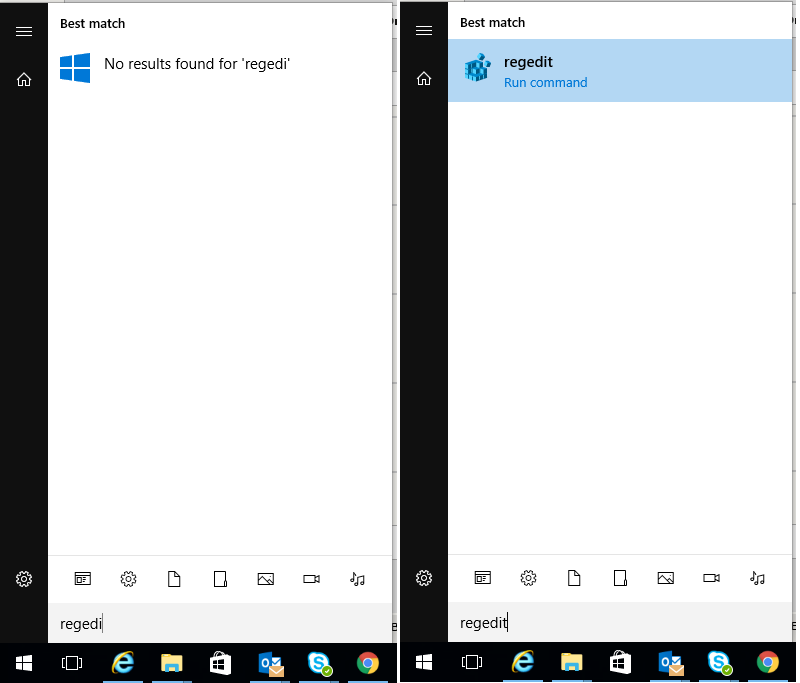
Saved comment
TheOneWhoReadsStuff · 4002 points · Posted at 14:46:52 on November 27, 2017 · (Permalink)
Yeah, I would like a setting where I can turn off web searches. I just want to search for items on my computer, not the web. If I wanted to search the web, I could just open the browser.
MemoryLapse · 874 points · Posted at 15:59:52 on November 27, 2017 · (Permalink)
Turn off Cortana. In windows home you (coincidentally) need to edit the registry, but in professional you can edit the group policy.
UhaiFE · 392 points · Posted at 16:48:12 on November 27, 2017 · (Permalink)
Turning off cortana (for me) also disabled my ability to search for programs like that
Enderpig1398 · 391 points · Posted at 17:04:47 on November 27, 2017 · (Permalink)
This is a common misconception. Press the start button and start typing. It's really dumb that they hid it like that.
algag · 178 points · Posted at 17:41:43 on November 27, 2017 · (Permalink)
Tbf, thats what it was in Win8 and possibly earlier.
LoudMusic · 93 points · Posted at 17:48:02 on November 27, 2017 · (Permalink)
Correct - it was like that in Win7 as well. Prior to that you might have had to actually click in the Search field in the Start Menu, but it was still there.
tgp1994 · 38 points · Posted at 18:41:06 on November 27, 2017 · (Permalink)
And Vista, if I'm not mistaken...
sptn1gooz · 84 points · Posted at 19:25:33 on November 27, 2017 · (Permalink)
We don't talk about Vista.
SaintNewts · 20 points · Posted at 20:14:19 on November 27, 2017 · (Permalink)
What about Win ME? lol
xandercusa · 15 points · Posted at 21:02:13 on November 27, 2017 · (Permalink)
We do NOT acknowledge the existence of WinME around here
NoRocketScientist · 3 points · Posted at 21:52:39 on November 27, 2017 · (Permalink)
I personally had no issues with those two unmentionables!
xandercusa · 2 points · Posted at 23:08:50 on November 27, 2017 · (Permalink)
I use Vista as my main OS on a laptop of mine and it's fine. I used ME at one point and had a whole bunch of BSODs before moving to Win98se
SaintNewts · 2 points · Posted at 21:51:48 on November 27, 2017 · (Permalink)
Oh but Vista is marginally okay? THIS SUB IS A JOKE! *unsu-- *subscribe* --- *unsubscribe*
xandercusa · 3 points · Posted at 22:48:39 on November 27, 2017 · (Permalink)
I still use Vista on my main workstation laptop and it's just fine!
SaintNewts · 1 points · Posted at 22:58:33 on November 27, 2017 · (Permalink)
Even though it's out of extended support? As of April, unless you're spending more money than it's worth paying for custom updates of course.
xandercusa · 2 points · Posted at 23:05:55 on November 27, 2017 · (Permalink)
Windows update doesn't even work on it, and yet I still use it on the internet.
SaintNewts · 1 points · Posted at 01:17:43 on November 28, 2017 · (Permalink)
That's okay. I have a VM running Win XP. They quit making chrome updates for that even.
xandercusa · 1 points · Posted at 03:11:54 on November 28, 2017 · (Permalink)
Chrome doesn't support Vista either, but I've been using Firefox and I think it still has some support going for it. If I remember correctly, it just updated a few days ago.
tgp1994 · 1 points · Posted at 23:50:32 on November 27, 2017 · (Permalink)
I have Vista on my "side" laptop that I use for random things. It always works when I need it to, ironically. Gave the machine an upgrade from 1GB to 2GB of RAM, that was like night and day!
SaintNewts · 2 points · Posted at 01:19:05 on November 28, 2017 · (Permalink)
Agreed. Amazing how easily Windows 7 and 10 stuck down the RAM.
tgp1994 · 1 points · Posted at 03:30:01 on November 28, 2017 · (Permalink)
Even my mom's computer with Windows 7 and 4GB of RAM is really struggling. She typically has no more than 3 tabs open in Firefox, Office Outlook and an instance or two of Word. Like, honestly, I can see how that would be a stretch for 2GB of RAM. But 4? I think there's been some pretty big software bloat especially over the last decade.
SaintNewts · 1 points · Posted at 21:52:14 on November 27, 2017 · (Permalink)
Oh but Vista is marginally okay? THIS SUB IS A JOKE! *unsu-- *subscribe* --- *unsubscribe*
NoRocketScientist · 1 points · Posted at 21:52:19 on November 27, 2017 · (Permalink)
I personally had no issues with those two unmentionables!
Andromeda2803 · 1 points · Posted at 09:05:28 on November 28, 2017 · (Permalink)
I was the sole person to really like ME..
Bone-Juice · 2 points · Posted at 20:58:31 on November 29, 2017 · (Permalink)
We do not speak of Windows Mangled Edition
ZippyDan · 33 points · Posted at 20:15:27 on November 27, 2017 · (Permalink)
Vista was decent after the second(?) SP
choufleur47 · 5 points · Posted at 01:30:55 on November 28, 2017 · (Permalink)
it did wonder for my sales in computer stores. Everyone had to upgrade lol.
WhiteBoyFromHait · 3 points · Posted at 20:56:03 on November 27, 2017 · (Permalink)
Or windows RT...
UnicornRider102 · 3 points · Posted at 21:51:10 on November 27, 2017 · (Permalink)
Why not? We're talking about Windows 10.
xyifer12 · 1 points · Posted at 00:23:27 on November 28, 2017 · (Permalink)
Because shit drivers gave it a bad name and now people think it's a bad OS because of their experiences caused by other software?
Zefirus · 1 points · Posted at 01:39:14 on November 28, 2017 · (Permalink)
Vista was and is fine. All of its problems were entirely with third parties. Hardware didn't have proper drivers, and OEMs put it on computers that didn't have high enough specs to support it.
If you just flat out deleted Windows Vista from existence and put Windows 7 in its place, it would have almost the EXACT same problems that Vista had.
ChuckVader · 1 points · Posted at 03:22:24 on November 28, 2017 · (Permalink)
This was part of it, but I think the bigger problem was that it was simply too reaource intensive for the majority of machines that had it installed from the factory. I never had any problems with Vista, I loved it to tell the truth. My friend with a Celeron laptop that came with Vista on the other hand? Not so much.
Zefirus · 1 points · Posted at 13:54:45 on November 28, 2017 · (Permalink)
Uh, I said that.
Basically intel started throwing their weight around and forced Microsoft to "approve" of low quality computers that could barely run it. That's what those "Designed for XP, Windows Vista Capable" logos were.
[deleted] · 1 points · Posted at 19:17:19 on November 27, 2017 · (Permalink)
I think 95 as well...
the_grass_trainer · 2 points · Posted at 19:37:43 on November 27, 2017 · (Permalink)
I don't remember Winblows 95/98 having a search function in the start menu, but it still had the Run program.
ZippyDan · 1 points · Posted at 20:15:00 on November 27, 2017 · (Permalink)
i think Windows Search was a separate install that came later in the life of Windows 9x
the_grass_trainer · 1 points · Posted at 00:46:08 on November 28, 2017 · (Permalink)
That would make sense, but i thought the start menu search function was a separate application altogether?
Losicta · 0 points · Posted at 18:55:04 on November 27, 2017 · (Permalink)
Which they copied from Mac OSX, iirc
radwic · 6 points · Posted at 19:38:31 on November 27, 2017 · (Permalink)
Which was ripped from DOS, tbh
trznx · 22 points · Posted at 20:02:07 on November 27, 2017 · (Permalink)
Not it's not. yes you can just press start and type, but Win7 has a field you can see when you press start. I started typing in w10 because I assumed it should be there and funnily enough it is, but it's hidden. In Win7 it's not hidden. Huge difference if you ask me, the people who won't try will never know there IS A SEARCH BAD in there
PillowTalk420 · 5 points · Posted at 02:20:28 on November 28, 2017 · (Permalink)
Even with Cortana off, you can open the normal search field with Windows Key + Q.
I use this because hitting the start button, for whatever reason, is retardedly slow to actually open the start menu.
Bone-Juice · 1 points · Posted at 20:58:08 on November 29, 2017 · (Permalink)
Just tried it on my Win7 work pc, can confirm it is the same result.
Cuttybrownbow · 47 points · Posted at 18:26:36 on November 27, 2017 · (Permalink)
It still doesn't find anything. Like at all. It's embarrassing for Windows.
FriesWithThat · 14 points · Posted at 18:39:06 on November 27, 2017 · (Permalink)
Considering the amount of time it takes indexing my files it would be nice if it could find some things. I guess I'm just grateful that searching in file explorer works so long as it's it a format Windows likes. I backup all my technical LibreOffice documents as .docx in an archive folder just to be able to search inside the documents and ever find things again. And I did do a few other hacks to try to bypass this step and make Windows think it was one of their precious Word documents, but to no avail.
alrf536 · 10 points · Posted at 20:10:05 on November 27, 2017 · (Permalink)
It is another setting. You have to enable Background Apps. Just the main switch, disable all the apps. I had the same problem as you and was about to give up until I found it. Now I can find programs again.
[deleted] · 5 points · Posted at 22:14:24 on November 27, 2017 · (Permalink)
This is part of the problem. Disabling background apps should notify you of the change or not disable it at all. Let the main disable be a regedit or gp edit.
KevinCarbonara · 0 points · Posted at 20:44:46 on November 27, 2017 · (Permalink)
It's not embarrassing. It's profitable.
It's the Winten users who defend Microsoft's exploitative business decisions that's embarrassing.
Cuttybrownbow · 2 points · Posted at 02:58:54 on November 28, 2017 · (Permalink)
Breaking a once useful tool is not profitable. Its a fuckup.
KevinCarbonara · 1 points · Posted at 04:42:15 on November 28, 2017 · (Permalink)
It's profitable when it defaults to a web search on your own service and isn't preventing any users from buying your product. "fuckup" implies it was a mistake. This was on purpose.
LiberatedCapsicum · 5 points · Posted at 18:54:01 on November 27, 2017 · (Permalink)
Regardless, it now takes 500% longer to open the search bar.
IVIaskerade · 38 points · Posted at 18:07:00 on November 27, 2017 · (Permalink)
Not dumb, malicious.
OathOfFeanor · 27 points · Posted at 18:42:10 on November 27, 2017 · (Permalink)
What are you smoking?
It's CONVENIENT.
For years I keep telling people to stop searching all over their screen for something to click on.
"Just hit the little flag button on your keyboard, then type the first word of what you want and wait a few seconds to see the results"
BUT the search is pretty shitty as shown in OP, since it often does not work for partial matches. Nevertheless I don't understand how you can claim it is malicious that they don't force you to click a search button. Why do you want the process to be MORE complicated?
[deleted] · 24 points · Posted at 19:16:09 on November 27, 2017 · (Permalink)
The search field doesn't even show, though, and web searches likely to try to sell you something pop up first. I don't think malice is exactly a leap.
OathOfFeanor · 1 points · Posted at 19:38:18 on November 27, 2017 · (Permalink)
"Never attribute to malice that which is adequately explained by stupidity."
https://en.wikipedia.org/wiki/Hanlon%27s_razor
Did you know that every iPhone or Mac does the same thing? It has a web search too when you use Spotlight. The only difference is that their search of the local computer isn't total hogshit, so you get the results you want before the web results.
I wouldn't be surprised if Android does the same thing, but I don't have one so I'm not sure.
Microsoft is just too incompetent to search the local computer in a reasonable amount of time, so you get web results instead.
TommyLaSortof · 3 points · Posted at 23:22:52 on November 27, 2017 · (Permalink)
It do
tojoso · 11 points · Posted at 20:55:45 on November 27, 2017 · (Permalink)
Being forced to click a search button is different than showing a search bar with a blinking cursor indicating that you can start typing right away. It is not at all intuitive to just start typing when there is no visible text input box. It doesn't have to be more complicated, but it should be more clear and intuitive.
OathOfFeanor · 2 points · Posted at 20:59:35 on November 27, 2017 · (Permalink)
That's fair, for new users it is not intuitive. Microsoft probably felt that since this was the fourth major OS they've sold that offers this functionality (that's right, you have been able to do this since Vista), they could finally get rid of the training wheels.
tojoso · 10 points · Posted at 21:07:25 on November 27, 2017 · (Permalink)
An intuitive UI is not training wheels. That's like removing the X from the top of every window and saying "well you can still click the top right corner to close a window, it's been that way since Windows 95! When can we take these training wheels off?!"
OathOfFeanor · 6 points · Posted at 21:47:34 on November 27, 2017 · (Permalink)
You know what, that's fair.
I am always giving Apple a hard time "How was I supposed to know that holding Ctrl + Shift while swiping with 8 fingers was the secret password to unlock extra ammo?!"
ToastWithoutButter · 3 points · Posted at 19:08:01 on November 27, 2017 · (Permalink)
Well, that escalated quickly.
IVIaskerade · 1 points · Posted at 15:34:30 on November 28, 2017 · (Permalink)
Making it so that disabling Cortana also hides the search bar is malicious design, because it has to be deliberate.
Brazen_Serpent · 1 points · Posted at 19:33:26 on November 27, 2017 · (Permalink)
I have disabled cortana fully. If i press the start button and start typing nothing happens at all.
[deleted] · 1 points · Posted at 22:28:04 on November 27, 2017 · (Permalink)
[deleted]
Enderpig1398 · 1 points · Posted at 22:42:20 on November 27, 2017 · (Permalink)
I'm not using the pro version
HateMeMoreThanIDo · 1 points · Posted at 17:51:07 on November 27, 2017 · (Permalink)
If you disable cortana so web search is not on you cannot search in the start menu.
Demaun · 5 points · Posted at 18:40:23 on November 27, 2017 · (Permalink)
Nopenopenope. You can still search apps and files much like Win7 without the bullshit that is Cortana. The bar is hidden until you start typing, though.
How? In Regedit, find the registry key: HKEY_LOCAL_MACHINE\SOFTWARE\Policies\Microsoft\Windows\Windows Search
Add the Windows Search key if it is not present.
In this key, add a DWORD value. name: "AllowCortana" data: 0
A restart is necessary for any change to take effect.
Here's an article that goes into a tiny bit more depth
FriesWithThat · 1 points · Posted at 18:57:09 on November 27, 2017 · (Permalink)
Here's another step-by-step that I just followed. Quickly tested, and this works sweet, just like searching in file explorer as opposed to Bing!:
For reference, the end result in the Registry editor should look like the below screenshot:
https://i.imgur.com/13ozXYl.png
zHellas · 0 points · Posted at 18:31:50 on November 27, 2017 · (Permalink)
Yes you can. Just start typing.
HateMeMoreThanIDo · 0 points · Posted at 18:38:55 on November 27, 2017 · (Permalink)
You figured it out!!!! I wasn't typing.../s
Do you really think I decided I could not search but never tried typing??
[deleted] · 1 points · Posted at 18:54:40 on November 27, 2017 · (Permalink)
[deleted]
HateMeMoreThanIDo · 1 points · Posted at 18:58:35 on November 27, 2017 · (Permalink)
Or theres more than one way to disable Cortana?
zHellas · 1 points · Posted at 01:20:51 on November 28, 2017 · (Permalink)
Yes.
Aidoboy · 10 points · Posted at 17:09:28 on November 27, 2017 · (Permalink)
Huh, I turned it off and I can still search.
iHeartApples · 46 points · Posted at 16:51:29 on November 27, 2017 · (Permalink)
Yeah I turned off Cortana now I have no search function.
Enderpig1398 · 97 points · Posted at 17:06:02 on November 27, 2017 · (Permalink)
You can still search without Cortana. The search button disappears but if you press the start button and start typing, it will pull up the search thing.
KolbStomp · 16 points · Posted at 18:21:14 on November 27, 2017 · (Permalink)
Yes, I turned off Cortana and thought I lost the ability to search but then I accidentally pressed a button after opening the Start menu and it searched. I was confused at first but then I realized it was just horrible UI decisions.
fatalicus · 29 points · Posted at 18:39:32 on November 27, 2017 · (Permalink)
Ever since windows vista, you have had the ability to just press the windows key and start typing to search.
Nothing has changed in windows 10, other than that they have added win+s for the cortana search.
No need to press any additional buttons after opening start. just click the start button (or windows key) and start typing.
[EDIT] corrected windows 7 to vista, since the windows key search was added then.
tojoso · 4 points · Posted at 20:58:32 on November 27, 2017 · (Permalink)
Pretty sure in Windows 7 the text input box with a blinking cursor showed up as soon as you pressed the windows key, as opposed to Windows 10 where it only shows up once you start typing a word. To generations of people trained to only type when there's a text box active on the screen, this is highly unintuitive.
FormerGameDev · 11 points · Posted at 18:41:24 on November 27, 2017 · (Permalink)
Windows 10 === Horrible UI decisions.
DrShamusBeaglehole · 2 points · Posted at 22:13:50 on November 27, 2017 · (Permalink)
Found the JavaScript developer
You're right though, windows 10 is the definition of bad UI decisions
FormerGameDev · 1 points · Posted at 22:29:54 on November 27, 2017 · (Permalink)
100%
__Lua · 2 points · Posted at 18:35:03 on November 27, 2017 · (Permalink)
You can still search properly, it just changes from the Cortana icon to the magnifying glass icon. Enable the icon in the taskbar.
KolbStomp · 1 points · Posted at 18:44:36 on November 27, 2017 · (Permalink)
Oh interesting, I will do this when I get home
vitorgrs · 1 points · Posted at 03:49:45 on November 28, 2017 · (Permalink)
Well, you did it wrong. You don't disabled Cortana then. You hide. To disable Cortana, you can go to Group Policy and fully disable it, or on Cortana settings, just sign-out of your account.
[deleted] · 1 points · Posted at 20:52:47 on November 27, 2017 · (Permalink)
[deleted]
Enderpig1398 · 1 points · Posted at 21:13:13 on November 27, 2017 · (Permalink)
Control Panel > Indexing Options > Modify
Then include any folder like Program Files that you want to be found when you search with Windows. Whenever you search for something, it will look in those folders. I feel like it should index Program Files by default, but it doesn't.
jothki · 1 points · Posted at 21:53:11 on November 27, 2017 · (Permalink)
Is that new to the FCU? I'm running an earlier version and can see the search button fine. It even changes to a magnifying glass instead of the Cortana logo.
Enderpig1398 · 1 points · Posted at 21:59:52 on November 27, 2017 · (Permalink)
I remember the magnifying glass but I don't have it anymore. I can't figure out how to get the magnifying glass back, but I'm sure the option is there. I'm running build 16299.
iHeartApples · 1 points · Posted at 15:49:01 on November 28, 2017 · (Permalink)
Well fuck thanks for that. Annoying that I have to find out this way when I’m not completely obtuse with computers.
Enderpig1398 · 2 points · Posted at 16:59:29 on November 28, 2017 · (Permalink)
That's ok. Learning from other people is usually better than trying to learn everything by yourself.
[deleted] · 1 points · Posted at 11:52:37 on November 29, 2017 · (Permalink)
[deleted]
Enderpig1398 · 1 points · Posted at 21:43:43 on November 29, 2017 · (Permalink)
Maybe not right click and paste, but Ctrl + V works.
Solarbro · 16 points · Posted at 17:05:23 on November 27, 2017 · (Permalink)
This won’t be all that helpful, but you can add a Windows Search value in the registry somewhere to replace Cortana. I’d look it up but I’m at work doing crap like this for clients.
A lot of Cortana and search item suggestions may not work anymore. It seems like they disable a work around per update. You used to be able to uninstall Cortana, now you can’t. Powershell warns you about “uninstalling essential OS materials is not allowed” or some odd thing. That’s why I mostly do it through the registry, cause at least then it works. Until they do a big update and reset your OS registry values....
felio_ · 2 points · Posted at 17:16:37 on November 27, 2017 · (Permalink)
Thanks for doing this
!RemindMe 3 days "Disabled Cortana"
RemindMeBot · 3 points · Posted at 17:16:54 on November 27, 2017 · (Permalink)
I will be messaging you on 2017-11-30 17:16:50 UTC to remind you of this link.
CLICK THIS LINK to send a PM to also be reminded and to reduce spam.
Parent commenter can delete this message to hide from others.
jtriangle · 3 points · Posted at 19:10:21 on November 27, 2017 · (Permalink)
If you have a pro version of windows, you can use the group policy editor to solve this. You need to disable(disallow) cortana and web search results.
You can find the settings in: Computer Configuration->Windows Components->Search. Set "allow cortana" to disabled and "Do not allow web search to "enabled".
pohuing · -1 points · Posted at 18:21:24 on November 27, 2017 · (Permalink)
That is absolutely overkill. Just open the start menu and start typing, the search will come up even with cortana disabled
fatalicus · 6 points · Posted at 18:40:46 on November 27, 2017 · (Permalink)
Press the windows key and start typing. just like it has been since windows vista.
LooCid36 · 2 points · Posted at 19:28:53 on November 27, 2017 · (Permalink)
Right click taskbar, Hover over search, click on Show search box
EarthlyAwakening · 1 points · Posted at 17:34:04 on November 27, 2017 · (Permalink)
I never had Cortana cause I'm in NZ, and not a single issue people have in Windows 10 has affected me. I love the OS and really hate eveything before it.
SpcK · 1 points · Posted at 16:53:28 on November 27, 2017 · (Permalink)
That would be fine, but It also disabled the Start menu pinned apps, Which I really liked.
antabr · 8 points · Posted at 17:03:18 on November 27, 2017 · (Permalink)
Such a ridiculous interconnected weaving of settings. I just want my windows 7 search bar back!
jantari · 7 points · Posted at 18:13:50 on November 27, 2017 · (Permalink)
It's not interconnected in the slightest, he's either just trolling or messed up other settings too
angrylawyer · 1 points · Posted at 17:17:20 on November 27, 2017 · (Permalink)
The Cortana search turns off, but you should still be able to search by clicking the windows button.
XavierRenae · 1 points · Posted at 19:09:39 on November 27, 2017 · (Permalink)
I use a program called ClassicShell to make my start menu look like window 7 again, and it gives me back all of the functionality it used to have.
walkintheforest1 · 1 points · Posted at 19:58:25 on November 27, 2017 · (Permalink)
I disabled Cortana but I think she still does the searches just doesn't talk
alrf536 · 1 points · Posted at 20:13:40 on November 27, 2017 · (Permalink)
Posting for you too:
It is another setting. You have to enable Background Apps. Just the main switch, disable all the apps. I had the same problem as you and was about to give up until I found it. Now I can find programs again.
[deleted] · 6 points · Posted at 18:09:58 on November 27, 2017 · (Permalink)
Got a link?
Thedirtyjersey · 2 points · Posted at 18:22:03 on November 27, 2017 · (Permalink)
Yep, I Disabled Cortana, forced updates, location, one drive, etc etc
Fuck the cloud, stop shoving shit down my throat, I have a workflow that works most of these options just eat CPU or add extra steps to do the same fucking thing I always do.
ESPECIALLY in a corporate environment where every update wipes out my office settings, (fuck trust center too)
bobbaphet · 2 points · Posted at 18:42:28 on November 27, 2017 · (Permalink)
Again...and again...and again...
VoiceOfLondon · 2 points · Posted at 18:50:59 on November 27, 2017 · (Permalink)
Just download Ultimate Windows Tweaker. It's a lifesaver.
Custodian_Carl · 1 points · Posted at 19:29:04 on November 27, 2017 · (Permalink)
I attempted to delete Cortana but it shares .dlls with windows explorer. Windows was just fine crippling itself through my action.
AllThat5634 · 1 points · Posted at 21:09:57 on November 27, 2017 · (Permalink)
But the created will make the decisions from now on or are you wanna die?
johnmountain · 1 points · Posted at 22:31:49 on November 27, 2017 · (Permalink)
I disabled web searches/Cortana from day one of using Windows 8 and then 10. It was obvious to me from the start how much worse the search was with those enabled.
I don't know how some of you lasted this long with Cortana enabled.
jslingrowd · 1 points · Posted at 08:03:11 on November 28, 2017 · (Permalink)
Cortana is a travesty
Hotfries456 · 1 points · Posted at 20:17:53 on November 28, 2017 · (Permalink)
Here is a powershell function that will disable cortana without needing to mess with the registry manually
specifically this command can be used in Powershell as an administrator
EnterTheLight · -6 points · Posted at 17:26:24 on November 27, 2017 · (Permalink)
Not to be "that guy" but I decided to turn off windows 10 and turn on Ubuntu and I have been loving it.
flippydude · 30 points · Posted at 17:46:42 on November 27, 2017 · (Permalink)
chillaxinbball · 2 points · Posted at 17:54:04 on November 27, 2017 · (Permalink)
Is there a good tablet branch somewhere?
CharaNalaar · 0 points · Posted at 17:50:52 on November 27, 2017 · (Permalink)
Um, no. Disabling Cortana is what causes problems with search like this.
MemoryLapse · 6 points · Posted at 17:57:09 on November 27, 2017 · (Permalink)
No it isn't. Disabling Cortana disables searching outside of your computer and replaces her with the more traditional "Search" box.
Depending on your version, you may also have to disable web search.
https://superuser.com/questions/1196618/how-to-disable-internet-search-results-in-start-menu-post-creators-update
shillyshally · 21 points · Posted at 17:58:35 on November 27, 2017 · (Permalink)
I have been using the Everything search for years. It is fantastic, so much better than the Windows default.
[deleted] · 6 points · Posted at 21:59:09 on November 27, 2017 · (Permalink)
[deleted]
shillyshally · 1 points · Posted at 23:05:02 on November 27, 2017 · (Permalink)
Thanks, I will check it out.
frikin8 · 54 points · Posted at 17:13:13 on November 27, 2017 · (Permalink)
There is a setting for that. Look for the "Disable web search results on a local computer" section for pictures. Just click on the search box, then select the settings cog to adjust search settings.
https://4sysops.com/archives/disable-web-search-in-the-windows-10-start-menu-via-group-policy/
joheinous · 69 points · Posted at 16:20:23 on November 27, 2017 · (Permalink)
I recently used classic shell to give myself the windows xp start menu and it doesn't search the web. So nice.
flaim · 24 points · Posted at 18:36:00 on November 27, 2017 · (Permalink)
I never thought I would need to re-install classic shell after Win8 but I guess I do now.
KennyFulgencio · 2 points · Posted at 18:49:44 on November 27, 2017 · (Permalink)
huh? why not?
recluseMeteor · 7 points · Posted at 00:27:10 on November 28, 2017 · (Permalink)
Because the ginormous full-screen Start Menu that was in Windows 8/8.1 was the main drive for the usage of Start Menu replacements.
pineappleshaverights · 5 points · Posted at 16:32:47 on November 27, 2017 · (Permalink)
Does searching for apps work?
joheinous · 25 points · Posted at 16:42:55 on November 27, 2017 · (Permalink)
Like programs installed? Yeah.
timmie124 · 3 points · Posted at 02:04:46 on November 28, 2017 · (Permalink)
Works great https://i.gyazo.com/61dd77fb3ee5e8de8b183b8123e0605b.png
Vladimir_Pooptin · 12 points · Posted at 18:58:20 on November 27, 2017 · (Permalink)
But how else would anyone be tricked into using Bing
[deleted] · 4 points · Posted at 17:12:07 on November 27, 2017 · (Permalink)
[deleted]
jakeinator21 · 8 points · Posted at 17:53:04 on November 27, 2017 · (Permalink)
Correct. Under "Cortana and Search settings" there is a toggle for "Search online and include web results".
[deleted] · 1 points · Posted at 18:02:22 on November 27, 2017 · (Permalink)
Where? I clicked this and got here:
https://prnt.sc/hfzfs4
jakeinator21 · 1 points · Posted at 18:11:44 on November 27, 2017 · (Permalink)
Try typing "Cortana & Search Settings", that's how I got to it.
Edit: Screen shots
[deleted] · 3 points · Posted at 18:23:45 on November 27, 2017 · (Permalink)
That must've been disabled in an update--"Cortana & Search Settings" is the same place in the 2nd link. :( Nothing at alll mentions "online" or "web results".
I disabled "Windows Cloud Search", but that seems to search mobile devices? I've disabled everything and I'm still getting web results.
Let me Google further. If I'm successful, I'll post back.
EDIT: Thank you for the screenshots, but that's not coming up for me. :( I'm on the Fall Creators Update, version 1709 via the Run "winver" command). Once I click "Settings", I get to this screen: https://prnt.sc/hfzfs4 I used to have that little menu built-into the Start Menu, but now it opens the full-fledged Settings app.
EDIT2: This .reg file worked, from TenForums, after merging the edit and restarting!
https://www.tenforums.com/tutorials/25118-enable-disable-cortana-windows-10-a.html
jakeinator21 · 1 points · Posted at 18:53:22 on November 27, 2017 · (Permalink)
Ah, I'm on 1607. Not sure how that happened, I thought I was getting automatic updates.
[deleted] · 1 points · Posted at 18:55:21 on November 27, 2017 · (Permalink)
Ah, no worries. The rollout of the updates...is weird. I was waiting for the update and it came up after specifically tapping "Check for Updates"? I think /u/jenmsft said that should work now.
[deleted] · 6 points · Posted at 18:50:26 on November 27, 2017 · (Permalink)
Seriously. They make it seem like it’s so convienent, because it’s so difficult to use google right? And it’s useless anyway because it automatically uses bing
tooyoung_tooold · 4 points · Posted at 18:46:09 on November 27, 2017 · (Permalink)
They have that, it just turns itself back on after every update though. Pretty much all the annoying things get turned back on by the updates.
Anxiety_Mining_INC · 5 points · Posted at 19:22:36 on November 27, 2017 · (Permalink)
I don't think anyone has ever used that bar with the intention of searching stuff on the web. Talk about an annoying "feature."
Georgia_O_Queeffe · 4 points · Posted at 18:16:30 on November 27, 2017 · (Permalink)
Worst part is, it often can't even be relied on to find regular old documents. I have a Word document where I keep baking recipes I tried and liked, it's sitting in a folder in "My Documents", and the search function is literally unable to find it, even when I type the exact file name ("recipes.doc"). I tried other files, and there are a bunch that apparently don't exist as far as the search function is concerned. I can browse to the correct folder and open the file just fine, but Windows search can't see them.
WillSmoth · 3 points · Posted at 18:13:00 on November 27, 2017 · (Permalink)
You should know better than trying to use Window search function.
IJCQYR · 1 points · Posted at 17:26:23 on November 27, 2017 · (Permalink)
I'll just leave this here
https://www.voidtools.com/
SoVerySick314159 · 1 points · Posted at 00:23:13 on November 28, 2017 · (Permalink)
So fast, so lightweight. I only ever want to search on filenames, so that works great for me.
IJCQYR · 1 points · Posted at 01:14:08 on November 28, 2017 · (Permalink)
You can also set a global shortcut for the window to appear.
[deleted] · 1 points · Posted at 17:28:29 on November 27, 2017 · (Permalink)
[deleted]
jakeinator21 · 1 points · Posted at 17:54:44 on November 27, 2017 · (Permalink)
You don't need shutup10, there is a toggle for it in Cortana's settings.
[deleted] · 1 points · Posted at 18:07:37 on November 27, 2017 · (Permalink)
[deleted]
jakeinator21 · 1 points · Posted at 18:21:47 on November 27, 2017 · (Permalink)
I'm looking at it right now.
https://i.imgur.com/mW9zD3B.png
https://i.imgur.com/sQcwt4V.png
[deleted] · 1 points · Posted at 02:06:24 on November 28, 2017 · (Permalink)
[deleted]
jakeinator21 · 1 points · Posted at 02:12:21 on November 28, 2017 · (Permalink)
First Class Underdog?
Also yea you're right, I didn't realize I was on an older build, my mistake.
[deleted] · 1 points · Posted at 02:14:02 on November 28, 2017 · (Permalink)
[deleted]
jakeinator21 · 2 points · Posted at 05:06:29 on November 28, 2017 · (Permalink)
I'm on fcu on my home pc, but I guess my work pc is blocking automatic updates.
mustdashgaming · 1 points · Posted at 18:32:46 on November 27, 2017 · (Permalink)
You mean edge? Because they're just saying you time so you don't have to open edge, because who would use anything other than edge?
YourCompanyHere · 1 points · Posted at 19:02:44 on November 27, 2017 · (Permalink)
Not mention the opportunity for unwanted results, I was sharing my screen in a committee meeting with a client and wanted to spin a VM to show something, I hit WINKEY and typed Oracl and hit enter (Oracle VirtualBox), only I missed the C and it instantly open the web images results for "Oral", luckly nothing NSFW showed.
TheOneWhoReadsStuff · 1 points · Posted at 00:27:45 on November 28, 2017 · (Permalink)
You’ve gotta turn off “safe search” in bing to get to the fun stuff. Personally I’m glad they have safe search. when you turn it off you get the filthiest browser in existence.
walkintheforest1 · 1 points · Posted at 19:57:39 on November 27, 2017 · (Permalink)
Truth
TheOneWhoReadsStuff · 0 points · Posted at 00:29:07 on November 28, 2017 · (Permalink)
Don’t get me wrong, I’m enjoying Windows 10. I think they did a fine job. It’s just not exactly perfect, and they’re trying so damned hard to expand their bing and store user base
theSecondMouse · 1 points · Posted at 20:01:13 on November 27, 2017 · (Permalink)
Install Launchy. I haven't used the start menu in years thanks to that, its fantastic.
OldGuyWhoSitsInFront · 1 points · Posted at 20:15:38 on November 27, 2017 · (Permalink)
If they could build in a feature to have it suck your dick in exchange for using Bing and IE they just might.
shamowfski · 1 points · Posted at 20:33:27 on November 27, 2017 · (Permalink)
Download 'everything' from ninite. You can also pair it with wox and get a decent spotlight clone.
[deleted] · 1 points · Posted at 20:58:11 on November 27, 2017 · (Permalink)
I totally agree. I think Microsoft needs to quit pushing Microsoft Edge in our faces. I simply just want to search items in my computer, not search the web and or sure Edge to search the web with.
[deleted] · 1 points · Posted at 21:22:03 on November 27, 2017 · (Permalink)
Ya agreed, anything I type into the damn search bar to try and find something on my pc brings up internet searches of people asking where do they find the same thing on their pc... what's the God damn point of a search function if it's best use is to just inform me that no one else can find it on theirs either....
TheOneWhoReadsStuff · 1 points · Posted at 00:32:06 on November 28, 2017 · (Permalink)
Yeah. That’s my biggest gripe with 10. Search needs to remain untainted by the web.
bobsagetfullhouse · 1 points · Posted at 21:52:23 on November 27, 2017 · (Permalink)
Seriously. Who thinks, I need to do a web search, let me go to cortana.
bobsagetfullhouse · 1 points · Posted at 21:52:51 on November 27, 2017 · (Permalink)
Seriously. Who thinks, I need to do a web search, let me go to cortana.
dohimer · 1 points · Posted at 22:49:40 on November 27, 2017 · (Permalink)
High jacking the top comment.
Has Microsoft said anything about fixing search?
toekneeg · 1 points · Posted at 03:49:32 on November 28, 2017 · (Permalink)
Unfortunately, most users of PCs are clueless and this probably benefits them more than the rest of us that actually know how to use a computer. This should be an option on Pro versions of Win10 at least.
AwesomelyHumble · 1 points · Posted at 04:15:52 on November 28, 2017 · (Permalink)
I would like this for Google Hangouts. I don't want to search ALL of Google Hangouts for "Tim", just search my contacts.
hunt_the_gunt · 1 points · Posted at 11:01:15 on November 28, 2017 · (Permalink)
I just installed classic shell.
I'm getting old or something but it just works and doesn't accidentally Bing me.
Gadsden · 372 points · Posted at 14:44:39 on November 27, 2017 · (Permalink)
Even better is that it's not consistent. What you get a result for one time, may not work the next, and vise versa.
SabashChandraBose · 83 points · Posted at 16:46:31 on November 27, 2017 · (Permalink)
Heck it doesn't work for Office products either. I typed Outlook and it didn't find it.
akai_ferret · 43 points · Posted at 18:04:11 on November 27, 2017 · (Permalink)
Yes! Thank you!
It's been driving me crazy how I can search with the same exact terms, even for Microsoft Office programs, and one day it will work and the next it won't find anything.
[deleted] · 2 points · Posted at 21:48:41 on November 27, 2017 · (Permalink)
That might be an issue with your search index. It either doesn't include the right folders or it is corrupt. Or the third option, maybe windows is just that bad.
I'd try rebuilding your search index, and look for what folders are included by default.
$0.02
Renaldi_the_Multi · 2 points · Posted at 23:25:07 on November 27, 2017 · (Permalink)
Is there a setting to do that in the start menu?
[deleted] · 1 points · Posted at 02:13:49 on November 28, 2017 · (Permalink)
Nope, MSFT doesn't care if your search fails :)
See my reply below. The steps are not so bad. GL
vitorgrs · 1 points · Posted at 03:51:29 on November 28, 2017 · (Permalink)
How they don't care?
Settings > Update & Security > Troubleshoot > Search & Indexing.
SabashChandraBose · 1 points · Posted at 01:02:00 on November 28, 2017 · (Permalink)
I understand what you said, but I don't knowhow to do that. However I could figure that out by searching. But not everyone has a background in software, and this is really softwaregore
[deleted] · 2 points · Posted at 02:11:59 on November 28, 2017 · (Permalink)
Okay so, quick and easy version (it is pretty simple, difficulty is another matter :)
or
next
fatalicus · 0 points · Posted at 18:47:03 on November 27, 2017 · (Permalink)
wat?
[EDIT] Aww, did i ruin someones cirklejerk?
MrRobotsBitch · 32 points · Posted at 20:19:03 on November 27, 2017 · (Permalink)
My favourite is anything up to "updat" will bring me to windows updates. Type anything more? Oh no look no results! Fucking Windows.
SavageAlien · 3 points · Posted at 04:12:33 on November 28, 2017 · (Permalink)
I get to "update" with "Check for Updates" as the result, once I add the s at the end, it suggests Java "Check for Updates" as Best Match, listing 5 other results, all Windows related update links under the heading "Settings"
oliverspin · -7 points · Posted at 16:37:40 on November 27, 2017 · (Permalink)
I think it adapts to your use, so it is consistent, but people aren’t.
Medason · 4 points · Posted at 16:48:50 on November 27, 2017 · (Permalink)
I work at a college, with computers that hundreds of people access a week. Less adaptation would be nice.
oliverspin · -3 points · Posted at 16:55:45 on November 27, 2017 · (Permalink)
All I can recommend is watch the results as you type each letter. If search displays your result after three letters but you don’t click it, it will assume that’s not your result.
Philip_K_Fry · 7 points · Posted at 18:09:22 on November 27, 2017 · (Permalink)
If that is the case that is the stupidest thing I have heard in some time.
oliverspin · -2 points · Posted at 18:48:40 on November 27, 2017 · (Permalink)
It’s an attempt at a smarter search function. While the function lacks scope, it is an interesting concept. If people knew how it worked they would be less frustrated.
KevinCarbonara · 3 points · Posted at 01:52:08 on November 28, 2017 · (Permalink)
That is the definition of a dumber search function.
oliverspin · 0 points · Posted at 02:42:20 on November 28, 2017 · (Permalink)
The idea is to make commonly used functions accesible more quickly. So, if you search for something starting with “A” very frequently, but have hundreds of items that also start with “A” the system will suggest the frequently clicked one earlier, lessening the time to get to that item.
Not sure why I’m being downvoted. I’ve said multiple times now that it isn’t a complete concept, doesn’t work well in all cases. I’m just explaining why search is like this.
akai_ferret · 5 points · Posted at 18:19:11 on November 27, 2017 · (Permalink)
If true, that is an astonishingly stupid design.
zopiac · 4 points · Posted at 18:24:29 on November 27, 2017 · (Permalink)
It definitely seems to happen to me. Might be some sort of selection bias, but I'll watch as I type and halfway through I see my result, but by the time I get my fingers to stop typing it switches to something else and what I'm looking for is gone completely.
oliverspin · 2 points · Posted at 18:49:50 on November 27, 2017 · (Permalink)
Exactly.
oliverspin · 3 points · Posted at 18:49:26 on November 27, 2017 · (Permalink)
It’s definitely incomplete. It’s an interesting concept, though.
Gadsden · 1 points · Posted at 18:03:06 on November 27, 2017 · (Permalink)
I could maybe see that for online content matching, but there's no excuse for 'regedi' not matching regedit, but reged or regedit do. Sometimes, hitting backspace to remove a letter will show you what you're looking for.
[deleted] · 865 points · Posted at 15:32:50 on November 27, 2017 · (Permalink)
[deleted]
TribbleTrouble1979 · 99 points · Posted at 15:53:56 on November 27, 2017 · (Permalink)
I swear "programs and features" didn't get me to the place to uninstall things the other week but I just checked since I was going to complain about it too and it works now so... Eh. Thanks to whomever for the stealth fix I suppose, lol.
Frank2312 · 27 points · Posted at 18:06:49 on November 27, 2017 · (Permalink)
Win+X shows up a menu near the Windows button. All those options can be accessed with a key.
For example, "Programs and Features can be accessed easily by pressing Win+X then F.
I don't know them all, but IIRC, control panel is P.
TribbleTrouble1979 · 12 points · Posted at 18:16:54 on November 27, 2017 · (Permalink)
I love you too. I'm a bit weird and put my start bar on the right side but interestingly this shortcut still opens in the bottom left corner.
stephnstephnstuff · 3 points · Posted at 19:40:49 on November 27, 2017 · (Permalink)
I put mine on the left side, so you're not the only weird one out there lol. It really threw off a tech at work one day when they had to fix something on my machine.
AccidentalConception · 8 points · Posted at 19:11:44 on November 27, 2017 · (Permalink)
That doesn't work, it's been changed to Apps and Features and takes you to the metro version.
Frank2312 · 1 points · Posted at 20:29:01 on November 27, 2017 · (Permalink)
Just press T instead of F then.
TBH, I haven't had any problem with the metro version since they added the filter function.
patrad · 2 points · Posted at 18:38:01 on November 27, 2017 · (Permalink)
In my current Win10 version, there is no control panel option on the win+x menu
way2lazy2care · 1 points · Posted at 18:48:02 on November 27, 2017 · (Permalink)
I wonder if it's just not displayed but still works. It should be Win+X and then P.
patrad · 3 points · Posted at 19:18:21 on November 27, 2017 · (Permalink)
I get the "nope" sound when I try that.
wetnax · 2 points · Posted at 22:47:55 on November 27, 2017 · (Permalink)
You can also just right-click the start button.
rahuldottech · 2 points · Posted at 14:20:19 on November 28, 2017 · (Permalink)
They removed the Control Panel option in one of the updates a month ago or so. I'm still bitter.
bencanfield · 23 points · Posted at 17:24:56 on November 27, 2017 · (Permalink)
appwiz.cpl
TribbleTrouble1979 · 5 points · Posted at 18:19:18 on November 27, 2017 · (Permalink)
There's my old friend programs and features!
Rndom_Gy_159 · 6 points · Posted at 19:05:12 on November 27, 2017 · (Permalink)
Such a nice and intuitive name that comes up right when you start typing doesn't it?
moiax · 2 points · Posted at 17:58:25 on November 27, 2017 · (Permalink)
If you right click on the start menu icon, it's at the top of the context menu.
tael89 · 10 points · Posted at 18:08:19 on November 27, 2017 · (Permalink)
That had been replaced with an awful ”apps and programs” version which sucks ass.
TribbleTrouble1979 · 1 points · Posted at 18:15:10 on November 27, 2017 · (Permalink)
I love you <3
mavvv · 2 points · Posted at 18:44:54 on November 27, 2017 · (Permalink)
"Uninstall" takes you to the apps and programs for u installing everything on a fresh os. If, however, you have any thing downloaded that has an Uninstall file with that word in it, search will then grab that forever and you can't just type Uninstall to find that anymore
TribbleTrouble1979 · 1 points · Posted at 22:59:10 on November 27, 2017 · (Permalink)
Thanks I'll try to avoid that permanent wrongness from happening.
ihatenewaccts · 2 points · Posted at 21:23:42 on November 27, 2017 · (Permalink)
There was an actual update fix to the settings recently. I read about it a little bit.
Programs and features I think is now "add or remove programs."
I like the storage menu the best because I can also see if my video collection is getting out of control.
jen1980 · 1 points · Posted at 04:05:54 on November 28, 2017 · (Permalink)
Or "add or remove programs." Why can't Microsoft find that?
Mayor_of_tittycity · 90 points · Posted at 17:32:17 on November 27, 2017 · (Permalink)
Windows 7 search worked perfectly for me. How the fuck did they go and take something that worked as well as that and turn it into a completely useless steaming pile of shit. 90% of the time i use search in Windows 10 it doesn't work.
Dlgredael · 43 points · Posted at 18:17:40 on November 27, 2017 · (Permalink)
It's more important to direct as many users as possible to online purchasable options for the 0.01% that will actually buy something from their start menu than it is to give a decent user experience to everyone else.
way2lazy2care · 6 points · Posted at 18:48:30 on November 27, 2017 · (Permalink)
I think it's more to push people towards edge than it is to push them to the app store.
Deto · 4 points · Posted at 20:26:14 on November 27, 2017 · (Permalink)
Must have been feature creep. Bosses demanding "Oh, it should also search the internet and if they type in a football team it should bring up their win/loss record and if they type in something that relates to something in their email it should show the email and if it's a date it should show their calendar entry and ifitsa....."
All while losing site of the main useful way to use search....as a convenient application launcher!
kenpus · 4 points · Posted at 19:04:39 on November 27, 2017 · (Permalink)
Win7 also had pinned apps that could actually be accessed with Win, Down. Initial version of Win10 made it something like Win, Down, Right, Down. After the Anniversary Update, it's Win, Shift+Tab, Down. At this point I started to just mouse-click it, but fucking hell...
[deleted] · 1 points · Posted at 22:02:38 on November 27, 2017 · (Permalink)
The classic shell start menu works exactly like windows 7 and looks integrated into the Windows 10 design.
https://i.imgur.com/r7YCqFs.png
chylex · 1 points · Posted at 19:51:32 on December 12, 2017 · (Permalink)
They took calculator and broke decimal points in european locales. Still one of the most ridiculous findings I've had in Win10, leading me to immediately replace it with Win7 one.
HOW DID THEY MANAGE TO MAKE THE CALCULATOR WORSE
fatalicus · -1 points · Posted at 18:44:51 on November 27, 2017 · (Permalink)
rebuild your search index. It has probably been fucked at some point.
Mayor_of_tittycity · 3 points · Posted at 19:31:53 on November 27, 2017 · (Permalink)
Na. I've tried that. It's said index is up to date or whatever when I've attempted to update it. I could try to delete it and have it rebuilt from scratch? It literally works for nothing other than core commands. Like if i need control panel, or devices, or run, and maybe only 30% of programs. If it's not something I have pinned I often need to go to program files to find the .exe. But it will not find a file or folder the life of it. It defaults to the bullshit web search. It will NEVER find "the mayor's porn" folder, teentakesbigload.mp4, or anything along those lines.
fatalicus · 0 points · Posted at 20:12:59 on November 27, 2017 · (Permalink)
You use the rebuild button in the advanced panel of Indexing options?
That will delete the whole index and then make a new index.
Mayor_of_tittycity · 2 points · Posted at 20:46:25 on November 27, 2017 · (Permalink)
I'll try this when I get home. Worth a shot.
Edit: did not work. W10 is still a piece of shit.
mka696 · 3 points · Posted at 16:05:08 on November 29, 2017 · (Permalink)
I've rebuilt my search index probably 30 times and it has never, ever worked in the slightest. Ever time I got a search issue I'd try it and zilch. I just switched to Classic Shell and that actually works.
the_dayman · 33 points · Posted at 17:56:25 on November 27, 2017 · (Permalink)
Yep, "bluetooth" gets me nothing, which I type instantly. Backspace to just "blue" and "Bluetooth and other devices" suddenly shows up.
FeebleGimmick · 2 points · Posted at 20:34:48 on November 27, 2017 · (Permalink)
Works OK for me
[deleted] · 8 points · Posted at 22:18:55 on November 27, 2017 · (Permalink)
It's different on every single machine i swear. Nothing about the search is uniform.
splendidfd · 0 points · Posted at 00:24:16 on November 28, 2017 · (Permalink)
This is partially because it customises the results to what you've selected in the past.
If you typed 'bluetooth' and selected a web search option (intentionally or otherwise) then it will put that option at the top of the search results. Similarly if you type 'blue' and selected the Bluetooth settings option.
This is why if it gives you a suggestion and you keep typing the same the suggestion can jump away to something else.
sbabster · 12 points · Posted at 18:27:27 on November 27, 2017 · (Permalink)
save the below text in a text editor, then save as controlpanel.reg to anywhere locally, then run it. It will add the control panel to the right click context menu when you right click the desktop, above display settings and personalize, and even includes the icon:
Windows Registry Editor Version 5.00
[HKEY_CLASSES_ROOT\DesktopBackground\Shell\Control Panel]
"icon"="control.exe"
"position"="bottom"
[HKEY_CLASSES_ROOT\DesktopBackground\Shell\Control Panel\command]
@="control.exe"
anomalousBits · 1 points · Posted at 05:06:09 on November 28, 2017 · (Permalink)
Saving for later. This is great.
al3xst · 1 points · Posted at 10:49:43 on November 28, 2017 · (Permalink)
You missed a bracket '[' before the second HKEY_CLASSES... apart from that, thanks!
sbabster · 2 points · Posted at 16:10:24 on November 28, 2017 · (Permalink)
Thanks for the heads up, fixed.
f5f5f5f5f5f5f5f5f5f5 · 11 points · Posted at 16:59:03 on November 27, 2017 · (Permalink)
The nice workaround is that you can open the start menu and still no not find it manually. So even though search is slow as hell, it's still faster than using the start menu.
I installed the Everything search tool.
[deleted] · 3 points · Posted at 18:08:56 on November 27, 2017 · (Permalink)
[deleted]
epsiblivion · 3 points · Posted at 18:50:45 on November 27, 2017 · (Permalink)
it's gone in 1709 (and possibly 1703, I don't remember). I just do
win+r, controlKoutou · 1 points · Posted at 00:27:57 on November 28, 2017 · (Permalink)
If you want to add it back: https://winaero.com/comment.php?comment.news.30
epsiblivion · 1 points · Posted at 00:30:50 on November 28, 2017 · (Permalink)
tried it before. did not work for me.
Koutou · 1 points · Posted at 00:44:07 on November 28, 2017 · (Permalink)
You have to add a & before the letter you want as the key shortcut.
https://i.imgur.com/ee0QVAV.png in my case, the u will be the shortcut. win+x -> u
psivenn · 2 points · Posted at 17:52:21 on November 27, 2017 · (Permalink)
Control Panel sometimes brings it up but half the time it lists the joysticks and gamepads Control Panel first, with the same name but a little joystick icon.
Nvidia Control Panel seems to hide itself entirely from search 90% of the time when I update the drivers...
[deleted] · 1 points · Posted at 19:01:48 on November 27, 2017 · (Permalink)
protip for nvidia control panel just right click on the desktop and its in the context menu
slykrysis · 2 points · Posted at 16:48:47 on November 27, 2017 · (Permalink)
"Con" gets it for me every time.
jakeinator21 · 1 points · Posted at 17:50:27 on November 27, 2017 · (Permalink)
I get it with "Co"
kenpus · 1 points · Posted at 19:06:01 on November 27, 2017 · (Permalink)
It depends on how often you've picked it. For me, "Co" selects Command Prompt, "Con" selects "Settings". Only "Contr" selects Control Panel.
In Win7: "co pa Enter", done...
dyers3001 · 1 points · Posted at 20:22:13 on November 27, 2017 · (Permalink)
Control[enter]
Will open control panel as control.exe is the actual program executable for control panel.
VodkaHappens · 1 points · Posted at 01:19:27 on November 28, 2017 · (Permalink)
Cannot confirm, I tried control panel and several control panel options and they all showed up.
Same for the tablets I use for work, some bugged versions of windows, or updates maybe? Who knows.
xW4RP · 2274 points · Posted at 13:45:48 on November 27, 2017 · (Permalink)
I see everybody saying this is because regedit isn’t supposed to show up unless you know what you’re looking for and all that, but this regularly happens to me when looking for things that aren’t potentially system destroying.
INeedAFreeUsername · 1038 points · Posted at 15:23:40 on November 27, 2017 · (Permalink)
I really dislike that my OS gets to decide what I can look up in the search. It is annoying and that search fonction is, IMHO, really bad most of the time
Reacher-Said-Nothing · 796 points · Posted at 15:42:05 on November 27, 2017 · (Permalink)
Windows 10 in a nutshell.
INeedAFreeUsername · 153 points · Posted at 15:55:01 on November 27, 2017 · (Permalink)
Yep really ! I didn't realised that until I installed my first GNU/Linux distro, where you have all the freedom you could dream of.
I think it would be cool if all the schools presented all the OSs that exist instead of just Windows.
Anyway, if anyone reading that is into computer and have some free time, I'd reccomend you to install a Linux distro, it is really fun and you can learn a lot of stuff about computers!
[deleted] · 77 points · Posted at 16:05:09 on November 27, 2017 · (Permalink)
University will absolutely expose you to Linux, at least if you're taking any subject that touches on computer science.
My high school was using Linux on every machine in 1995. It was ready for the desktop then and it's ready now. The problem is the inertia in people to keep using what is familiar instead of being brave and trying something new.
dragonfangxl · 58 points · Posted at 16:28:32 on November 27, 2017 · (Permalink)
It's nice that you can make it work, but imo, for most people, there's no reason to use Linux for a desktop environment.
VersalEszett · 10 points · Posted at 19:06:05 on November 27, 2017 · (Permalink)
Actually, it's the other way round: For most people, there's no reason for running Windows (except that it's preinstalled). ChromeOS and Ubuntu/Fedora/Debian/... can run Facebook and email just fine.
npc_barney · 2 points · Posted at 15:59:24 on November 28, 2017 · (Permalink)
Except that most people would want to use Microsoft Office and everything in an environment they are familiar with.
VersalEszett · 1 points · Posted at 18:27:11 on November 28, 2017 · (Permalink)
That's pretty subjective. I'd argue that most people will be fine with Libre/Caligra Office or Google Docs. Perhaps many of them won't even notice a difference.
INeedAFreeUsername · 19 points · Posted at 16:42:05 on November 27, 2017 · (Permalink)
Well for some people the reason can be the price or the need to protect their privacy. I had a teacher who was really bad at IT but she used a Ubuntu distro.
But yeah for most people there is no difference, they just keep using Windows because it's what they're used to
[deleted] · 29 points · Posted at 17:50:33 on November 27, 2017 · (Permalink)
[deleted]
Pixelgin · 9 points · Posted at 18:43:41 on November 27, 2017 · (Permalink)
Well people already do do that. Redhat/CentOs are huge in the corporate environment. A ton of business applications run on, and are built for Linux.
From a desktop users point of view, applications are written for where the money is. The consumer market for Linux is tiny so there's not a whole lot of money to be made. Likewise Linux users go crazy if something isn't open source which makes the ability to sell them closed sourced software even harder. To be frank it's not really worth it.
For gaming Linux might be a more realistic platform in the near future. Microsoft really gimped other platforms via DirectX. If vulkan actually takes off you should see a lot more cross platform titles.
[deleted] · 1 points · Posted at 18:57:35 on November 27, 2017 · (Permalink)
[deleted]
Maxdec94 · 1 points · Posted at 12:11:42 on November 28, 2017 · (Permalink)
OS is almost there, but hardware... not so much. Macs just don't have the power to play AAA titles on full graphics. Also the fact that you can't upgrade the hardware, so the only way would be to run Hackintosh on a PC and that can have lots of problems depending on the hardware being used etc.
I set up a Hackintosh machine few years ago (second PC with Q6600), it worked for 2 days and then kernel panicked out of nowhere. Didn't boot after that and I couldn't be bothered to start figuring out the issue because I had just fiddled with kext files for many hours to even get the video card working (it showed only half the picture, the top bar was at the middle of the screen and the dock etc went way outside of the bottom), so I just installed Windows back.
Pixelgin · 0 points · Posted at 19:28:40 on November 27, 2017 · (Permalink)
Sort of. I actually exclusively use MacOs and Linux at home. They're pretty diffent. In regards to games Macs have very few major titles available. The majority are older games, and of those most of them run on OpenGL which works on both Linux and Mac. That API isn't very efficient and leads to poor performance. Apple's preferred API is metal which offers way better performance, but is exclusive to MacOs.
Metal is rarely implemented in games, and even when it is it tends to be buggy. I play quite a few Blizzard games on my Mac, and those all list Metal as Beta (even though it's been out for a bit) and you get some graphical bugs through using it.
Macs have definitely solved the consumer market issue (to an extent. It's still small) that Linux has. However MacOs isn't open source and the insistence on OSS isn't a demand of their consumer base.
xxkid123 · 1 points · Posted at 20:04:21 on November 27, 2017 · (Permalink)
Likewise I don't see the Mac gaming market expanding easily in the future. Computer gamers tend to gravitate towards either towards prebuilts with big numbers or custom rigs. Apple has always marketed itself around providing exceptional built quality and reliability. They would need to compete on price and raw numbers to beat out the prebuilt desktop market, which is dominated by behemoth glowing machines marketed specifically to gamers.
I could see it growing if Apple stuck a new CPU and an AMD 580/Vega 56 in the Mac pro chassis, and then sold it at a competitive price to gamers (whereas prosumers using it for production care much less about value), but I highly doubt apple wants to compete on price.
Pixelgin · 1 points · Posted at 01:21:20 on November 28, 2017 · (Permalink)
The problem with AMD is the TDP. Apple likes small and sleek. That design isn't great for heat dissipation, and AMD GPUs tend to run pretty hot. I recently built a hackintosh in a streacom DB4 chassis. I wanted an AMD card for native support, but had to pass on it since there was no way I could adequately cool the cards.
[deleted] · 0 points · Posted at 20:02:22 on November 27, 2017 · (Permalink)
[deleted]
Pixelgin · 1 points · Posted at 01:17:27 on November 28, 2017 · (Permalink)
For a comparison of big titles go to Steam and compare windows top sellers to Mac. Most of the games listed are either not too popular or older.
I've got nothing against older games. I frequently play them. A good chunk of people who identify as gamers though want to play the latest and greatest. Until you start to see more of an overlap between top games between windows and Mac I would hesitate to recommend it for anyone interested in games. At the very least it would need to have proper attention given for metal implementation.
Even though I like metal I think Apple would have been better off supporting vulkan along with windows and Linux.
[deleted] · 3 points · Posted at 19:04:07 on November 27, 2017 · (Permalink)
Con confirm. Work at an MSP. Roughly 90% RHEL, 5% other Linux/Unix distros and 5% Windows installed on ~10.000 hosts.
bHarv44 · 1 points · Posted at 04:08:05 on November 28, 2017 · (Permalink)
If I remember correctly, back around 2006-2008ish Dell tried this with Ubuntu (hell maybe they still do, I don’t know). They had great drivers and support for laptops/desktops and advertised it as a cheaper alternative - thinking it was around $100 less than their Windows counterpart. Problem was, it didn’t feel as familiar and people still bought Windows machines because the price was justifiable if they were already spending $500+.
Would have been great if it would have taken off but it was just too “out of the norm” for your general users.
Side note: I’ve seen a massive amount of adoption with Chromebooks and your basic users (mostly driven by the cheap prices). At least it’s something of an alternative to Windows-based everything I guess?!
INeedAFreeUsername · 0 points · Posted at 19:01:00 on November 27, 2017 · (Permalink)
right. Gaming and photoshop
[deleted] · 3 points · Posted at 18:21:22 on November 27, 2017 · (Permalink)
[deleted]
INeedAFreeUsername · 2 points · Posted at 18:34:12 on November 27, 2017 · (Permalink)
yeah actually I can picture them, they'd only use firefox ! Obviously I would have to set up the system myself.
probably2high · 2 points · Posted at 18:15:45 on November 27, 2017 · (Permalink)
While I agree, I'd also argue that, for most people, there's no reason not to use linux for a desktop environment. Unless you're gaming, or have a specific need for software that is explicitly made for Windows, most users wouldn't run into any more issues than they would in a typical Windows environment. Most hardware works out of the box, and mainstream distros are far more user-friendly than they get credit for.
Abounding · 1 points · Posted at 23:20:45 on November 27, 2017 · (Permalink)
I'm a computer science major and I use windows on my desktop machine because of driver support.
I use linux on my secondary machine for when i need it.
dragonfangxl · -1 points · Posted at 23:41:16 on November 27, 2017 · (Permalink)
I work IT. its a gigantic pain in the ass to fix linux desktop issues (which happen just as frequently if not more frequently than windows issues.) windows desktop issues i will eventually get it working if given enough time
[deleted] · 1 points · Posted at 00:44:41 on November 29, 2017 · (Permalink)
I personally use a Mac, but I write software that runs on Linux servers that people on any OS can use through the browser. We no longer live in a world where you can be anything other than a platform agnostic if you want to get ahead in IT.
alienith · 17 points · Posted at 16:25:07 on November 27, 2017 · (Permalink)
I don't think I did any windows-specific programming when I was at my university. Even my operating systems course pretty much just talked about Linux (or rather POSIX systems). When you first start with computers and programming, Windows seems standard and everything else seems like the odd-ball. The more you learn, the more you realize that everything else is standardized, and windows is the complete oddball.
[deleted] · 3 points · Posted at 00:45:08 on November 29, 2017 · (Permalink)
Windows is bloody weird. Sometimes in good ways, sometimes in ways that only make any sense at all with a lot of historical context.
INeedAFreeUsername · 4 points · Posted at 16:50:26 on November 27, 2017 · (Permalink)
Well that's what I thought, but after two year in a french university (Debian on all the computers) I moved to Canada and in my class, nobody had ever used Linux! (they did a 2 years IT diploma just like me)
Well maybe it's just pure luck but they all did only Microsoft stuff (.NET, C#,...) on Windows. So during the labs I'm the only one booting Linux on the school computers.
But once again maybe it's just luck, and I'm not saying that everybody should use Linux: just that people should know what exists and then make a choice
[deleted] · 6 points · Posted at 16:16:59 on November 27, 2017 · (Permalink)
[deleted]
[deleted] · 2 points · Posted at 00:46:32 on November 29, 2017 · (Permalink)
As mentioned, Debian Buzz, and before that I think Slackware, though I wasn’t there at the time. By grade 12 in 2000 I was helping with deploying diskless PXE boot to the machines.
It was an exciting time. Far more fun for a learning IT nerd than windows would have been. We had Blender on the desktops as our art class in 99.
ErixTheRed · 6 points · Posted at 16:39:24 on November 27, 2017 · (Permalink)
I'd disagree with that first paragraph. Seems like a gross over simplification. I've taken VB.NET and some PLC programming and never touched Linux
[deleted] · 1 points · Posted at 00:42:40 on November 29, 2017 · (Permalink)
Well, if you’re still in the university environment, I’d definitely recommend you get some exposure. Microsoft treats Linux as a first class citizen these days on the server side - witness the Linux subsystems for Windows, Docker support, Linux on Azure, MS SQL server for Linux, etc.
Daedeluss · 4 points · Posted at 16:30:55 on November 27, 2017 · (Permalink)
Not really. Linux distributions have been really good for years - the problem is there is zero software for Linux, at least nothing useful.
[deleted] · 1 points · Posted at 00:43:45 on November 29, 2017 · (Permalink)
The definition of software is changing from desktop applications to browser apps. Those run fine on Linux in the same browser you’d use on any other platform. Office and games are the only things missing; for many people that is no longer a deal breaker.
[deleted] · -1 points · Posted at 16:42:08 on November 27, 2017 · (Permalink)
[deleted]
Daedeluss · 9 points · Posted at 16:54:23 on November 27, 2017 · (Permalink)
Consumer software is what I obviously was referring to e.g. games, Photoshop.
Be careful what accusations you make when you know nothing about my background.
[deleted] · 0 points · Posted at 18:41:28 on November 27, 2017 · (Permalink)
ill take your bait. consumer software? photoshop? shut up man. ofc there are people that need their software to work well, but:
is wrong on so much levels.
Daedeluss · 2 points · Posted at 18:47:19 on November 27, 2017 · (Permalink)
was the original post I replied to. Note the use of the word 'desktop'. I am well aware that the internet is powered by linux farms but for the average Joe who wants a DESKTOP computer, there is no software for them, or not enough to make them switch from Windows or OSX, even if they wanted to.
FormerGameDev · 3 points · Posted at 18:51:56 on November 27, 2017 · (Permalink)
Yeah, bullshit. X barely functioned in 1995 on Linux, and many of us (such as me) were patching the kernels at that point in time, just to make networking or other absolute basic things function. I'd believe you if you'd picked any other Unix like system in existence, but Linux, in 1995, wasn't being used by pretty much anybody who wasn't a kernel or other systems-level hacker - because at that point you had to be just to get it to boot on hardware outside of what Linus himself had.
[deleted] · 1 points · Posted at 17:22:48 on November 28, 2017 · (Permalink)
I too built the kernel on boxes where it took eight hours. Nevertheless, if you were smart and bought hardware specifically for compatibility rather than whatever was cheap at your local store, you could get XFree86 working really really well even in ‘95.
I swear to god it was on a hundred computers across a high school with a 10mb LAN in 1996. Floppy disk booting to read-only root on NFS, X, Netscape 3. Debian Buzz. Custom kernel with a RAM disk built for just those machines. It was great, and it’s the reason why I’m a senior cloud engineer now.
recluseMeteor · 0 points · Posted at 00:28:39 on November 28, 2017 · (Permalink)
Though I like Linux distributions and I use them sometimes, I can't stand some pieces of software like LibreOffice/OpenOffice when compared to the "real thing."
[deleted] · 1 points · Posted at 17:18:01 on November 28, 2017 · (Permalink)
They’re usable. Just like how Google Docs is usable. I too prefer Word.
Reacher-Said-Nothing · 56 points · Posted at 16:10:04 on November 27, 2017 · (Permalink)
I love linux, my problem was that it wasn't great for gaming. And I'm not talking about the selection of games, I'm talking about hardware support. I couldn't get things like my drive bay LCD screen working, or anything to do with RGB. There's only one program in the whole world of linux that can measure temps, lm-sensors, and if it doesn't support your chipsets, you're SOL. Same goes for fan speeds. And the graphics drivers always seemed like they were 2 steps behind - while nvidia in Windows was just getting support for "fast" lag-free v-sync, nvidia in Linux just got the ability to let you change the default anti-aliasing settings - that sort of thing.
INeedAFreeUsername · 18 points · Posted at 16:17:34 on November 27, 2017 · (Permalink)
Yeah gaming on Linux is very limited right now, and
any support of modern hardwaresupport of Nvidia graphic chips and optimus architecture is difficult. Though I really hope it gets better with time.[deleted] · 6 points · Posted at 17:05:33 on November 27, 2017 · (Permalink)
[deleted]
jantari · 2 points · Posted at 18:19:17 on November 27, 2017 · (Permalink)
That heavily depends on the exact kernel version you're running. Until 4.13 (which is not gonna be in any LTS distro), my bog-standard Realtek wired Gigabit Ethernet chip wasn't supported. L M F A O @ not supporting every possible ethernet chip in 2017, as if there's more than 3 manufacturers - that was pretty embarrassing.
INeedAFreeUsername · 1 points · Posted at 17:08:02 on November 27, 2017 · (Permalink)
Yeah that's the only think I thought of. My phrasing isn't good on this one. There is also issues with some distros on modern laptops. But yeah "modern" is definitely not right I'll correct it
FormerGameDev · 1 points · Posted at 18:46:48 on November 27, 2017 · (Permalink)
Multi-head / multi-video-card display setups range anywhere from "extremely difficult" to "nigh impossible". Modern distributions no longer work on systems with Nvidia Quadro. High-DPI systems are basically fux0red, even more so if you have a mix of High-DPI and standard displays. Sound hardware support is basically like revisiting 1990, if even that.
If it's hardware that a server would use, or a mobile device, you're probably in good shape.
okmkz · 6 points · Posted at 16:24:27 on November 27, 2017 · (Permalink)
indie gaming on Linux is pretty great, steam makes it really easy
INeedAFreeUsername · 9 points · Posted at 16:34:29 on November 27, 2017 · (Permalink)
yeah but that's when you have your nvidia drivers installed and correctly configured. On some distro it is really difficult. But yeah I enjoyed some KSP, darkest dungeon, ... Games on linux
okmkz · 3 points · Posted at 16:40:42 on November 27, 2017 · (Permalink)
I guess that's probably more of an issue with laptops, I buy cards that have known Linux support and never have an issue
INeedAFreeUsername · 2 points · Posted at 16:45:06 on November 27, 2017 · (Permalink)
yeah, definitely. Laptop support isn't great yet. But I have good hope for the future.
That's great for you ! What card do you buy ?
pomlife · 2 points · Posted at 17:09:30 on November 27, 2017 · (Permalink)
Off topic: are you French?
INeedAFreeUsername · 1 points · Posted at 17:12:02 on November 27, 2017 · (Permalink)
Haha, you got me : "I have good hope for the future", I knew it wasn't correct english !
Tu es
françaisfrancophone également, j'imagine ?pomlife · 2 points · Posted at 17:45:13 on November 27, 2017 · (Permalink)
Nah, I just noticed the space before the punctuation :)
INeedAFreeUsername · 1 points · Posted at 17:48:38 on November 27, 2017 · (Permalink)
Oh, this is a really good typographic awarness! <-- note that correct english spacing!
You must be Sherlock or something like that :)
okmkz · 2 points · Posted at 17:34:23 on November 27, 2017 · (Permalink)
I have a 970, don't remember what vendor off the top of my head
INeedAFreeUsername · 2 points · Posted at 17:41:51 on November 27, 2017 · (Permalink)
Oh ok, I thought AMD was more supportive for Linux platforms, so I imagined you got an AMD
okmkz · 2 points · Posted at 17:50:02 on November 27, 2017 · (Permalink)
I've had it for a few years and AMD has definitely improved in the meantime. When it comes time to upgrade in another year or so I'll definitely check out their lineup
henryroo · 1 points · Posted at 20:18:41 on November 27, 2017 · (Permalink)
Yeah, these days AMD has a high-quality fully open source driver stack, so their cards work perfectly right out of the box in Linux for the most part. Nvidia refuses to release open source drivers, so there are two different sets: their proprietary drivers (which usually work well, but can be weird in various ways and aren't kept up to date automatically) or the open source drivers that the community has reverse-engineered, which aren't as good.
Until Nvidia starts supporting open source, I'll just be buying AMD.
jantari · 1 points · Posted at 18:17:12 on November 27, 2017 · (Permalink)
Steam is not FOSS though and you don't own the games so you might as well run it under Windows and enjoy the full selection of games
okmkz · 1 points · Posted at 18:19:19 on November 27, 2017 · (Permalink)
I don't see how that was even implied, but you're right. I don't want to run windows because I like using Linux. I don't mind non-libre games, however.
luridyellow · 2 points · Posted at 19:04:27 on November 27, 2017 · (Permalink)
Actually, support of Nvidia and Optimus is quite good right now, just that it doesn't work out of the box and, well, the information how to configure it properly is hard to find (and most people on the internet have no clue, so they give you answers that don't work).
But yes, the software support is there, just nobody cares that it takes a good week to set it up if you don't already have the knowledge and get unlucky.
INeedAFreeUsername · 2 points · Posted at 19:41:45 on November 27, 2017 · (Permalink)
Ok I didn't know it was ok. I tried when I was on Debian (not the best for that I'll admit it) and I just couldn't get it working, after countless crashes of the X server :)
But I'm curious how you managed to make it work (I'm obviously not asking an in-depth explanation, just the idea) because I was directed to Bumblebee but the software is not maintained anymore
luridyellow · 2 points · Posted at 20:54:11 on November 27, 2017 · (Permalink)
Yeah, when I first installed Debian I just gave up trying to get the Nvidia card to work. I didn't get X crashes though, so maybe there's a bug related to your setup specifically.
I don't remember what exactly I did last time when I installed bumblebee, but roughly what worked on Debian Jessie:
BTW, don't bother visiting forums, and take advice from stackoverflow-like sites with grain of salt. They're clueless and repeat the same answers that worked for someone but obviously don't work in general. ArchWiki is helpful, but it answers maybe 50% of the questions I had.
INeedAFreeUsername · 2 points · Posted at 21:13:51 on November 27, 2017 · (Permalink)
Thanks for the advice !
Well I'm on fedora now and I'm just fine with the nouveau driver : i can play 2d games and emulate the NGC so I'm cool with that
but I'm definitely saving your answer for later use, even though I already kind of tried it.
But yeah I learned the hard way that you don't run commands you don't understand !
luridyellow · 1 points · Posted at 09:08:02 on November 28, 2017 · (Permalink)
Well, the nouveau driver is supposed to have limited support of Optimus (without Bumblebee installed, otherwise it conflicts). Supposed, it seems that programs get the OpenGL 2 context from the Intel card no matter what I do.
FormerGameDev · 5 points · Posted at 18:43:11 on November 27, 2017 · (Permalink)
Having been a Linux user for more than 20 years at this point, I hate Linux with a passion now. Add on top of that, that there's not a single machine in my house, of which we have about a dozen, that it actually works right on.
GNU is more likely to work on Windows than on Linux now.
SathedIT · 2 points · Posted at 22:55:02 on November 27, 2017 · (Permalink)
Funny enough... I have the exact opposite experience...
aliniazi · 2 points · Posted at 19:49:59 on November 27, 2017 · (Permalink)
I'm just sitting here with my windows 7. Don't look at me im and old man apparently.
ItsNotBinary · 5 points · Posted at 21:00:53 on November 27, 2017 · (Permalink)
I love the idea of open source software, but the zealous community is disgusting to deal with, it's very limited in innovation (a lot of software wouldn't have half the functionality if it's proprietary counterpart didn't introduce the idea) and has too much draw the rest of the fucking owl about it.
Also I don't want to learn a lot of stuff about computers, I want computers to make my life easier, and as much as I dislike microsoft and apple, their convenience still trumps the things I have to give up by not using an open source based system.
INeedAFreeUsername · 1 points · Posted at 23:07:09 on November 27, 2017 · (Permalink)
Fair enough, you do you.
But the free software community is (i think i'm not a pro) not always zealous
[deleted] · 3 points · Posted at 19:05:45 on November 27, 2017 · (Permalink)
That's great that you found an OS that suits you as a user. Whenever I see people complain that an OS doesn't do X, I suggest Linux. Make it however you want it to be.
I am a very lazy person. I also am decent with finding my own answers to things or dealing with how things work. Win10 is fine for me. I like the homogenized OS environment. Someone has likely had my issue before and aside from a few hardware/software differences I can bet that the solution is at least somewhat relevant. I dislike Linux because I don't want to solve problems constantly. That and I game. Linux probably has some application that can run Windows in a virtual machine but why add more to the Rube Goldberg machine that is the PC.
INeedAFreeUsername · 1 points · Posted at 19:14:16 on November 27, 2017 · (Permalink)
Yeah that's great!
I like that you actually use Windows because you actually like it, whether than because it is the OS that comes preinstalled on your computer.
I wish more people were aware of the choice they have.
[deleted] · 1 points · Posted at 02:42:01 on November 28, 2017 · (Permalink)
I wasn't going for a backhanded compliment.
INeedAFreeUsername · 1 points · Posted at 03:11:05 on November 28, 2017 · (Permalink)
I'm sorry, what's a backhanded compliment ? (am not english)
10art1 · 2 points · Posted at 18:19:18 on November 27, 2017 · (Permalink)
Are there any Linux-based OSs that look and feel like Windows 7? I really like Windows 7 but it's going to be obsolete one day and I don't have high hopes for Microsoft at this point.
INeedAFreeUsername · 3 points · Posted at 18:50:03 on November 27, 2017 · (Permalink)
The fun thing with Linux distros is that they don't have a look. they come with a default DE (desktop environment), which is their look, but you can install an other one later, and some are made to look like Windows.
However, the feel will be different. You don't install software the same way, ...
unampho · 1 points · Posted at 19:46:13 on November 27, 2017 · (Permalink)
Kinda manjaro
Crannogbruh · 1 points · Posted at 19:52:43 on November 27, 2017 · (Permalink)
Zorin OS may fit your needs.
Amj161 · 2 points · Posted at 18:36:25 on November 27, 2017 · (Permalink)
I love Linux and live my life in a VM, but I'm having trouble dual booting with Windows and Linux. Did you manage to get that to work?
INeedAFreeUsername · 2 points · Posted at 18:58:02 on November 27, 2017 · (Permalink)
Yep ! I use Windows for gaming and some softwares, and Linux for all the fun and programming (and some games as well)
Although it works just fine, some Windows updates broke my boot on the past. I just had a black screen with nothing when booting. It is very unlikely it happens to you but it's an outcome you mist considerif you wanna make a dual boot.
What is your problem with your dual boot ? I'd be happy to help if I can.
Amj161 · 2 points · Posted at 19:12:40 on November 27, 2017 · (Permalink)
Cool! That's basically what I'm trying to do but my laptop is being uncooperative...
My main issue is that when I install Linux, it installs fine and boots fine. But as soon as I reopen windows, it kills my grub boot manager and I can't boot into Linux again. Not sure how or why this is happening, but windows isn't playing nice
INeedAFreeUsername · 2 points · Posted at 19:22:36 on November 27, 2017 · (Permalink)
Mmh.. What distro are you trying to install ?
What it seems to indicate is that you dont actually install grub on the boot sector so Windows boots as usual
Amj161 · 1 points · Posted at 19:33:40 on November 27, 2017 · (Permalink)
Hmm that could be it! And I was trying to install Ubuntu, and then when that didn't work I tried Kali as I need Kali for class anyways
INeedAFreeUsername · 2 points · Posted at 19:55:56 on November 27, 2017 · (Permalink)
Have you tried to
# grub-installonce you're on your ubuntu ?edit: you'll maybe need to grub-update as well
Amj161 · 1 points · Posted at 20:18:10 on November 27, 2017 · (Permalink)
Wait so like when I boot in the first time try grub-install?
INeedAFreeUsername · 2 points · Posted at 20:28:40 on November 27, 2017 · (Permalink)
well it helped me some times but i'd recommend you to read some documentation on that.
but this is supposed to be automatic. Did you create a /boot partition yourself ?
Amj161 · 2 points · Posted at 20:36:47 on November 27, 2017 · (Permalink)
Yep, that's what I did the first time and when that didn't work I tried without. Nothing either way
INeedAFreeUsername · 2 points · Posted at 20:43:50 on November 27, 2017 · (Permalink)
Well I'm afraid I can't help you. But if you post on the askUbuntu forums with your hardware specs they'll probably be able to help you !
Techiastronamo · 2 points · Posted at 16:59:11 on November 27, 2017 · (Permalink)
My schools all have Macs... Not much better.
INeedAFreeUsername · 1 points · Posted at 17:00:30 on November 27, 2017 · (Permalink)
I never used Macs, why are they terrible ?
Techiastronamo · 3 points · Posted at 17:01:01 on November 27, 2017 · (Permalink)
I just don't like their presentation, it's personal preference imo.
INeedAFreeUsername · 2 points · Posted at 17:02:00 on November 27, 2017 · (Permalink)
Oh ok. Yeah I guess you can't customize it as you wish
destructor_rph · 1 points · Posted at 19:13:14 on November 27, 2017 · (Permalink)
I wish I could use Linux primarily but I like gaming and visual studio too much
[deleted] · 1 points · Posted at 20:09:17 on November 27, 2017 · (Permalink)
[removed]
INeedAFreeUsername · 3 points · Posted at 20:14:54 on November 27, 2017 · (Permalink)
But you actually are free to change to a desktop environment to find one that fits your need. And if you don't find one, you can tweak an existing one or create your own (if you're talented)
By free I didn't mean that everything is done easily, I meant that you have the freedom to customize as you will (but yeah it takes time)
[deleted] · 2 points · Posted at 20:38:42 on November 27, 2017 · (Permalink)
[removed]
INeedAFreeUsername · 1 points · Posted at 20:57:11 on November 27, 2017 · (Permalink)
Ah yeah sure I can totally picture that !
coffedrank · 13 points · Posted at 15:58:43 on November 27, 2017 · (Permalink)
Why i went back to 7
[deleted] · 8 points · Posted at 16:31:27 on November 27, 2017 · (Permalink)
[deleted]
i-like-to-pinch · 11 points · Posted at 17:18:15 on November 27, 2017 · (Permalink)
Intel has dropped support for Win7 on 7th gen processors so you may run into driver issues depending on how modern the computer is - especially if you have integrated Intel graphics.
DHermit · 2 points · Posted at 16:46:25 on November 27, 2017 · (Permalink)
You can't use some features like WSL and I think DirectX 12 (please correct me, if I'm wrong).
The 32bit version is always not able to detect more than 4GB of RAM, no matter what version you have.
[deleted] · 3 points · Posted at 16:48:40 on November 27, 2017 · (Permalink)
[deleted]
fuckinstupidregional · 7 points · Posted at 17:19:19 on November 27, 2017 · (Permalink)
I use both 7 and 10 on a daily basis, and always install 7 wherever possible, it's just so much better. Really annoyingly though, it is getting harder and harder. The main issue is drivers, if you've got a piece of hardware that doesn't have W7 drivers, you're out of luck. I couldn't get any W7 drivers for any of my laptop's trackpads... so I'm forced to use 10.
On the desktop front you've got a much better chance, all my desktops run 7. If you don't have any USB 2 ports you need to bundle the USB 3 drivers into the Windows installation, or you won't be able to go through the installation, because you won't be able to use your keyboard and mouse.
Microsoft has starting feeding us some bullshit that newer intel CPUs arent compatible with 7, this is horseshit, I'm typing this on an i5 8400 running 7 right now.
Also, I got an Asrock motherboard for this desktop, and had no trouble getting all the W7 drivers for the lan/wireless/sound from the Asrock site when I was setting up. But now - there's no sign of them at all, it looks like they've been removed. So the tide is against you, we're all being forced onto 10 and it fucking pisses me off.
mungu · 5 points · Posted at 17:21:11 on November 27, 2017 · (Permalink)
Microsoft tried to cut off support to skylake CPUs in windows 7, but reversed that policy. I bet they will try it again with newer gen intel CPUs.
Also Windows 7 is in extended support right now (i.e. security updates only). Come 2020 it will be fully out of support
Saucermote · 2 points · Posted at 17:59:58 on November 27, 2017 · (Permalink)
This is also a blessing, less crap to sort through when it comes time for the monthly updates; you just have to hide maybe one or two telemetry updates that re-enabled themselves, and you're good to go.
fauxhawk18 · 2 points · Posted at 17:19:33 on November 27, 2017 · (Permalink)
As long as the modern machine has drivers available for 7. If it was released with 8 or 10, it very well might not. Without proper drivers installed, the computer will be worse than before.
LanternWolf · 2 points · Posted at 18:21:39 on November 27, 2017 · (Permalink)
Found this out last night: 7 can't support more than 8000~ pixels in either direction. In other words you can't have three 4K monitors, or in my case 1080p and 1440p monitors and a 4K TV. It's actually a limitation of dx10 that 7 is built on, so Microsoft can't do much to fix it. If you have that many pixels Aero will crash, but the system will still work, you just lose window preview and all those improvements since windows xp
Edit for accidentally posting before I finished typing
Forgiven12 · 1 points · Posted at 21:09:22 on November 27, 2017 · (Permalink)
[deleted] · 2 points · Posted at 18:42:47 on November 27, 2017 · (Permalink)
as if the search function was better on windows 7. it sucks the same for both version. stay with win 10
rnd_usrnme · 1 points · Posted at 18:47:45 on November 27, 2017 · (Permalink)
Why I never "upgraded"
chicaneuk · 1 points · Posted at 22:47:40 on November 27, 2017 · (Permalink)
I actually went back to 8.1 recently and even that seemed like a revelation. Sure it still has that half-baked "some settings are here in the modern UI control panels, and some are not" BS but search at least seems significantly more dependable and the whole system felt far more peppy overall.
Honestly there's some great ideas in Windows 10 but I'm just sick of feeling like fighting it all the time to stop doing things you don't want.
[deleted] · 2 points · Posted at 18:06:48 on November 27, 2017 · (Permalink)
Oh please OSx is far faaar worse in that regard. I've got to go through hoops just to install software that apple can't "identify" Heck I had an issue with iTunes where I couldn't update it nor could I uninstal it. Which is crazy, iTunes refused to uninstall itself I had to find a program online to do it
Reacher-Said-Nothing · 2 points · Posted at 18:11:55 on November 27, 2017 · (Permalink)
Yeah, I wasn't comparing it to osx, I was comparing it to previous versions of windows.
bHarv44 · 1 points · Posted at 03:58:32 on November 28, 2017 · (Permalink)
Just like the brilliance of “Allow Windows to manage your default printer”. Holy shit I’d like to punch the guy that created that useless “feature”.
fluffygryphon · 30 points · Posted at 16:26:08 on November 27, 2017 · (Permalink)
I remember the days of typing a letter in the search and watching as Windows pulled up literally every file and folder that had that letter in it. It'd take hours, too.
fatalicus · 17 points · Posted at 18:26:35 on November 27, 2017 · (Permalink)
You mean today?
Cause I opened search, entered "a", and it has now been searching for 5 minutes (and still going) and has found 166k files so far.
Everything from wow64_microsoft-windows-a..ence-mitigations-c3_31bf3856ad364e35_10.0.16299.15_none_39650f0297cfd3a0 in the C:\Windows\WinSxS folder, too a003.png in a folder that i will not name ehem.
Svelemoe · 5 points · Posted at 19:18:31 on November 27, 2017 · (Permalink)
Download Search Everything. Literally finds every single file and folder with "a" instantly. Also searches file extensions.
followedthelink · 8 points · Posted at 15:57:22 on November 27, 2017 · (Permalink)
Maybe if there was a group policy to show everything for those on Pro or Enterprise that probably know what they're doing
fatalicus · 4 points · Posted at 18:18:58 on November 27, 2017 · (Permalink)
No group policy needed.
Just open "Indexing Options" (search for index).
Then use that to remove the exclusions that have been added to the C drive.
Meanwhile_in_ · 1 points · Posted at 23:46:20 on November 27, 2017 · (Permalink)
Can anyone ELI5 this process?
spaceisfun · 2 points · Posted at 04:49:40 on November 28, 2017 · (Permalink)
If you need it ELI5'd you probably shouldn't be doing it :)
Meanwhile_in_ · 1 points · Posted at 09:54:29 on November 28, 2017 · (Permalink)
A brother needs to search!
fatalicus · 8 points · Posted at 18:21:46 on November 27, 2017 · (Permalink)
Default Windows 10 (and 8.1 and 8 and 7) will exclude ProgramData, AppData, Windows and CSC from search results, since most users have no reason to find anything in those folder so results from them will just be clutter.
If you want to search in these folders as well, just open the Indexing Options (search for indexing) and then remove the exclusions.
Koutou · 2 points · Posted at 00:15:32 on November 28, 2017 · (Permalink)
Good tips. Another one I like is to manually create shortcut in
%appdata%\Microsoft\Windows\Start Menu\Programsfor portable software so they show up in the start menu.way2lazy2care · 1 points · Posted at 18:44:08 on November 27, 2017 · (Permalink)
Holy turds. Thank you.
INeedAFreeUsername · 1 points · Posted at 19:02:23 on November 27, 2017 · (Permalink)
Wow I didnt know that. Thank you !
Mozen · 5 points · Posted at 17:33:08 on November 27, 2017 · (Permalink)
That's the problem. You shouldn't have to install something only to turn off functionality in order to use it properly.
INeedAFreeUsername · 4 points · Posted at 17:40:55 on November 27, 2017 · (Permalink)
What software are you talking about? I'm not aware of that
Mozen · 3 points · Posted at 17:44:46 on November 27, 2017 · (Permalink)
Windows
INeedAFreeUsername · 3 points · Posted at 17:46:31 on November 27, 2017 · (Permalink)
Oh sorry what functionality are you talking about ? I'm kinda slow, excuse me
Like I meant I wasn't aware of the functionality
[deleted] · 2 points · Posted at 19:23:22 on November 27, 2017 · (Permalink)
[deleted]
INeedAFreeUsername · 1 points · Posted at 19:27:49 on November 27, 2017 · (Permalink)
Arg please go away
[deleted] · 1 points · Posted at 21:14:24 on November 27, 2017 · (Permalink)
[deleted]
INeedAFreeUsername · 1 points · Posted at 21:51:35 on November 27, 2017 · (Permalink)
Sorry I didn't mean to offend you. It's just that I don't really like Windows update. One time the update erases my linux partition and erases the boot sector, making the computer unbootable, and the rest of the time it just consumes my Internet when I need it the most !
INeedAFreeUsername · 1 points · Posted at 21:51:53 on November 27, 2017 · (Permalink)
Sorry I didn't mean to offend you. It's just that I don't really like Windows update. One time the update erases my linux partition and erases the boot sector, making the computer unbootable, and the rest of the time it just consumes my Internet when I need it the most !
INeedAFreeUsername · 1 points · Posted at 21:52:01 on November 27, 2017 · (Permalink)
Sorry I didn't mean to offend you. It's just that I don't really like Windows update. One time the update erases my linux partition and erases the boot sector, making the computer unbootable, and the rest of the time it just consumes my Internet when I need it the most !
INeedAFreeUsername · 1 points · Posted at 21:53:29 on November 27, 2017 · (Permalink)
Sorry I didn't mean to offend you. It's just that I don't really like Windows update. One time the update erases my linux partition and erases the boot sector, making the computer unbootable, and the rest of the time it just consumes my Internet when I need it the most !
STATIC_TYPE_IS_LIFE · 2 points · Posted at 20:57:35 on November 27, 2017 · (Permalink)
As much of a windows hater as I am(and I barely use it, unless I'm specifically booting my pc for LoL, MySQL or msvc stuff). this is just because the search function from the start menu is not a filesystem wide search for any file recursively starting at / (or c:/ in Windows) that contains, *searchterm*. (*=wildcard). That takes much longer. From my personal experience (I obviously don't have the source code for the search/cortana package) It searches through certain predefined directories, installed applications, and then predefined search terms bring up certain results.
Ie, from what I can tell, If you search up "Poop" it will search my docs(and other commonly used folder), then look for applications installed with the name *poop*, then check if poop is a string known to windows (like "control panel") and Display the results. Something like "control pane" is just probably not added as a "known search term".
Searching everything recursively to get any possible matching results is slow. Our 2nd term c++ project does this, and the difference between searching a whole fs and a few directories is night andday. Searching from / for "a" takes hours, searching from /media/user/code takes 0.28 seconds. Tbf, we don't run our compilers with optimization enabled, but still.
Edit:my knowledge of markup sux,and in mobile. Sorry.
You can actually do a fs wide search for anything, from within file explorer (not sure how in Windows, find in Linux) or powershell.
INeedAFreeUsername · 1 points · Posted at 21:42:52 on November 27, 2017 · (Permalink)
Thank you for your answer ! It explain why it doesn't find some weirdly installed programs.
Yep right I suppose that if you were to do a find / on Linjx it would also take a long time.
That's why package managers are cool !
kadirmarangoz · 2 points · Posted at 21:04:05 on November 27, 2017 · (Permalink)
Get Everything its a program that's like the search tool, but not shit
INeedAFreeUsername · 1 points · Posted at 21:14:24 on November 27, 2017 · (Permalink)
Oh, sounds like a nice concept!
splendidfd · 2 points · Posted at 00:14:55 on November 28, 2017 · (Permalink)
The OS isn't deciding what shows up. For programs the search only really considers what links it has from the Start Menu, as well as Control Panel/Settings. "regedi" doesn't match to anything on the Start Menu so there is no suggestion. When you type "regedit" in full then search recognises that's a valid command and gives it as an option - it doesn't actually know what that program is, it just knows that something will run. If OP wanted it to recommend the registry editor earlier then they should make a link to it.
dkyguy1995 · 2 points · Posted at 01:17:26 on November 28, 2017 · (Permalink)
Yeah if I wanted the OS to make all my choices for me I would have bought a Mac
Shiroi_Kage · 1 points · Posted at 20:48:57 on November 27, 2017 · (Permalink)
Run commands have always been like this. It's treating them as such. Search isn't hiding it if you type the full thing.
Who_Decided · 1 points · Posted at 19:56:26 on November 27, 2017 · (Permalink)
Only because you're computer literate and/or not an idiot. Neither of those things is actually the default state for the majority of the population, let alone the majority of users. Ask any sysadmin.
INeedAFreeUsername · 1 points · Posted at 20:11:42 on November 27, 2017 · (Permalink)
Right. The user doesn't need to see everything unless he wants or need to, I totally agree.
But the problem with this kind of search is that it doesn't always display program that are installed and should be accessible by any user. So the only solution is to browse the files or create a shortcut on the desktop.
Actually I use Windows rather casually so I'm a basic user in that sense.
And I also find it really slow. If you're looking for a file, it takes ages ! Compared to Unix-like commands like find, I find it uncomfortably long.
[deleted] · 126 points · Posted at 15:21:48 on November 27, 2017 · (Permalink)
[deleted]
PM_COFFEE_TO_ME · 54 points · Posted at 16:12:45 on November 27, 2017 · (Permalink)
"VMWare" doesn't show up in search, I have to go into applications and scroll down.. wtf?
Edit: I've started using a search utility called "Everything" and I've been having good results with it. Especially at finding documents really quickly. It has a cache database of your filesystem it filters. I have Windows search index enabled and it still can't return results as fast.
JJakc · 5 points · Posted at 17:10:29 on November 27, 2017 · (Permalink)
Do you know if its poosible to bind it to windows+s or another hotkey? I have this programme too but its a little annoying to double-click on the tray icon when i want to search.
PM_COFFEE_TO_ME · 5 points · Posted at 17:11:14 on November 27, 2017 · (Permalink)
Yup, there is a section under preferences for key bindings
JJakc · 3 points · Posted at 17:22:39 on November 27, 2017 · (Permalink)
wow i'm dumb, thank you my dude
slampisko · 2 points · Posted at 17:30:21 on November 27, 2017 · (Permalink)
I personally pinned it to the taskbar on the first spot and whenever I need it, I press Win+1 (Win+number runs whatever is pinned to that spot).
kit1150 · 1 points · Posted at 18:15:40 on November 27, 2017 · (Permalink)
Its a little bit of extra work but you can always just use rainmeter to have a typable search bar which uses everything to search.
Then you can just disable/hide the windows taskbar entirely. Win key still opens start menu.
turnoftheworm · 2 points · Posted at 17:41:45 on November 27, 2017 · (Permalink)
Second recommendation for "Everything". Anyone know how I could map it to the Windows key?
PM_COFFEE_TO_ME · 1 points · Posted at 17:42:39 on November 27, 2017 · (Permalink)
After I got a reply for Windows+S, I tried on the Windows key but couldn't succeed in making that bind :(
tigerwash · 1 points · Posted at 23:52:42 on November 27, 2017 · (Permalink)
Try AutoHotkey ("#" is the Windows key in AutoHotKey-scripts, so I mapped it to Windows+S - but you could also map it just to the Windows-Key by deleting the "s"):
electronicdream · 1 points · Posted at 17:28:23 on November 27, 2017 · (Permalink)
I use Listary now.
PM_COFFEE_TO_ME · 1 points · Posted at 18:10:10 on November 27, 2017 · (Permalink)
Just installed that. Very slick integration with the OS! I'll give it a go.
fanboat · 1 points · Posted at 19:02:52 on November 27, 2017 · (Permalink)
I started using everything recently, and I like it so far, too. If you know a file name, you can type that name in and it will tell you where that file is. God knows why Microsoft thinks this is a niche function. It's nice being able to search my own files like google rather than like reddit search.
mka696 · 1 points · Posted at 16:01:51 on November 29, 2017 · (Permalink)
I'd suggest trying Windows Classic Shell as well. Brings back the Windows 7 or XP start menu and the search is amazing. I could never go back to the Windows 10 start menu
gurgle528 · 8 points · Posted at 17:39:55 on November 27, 2017 · (Permalink)
My favorite is when you expect search to not work but it does (sort of). If I'm searching for a program, sometimes search will show the program before I finish typing (havent tried it with Steam but if I typed something like Ste for example) and then when I finish typing the full name the program disappears from the search
lydocia · 15 points · Posted at 17:41:38 on November 27, 2017 · (Permalink)
STE
-shows steam-
A
-guess you don't need Steam then-
Winter-Burn · 8 points · Posted at 17:01:24 on November 27, 2017 · (Permalink)
It's working pretty well for me though. Haven't really experienced this issue with win10 and I almost always use search function solely to open programs.
Moonchopper · 1 points · Posted at 20:04:48 on November 27, 2017 · (Permalink)
lol there's a space in 'IJ' and 'Scan,' that's why.
Moonchopper · 2 points · Posted at 20:05:41 on November 27, 2017 · (Permalink)
That's because the software is called 'IJ Scan,' not 'IJScan'. Sourced this from /u/Winter-Burn's screenshot.
Yarthkins · 1 points · Posted at 20:25:12 on November 27, 2017 · (Permalink)
Or like I've done 1,000 times since upgrading to 10:
>press Windows key
>type "devices"
>don't see "devices and printers"
>type "devices and printers"
>nothing
>remember that doesn't exist in win10
Would it be so difficult for those search results to redirect to the new location?
ScoobySharky · 20 points · Posted at 16:17:56 on November 27, 2017 · (Permalink)
Hijacking to say this is most annoying with dxdiag.
lillgreen · 12 points · Posted at 16:32:43 on November 27, 2017 · (Permalink)
I believe they just do it to make Win32 inconvenient. Bc it's fine at searching shit that aren't .exe's. There's no way after 4 feature updates they couldn't 'figure it out'. It's working as designed.
FormerGameDev · 3 points · Posted at 18:55:08 on November 27, 2017 · (Permalink)
The problem here, at least in part, is that none of us seem to be able to figure out what it's designed to actually operate like.
Dick_O_Rosary · 0 points · Posted at 15:40:05 on November 28, 2017 · (Permalink)
I don't think that's what they're doing. Stop spreading conspiracy theories.
B3yondL · 2 points · Posted at 18:07:13 on November 27, 2017 · (Permalink)
even Macs know what that is without typing it all the way 😅
Pollyanna584 · 2 points · Posted at 00:49:18 on November 28, 2017 · (Permalink)
I use MMC at my job and it doesn't come up if I search MMC, but it does if I search MMC.exe
fatalicus · 0 points · Posted at 18:35:05 on November 27, 2017 · (Permalink)
what is your problem with dxdiag?
Parapraxia · 6 points · Posted at 16:13:05 on November 27, 2017 · (Permalink)
100% I have text files handy that I need and they literally do not show up in the results until the first letter of the second word is typed! "Network P...."
akai_ferret · 5 points · Posted at 17:36:56 on November 27, 2017 · (Permalink)
I can't even successfully search for microsoft office programs half the time.
That's what really gets me.
I'll have the exact same search term work one day, and not work the next.
FormerGameDev · 2 points · Posted at 18:56:04 on November 27, 2017 · (Permalink)
from click to click, really.
ergo__theremedy · 22 points · Posted at 14:43:07 on November 27, 2017 · (Permalink)
Well they too are system destroying!
In all seriousness though have you tried running the search troubleshooter? For some odd reason some installations get fucked up and the troubleshooter sorts it out. Others run "botnet" disabling scripts and that also fucks with things, but I generally assume they won't be posting on a subreddit dedicated to a "botnet". Or there are little weird issues like disabling the main "Background Apps" toggle fucks with searches.
Blawdfire · 63 points · Posted at 16:04:07 on November 27, 2017 · (Permalink)
In 12 years of using Microsoft products, I've not once had a Windows troubleshooter fix a problem for me. Just ran the search troubleshooter and it did nothing for me.
xW4RP · 24 points · Posted at 16:15:47 on November 27, 2017 · (Permalink)
I swear MS troubleshooters are built to tell you six different ways to not fix your problem.
scsibusfault · 17 points · Posted at 16:22:46 on November 27, 2017 · (Permalink)
"We'll waste 10 minutes with a timer animation and hopefully the problem will resolve itself while... yep, all fixed!"
thisisafairrequest · 39 points · Posted at 16:17:42 on November 27, 2017 · (Permalink)
The network troubleshooter at least deserves a little credit. Works like 90% of the time. Sure, all it's doing is saving me a few clicks to enable/disable the network adapter, but it does technically do its job.
MilkoPupper · 12 points · Posted at 17:41:23 on November 27, 2017 · (Permalink)
I'm 90% sure it just disables and re-enables the network adapter.
That almost always fixes things in network land.
Chiikken · 6 points · Posted at 16:51:06 on November 27, 2017 · (Permalink)
Yup, only one for me too that saved me clicks a lot of times thanks to a sometimes fucky wlan adapter.
spaceisfun · 1 points · Posted at 04:50:38 on November 28, 2017 · (Permalink)
I used to think that too, but IMO they are a lot better in W10.
ergo__theremedy · 1 points · Posted at 16:10:05 on November 27, 2017 · (Permalink)
That's odd. At the very least it should point you into the right direction. I've had to use WU troubleshooter a couple of times in the past and they've solved that mess.
DrBerminverter · 11 points · Posted at 17:35:22 on November 27, 2017 · (Permalink)
If you type "regedi", you know what you're looking for.
zopiac · 13 points · Posted at 18:22:34 on November 27, 2017 · (Permalink)
What if I'm looking for documents pertaining to my aunt, Regedine??
ameoba · 1 points · Posted at 01:04:02 on November 28, 2017 · (Permalink)
It's nothing about the effects of that application, it's that the Start Button search dialog only searches programs with start menu entries. It clearly wasn't intended to search all executables that may be in the path unless you typed out the full name.
Let's compare this to everyone's darling, Windows XP. For starters, there was no search for start menu items - you had to pour of the list visually to find it. After going over everything twice, just to make sure you didn't miss anything, you then had to abort what you're doing and pull up a separate dialog to run a command.
If you're smart enough to know what
regeditis, why aren't you using the proper mechanism for starting it?Win+Rstill pulls up the "Run" dialog.JoshMiller79 · 3 points · Posted at 17:03:41 on November 27, 2017 · (Permalink)
More annoying. I search for something, the result shows up below in "other results" but the top suggested one is some web search bull shit or store link.
I want to WinKey+type+Enter my most used programs.
smeinrich · 5 points · Posted at 17:24:08 on November 27, 2017 · (Permalink)
Most annoying. The result shows up at the top while I'm typing, and just before I click on it some other result jumps to the top, resulting in me clicking the wrong result.
JoshMiller79 · 2 points · Posted at 18:17:43 on November 27, 2017 · (Permalink)
I wish there was a way to hide an item from results, or choose a preferred result, like with a right click.
I literally never want Notepad when Notepad++ is a thing that exists.
Cervidantidus · 3 points · Posted at 18:15:09 on November 27, 2017 · (Permalink)
https://imgur.com/a/WQfxe
Windows 10 search versus "Everything" search. Why the hell do I have to download a separate app for the search function to work?!
kgs10 · 3 points · Posted at 19:16:54 on November 27, 2017 · (Permalink)
I agree. Windows search is fucking terrible... Windows 10 in general is terrible.
KsbjA · 1 points · Posted at 16:56:44 on November 27, 2017 · (Permalink)
Typing in "iexplore" works the same way in Windows 7. Might be the same with regedit as well, I can check when I'm at my work PC.
MasterPsyduck · 1 points · Posted at 18:47:27 on November 27, 2017 · (Permalink)
The search bar often doesn’t want to find anything for me and it will be like, “uh search bing?”
OSX’s search isn’t perfect but at least it knows what programs I have installed and quickly finds files. I did notice though after installing word on my Mac that if I search for pages it will find word instead.
lickityslits · 1 points · Posted at 19:11:00 on November 27, 2017 · (Permalink)
Why didn’t mine work ? https://i.imgur.com/KsF1H8v.jpg
Rosetti · 1 points · Posted at 19:18:33 on November 27, 2017 · (Permalink)
Yeah, this happens to me at work when I try to open Outlook. I usually have to type the whole word before it pops up - but I could swear it's intermittent. With some apps it works fine, and with others it sucks.
jeff_fan · 1 points · Posted at 19:24:43 on November 27, 2017 · (Permalink)
That would make sense if the problem only happened on the Desktop OS. Windows server 2016 has the same problem, where daily you may have to go into dangerous settings.
TheBowerbird · 1 points · Posted at 21:53:19 on November 27, 2017 · (Permalink)
This happens to me all the time with various normal applications. Infuriating.
rednax1206 · 1 points · Posted at 00:50:48 on November 28, 2017 · (Permalink)
Sometimes "update" only shows me Java Update and Dell Update while "updat" gives me Windows Update.
VodkaHappens · 1 points · Posted at 01:14:48 on November 28, 2017 · (Permalink)
For me it seems to find everything other than some Windows features that you need to type the whole name. Dxdiag or regedit like you mentioned.
tarunteam · 1 points · Posted at 01:34:03 on November 28, 2017 · (Permalink)
Well. It's built for the lowest common denominator with the expectation that if you are a power user you will know exactly what to type. Even with things that are not system destroying you wouldn't exactly want grandma to change the color scheme to gray and start freaking out if she has one of those virus thingys.
Alex_Maccy · 1 points · Posted at 17:26:36 on November 27, 2017 · (Permalink)
Windows 7 and 8 both do it too. There are a bunch of tools that windows treats like that, and i agree with what other people are saying it can be somewhat damaging if you don't know what you are doing with it.
Dear_Occupant · 4 points · Posted at 19:32:00 on November 27, 2017 · (Permalink)
I've been using some version of Windows or another since 3.11 and I have never, in the entire time I've used it, had any implementation of their search function be useful. I lost a couple of Diablo 2 hardcore characters during the Win2000/XP days because searchindexer.exe would suddenly fire up in the background and lag me at a critical moment. It's always baffled me how consistently, for decades now, MS's search function manages to consume so many system resources and still remain utterly useless for its intended purpose. They've had over twenty years to get this right and it's still just as much of a disaster as it was when I started working in this field.
fromdiggwithlove · 172 points · Posted at 16:20:15 on November 27, 2017 · (Permalink)
windows 10 search is the most inconsistent function that i ever had the displeasure of using . you can have 2 computers with the exact same hardware and both freshly imaged with the exact same image ,will return very different results when you search for the word "printer" , its infuriating, since search is my go to ever since the start menu disaster .
AvoidingIowa · 31 points · Posted at 19:31:54 on November 27, 2017 · (Permalink)
I like when I type calculator and it doesn’t bring up the calculator and instead a search result for some foreign language calculator app.
Meanwhile_in_ · 5 points · Posted at 23:48:30 on November 27, 2017 · (Permalink)
Or it links me to the calculator in the app store, and when I click that it says I already have it installed and asks me to open it from there.
One of the most frustrating things ever.
radicalelation · 10 points · Posted at 18:54:13 on November 27, 2017 · (Permalink)
Mine sometimes shits itself to where I can't input certain letters. Have to kill Cortana and let it restart.
It has happened on two different systems too.
PostalSpan · 4 points · Posted at 20:11:40 on November 27, 2017 · (Permalink)
For some reason, I can't access any of my development tools using the search. Pycharm? No way. Intellij? Postman? Atom? Of course not.
30bmd972ms910bmt85nd · 2 points · Posted at 22:08:36 on November 27, 2017 · (Permalink)
Can acces android studio, but not Visual studio. Still wanna know why.
Muezza · 72 points · Posted at 17:22:08 on November 27, 2017 · (Permalink)
I like when I type something halfway and it shows up and I go up to click it and a second before I hit the button the result updates to some random ass dll file.
oratory1990 · 19 points · Posted at 17:26:39 on November 27, 2017 · (Permalink)
OH LORD HOW I HATE IT
algag · 2 points · Posted at 17:57:42 on November 27, 2017 · (Permalink)
Interesting. Recently, I was searching for something and in between me seeing what I wanted and my pressing enter, it changed. However, it still opened what I wanted, not what was highlighted.
DonzaMac · 347 points · Posted at 13:59:18 on November 27, 2017 · (Permalink)
Try searching for Bitlocker if you type the whole word it will show no results but if you type bitlocke you will get Bitlocker.......
[deleted] · 26 points · Posted at 15:34:10 on November 27, 2017 · (Permalink)
[deleted]
jonesRG · 3 points · Posted at 21:53:25 on November 27, 2017 · (Permalink)
This fucking shit started like last week! I have several output cards for different devices so this gets typed in a lot. It is shit. Searching should not require finesse
VodkaHappens · 1 points · Posted at 01:21:39 on November 28, 2017 · (Permalink)
It always results in sound recorder for me, the only way to get the "Sound" option is to incorrectly type "Sound" try "Saund" or "Souind" I shit you not.
vitorgrs · 1 points · Posted at 03:58:24 on November 28, 2017 · (Permalink)
Not with me, again.
https://imgur.com/a/zzCpn
teraflux · 1 points · Posted at 19:33:48 on November 27, 2017 · (Permalink)
"Sou" resolves to control panel sound page for me.
the_harakiwi · 54 points · Posted at 14:46:39 on November 27, 2017 · (Permalink)
typing " bit " and it recommends the Bitlocker Encryption thingy.
ergo__theremedy · 8 points · Posted at 14:45:35 on November 27, 2017 · (Permalink)
The whole word works here. Even works with the entire phrase manage bitlocker.
DonzaMac · 12 points · Posted at 15:09:58 on November 27, 2017 · (Permalink)
They must have fixed it. 3 months ago I rolled out 400 windows 10 laptops and had to enable Bitlocker on every one and none of them found Bitlocker in Search. Anyway it was faster to not search the whole word anyway.
teraflux · 1 points · Posted at 19:34:49 on November 27, 2017 · (Permalink)
Manually configuring 400 windows 10 laptops? Why?
DwarvenChiliVacuum · 1 points · Posted at 19:55:47 on November 27, 2017 · (Permalink)
They probably had an image they used plus additional software for certain users.
Where I worked we couldn't just update images when needed, we had to get authorized with a good amount of red tape (US gov't). We'd have to resort to installing shit on every PC on certain rollouts. "Why not have it just get pushed to the pcs after getting on the network?" Our push application, can't remember the name since it was a few years ago, but it was shitty af and wouldn't work sometimes. Fun times.
teraflux · 1 points · Posted at 20:11:42 on November 27, 2017 · (Permalink)
What about saving a .bat file on a share somewhere and launching that post install?
DwarvenChiliVacuum · 1 points · Posted at 22:00:53 on November 27, 2017 · (Permalink)
Bats weren't allowed due unless signed in as an admin, but usually these apps were "required to be installed manually" due to security.
NMCI was a bit more adolescent then so hopefully they've updated their tech a bit lol.
DonzaMac · 1 points · Posted at 20:42:20 on November 27, 2017 · (Permalink)
Nope I automated during the imaging process but when you join them to MDM it turns Bitlocker off so you have to then enable it again.
ShadowAether · 2 points · Posted at 15:37:37 on November 27, 2017 · (Permalink)
This happens with other terms too. Sometimes it just takes forever to find it with the complete word
changingminds · 4 points · Posted at 16:28:55 on November 27, 2017 · (Permalink)
Literally typed the whole thing and it gave me no results.
vitorgrs · 1 points · Posted at 03:59:54 on November 28, 2017 · (Permalink)
You probably have Windows Home?
jantari · 1 points · Posted at 18:27:01 on November 27, 2017 · (Permalink)
You're probably on Windows 10 Home, the Home Edition doesn't have BitLocker so obviously it can't be found by searching for it.
[deleted] · 0 points · Posted at 16:50:38 on November 27, 2017 · (Permalink)
[deleted]
WorldOfTRUCKS · 5 points · Posted at 16:56:38 on November 27, 2017 · (Permalink)
But the guy above typed the whole thing and got nothing
[deleted] · 0 points · Posted at 17:05:41 on November 27, 2017 · (Permalink)
[deleted]
vitorgrs · 1 points · Posted at 04:00:58 on November 28, 2017 · (Permalink)
Well, kinda neither. How search works, since 8 at least, it's to try to see which apps you search and open most. So he result will always be different.
DonzaMac · 1 points · Posted at 17:30:26 on November 27, 2017 · (Permalink)
For me it would only show when I typed bitlocke and nothing shorter or longer would work. It was on 400 devices every single one. That was 3 months ago and it works now so they must have fixed it.
cMiV2ItRz89ePnq1 · 2 points · Posted at 17:04:02 on November 27, 2017 · (Permalink)
I think this inconsistency is part of the problem. It works fine for me too, but other examples do not (like regedit).
DanielBarragues · 1 points · Posted at 17:05:00 on November 27, 2017 · (Permalink)
I tried it, it is because the "L" is mayus, if I type BitLocker it shows the Wikipedia web result and the app.
MattWatchesChalk · 1 points · Posted at 17:37:36 on November 27, 2017 · (Permalink)
Same with update instead of updates. It's weird.
gurgle528 · 1 points · Posted at 17:40:40 on November 27, 2017 · (Permalink)
this right here is the bane of my existence
fatalicus · 1 points · Posted at 18:42:54 on November 27, 2017 · (Permalink)
Nope, works just fine.
Rebuild your search index if this is a problem.
Deto · 1 points · Posted at 20:28:40 on November 27, 2017 · (Permalink)
You just need to memorize the exact right number of letters to type in for each thing you use! Easy!
CallMeChristina · 1 points · Posted at 20:39:22 on November 27, 2017 · (Permalink)
I'm always searching for "bluetooth" and it'll maybe come up 1/5 of the times no matter how I spell it. Most infuriating thing ever.
vitorgrs · 1 points · Posted at 03:57:41 on November 28, 2017 · (Permalink)
Not with me.
https://imgur.com/a/PAioq
slykrysis · 1 points · Posted at 16:48:27 on November 27, 2017 · (Permalink)
I type "bit" and "bitlocker" and get the Manage Bitlocker every time...?
mtndev · 109 points · Posted at 16:12:44 on November 27, 2017 · (Permalink)
i seriously can't wrap my head around how incredibly bad the search function of windows 10 (and 8) is.
example from last week: i was searching for the installation directory of my nvidia drivers.
searching for the word 'NVIDIA' didn't give any results, not even the program itself, not even a random file containing the word nvidia. NOTHING.
i ended up manually seaching the map in program files, which had a lot of files and folders containing the word nvidia.
[deleted] · 51 points · Posted at 19:02:23 on November 27, 2017 · (Permalink)
I have accepted that it just doesnt work, I installed "everything" it gives you literally everything and is amazingly quick.
It's the first thing I install in a fresh windows installtion, I don't even touch that search bar.
https://www.voidtools.com/support/everything/
burkybang · 4 points · Posted at 19:48:55 on November 27, 2017 · (Permalink)
Completely agree! Found this beauty 6 months ago and it's magical.
muntoo · 2 points · Posted at 00:05:01 on November 28, 2017 · (Permalink)
Launchy is much better. Some features I missed when I switched to Arch Linux:
Of course, I've replaced these with
rofi, python shell scratchpad, and a dropdown terminal.defmans7 · 3 points · Posted at 00:17:27 on November 28, 2017 · (Permalink)
"everything" is a lot faster in my experience.
voracread · 1 points · Posted at 09:57:26 on November 29, 2017 · (Permalink)
Is Launchy still maintained?
[deleted] · 1 points · Posted at 11:01:21 on November 28, 2017 · (Permalink)
[deleted]
[deleted] · 1 points · Posted at 11:47:47 on November 28, 2017 · (Permalink)
Awesome man, Its ridiculous, I am not programmer or anything, but I would assume, that this should be the most basic feature to get right if you can create this fantastically complicated OS that can handle, media decode high res images, run complex processes but you cant handle finding files in a database? Tin foil hat on I would almost say its purposefull so you can get o there and use Cortana more instead somehow
Flamousdeath · 22 points · Posted at 18:58:54 on November 27, 2017 · (Permalink)
Pro tip, for some stupid reason Program Files and Program Files(x86) aren't part of the search index. You need to manually add them in windows 10, and then wait a bit for the index to rebuild to be able to type in applications and have it find them
newone_forgot_oldone · 15 points · Posted at 20:04:38 on November 27, 2017 · (Permalink)
Thanks. But, no, just no. What needs to happen is Microsoft getting their act together on basic functionality. Search is beyond ridiculous at this point. And preview options on files are also stuck somewhere in the middle ages for some reason.
jakegt1 · 3 points · Posted at 00:30:07 on November 28, 2017 · (Permalink)
I always found that the windows 8 search was really good, never had any problems with it
asm8086 · 2 points · Posted at 01:22:59 on November 29, 2017 · (Permalink)
That's bullshit. Windows 10 search is awful, but Windows 8's search was by far the best and fastest in any Windows version. I could type one or two letters and find any program and setting instantly. It was much better than Windows 7's.
But they ruined the search experience in Windows 10 by moving from the native rendering of the Windows 8 Metro Start Screen to an XAML-based clunky Start Menu/Screen hybrid of Windows 10. That's when the search really started to suck.
KeenMarinx · 1 points · Posted at 20:40:17 on November 27, 2017 · (Permalink)
Mine won’t even find WinRAR 7/10 times. It’ll bring up RAR files, but no results for the program itself.
TheThankUMan66 · 1 points · Posted at 23:20:50 on November 27, 2017 · (Permalink)
This is because windows doesn't add a lot of directories to the search index or else you will get 100s of unrelated files. Remember the old days when searching for 1 file took like 10 minutes.
ScarletCaptain · 36 points · Posted at 16:08:49 on November 27, 2017 · (Permalink)
I frequently get the opposite. I type like three letters of the word, and it pulls it up right away. But, if I type one more letter, the suggestions disappear and I have to type the entire fucking thing.
algag · 7 points · Posted at 18:04:23 on November 27, 2017 · (Permalink)
In my understanding, it will assume that if you continue typing x much after a suggestion appears, that you don't want whatever had appeared. Great idea imo, very poor execution right now.
It would be great in Chrome, for example, in some cases. If I want 192.168.0.1:9999, I'd have to move my hands or type the whole thing out, even if 192.168.0.1:999 has been highlighted for 6 characters already.
30bmd972ms910bmt85nd · 2 points · Posted at 22:11:10 on November 27, 2017 · (Permalink)
if i take a break to look at the results and continue typing yeah. If I type the word in half a second this wont make me happy.
[deleted] · 140 points · Posted at 13:42:58 on November 27, 2017 · (Permalink)
Agree it is a joke. Never seems to find the devices and printers folder
Max_Emerson · 25 points · Posted at 13:49:22 on November 27, 2017 · (Permalink)
This one? https://i.imgur.com/D6L8noL.png
azspeedbullet · 112 points · Posted at 15:31:49 on November 27, 2017 · (Permalink)
how do you get that to show up? it never works for me. this is what i get when i search for it: https://i.imgur.com/bn4LHt1.png
I always need to access devices and printers as i have multiple printers installed and it is always annoying finding it
rickyhatespeas · 22 points · Posted at 16:35:44 on November 27, 2017 · (Permalink)
Mine pulls up like yours. Also sqldeveloper doesn't ever come up in search for me I've resulted in just pinning important stuff to the start bar
onyxblack · 7 points · Posted at 19:52:01 on November 27, 2017 · (Permalink)
At least you get something...
https://imgur.com/00YqPCv
jen1980 · 3 points · Posted at 04:07:24 on November 28, 2017 · (Permalink)
Same here. What did the GP do special to get it to show?
againsterik · 8 points · Posted at 17:44:48 on November 27, 2017 · (Permalink)
From what I've seen, it sometimes depends on which patch of Windows 10 you are on. From 1703 and on, since they are really pushing the newer windows 10 settings menu, everything control panel related seems impossible to find in search.
[deleted] · 2 points · Posted at 22:22:12 on November 27, 2017 · (Permalink)
Network settings, just beyond belief. How they even thought of putting that into metro is unbelievable.
Most of the control panel items are now 3-4 weird and wonderful clicks away
[deleted] · 3 points · Posted at 19:44:34 on November 27, 2017 · (Permalink)
Man.
I don't even have a devices and printers.
Devices shows up and Printers and Scanners shows up.
But I can't get devices and printers no matter what I type
Sezhe · 3 points · Posted at 22:23:26 on November 27, 2017 · (Permalink)
I get the exact same. I think it's part of their bullshit redesign forcing you to open another window and then click a link to open the old, more functional window that you're after.
Eg - Programs and Features. Have to go into Apps & Features, then click to open Programs and Features. Never had to a few versions ago. W7 you can type "pro fea" and get it, not in W10 though ....
fatalicus · 2 points · Posted at 18:45:49 on November 27, 2017 · (Permalink)
rebuild the search index.
reseph · 2 points · Posted at 20:11:51 on November 27, 2017 · (Permalink)
I have this same issue.
[deleted] · 23 points · Posted at 14:05:07 on November 27, 2017 · (Permalink)
Yes. Very hit and miss for me
Reacher-Said-Nothing · 30 points · Posted at 15:43:07 on November 27, 2017 · (Permalink)
HOW DID YOU DO THAT? I just typed "devices and printers" into my start menu right now, and I get nothing.
Solarbro · 4 points · Posted at 17:06:50 on November 27, 2017 · (Permalink)
It’ll MAYBE start showing up if you manually go to control panel then to devices and printers, and do it a few times. It SHOULD eventually remember and start showing up on searches.
This does not always happen, hence the caps lol
[deleted] · 2 points · Posted at 16:54:33 on November 27, 2017 · (Permalink)
[deleted]
__gt__ · 2 points · Posted at 20:36:13 on November 27, 2017 · (Permalink)
Window Key + R
control printers
Enter.
Never leave home without it.
dyers3001 · 1 points · Posted at 20:28:24 on November 27, 2017 · (Permalink)
Search is so inconsistent on each Windows 10 system, that I've instructed techs to just type "control printers" instead. It does seem like the legacy interfaces are being suppressed in the search results. But I can't attribute malice to what is likely incompetence.
MrDysprosium · 65 points · Posted at 17:17:43 on November 27, 2017 · (Permalink)
Yep, then go and type "ter" for terminal, and you get "TERROR SNIPER SHOOTER 3 ON WINDOWS STORE".
Get fucked, Ms.
umar4812 · 2 points · Posted at 19:44:25 on November 27, 2017 · (Permalink)
I typed "ter" and got command prompt.
cocks2012 · 1 points · Posted at 02:09:59 on November 28, 2017 · (Permalink)
lmao. is that a actual game?
erdemece · 1 points · Posted at 11:15:23 on November 28, 2017 · (Permalink)
You know lying or manipulating is not a good thing!
longboardshayde · -2 points · Posted at 19:25:54 on November 27, 2017 · (Permalink)
No it doesn't do that, I literally just tried it and did no such thing.
Edit: lol seriously downvoted? Sorry for breaking up the circlejerk guys, downvoted away!
MrDysprosium · 4 points · Posted at 19:28:35 on November 27, 2017 · (Permalink)
Hmm, I wonder if it has to do with the type.of account I'm signed in with.
owhkgjsndgv · 6 points · Posted at 20:11:59 on November 27, 2017 · (Permalink)
Also what type of cereal you ate for breakfast. Seriously, there’s apparently zero rhyme or reason to what the search puts out. Two identical computers could give two completely different results for the same search.
[deleted] · 2 points · Posted at 22:27:15 on November 27, 2017 · (Permalink)
You're being downvoted because you don't realise win10 will show everyone different things. I can search for something and find it but you might not.
jonesRG · 2 points · Posted at 21:57:03 on November 27, 2017 · (Permalink)
My experience is different so you are obviously very clearly wrong /s
vitorgrs · 0 points · Posted at 04:03:29 on November 28, 2017 · (Permalink)
;) https://imgur.com/a/dY7n3
Dankelpuff · 107 points · Posted at 16:19:24 on November 27, 2017 · (Permalink)
Really miss Windows 7.
You could type .txt and it would find every single .txt file on your computer in miliseconds.
Windows 8 searches fucking bing.
Next up searching for something will call your local suparmarket and ask them for matches.
[deleted] · 51 points · Posted at 18:18:20 on November 27, 2017 · (Permalink)
I'm from r/all and I'd just like to say that Windows 10 sucks monkey dick
[deleted] · 1 points · Posted at 19:44:10 on November 27, 2017 · (Permalink)
[removed]
[deleted] · 9 points · Posted at 19:59:09 on November 27, 2017 · (Permalink)
If you have one, sure
Pardoxon · 9 points · Posted at 19:22:51 on November 27, 2017 · (Permalink)
Just a suggestion: you could install Everything, it will find every .txt file on your PC in seconds.
GefreiterConley · 8 points · Posted at 01:17:18 on November 28, 2017 · (Permalink)
While I and I'm sure others appreciate the suggestion, the fact I have to install a program on these new UWP WaaS OS's to get an actual file explorer/search worth a damn is not just a step-back from the revolutionary changes of Windows 95/XP and 7, it is completely and utterly pathetic MS has done this 180.
definetelytrue · 3 points · Posted at 02:19:01 on November 28, 2017 · (Permalink)
Install classic shell, it brings back Windows 7 functionality.
GefreiterConley · 2 points · Posted at 01:15:07 on November 28, 2017 · (Permalink)
You can still get 7 like I did. Will never touch Windows 10 again unless they make some SERIOUS amounts of changes! (Luna and Classic theme options for the HUD please?) Instead they removed a lot of the useful functions and replaced them with garbage and BS. Windows 8/10 are the most horrendous OS's I've had the displeasure of using.
asm8086 · 2 points · Posted at 01:26:13 on November 29, 2017 · (Permalink)
Complete bullshit. Don't mix Windows 10's search with Windows 8's.
Windows 8's search was fucking amazing. I could type one or two letters of any app or settings and it would INSTANTLY find it. It was MUCH MUCH faster than Windows 7's search.
But they really ruined the search experience since moving to XAML based Start Menu in Windows 10. Windows 8's Metro Start Screen was written in native C++. But in Windows 10 they moved to managed code for the Start Menu and ruined everything.
[deleted] · 1 points · Posted at 19:46:50 on November 27, 2017 · (Permalink)
Can we still use Windows 7 for everything? It's dirt cheap...
owhkgjsndgv · -1 points · Posted at 20:10:24 on November 27, 2017 · (Permalink)
Too bad it looks like shit and isn’t supported by a bunch of programs
[deleted] · 6 points · Posted at 20:39:44 on November 27, 2017 · (Permalink)
Looks nicer 'en ten.
dolan313 · 5 points · Posted at 21:19:47 on November 27, 2017 · (Permalink)
Still think aero looks more than 5x better than 10's flat look.
Renaldi_the_Multi · 2 points · Posted at 23:36:58 on November 27, 2017 · (Permalink)
Call me the one person who hates Aero then
skygz · 24 points · Posted at 16:31:21 on November 27, 2017 · (Permalink)
I just tried this in Windows 7 (work computer), same thing
beefJeRKy-LB · 10 points · Posted at 17:23:10 on November 27, 2017 · (Permalink)
it's always been like this. it's a joke compared to spotlight.
[deleted] · 2 points · Posted at 22:31:15 on November 27, 2017 · (Permalink)
[deleted]
beefJeRKy-LB · 1 points · Posted at 22:34:05 on November 27, 2017 · (Permalink)
Well I am thinking of when I used mac back in 2010. Knowing Apple's recent changes, wouldn't be surprised if they ruined it too.
joshtheimpaler · 1 points · Posted at 01:49:24 on November 28, 2017 · (Permalink)
Spotlight used to be the best thing in the world, but in the last two updates, it's just become pretty good (was better).
Still the best thing in the world compared to the Windows Search, but that's a low bar...
umar4812 · 4 points · Posted at 19:45:56 on November 27, 2017 · (Permalink)
BUT MUH WNIDOWS 10 HATEJERK
crosph · 1 points · Posted at 22:07:57 on November 27, 2017 · (Permalink)
Even "registry editor" yields nothing as you type it, even once the whole thing's typed. Yeah, W10's search is pants, but OP's example isn't unique to it.
SonovaBichStoleMyPie · 21 points · Posted at 16:12:59 on November 27, 2017 · (Permalink)
I deal with this whenever I try to go to uninstall something.
un...nothing
unins...nothing
uninstal...nothing
...l BAM "Add or Remove Programs".
Fuck you microsoft.
Thomasedv · 10 points · Posted at 20:49:26 on November 27, 2017 · (Permalink)
Write "uninstall" and get served a exe to uninstall something... Can't possibly go wrong....
StrudelB · 2 points · Posted at 18:50:34 on November 27, 2017 · (Permalink)
Right click the start menu/Win+X, add or remove programs is the top item in the list. Much easier.
Just-A-City-Boy · 1 points · Posted at 20:24:25 on November 27, 2017 · (Permalink)
I just habitually hit WinKey+R to bring up the run dialogue and type appwiz.cpl then hit enter.
I think you can also search appwiz.cpl and it will show a result.
tigerwash · 1 points · Posted at 23:56:46 on November 27, 2017 · (Permalink)
Try typing "a o r", as these are the first letters from the first three words.
SonovaBichStoleMyPie · 1 points · Posted at 00:07:28 on November 28, 2017 · (Permalink)
No dice. Tho I did find a shortcut to realms of ancient war... Whatever the fuck that is.
toastyGhoaster · 38 points · Posted at 15:40:42 on November 27, 2017 · (Permalink)
I use an app called Everything for search. it's great
Pterocles · 1 points · Posted at 18:06:19 on November 27, 2017 · (Permalink)
Me too! I bound it to win+space with AHK and it's so fast and powerful I can't remember the last time I opened a folder in explorer.
toastyGhoaster · 1 points · Posted at 18:07:40 on November 27, 2017 · (Permalink)
haha, i think there's Keyboard shortcut settings within the app as well,
I have mine bound to Win+Space too, so it's kind of like spotlight on mac :D
NoShameInternets · 12 points · Posted at 18:56:45 on November 27, 2017 · (Permalink)
My favorite is when I type two letters and the top result is the thing I want, but GOD FORBID I TYPE A THIRD LETTER AND EVERYTHING DISAPPEARS
DevonX · 32 points · Posted at 14:00:51 on November 27, 2017 · (Permalink)
https://www.voidtools.com/ try this.
[deleted] · 11 points · Posted at 16:05:47 on November 27, 2017 · (Permalink)
deleted What is this?
SdKfz2 · 8 points · Posted at 17:12:59 on November 27, 2017 · (Permalink)
Give the free version of Listary a try. It's what the windows search should be.
mistermagic87 · 4 points · Posted at 19:08:37 on November 27, 2017 · (Permalink)
+1 this software is amazing.
Link for the lazy: http://www.listary.com/
i_wanna_b_the_guy · 1 points · Posted at 17:24:24 on November 27, 2017 · (Permalink)
Idk if you know the answer, but I saw they searched for in a screenshot. Does it change order of items over time as specific items are used more?
SdKfz2 · 1 points · Posted at 17:34:53 on November 27, 2017 · (Permalink)
Yep it adapts based on your selections. It's a real neat piece of software.
i_wanna_b_the_guy · 1 points · Posted at 18:49:36 on November 27, 2017 · (Permalink)
Gonna try it when I get home!
LuminalGrunt2 · 1 points · Posted at 19:19:08 on November 27, 2017 · (Permalink)
This is fucking awesome. Double ctrl brings up a mac-like finder box. Holy shit.
fireattack · 3 points · Posted at 16:11:29 on November 27, 2017 · (Permalink)
yeah I use everything every day but it's not really a good way to find executables.
m1rado · 2 points · Posted at 17:44:36 on November 27, 2017 · (Permalink)
Install http://www.getwox.com and you can right click search results in the launcher and set them as "Topmost for this query"
pig_master · 1 points · Posted at 16:42:13 on November 27, 2017 · (Permalink)
There are some default filters, which you can hotkey to apply. I have alt-V assigned to only show .exe in everything. So until I disable the filter the only thing it will show is exe, even when I minimize everything and bring it back.
enenth · 1 points · Posted at 18:17:05 on November 27, 2017 · (Permalink)
I use Keypirinha as my quick launcher.
It's a great tool, but requires some configuration to fully appreciate it (by default it indexes directories and non-executable files as well, which I find to be badly overkill — once you configure it to only index executables, it's great).
Rhysk · 1 points · Posted at 19:58:17 on November 27, 2017 · (Permalink)
Two things that made Everything way better for me:
Options - Home - Sort: Run Count (Descending)
View - Filters
DutchmanDavid · 1 points · Posted at 21:26:25 on November 27, 2017 · (Permalink)
Next time you type "pho" press enter and it'll automatically select photoshop.exe
[deleted] · 2 points · Posted at 03:48:58 on November 28, 2017 · (Permalink)
deleted What is this?
peanutbudder · 0 points · Posted at 16:12:18 on November 27, 2017 · (Permalink)
You can change the Everything hotkey.
[deleted] · 3 points · Posted at 16:29:54 on November 27, 2017 · (Permalink)
deleted What is this?
Super13 · 2 points · Posted at 14:04:57 on November 27, 2017 · (Permalink)
Love this thing. It's my go-to for eveything, except searching my outlook.
Megatech1966 · 1 points · Posted at 15:42:46 on November 27, 2017 · (Permalink)
Yes. Much better.
StarkyA · 1 points · Posted at 19:00:03 on November 27, 2017 · (Permalink)
Great as a search tool, but not as a winkey search replacer. Everything is replacement for explorers search function.
Classic Shell is is a better replacement for win + typing for launching software.
It gets Regedit top by "rege", in the list at "reg".
dottybotty · 1 points · Posted at 19:10:59 on November 27, 2017 · (Permalink)
Yes this. Amazing tool. So fast!
harald921 · 20 points · Posted at 17:59:49 on November 27, 2017 · (Permalink)
Okay, I am one of "those" guys who trash Windows 10 for every single detail (the majority I believe are perfectly valid), but this actually for once makes sense.
It's not searching for a regedit file, it's executing the Run command "regedit". It does makes sense, and I don't believe it should show up in the first image.
HOWEVER, why the FUCK does Windows 10 not get any sensible results when I type "Device Manage"?
Why the FUCK does Windows 10 say there's no results for "Visual Stud", while "Visual Stu" gives me Visual Studio 2015, and "Visual Studio" gives me Visual Studio 2017?
Why the FUCK does start search for tasks to do in the settings, rather than the settings cathegory?
</rant> I'm sorry
Autoradiograph · 3 points · Posted at 07:29:23 on November 28, 2017 · (Permalink)
( ͡° ͜ʖ ͡°)
Thomasedv · 1 points · Posted at 20:55:42 on November 27, 2017 · (Permalink)
If it makes it any better, it does seem to proritize what you use the most often. I have two pycharms on my pc, commnity edition and the full version. In the beginning it picked community because i picked that, now full version is always suggested first.
Now, if you use both regularly, then that's another issue...
vitorgrs · 1 points · Posted at 04:04:47 on November 28, 2017 · (Permalink)
Funny. https://imgur.com/a/PTptr
Nertez · 109 points · Posted at 14:09:17 on November 27, 2017 · (Permalink)
Welcome to Windows 10, prepare yourself to be miserable and frustrated, everyone.
[deleted] · 43 points · Posted at 16:58:57 on November 27, 2017 · (Permalink)
[deleted]
algag · 26 points · Posted at 17:50:35 on November 27, 2017 · (Permalink)
I agree that the comments are often overzealous, but I'm far from saying Win10 search "just works" as expected. I think they're trying for something better than expected, but they're not there yet, and utility has gone down in many cases.
[deleted] · 15 points · Posted at 17:59:20 on November 27, 2017 · (Permalink)
[deleted]
CluelessTurtle · 7 points · Posted at 18:10:55 on November 27, 2017 · (Permalink)
Windows search is arguably one of the most important features for usability and user sanity but they broke the shit out of it. That and their ridiculous update policy is why I switched to OSX and haven't looked back.
algag · 2 points · Posted at 18:26:52 on November 27, 2017 · (Permalink)
I was stuck on Yosemite for work, so I didn't have some of the newer features, but the window management on OSX just frustrated me to no end.
CluelessTurtle · 1 points · Posted at 19:44:55 on November 27, 2017 · (Permalink)
Unfortunately it hasn't gotten much better :(
algag · 1 points · Posted at 20:21:44 on November 27, 2017 · (Permalink)
Just fucking let me maximize the goddamn window!
[deleted] · 1 points · Posted at 18:15:24 on November 27, 2017 · (Permalink)
[deleted]
CluelessTurtle · 1 points · Posted at 18:30:18 on November 27, 2017 · (Permalink)
That would be exciting lol. I really do hope Microsoft gets their shit together though, Win10 does have many neat features and it is definitely fast. I've been using Windows ever since I first learned how to use a computer, and I don't remember an OS being as clunky as Win10 since WinVista. I still come back to my PC whenever I need to do something that can only be done in Windows of course. I just can't really think of any single company that would create a new OS, I don't see how they could really profit from that without also being a hardware company (not to mention how hard it would be to even enter that market). I could see a non-profit tackling this though, maybe Mozilla.
ThatsPresTrumpForYou · 13 points · Posted at 17:42:58 on November 27, 2017 · (Permalink)
Interesting, I'm using linux since 2 years and as soon as something works, it always works. If it breaks, it's because I started fiddling with it, and getting it back to the previous state always worked.
Can't say the same for windows. Even the ltsb version I'm using randomly craps out sometimes, the windows explorer program is unstable as fuck, buttons can't be clicked, everything hangs until I restart windows. Or try to click the filter button in the group policy editor, I dare you.
Windows only barely works as long as you literally don't even look at system settings, and even then sometimes things randomly don't work until you restart.
PastaOfMuppets · 6 points · Posted at 19:19:47 on November 27, 2017 · (Permalink)
You never get Windows updates, then?
umar4812 · 1 points · Posted at 09:49:32 on November 28, 2017 · (Permalink)
I get regular OS updates in the Insider program and my three eligible devices - PC, laptop, mobile - all work without issue.
harald921 · 18 points · Posted at 18:02:25 on November 27, 2017 · (Permalink)
How come shit usually just worked in Windows 7?
How come shit basically always just worked in Windows XP?
[deleted] · 11 points · Posted at 18:04:39 on November 27, 2017 · (Permalink)
[deleted]
harald921 · 3 points · Posted at 18:13:07 on November 27, 2017 · (Permalink)
I'm going to be honest and say no, I don't remember that. I was born in 97.
But yes, you do have a valid point that giving side by side comparisons right now might be unfair since Windows 10 is new, and they are not.
But valid or not, it still annoys the hell out of me. I went back to Windows 7 for almost a year and it felt like a complete upgrade. Much more responsive, vastly better UI (with exceptions) and not nearly as many hitches and bugs. Sadly I had to switch back in order to be able to work with the DX12 API.
[deleted] · 3 points · Posted at 18:18:09 on November 27, 2017 · (Permalink)
[deleted]
StarkyA · 3 points · Posted at 18:52:41 on November 27, 2017 · (Permalink)
Windows new kernel release: Garbage for all but the lucky few.
Service Pack 1: Acceptable for most, still garbage for the unlucky few.
Service pack 2: Now we're talking - this is how it should have been on release.
Service Pack 3: (or 2+6 months of updates) Best OS ever.
Worth noting that windows 7 was literally Vista service pack 3 (very little difference between win7 and vista after the "platform update").
Much like windows 10 was basically windows 8.2.
Soof49 · 2 points · Posted at 19:32:39 on November 27, 2017 · (Permalink)
I dunno, Windows 10 has felt almost entirely like an upgrade for me. I don't mind these little quirks like that bullshit search issue (please god tell me why it doesn't always open programs and features), when in comparison the OS seems so much faster.
It may vary. I know that Windows 10's first build to more later builds (I think my workplace uses 1607.1 right now) is a massive difference. It feels like people who have problems with 10 are not updating consistently.
burtwart · 0 points · Posted at 17:57:18 on November 27, 2017 · (Permalink)
Switch OS’s and you’ve got it right. The only time I and many others have problems with Linux is when we start messing with something we don’t know about and do it wrong. Of course it won’t work then, and if you don’t know about it, of course it’s going to be hard to fix. And you as well, are hilariously exaggerating on the time it would take to fix something in the first place.
Porn-Flakes · 1 points · Posted at 19:27:39 on November 27, 2017 · (Permalink)
Install Classic Start. You get an old style start menu with proper search. Free and works great.
[deleted] · 1 points · Posted at 18:10:03 on November 27, 2017 · (Permalink)
I must be the only person who doesn't constantly have issues with Windows 10. Just disable all the useless crap when you install and it'll basically be like using Windows 7.
Nertez · 0 points · Posted at 18:29:32 on November 27, 2017 · (Permalink)
You like, for example, the info/details panel in Explorer taking so much space on the right? I cannot stand it, I even installed something to fix that and have it at the bottom like Windows 7, but after few hours (in the evening) it will go back to "normal". And that's one of hundred smaller things that pisses me off to absolute rage. I regret the day I decided to "upgrade", Windows 10 is an absolute nightmare designed by complete idiots. Everything is super slow and even Calculator takes few seconds to load. It's like everything must be "an app" that needs to load or some shit. Hell even the Win+P setting (project screen) is loading for a second or two. All you do is wait in this piece of shit OS.
[deleted] · 3 points · Posted at 18:35:33 on November 27, 2017 · (Permalink)
I don't know what info panel you're talking about but there's nothing taking up space on the right when I'm in the File Explorer. I have also not experienced the lag you are talking about here, it has always run completely smoothly. Seriously, spend an hour disabling things and it is essentially an updated Windows 7.
watership · 1 points · Posted at 21:31:10 on November 27, 2017 · (Permalink)
Welcome to Windows 7. The EXACT same thing happens there. It's on purpose.
TheImminentFate · -1 points · Posted at 14:45:20 on November 27, 2017 · (Permalink)
Pretty sure this particular case has been around since at least Windows 7, almost certainly longer. System commands (like regedit) only show up if you type the full name, and it’s by design. It’s annoying and frustrating, but it’s not new.
literallyjusttrans · 4 points · Posted at 15:53:08 on November 27, 2017 · (Permalink)
I'm with you on this. I've never had 10 on my machine, only 7 and it does this on there.
CJ101X · 4 points · Posted at 14:46:51 on November 27, 2017 · (Permalink)
I'm still running 7 on my home desktop, and I can't say I've had that issue. Maybe it was on specific builds
TheImminentFate · 11 points · Posted at 14:57:52 on November 27, 2017 · (Permalink)
Hmm, I just tried it on an old Win 7 laptop, if I type “regedi” into the start menu nothing comes up but then if I add the “t” on the end then regedit.exe shows up.
d00dsm00t · 3 points · Posted at 16:17:32 on November 27, 2017 · (Permalink)
Same with msconfig
akai_ferret · 1 points · Posted at 17:52:20 on November 27, 2017 · (Permalink)
Windows 10 search is horribly broken and this has nothing to do with regedit.
When I type "word" into the search bar it only manages to find Microsoft Word about 30% of the time.
TheImminentFate · 1 points · Posted at 23:37:46 on November 27, 2017 · (Permalink)
Except the OP’s search was actually for regedit.
I agree the search is broken, I was pointing out that for this case it’s functioning normally with respect to previous versions.
Demileto · 5 points · Posted at 16:49:35 on November 27, 2017 · (Permalink)
Improved .exe search and more based on your feedback, posted 23 days ago by /u/jenmsft.
Apparently they're currently testing said improvements in Cortana markets and will expand to others if they end up satisfied with the results. If your market isn't a Cortana one, hold tight.
cheetosnfritos · 6 points · Posted at 18:30:47 on November 27, 2017 · (Permalink)
Mine does this with the calculator. The freaking calculator
Burritosfordays · 5 points · Posted at 15:58:05 on November 27, 2017 · (Permalink)
Doesn't the Win+r then type "regedit" work?
photenth · 6 points · Posted at 18:50:45 on November 27, 2017 · (Permalink)
of course it does, anyone who uses the start menu to start windows core programs is being at fault here.
For those wondering, even the control panel can be opened with it
Win+R and then type "control"
🎙️ hardypart · 2 points · Posted at 08:50:16 on November 28, 2017 · (Permalink)
That's one more keystroke.
JobDestroyer · 13 points · Posted at 15:44:33 on November 27, 2017 · (Permalink)
I absolutely despise the Windows start menu. The number of times it needs to wait a minute just to let me start entering text, only to have that text not bring up the thing I want is just mind-blowing. I have no idea how you guys in windows-land deal with it.
harald921 · 13 points · Posted at 18:05:18 on November 27, 2017 · (Permalink)
Something that drives me mad is the logon screen. The first button is alway ignored, and I am a fairly fast typer so I usually enter my PW before the screen has turned on.
And when the screen turns on, it usually shows "wrong password", because the first letter was ignored.
UUUGH!
JobDestroyer · 3 points · Posted at 18:08:46 on November 27, 2017 · (Permalink)
I like when I start typing, expecting it to fill it in, and then it doesn't fill it in until later, then it fill sin that plus what I was already typing elsewhere so I have to erase it all and type it in again.
harald921 · 7 points · Posted at 18:13:55 on November 27, 2017 · (Permalink)
Or when you press the windows button, and the menu doesn't open up, so you press it again - and the menu opens and closes immediatly.
JobDestroyer · 1 points · Posted at 18:15:58 on November 27, 2017 · (Permalink)
Believe it or not, those mild inconveniences, piled on top of each other, are why I use linux. Linux has it's own set of mild inconveniences, but they're much easier to deal with in my opinion.
Simple things, like if I'm filling out something on a document, but I have to reference another window, I can't hover over the other window, scroll, and expect it to scroll without actually having to click on it to raise it's focus. There's no reason why I shouldn't be able to do that, focus should somewhat follow mouse, but windows shouldn't raise until I click, but on windows it's an unnecessary annoyance that I just kinda have to deal with.
Or the volume bar. Why can't I just hover on the little audio icon, scroll, and turn up or down the volume? Why do I have to click on it first? Makes no sense.
Cirevam · 3 points · Posted at 20:02:35 on November 27, 2017 · (Permalink)
Scrolling unfocused windows works for me in Windows 10. I tried it just now with multiple windows overlaid on each other, and across two monitors. Then again, I'm using an enterprise build that cuts the fat. Maybe the non-enterprise versions are different. It would get really annoying if I had to be in your situation, I tell you what...
JobDestroyer · 0 points · Posted at 22:32:33 on November 27, 2017 · (Permalink)
Huh, maybe they changed things since I last used Windows. Good stuff
ka-splam · 3 points · Posted at 21:04:25 on November 27, 2017 · (Permalink)
So fix it: http://ehiti.de/katmouse/ scroll the window under the cursor on Windows
Implying Linux has conveniences
JobDestroyer · 3 points · Posted at 22:34:08 on November 27, 2017 · (Permalink)
The command to copy files based on a regular expression (or whatever Windows equivalent) in Windows is stupid, the one on Linux is convenient.
ka-splam · 1 points · Posted at 03:40:46 on November 28, 2017 · (Permalink)
Ha ha, go on then, what's the "convenient" command?
JobDestroyer · 2 points · Posted at 03:59:49 on November 28, 2017 · (Permalink)
cp (insert expression here) (insert destination here)
ka-splam · 3 points · Posted at 04:35:45 on November 28, 2017 · (Permalink)
and in the command prompt,
copy shellglob destand in powershellcopy shellglob dest.AFAICT, GNU
cpdoesn't have any regex support, and shell pattern syntax is shell dependent and Windows has it..but I bet the Windows way to actually use regex is more convenient, more consistent, more discoverable, more readable, and less buggy by design..
JobDestroyer · 1 points · Posted at 05:01:02 on November 28, 2017 · (Permalink)
Yeah okay bud
ka-splam · 2 points · Posted at 05:13:38 on November 28, 2017 · (Permalink)
Of all the things you could have picked, the stuck-in-the-80s, user-hostile shell commands is something I'm itching to argue about.
I googled how to use regex to specify files to copy and StackOverflow handed me some intuitive and convenient pipe through
grepandxargswhich relies on knowing that the destination parameter forcpis-t. Exactly the kind of thing which is powerful but inconvenient. Unhelpful names, not discoverable commands, annoying options, and leads everyone into writing scripts that don't take into account the poor filesystem design and introduces bugs and security flaws in simple file copying scripts.All of which are addressed in large measures of convenience, readability, syntax consistency, command chain consistency, and easy bug-avoidance and testing code before running it in huge amounts by PowerShell.
JobDestroyer · 1 points · Posted at 05:16:59 on November 28, 2017 · (Permalink)
Well, frankly, power shell commands are stupid, long, and hard to remember. Unix commands are short, sweet, easy to remember, and tab completed. Unix shell is so good Microsoft stole it.
ka-splam · 2 points · Posted at 07:05:56 on November 28, 2017 · (Permalink)
Unix tab completion can't complete command parameters, that's partly why Unix commands are hard to remember, because they take meaningless single character parameters to be short to type, which you can't guess, and just have to memorize. Unix shells have nothing like typing
measure-object -<ctrl-space>and having a popup menu of parameters that it takes, named consistently with other tools.Unix shell is so bad, Microsoft tried to use it, couldn't, reinvented it better.
Now PowerShell is available on Linux - the best, most innovative, most user-friendly shell in the past twenty years came out of Microsoft.
Run
ip addrand realise that you're looking at a programming language grammar dumped into stdout because the shell is so weak it can't do anything to help you use the tool at all, no parameter sets, no syntax highlighting based on parsing what you type as you type it, no parameter typing, no per-command output formatting at the shell level.The only convenient Linux has is the CLI tool world - being able to run real interactive programs over SSH, and a pricetag of $0. Being open source is why Google loves it (but that's not convenient). But the shell (Bash (RedHat/Ubuntu default settings)) is awwwwfuulllll.
JobDestroyer · 1 points · Posted at 08:18:11 on November 28, 2017 · (Permalink)
the simple fact of the matter is that, despite working with windows shells and linux shells regularly, I have an easier time remembering unix commands. I don't know, nor care, why this is, though I would guess it's because they're shorter. All other points are moot, because the superiority of bash has already been recognized by microsoft, which is why they're incorporating it into Windows. They lost. Their shell is not as good as the Unix shell, so they are adopting it. In fact, they're adopting all of linux.
ka-splam · 1 points · Posted at 01:35:13 on November 29, 2017 · (Permalink)
I would be surprised if the commands you find easy to remember are the ones which address all the inherent bugs in shell script handling of filenames: https://www.dwheeler.com/essays/filenames-in-shell.html - even the POSIX standards people can't / won't deal with them.
Fact is, PowerShell fixes all those filename parsing security-bugs-in-waiting once and for all with the object pipeline, same way managed code fixed buffer overflow bugs once and for all.
PowerShell helps more with commands that you haven't used before; clear, consistent naming and parameter naming, and it's a scripting language so if you need more power you don't have to reach for a completely different tool with its own syntax like Perl or Python.
When a whale eats plankton, it doesn't mean the plankton wins. They're simultaneously pushing PowerShell for Linux and PowerShell for macOS. Soon PowerShell DSC will be the way to configure Linux servers in the Azure cloud - the second largest cloud, the only Microsoft cloud. The only reason they're adopting Ubuntu is to give die-hard Linux users the excuse they've been craving to run Windows without having to feel weak. "I just do it for the games, look I can still get to a real terminal. Somewhere here. I haven't used it in a while but I'm sure it's still here".
shillbert · 1 points · Posted at 18:19:20 on November 27, 2017 · (Permalink)
>mild inconveniences
>your repository doesn't have the latest version of something so you compile it yourself and now all your dependencies are broken and you can never update anything anymore
yeah, mild
JobDestroyer · 1 points · Posted at 18:21:43 on November 27, 2017 · (Permalink)
See, that's the sort of mistake that takes work to accomplish. Also, it's valuable to do that occasionally so you learn how not to break your computer.
It's like that time on Windows where a customer ran a Windows Update and it broke her network library somehow so I had to factory restore her computer and now she never installs security updates unless I tell her it's okay first and if this ever happens again it'll be my fault.
shillbert · 1 points · Posted at 18:57:20 on November 27, 2017 · (Permalink)
True, and you can definitely break every OS by tinkering enough, but it's just frustrating that Linux doesn't have the equivalent of Windows' WinSxS for shared libraries. I guess I need to make sure to compile everything statically, but of course sometimes that just doesn't work for some arcane reason.
JobDestroyer · 2 points · Posted at 19:02:02 on November 27, 2017 · (Permalink)
Recently, a solution in the form of Flatpak seems to be gaining popularity. It's purpose is not just to function on all distros regardless of how they work, but also to sandbox the application so it has no access to anything outside of what it's supposed to have. It seems to be getting heavy distro support, and all you need is the 'flatpak' package to be in the repositories for it to work. I recently installed Cuphead with it, it works great.
asm8086 · 2 points · Posted at 01:30:41 on November 29, 2017 · (Permalink)
Windows 8's Start Screen was incredibly fast (as was Windows 7's). But in Windows 10 they moved the Start Menu code from native C++ to managed XAML. That's when the Start Menu became really slow and extremely buggy. Please ask Microsoft to go back to native code for the Start Menu.
JobDestroyer · 1 points · Posted at 01:55:38 on November 29, 2017 · (Permalink)
Interesting, I didn't know that.
FormerGameDev · 1 points · Posted at 19:03:23 on November 27, 2017 · (Permalink)
yeah, the computers that still have their OS on spinning disks are seriously slowed way the fark down by Win10.
[deleted] · 8 points · Posted at 16:39:52 on November 27, 2017 · (Permalink)
Use classic shell, it fixed the search function for me.
killerwin · 3 points · Posted at 19:01:19 on November 27, 2017 · (Permalink)
YUP!
Porn-Flakes · 3 points · Posted at 19:30:10 on November 27, 2017 · (Permalink)
Classic Start is the fix for all these problems yeah!
gpia7r · 4 points · Posted at 16:11:20 on November 27, 2017 · (Permalink)
I constantly get mixed results when searching for "control panel", or "devices and printers" when setting up machines at work.
Sometimes it shows. Sometimes there are no results.
[deleted] · 4 points · Posted at 17:48:56 on November 27, 2017 · (Permalink)
I literally get wordpad instead of microsoft word anytime I search for word
caz- · 3 points · Posted at 22:07:16 on November 27, 2017 · (Permalink)
Sometimes I start typing a program name, and after three characters it pops up, highlighted. So I hit "enter", but about 50ms before my finger hits the key, a different program pops to the top and is highlighted. Really annoying if it's something that takes a little while to load. This shit happens in every browser I've ever used too. It's just much more frustrating when it results in a program loading.
PsychoSunshine · 5 points · Posted at 08:59:20 on November 28, 2017 · (Permalink)
Something something Mom's Regedi.
[deleted] · 7 points · Posted at 14:18:36 on November 27, 2017 · (Permalink)
Worse.
If you have a regedit.exe in a place that's been indexed, it may suggest that as best match rather than the regedit.exe that you actually want to run.
serosis · 10 points · Posted at 16:18:40 on November 27, 2017 · (Permalink)
Why would you have a second one if you don't intend to use it?
FormerGameDev · 6 points · Posted at 19:05:04 on November 27, 2017 · (Permalink)
Think: Malicious software.
smallpoly · 3 points · Posted at 18:33:57 on November 27, 2017 · (Permalink)
Two edits at the same time, man.
nonvelty · 1 points · Posted at 17:52:09 on November 27, 2017 · (Permalink)
A OS backup maybe?
sprinkles5000 · 3 points · Posted at 14:22:13 on November 27, 2017 · (Permalink)
I just converted from Mac to SB2. Returned it yesterday. Windows 10 has some really nice features and some really bad ones.
canada432 · 3 points · Posted at 17:23:50 on November 27, 2017 · (Permalink)
When I go to search for windows update, typing everything up to updat gives me HP Updates. When I complete update it gives me windows update Check for Updates, but if I add the S for updates it then change again and gives me Java check for updates. It makes no sense why it divides them up and selects them at specific points in the same word.
Akoustyk · 3 points · Posted at 17:50:07 on November 27, 2017 · (Permalink)
Ya, the search is really bad. But it's not consistent, either. Sometimes you write the exact same thing again, and all of a sudden it finds it.
captaindickfartman2 · 3 points · Posted at 18:13:57 on November 27, 2017 · (Permalink)
My search bar doesn't even work anymore.
Xerotrope · 3 points · Posted at 18:17:40 on November 27, 2017 · (Permalink)
Disable superfetch and Cortana. Your life will be much better.
1adog1 · 3 points · Posted at 18:26:01 on November 27, 2017 · (Permalink)
Same thing happens for the %appdata% folder. I can type %appdata but until I put that last % it has no freaking idea what I want.
JectorDelan · 3 points · Posted at 18:35:33 on November 27, 2017 · (Permalink)
There are two types of search engines:
sempiternum · 3 points · Posted at 19:14:23 on November 27, 2017 · (Permalink)
This is Classic Shell software that replaces the start menu.
https://i.imgur.com/mMcOqni.jpg
idiBanashapan · 3 points · Posted at 19:18:42 on November 27, 2017 · (Permalink)
Classic Shell is the answer to everyone’s woes
NedzAtomicDustbin · 3 points · Posted at 20:07:09 on November 27, 2017 · (Permalink)
Install Classic Shell and be done with the awful Windows 10 start menu
ficarra1002 · 3 points · Posted at 20:50:08 on November 27, 2017 · (Permalink)
Install classic start.
crazytomm · 3 points · Posted at 02:02:08 on November 28, 2017 · (Permalink)
AllowCortana Dword=0
Shywim · 55 points · Posted at 12:53:04 on November 27, 2017 · (Permalink)
I think it is working as intented for this particular case, as this is an administration tool which can break your system if you don't know what you are doing.
There's the same behavior for other "sensible" tools.
EDIT: I don't mean it as "it is a good thing" but as "the search tool is designed like this".
TheCheshireCody · 8 points · Posted at 16:04:00 on November 27, 2017 · (Permalink)
But it's not like you're going to accidentally type "regedi" or even "reged" and want something else, then accidentally click on the regedit.exe because it showed up in the search results even though you wanted something totally different, then accidentally navigate to a registry key, select it, modify it and ignore the prompt about saving changes. That isn't all going to accidentally happen, and it's pretty damned unlikely that even one of those many steps is going to accidentally happen.
recluseMeteor · 85 points · Posted at 12:55:59 on November 27, 2017 · (Permalink)
I know what I am doing, so there's no point in doing this. It's an operating system, not a parent.
[deleted] · 19 points · Posted at 14:37:27 on November 27, 2017 · (Permalink)
[deleted]
gbtimmon · 9 points · Posted at 16:33:19 on November 27, 2017 · (Permalink)
Can confirm that the behavior is the same on server 2016. I dont know why the took the windows search of 7 which was amazing and just fucked it all up for no good reason.
ThatsPresTrumpForYou · 0 points · Posted at 17:44:02 on November 27, 2017 · (Permalink)
It's probably so deep inside their spaghetti code no one knows how to disable it without giving compiler errors.
vitorgrs · 2 points · Posted at 04:09:49 on November 28, 2017 · (Permalink)
It's not deep anywhere. Regedit is variable command to regedit app on windows folder. Search don't index Windows folder unles you choose that. Simple.
Darkionx · 5 points · Posted at 13:01:08 on November 27, 2017 · (Permalink)
That WiiU-3ds nintendo style
fatalicus · 2 points · Posted at 18:51:56 on November 27, 2017 · (Permalink)
Oh man, it is almost like there is a way to turn of this behaviour.
But you are a techincal users, you have probably figured that out allready.
For the wast majority of users that will use windows 10 however, accessing regedit and gpedit and other similar tools is useless, and having them show up in search results will just be clutter.
darkdex52 · 2 points · Posted at 14:51:52 on November 27, 2017 · (Permalink)
Well, believe me or not, you're the exception. Most people don't know what they are doing and do need the OS to be parenting over them.
recluseMeteor · 30 points · Posted at 15:14:54 on November 27, 2017 · (Permalink)
Then do that on the crappy Windows 10 S and Home, but not on Pro, Workstation, and Server.
umar4812 · 2 points · Posted at 19:42:54 on November 27, 2017 · (Permalink)
Believe it or not, there are many normal consumers who aren't pro users, who end up having the Pro edition installed.
vitorgrs · 1 points · Posted at 04:11:06 on November 28, 2017 · (Permalink)
Believe it or not, normal people use Pro...
[deleted] · 1 points · Posted at 15:14:19 on November 27, 2017 · (Permalink)
[deleted]
Artyloo · 4 points · Posted at 18:25:37 on November 27, 2017 · (Permalink)
let me know if you need some more help jerking yourself off
sourc3original · 1 points · Posted at 22:46:43 on November 27, 2017 · (Permalink)
/r/iamverygoodwithcomputers
joedude1635 · 1 points · Posted at 21:05:01 on November 27, 2017 · (Permalink)
If you know what you’re doing, you’re perfectly capable of opening it with the run dialog.
vitorgrs · 1 points · Posted at 04:07:16 on November 28, 2017 · (Permalink)
How do Windows know if you know what you are doing? If you know, I don't think people will care if you type just + one character?
I agree Windows search is not good, but regedit is definitely not the problem here. Yes, it should be hidden. It should even ask for password (this is how macOS, Linux already do when you are trying to modify sensible things)
Also, I believe you can just go to Index option, and select to index Windows folder (if you do that, it will get regedit.exe, likely).
pieplate_rims · 1 points · Posted at 16:31:35 on November 27, 2017 · (Permalink)
It's for the other 98% of the population who doesn't. I too, know what I'm doing, but understand a lot of people can really fuck things up by accident.
[deleted] · 25 points · Posted at 14:06:36 on November 27, 2017 · (Permalink)
If that's the case, a toggle for showing admin tools in search could be nice.
GrzegorzWidla · -5 points · Posted at 14:37:10 on November 27, 2017 · (Permalink)
But it shows admin tools. You just need to explicitly show you actually know their name.
What it could do is learn based on your usage and if you open it several times it shows it immediately as a search result - same as touch keyboard learn you want to say "fuck" or "shit" after you enter them manually couple times.
Toribor · 9 points · Posted at 15:50:28 on November 27, 2017 · (Permalink)
Super annoying as an administrator though considering I'll touch thousands of installations that require me to access these tools but it'd never learn them from analyzing search behavior since I wouldn't work on each one regularly.
That being said, any default windows setting that I disagree with is basically going to haunt me for eternity considering how many fresh installs I'm going to have to touch.
GrzegorzWidla · 0 points · Posted at 18:06:42 on November 27, 2017 · (Permalink)
Why don't you create your own image of Windows with defaults that you want if you are touching so many fresh installs?
Toribor · 2 points · Posted at 18:10:57 on November 27, 2017 · (Permalink)
I work at a large company so I don't make the images that I use, so a lot of stuff is fixed already, but a lot of it is just things that bother me personally. I write a lot of Powershell to fix common nuisances, but nevertheless I still end up touching a lot of fresh Windows installs professionally and personally so even just a minor thing ends up being something I end up changing or dealing with over and over and over again.
Edit: Also, working on hundreds of different clients servers/workstations, so all bets are off.
umar4812 · -1 points · Posted at 19:43:53 on November 27, 2017 · (Permalink)
And then everyone would enable it. Just like everyone disabled Windows Update.
powerage76 · 24 points · Posted at 13:59:39 on November 27, 2017 · (Permalink)
If I logged in with a system administrator account, I expect the system to assist me with my work instead of behaving like my nanny.
GrzegorzWidla · 6 points · Posted at 14:38:11 on November 27, 2017 · (Permalink)
Everybody is an admin - even my grandma on her laptop she is an admin. Until Windows 10 S becomes the default and admin profile is created manually, by choice, no admin profile will be treated as power user.
powerage76 · 12 points · Posted at 15:32:34 on November 27, 2017 · (Permalink)
This is bad practice. I put together my parents' machine and since they have no clue about how IT works, both of them are just regular users.
This makes as much sense as a glaucoma surgery through the anus. It doesn't matter if it is a server or granny's laptop, the admin is an admin with all the rights and privileges.
Also, if Windows 10S will ever be the default, it won't solve anything. In fact, security will be a non-issue, since your main problem will be surviving on the Microsoft Store apps only.
Search is crap, it needs to be fixed and not explained.
GalacticSpaceTiger · 4 points · Posted at 15:44:32 on November 27, 2017 · (Permalink)
I'm sorry, this was too damn funny!
GrzegorzWidla · 2 points · Posted at 18:05:34 on November 27, 2017 · (Permalink)
This is the default and that was my point.
[deleted] · 43 points · Posted at 13:14:57 on November 27, 2017 · (Permalink)
In which case we need to emphasize again that we don't want Windows being dumbed down just because some dude somewhere may break his computer. You don't make cars artificially go at 10 km/h just because someone might cause an accident.
UmerHasIt · 6 points · Posted at 16:20:08 on November 27, 2017 · (Permalink)
Wellllll that's a bad comparison because a lot of cars are electronically limited. Japanese cars are usually limited to 120mph, German cars 160mph, etc...
sourc3original · 2 points · Posted at 22:48:42 on November 27, 2017 · (Permalink)
Really? Whats the point of limiting, say, a GTR to 120mph?
UmerHasIt · 1 points · Posted at 02:46:17 on November 28, 2017 · (Permalink)
Japan Automobile Manufacturers Association says so
https://en.wikipedia.org/wiki/Japanese_domestic_market
Though, it's not tooooo difficult to get rid of the limiter. On my Lancer, it involves cutting a wire from the ECU, in case you want to take it to a track. But for general use, those safeguards/restrictions are in place
chocolateandmilkwin · 2 points · Posted at 13:57:57 on November 27, 2017 · (Permalink)
Microsoft does not make money from people like you who know what they are doing, they make from having the largest marketshare possible, so if they don't make it very accessible for the average joe, they won't be able to afford making windows at all.
Butts_On_Fire · -2 points · Posted at 15:00:49 on November 27, 2017 · (Permalink)
The average Joe doesn't need regedit.
Even lusrmgr.msc, gpedit.msc, fsmgmt.msc and appwiz.cpl are hidden from search results unless you know what you are searching for.
MS knows what it's doing, and thus you have powerful system softwares tucked behind a neat GUI to cater to all kinds of people. From regular Joes to GI Joes.
chocolateandmilkwin · 5 points · Posted at 15:15:09 on November 27, 2017 · (Permalink)
Yeah that was what I was trying to say ☺️
m4xc4v413r4 · 2 points · Posted at 15:45:49 on November 27, 2017 · (Permalink)
The average Joe doesn't need but they WILL use those tools because they saw on some YouTube video that's the way they increase their fps on Pokemon.
And remember these people are the majority, so don't expect the OS to be tailored to the minority.
GameKyuubi · -1 points · Posted at 15:08:39 on November 27, 2017 · (Permalink)
That'll be the day!
Koooooj · 3 points · Posted at 16:09:18 on November 27, 2017 · (Permalink)
Meh, in this case I'd say they made a good call.
This isn't making the car go 10 km/h. It's putting a child resistant cap on a medicine bottle. If you are someone who has a legitimate need to open that bottle then the cap poses only a trivial inconvenience, but if you're not then it can prevent serious harm.
If Windows were locking regedit behind serious barriers then I'd be inclined to agree with you and I think in general your sentiment has a lot of merit, but in this case I'm on Microsoft's side (assuming that this was an intentional attempt to hide system tools from casual users). I'm fine with trivial inconveniences if it makes it a little less likely my friends and family will come to me with a horribly broken OS they want me to fix.
vitorgrs · 1 points · Posted at 04:11:42 on November 28, 2017 · (Permalink)
When, you are literally the minority, so there's no win.
Reacher-Said-Nothing · 4 points · Posted at 15:43:57 on November 27, 2017 · (Permalink)
It does this just as often with programs built into Windows that Microsoft wants you to use, and even 3rd party software.
nevergetssarcasm · 1 points · Posted at 15:56:26 on November 27, 2017 · (Permalink)
It's a shit design.
rastilin · 1 points · Posted at 22:16:03 on November 27, 2017 · (Permalink)
Are we absolutely sure that this is intentional and not just a bug?
woahacow · 1 points · Posted at 13:46:15 on November 27, 2017 · (Permalink)
Yes and I believe it was the same with windows 7; regedit would not appear in the result until typed in full.
Atomicnacho · 2 points · Posted at 14:36:46 on November 27, 2017 · (Permalink)
this also happens with apps on mmy windows, like "origin", is installed, i can see it in the "app" section in option, but if i search for it it doesn't appear
Mordicad · 2 points · Posted at 15:37:17 on November 27, 2017 · (Permalink)
Amen..
ImSoDan · 2 points · Posted at 16:21:52 on November 27, 2017 · (Permalink)
I've been meaning to make a post about this forever. I work in IT and you can't use the search function for anything reliably. Do you want system properties? Users and computers? Device Manager? Good luck.
These are base windows features than never change but sometimes they just don't appear at all, especially on fresh images.
I've been working on macs a lot lately for work, and one thing I can say is that spotlight search is not like this at all. Type "acti" and you get 'activity monitor' right away every time, it works for basically anything on the machine and it's nearly flawless. Command + Space and then any program or setting is available. Windows should have this totally basic ability.
ihadisr · 1 points · Posted at 18:33:45 on November 27, 2017 · (Permalink)
Same boat, I like how there is a built in synonym map for when you're making a wildish guess as to what your looking for: ex, config -> mac system properties
Prcrstntr · 2 points · Posted at 16:57:13 on November 27, 2017 · (Permalink)
Nice of the notepad video to invite us over for a picnic, eh Luigi?
I hope he has lottsa regdedi
brunettti · 2 points · Posted at 17:07:20 on November 27, 2017 · (Permalink)
does anybody know why this happens? because i doubt microsoft does.
RedSign1 · 1 points · Posted at 20:53:30 on November 27, 2017 · (Permalink)
This happens because regedit is not available in the indexed locations and therefore it cannot be found by the search function. It is only shown because you can not only do searches in the search box but also execute commands such as regedit. Commands have to be fully typed just like you have in the run dialog (Win + R).
brunettti · 1 points · Posted at 20:57:26 on November 27, 2017 · (Permalink)
that’s acceptable, but what about every other program that doesn’t have a shortcut?
RedSign1 · 1 points · Posted at 21:10:32 on November 27, 2017 · (Permalink)
AFAIK all exe files in the windows folder can be started as a command when typing its exact name into search or the run dialog. I just tried with some obscure exes found in the system32 folder and it worked for all of them.
xpclient · 1 points · Posted at 14:17:24 on November 28, 2017 · (Permalink)
It happens because Windows 10 search finds it thru App Paths, which requires the full executable name to be typed. Install Classic Shell which directly searches EXEs in system paths.
rulerdude · 2 points · Posted at 17:24:24 on November 27, 2017 · (Permalink)
To be fair, it would make sense why they wouldn't want regedit to show on just any search. If you're using regedit you need to know what you're doing, so if someone opens it, it needs to be someone that didn't accidentally open it through a search term
Kir4_ · 2 points · Posted at 18:44:41 on November 27, 2017 · (Permalink)
I don't know how, but I've never had any problems with the search function. Just been testing everything people say and even '.txt' works. 'un' for uninstall works.. etc.
regedit should behave like this on the other hand.
While I'm not praising Win10 cuz I see how many people have problems with it, personally I've never had any. Not even force update. So I'm happy that I updated. (before that shitstorm with some update notification or whatever it was)
Anyway I realised the post might be an excellent joke.
catdem · 2 points · Posted at 19:01:07 on November 27, 2017 · (Permalink)
It’s a sad fucking joke.
MerryGoWrong · 2 points · Posted at 19:33:26 on November 27, 2017 · (Permalink)
Palms are sweaty, no results for regedi
IloveReddit84 · 2 points · Posted at 19:34:21 on November 27, 2017 · (Permalink)
They hide admin tools from search on purpose.
danceswithwool · 2 points · Posted at 19:43:47 on November 27, 2017 · (Permalink)
Delete everything! That will make it work better. /s
NotScrollsApparently · 2 points · Posted at 19:45:55 on November 27, 2017 · (Permalink)
"uninsta" -> uninstall random app #1
"uninstal" -> add or remove programs (what I actually want)
"uninstall" -> uninstall random app #2
Thomasedv · 2 points · Posted at 20:33:39 on November 27, 2017 · (Permalink)
It's not really a bug, as much as intended. Maybe not in all cases, but it's been pretty standard for some of the more "advanced" user programs. Even back in windows 7 from what i can remember.
Not to say the search is bad, it definitively is. However, there are a important thing to notice:
It only searches places it's given(well indexed, because everything else takes too long i gues), so whatever that's the default because no one even knows where to change that. I had some folders that popped-up when searching, which warranted a hasty change of settings...
This probably applies to other stuff too, like programs that simply won't show because the .exe is hidden in a folder that's out of view.
Edit: It straight up can't find a .exe if it's not indexed. So people should really add the correct folders to the indexing! And you can remove filetypes from indexing, if you aren't intersted in getting .dlls for example.
To do so open up any search of choice, choose the top left button to filter, go to bottom and click the button for changing for windows searches. Now you can pick folders and drives to index! And under advanced you can change how it indexes filetypes under the corresponding tab. Even if it's shit, improve your experience a little by configuring this!
Lefty_22 · 2 points · Posted at 20:50:38 on November 27, 2017 · (Permalink)
Just tested on my Windows XP laptop and it does the exact same thing. It won't find Regedit using "Reg", "Rege", "Reged", or "Regedi". It will only pull it up if you fully type "Regedit".
shiki_present · 2 points · Posted at 21:16:01 on November 27, 2017 · (Permalink)
People give me shit for still being on Windows 7, but at this point I don't think I'll ever willingly upgrade to 10
throwaway5641123 · 3 points · Posted at 22:33:46 on November 27, 2017 · (Permalink)
Win 10 is nice. It just needs a single mod to work just as good. Try classic shell. I was VERY skeptical for a long time. Then i decided to try it on a spare hard drive with a legit Win 7 copy on it. Then I used the upgrade that is still available (Win10 for impaired). Dropped classic shell on top of it. Works better than W7, IMO it is more stable, and if i manage to crash my PC due to overzealous overclocking, it will automatically revert to the previous working overclock.
shiki_present · 1 points · Posted at 10:21:37 on November 28, 2017 · (Permalink)
I'll definitely keep that in mind, thank you!
abigfoney · 2 points · Posted at 21:34:33 on November 27, 2017 · (Permalink)
After windows 7, accidentally opening the search felt kinda like opening internet explorer. Just like aahh shit now I gotta wait for this guy to open so I can quit it.
CY4N · 2 points · Posted at 21:44:43 on November 27, 2017 · (Permalink)
Windows + R then regedit or install ConEmu windows terminal with Quake style dropdown.
FredFredrickson · 2 points · Posted at 22:31:04 on November 27, 2017 · (Permalink)
Is it possible that they make some functions, like regedit, only show up if you type it in full so that non-power users don't accidentally screw up the system with it?
cheekycherrycola · 2 points · Posted at 22:40:46 on November 27, 2017 · (Permalink)
I don’t understand the W10 start menu at all. I just got a first class degree in Comp Science and can’t figure it out
Why doesn’t it show all the programs? Why can’t I have Search and Run there?
Thank God for classic shell, I have to install it on every pc I use else I’m fucked, I don’t know how to find anything
[deleted] · 2 points · Posted at 22:54:28 on November 27, 2017 · (Permalink)
I wonder why people are still dealing with this steaming pile of shit that Microsoft is calling an OS. I downgraded to 7 and I feel like my PC makes my work easier again instead of it fighting me all the time. They first need to fix this mess before I will take a look at 10 again.
azspeedbullet · 2 points · Posted at 23:00:11 on November 27, 2017 · (Permalink)
because you are forced to..windows 7 is not supported by the newer intel/amd chipset
[deleted] · 1 points · Posted at 09:18:33 on November 28, 2017 · (Permalink)
I am running it on my Ryzen machine with wufuc. I know that's not an option in an Enterprise environment but it works well in my situation.
Cartina · 1 points · Posted at 23:38:43 on November 27, 2017 · (Permalink)
But in 7 you also need to search the whole word "regedit" for it to work
[deleted] · 2 points · Posted at 10:33:11 on November 28, 2017 · (Permalink)
Absolutely true, however I wasn't talking about the search particularly. In general, Windows 10 is giving me issues and I noticed I don't have these issues in 7 (or ever had them in 8.1 for that matter). It wasn't always this bad, I was happy with 10 until the FCU, which messed a lot of things up badly. I just want MS to fix this stuff. If it's fixed, I will happily use 10 again.
dean_L · 2 points · Posted at 23:10:20 on November 27, 2017 · (Permalink)
I can find the VPN setting if I type "VP" but it goes away if I type "VPN"... So, yup.
daddylove03 · 2 points · Posted at 23:17:13 on November 27, 2017 · (Permalink)
Best option. Get a Mac
🎙️ hardypart · 1 points · Posted at 08:36:27 on November 28, 2017 · (Permalink)
lol no
daddylove03 · 1 points · Posted at 13:48:23 on November 28, 2017 · (Permalink)
But it has a very good search function. :(
sud039 · 2 points · Posted at 23:19:23 on November 27, 2017 · (Permalink)
Guys, I'm all for ripping on Windows, but you can just change this behavior in indexing options...
Super_Shitlord_ · 2 points · Posted at 23:22:55 on November 27, 2017 · (Permalink)
ClassicShell is the answer you’re looking for.
KCDC3D · 2 points · Posted at 00:56:53 on November 28, 2017 · (Permalink)
Turn off cortana, use classic shell.
zalgebar · 2 points · Posted at 01:19:17 on November 28, 2017 · (Permalink)
I feel like this is purposeful, so as to keep people who don’t know what they’re doing from messing up stuff.
Agrees_withyou · 1 points · Posted at 01:20:39 on November 28, 2017 · (Permalink)
I can't disagree with that!
definetelytrue · 2 points · Posted at 02:17:56 on November 28, 2017 · (Permalink)
Install classic shell. It restores the old search function and windows menu. Works great.
egomosnonservo · 2 points · Posted at 02:41:59 on November 28, 2017 · (Permalink)
Really wish we could integrate Everything search into the Start menu
jen1980 · 2 points · Posted at 04:03:56 on November 28, 2017 · (Permalink)
Mine can't even find "cmd." It's a bad joke.
locnessmnstr · 2 points · Posted at 04:35:08 on November 28, 2017 · (Permalink)
Fellow people who hate windows 10
Download classic shell. http://www.classicshell.net
Gives you a windows 7 style menu and the classic search.
TPXP · 2 points · Posted at 09:11:36 on November 28, 2017 · (Permalink)
People have been complaining about windows 10's for years on this subreddit, and still nothing has been done. This is definitely a joke, as a technician I'm used to swear when someone needs help with windows and I can't find fastly what I'm looking for.
Thank you for wasting my time, it's a pleasure
ldAbl · 2 points · Posted at 10:04:52 on November 28, 2017 · (Permalink)
This is why I use classic shell. The search actually works as intended.
[deleted] · 2 points · Posted at 14:58:45 on December 14, 2017 · (Permalink)
I was getting death threats already for complaining about this issue happening me, (not a copy of this thread) to 4Chan /g/. Now I see it here. Am I retarded?
🎙️ hardypart · 1 points · Posted at 15:00:30 on December 14, 2017 · (Permalink)
The retarded person is always the person that makes death threats.
LiveLaughLoveRevenge · 15 points · Posted at 14:28:50 on November 27, 2017 · (Permalink)
Honestly what's the point of these threads? There are so many. We get it.
I just don't see the point in posting here instead of the feedback hub, except for the karma and circle-jerk. Why not post a concept of a tabbed file explorer while you're at it?
Sorry for being so bitter.
[deleted] · 9 points · Posted at 17:49:27 on November 27, 2017 · (Permalink)
[deleted]
[deleted] · 10 points · Posted at 15:20:31 on November 27, 2017 · (Permalink)
Fuck! Tabbed Explorer sounds awesome. Why the fuck don't we have that?
AdventurerInTheKnee · 1 points · Posted at 16:39:24 on November 27, 2017 · (Permalink)
We do on the subreddit, not on Windows though.
B3yondL · -1 points · Posted at 18:01:39 on November 27, 2017 · (Permalink)
I gotta tell ya, it is pretty awesome
ThotPolice1984 · 4 points · Posted at 19:38:37 on November 27, 2017 · (Permalink)
Finder is a fucking joke otherwise though lol
B3yondL · 0 points · Posted at 20:01:47 on November 27, 2017 · (Permalink)
It's better than Explorer in pretty much every way when you turn off the default 'show all my files' and make the path bar visible. And the toolbar is customizable.
ThotPolice1984 · 2 points · Posted at 20:08:44 on November 27, 2017 · (Permalink)
Apart from tabs, explorer does everything finder does and more. Finder is incredibly painful to use; much easier to just use the terminal for any serious file management.
FliesMoreCeilings · 1 points · Posted at 16:48:50 on November 27, 2017 · (Permalink)
There's a tabbed file explorer replacement called Clover. Seems to be based on chrome. Don't expect it to be bug-free or anything, but it does pretty much what you need
Beloved_King_Jong_Un · 1 points · Posted at 17:23:46 on November 27, 2017 · (Permalink)
I would love to be able to expand folders in the view like MacOS has much more than a tabbed browser.
[deleted] · -4 points · Posted at 17:01:05 on November 27, 2017 · (Permalink)
[deleted]
sh1ggy · 9 points · Posted at 17:53:36 on November 27, 2017 · (Permalink)
Because Windows is an absolute shit show of an OS. Some of us literally have no other choice than to use it and it's just so incredibly frustrating to see it getting worse and worse every freaking year. Some people just feel the need to vent, and I absolutely understand that.
If I could, I would gladly say goodbye to Microsoft. Can't.
[deleted] · 1 points · Posted at 18:02:42 on November 27, 2017 · (Permalink)
[deleted]
sh1ggy · 3 points · Posted at 18:28:48 on November 27, 2017 · (Permalink)
Thanks. I absolutely agree: We need a new OS. Microsoft is constantly adding more and more shit with an absolutely outdated foundation beneath it. Unfortunately they HAVE to do that because a lot of programs are based on those old things. It's a downward spiral.
[deleted] · -1 points · Posted at 18:28:16 on November 27, 2017 · (Permalink)
[deleted]
LiveLaughLoveRevenge · -2 points · Posted at 18:34:03 on November 27, 2017 · (Permalink)
I was pointing out that it is a pointless and unproductive post at this point. Much in the same way as your comment is pointless and unproductive.
henryviwasanicebloke · 3 points · Posted at 17:11:16 on November 27, 2017 · (Permalink)
If you're tired of microsoft's bullshittery, you can try classic shell. Lets you get a start menu similar to windows7/vista/xp, and you can customize the shit out of it. Also fixes the search function.
I wasn't paid by them, it's just a great tool. It's also free.
Satisfying_ · 3 points · Posted at 20:37:21 on November 27, 2017 · (Permalink)
It's because you have search indexing off dumbass
wearechemistry · 2 points · Posted at 18:32:56 on November 27, 2017 · (Permalink)
Any other OS > Windows
lancea_longini · 2 points · Posted at 19:02:36 on November 27, 2017 · (Permalink)
I read somewhere that the Edge browser was as good as chrome or Firefox etc. nope. You need Windows 10 to run it.
TwistedAero · 2 points · Posted at 20:45:28 on November 27, 2017 · (Permalink)
Guys, do you think this possible could be a safety feature rather than a fault ? There is good reason to hide the regedit.
trimbfit · 1 points · Posted at 17:03:04 on November 27, 2017 · (Permalink)
Well the thing is regedit isn’t he kind of think you’d want to stumble across and start editing Without knowing the consequences
HOLDINtheACES · 1 points · Posted at 19:23:21 on November 27, 2017 · (Permalink)
I'd go so far as to say that if you don't think to launch regedit with run, you shouldn't be launching regedit.
🎙️ hardypart · 1 points · Posted at 08:48:48 on November 28, 2017 · (Permalink)
Maybe with the Home Edition, but sure not with the Enterprise Edition.
hellothere156 · 2 points · Posted at 23:00:33 on November 27, 2017 · (Permalink)
The irony here is, that thread has become the Most Upvoted Post of All Time in this sub despite the fact that:
It's not a bug and Windows search is actually working as intended for this particular case to prevent casual users from messing up with registry.
This behavior is not even exclusive to Windows 10, if you want to search for "regedit" on Windows 7, you'll need to type the whole word too like Win 10.
Typical Circlejerk.
barrister89 · 1 points · Posted at 02:03:28 on November 29, 2017 · (Permalink)
Even so people are discussing other bugs with search
georgeMns · 0 points · Posted at 15:30:31 on November 27, 2017 · (Permalink)
its hidden on porpuse
[deleted] · 1 points · Posted at 15:04:18 on November 27, 2017 · (Permalink)
[deleted]
SuperMonkeyJoe · 3 points · Posted at 16:01:01 on November 27, 2017 · (Permalink)
I've seen a search for "update" return "windows updates", add an S to search for "updates", no results found. it's just baffling.
[deleted] · 1 points · Posted at 15:15:23 on November 27, 2017 · (Permalink)
I think it's an excellent joke.
devperez · 1 points · Posted at 15:43:47 on November 27, 2017 · (Permalink)
I'm currently using Wox to replace the search. Seems to work okay.
8xrx8 · 1 points · Posted at 15:51:16 on November 27, 2017 · (Permalink)
I'd recommend installing Everything, it's indexing speed is amazing. Also you can map hotkeys to open it, I have Win + S disabled in registry to not trigger Windows search and mapped to show Everything window
countachqv · 1 points · Posted at 15:56:21 on November 27, 2017 · (Permalink)
I just gave up with the widows search thing. Nothing is better than this.
clexecute · 1 points · Posted at 16:16:09 on November 27, 2017 · (Permalink)
It learns your searches which is comically annoying. Now when I type, "appwiz.cpl" in search from the moment I finish "app" it fills it in as appwiz.cpl as a Google search, when I finish typing it out it changes to opening the control panel
LikelyAFox · 1 points · Posted at 16:17:30 on November 27, 2017 · (Permalink)
Mine wont even do a 1 to 1 match most the time, try the program "everything" it's instant and accurate af
Marquizel · 1 points · Posted at 16:21:04 on November 27, 2017 · (Permalink)
on windows 10 home edition I've had to reinstall a few programs including Malwarebytes and then Windows Defender freaks out and tells me to enable the firewall again
MitsuAttax · 1 points · Posted at 16:25:26 on November 27, 2017 · (Permalink)
It has been since forever.
kokesh · 1 points · Posted at 16:30:44 on November 27, 2017 · (Permalink)
Also most of thr time you type and nothing is found. So you clear the text and search exactly the same again. And it finds it. WTF?
CountyMcCounterson · 1 points · Posted at 16:33:38 on November 27, 2017 · (Permalink)
Sometimes you type the whole thing in and it just doesn't recognise what you are searching for but then you do it again later and it does show the correct result.
iJeffwuh · 1 points · Posted at 16:36:57 on November 27, 2017 · (Permalink)
I can never find Origin. Drives me crazy. I only load it a couple times a year but still frustrating.
SmartOneZ · 1 points · Posted at 16:49:59 on November 27, 2017 · (Permalink)
I find this annoying too
The_MAZZTer · 1 points · Posted at 16:54:39 on November 27, 2017 · (Permalink)
tl;dr the old Run dialog never did it, is it that unreasonable search doesn't do it either?
This is probably because search is intended to look through it's local databases for results for you from the Start Menu, your Documents/Pictures/Videos/Music, the web, control panel, etc.
It can also act as a Run replacement but for it to search in that context it would need to look through all the executable search paths for a match, and most of those paths are probably not in the search index which means a slightly slower search though I would think it would still be quite usable. Maybe they felt it wasn't worth the effort to implement that just for running commands.
Anyway if you type the full path (so no searching needed) it should show autocomplete options I think. Not sure, not on Windows 10 at the moment.
kougan · 1 points · Posted at 16:55:47 on November 27, 2017 · (Permalink)
Search cant even find the folders or files in my pc it just shows internet results...
CantBanMeAgain · 1 points · Posted at 17:01:52 on November 27, 2017 · (Permalink)
Its a fucking joke!!!!!!!!!
outadoc · 1 points · Posted at 17:02:13 on November 27, 2017 · (Permalink)
That’s because you’re typing the name of the exe. Same behavior for all executables in system32, unless you type their “friendly name” which is listed in the startup menu.
20000Fish · 1 points · Posted at 17:06:07 on November 27, 2017 · (Permalink)
For some reason, post-XP, the search function just grew to be completely broken.
I'm still on W7 and it constantly refuses to find things that I know are there. I've ctrl+F'd for files in specific folders that I can actually see right there and it'll still refuse to show them sometimes. Sometimes I'll hit the windows key and start typing a program name that I forgot I added to the start menu and it won't appear. Even worse, sometimes I'll search for a specific filetype by typing "filetype: .mp3" or whatever and it'll give me miscellaneous non-mp3 files.
I'm not sure how it got to be so fucked up, whether it was some difference in how files are stored and indexed, but it's just so goddamn broken and inconsistent. And yes, I've indexed all my drives and all folder locations.
[deleted] · 1 points · Posted at 17:06:53 on November 27, 2017 · (Permalink)
bed joke. 😡😡😡
dank4tao · 1 points · Posted at 17:08:41 on November 27, 2017 · (Permalink)
Everything search tool is your answer: voidtools.com
xJoe3x · 1 points · Posted at 17:09:19 on November 27, 2017 · (Permalink)
Make sure your indexing settings are correct.
Codex_of_Wisdom · 1 points · Posted at 17:09:50 on November 27, 2017 · (Permalink)
The other day I put in "Printers" and, as I typed, I noticed "Printer" gave me the "Printers and Scanners" link, but as soon as I put the "S" at the end, it went to a web search and got rid of the direct "Printers and Scanners" option.
kritzikratzi · 1 points · Posted at 17:16:36 on November 27, 2017 · (Permalink)
fyi, they are experimenting with a new search feature and afaik you can enable it already.
https://www.windowscentral.com/microsoft-working-new-search-ui-windows-10
Kandoh · 1 points · Posted at 17:17:29 on November 27, 2017 · (Permalink)
I miss 8.1, I really regret upgrading.
notsurebutbestguess · 1 points · Posted at 17:21:30 on November 27, 2017 · (Permalink)
Still better than reddit search.
runny6play · 1 points · Posted at 17:21:59 on November 27, 2017 · (Permalink)
All of the OS config tools are like this. They dont want you to come across it accidentially. This is a poor example.
Pole-Cratt · 1 points · Posted at 17:22:03 on November 27, 2017 · (Permalink)
I can't find the Xbox app to stream my fucking XBOne. It just doesn't find it.
seeyew_soon · 1 points · Posted at 17:25:47 on November 27, 2017 · (Permalink)
Worth noting, it appears that Win10's search makes an attempt to keep high system level tools out of the hands of those who are simply click-happy. Meaning it won't suggest them til its sure that's what you're looking for. After all, this is an OS for the masses.
Like a couple others on this thread, I prefer Linux (mostly Fedora as of late), with W10 for the games that demand it.
zebedir · 1 points · Posted at 17:28:49 on November 27, 2017 · (Permalink)
Often doesn't even let me enter a search
AkazaAkari · 1 points · Posted at 17:34:52 on November 27, 2017 · (Permalink)
At least your search even functions. My start button, action center, and search doesn't work most of the time after installing the FCU.
SixthGrader · 1 points · Posted at 17:35:31 on November 27, 2017 · (Permalink)
Oh dang this happens to me but I didn't know it annoyed me until just now. Thanks for that
edible_aids · 1 points · Posted at 17:36:05 on November 27, 2017 · (Permalink)
If they would bring back the Winkey + X then 'P' for control panel I would be a happy dude. Or if they just had the control panel as an option right from clicking the start key, I would be a happy dude.
mellow999 · 1 points · Posted at 18:34:01 on November 27, 2017 · (Permalink)
if they just kept updating win7 instead of making win10 id be happy
edible_aids · 2 points · Posted at 18:35:38 on November 27, 2017 · (Permalink)
Pretty much. I only updated to win10 for directx12 which I really don't even know what the difference is so I guess that wasn't really a good reason to update.
IceColdMexicanCoke · 1 points · Posted at 17:44:04 on November 27, 2017 · (Permalink)
Netplwiz has been like this forever.
nattypnutbuterpolice · 1 points · Posted at 17:50:25 on November 27, 2017 · (Permalink)
I don't even use the search function unless I know exactly what I'm looking for and even then only if I'm somehow too lazy to find the shortcut I made specifically to avoid using the search function in the first place.
CharaNalaar · 1 points · Posted at 17:50:26 on November 27, 2017 · (Permalink)
This doesn't happen to me. Did you disable Cortana?
🎙️ hardypart · 1 points · Posted at 08:44:01 on November 28, 2017 · (Permalink)
Yes.
Linkage006 · 1 points · Posted at 18:01:50 on November 27, 2017 · (Permalink)
I literally just did this like 30 minutes ago.
GodEmperorSnowflake · 1 points · Posted at 18:04:33 on November 27, 2017 · (Permalink)
Get regedi regedi reged, son
81isnumber1 · 1 points · Posted at 18:04:52 on November 27, 2017 · (Permalink)
I ran a search for something (application launcher for python environment used for homework assignments) and it came up. Went to look for it again 10 minutes later to make a shortcut and it didn't show up.
RevivedBear · 1 points · Posted at 18:05:06 on November 27, 2017 · (Permalink)
It literally searches for that exact string rather than searching whether application names compare that string, major issue
ForeverALone_Ranger · 1 points · Posted at 18:06:19 on November 27, 2017 · (Permalink)
Jesus, if I wanted an OS that babied me, I'd just get a Mac.
Degru · 1 points · Posted at 18:08:42 on November 27, 2017 · (Permalink)
Yep, was noticing it got worse.
mnemoniker · 1 points · Posted at 18:08:56 on November 27, 2017 · (Permalink)
Good luck getting Devices and Printers to show up. One of the only 3 or 4 things in Control Panel you actually ever use.
themysteryking · 1 points · Posted at 18:12:34 on November 27, 2017 · (Permalink)
I know the feeling. I use bitlocker for every asset at work and I know I can get to it other ways, but I still try to use search and it will only recognize it if I type it all out, then backspace a couple of letters.
[deleted] · 1 points · Posted at 18:12:55 on November 27, 2017 · (Permalink)
For me it just doesn't find things, at all.
I installed Origin, and while installing I hit "don't create desktop icons or start menu icons".
So then I wanted to start it, typed "origin" into this search to open it quickly. It didn't find anything, except for the installer.
So then I went into C->Programs and there was a folder "origin" with in it a program "origin" and a thousand other files all named "origin...". Which the search function apparently refuses to find.
Cervidantidus · 1 points · Posted at 18:14:23 on November 27, 2017 · (Permalink)
Nice flair- bug.
This is not a bug.
This is Windows 10 search function being garbage. I had to download an app just to search files. Trying to find specific objects in my Sims 4 mods folder- something like, for example,
kittykat_cat_ears_headband_MALE
No results for kitty. No results for kittycat. No resoluts for cat. No results for kittykat_cat. No results for cat_ears. No results for headband.
With the app I got to search? Instant results for all of those.
https://imgur.com/a/WQfxe
Comparisons of Windows 10 search versus "Everything" search.
[deleted] · 1 points · Posted at 18:14:58 on November 27, 2017 · (Permalink)
Data Science isn't an exact science, okay.
watchdog4u · 1 points · Posted at 18:16:40 on November 27, 2017 · (Permalink)
Loll
mustXdestroy · 1 points · Posted at 18:18:03 on November 27, 2017 · (Permalink)
Reminds me of searching for posts on Reddit
WhiteNether · 1 points · Posted at 18:18:08 on November 27, 2017 · (Permalink)
I just thought about this. Had a paper called "Final Paper for FAM 2049" and I searched "FAM 2049" and nothing came up...I thought I had lost all my progress or something
zigzagg321 · 1 points · Posted at 18:18:56 on November 27, 2017 · (Permalink)
Spotlight FTW.
old_snake · 1 points · Posted at 18:22:27 on November 27, 2017 · (Permalink)
You must be new to Windows?
fnord123 · 1 points · Posted at 18:22:39 on November 27, 2017 · (Permalink)
Spotlight isbt much better on mac. "tex" matches TextEdit. "text" matches TextShop (latex editor I have installed). "texte" matches TextEdit.
Its infuriating when it shuffles the results under me.
ghofmann · 1 points · Posted at 18:23:07 on November 27, 2017 · (Permalink)
So terrible
seehp · 1 points · Posted at 18:23:34 on November 27, 2017 · (Permalink)
Well, you wouldn't think the regular Win10 user might know of regedt. Better not make them think about that kind of stuff!
I wonder why it does not offer something instead, like, a game, or maybe buy some music, some U2? Oh, wrong company.
ta2017feb · 1 points · Posted at 18:24:07 on November 27, 2017 · (Permalink)
Are there any good 3rd party search tools?
xpclient · 2 points · Posted at 14:21:42 on November 28, 2017 · (Permalink)
Classic Shell or Voidtools Everything.
deathsoverture · 1 points · Posted at 18:25:45 on November 27, 2017 · (Permalink)
If you make a typo in this window, don't bother manipulating your cursor position or hitting ctrl+a cause that shit don't work.
bloqs · 1 points · Posted at 18:27:08 on November 27, 2017 · (Permalink)
This will probably not be read but downloading Everything and using it from right click menu/start menu icon has proven almost as good as windows 7 search. Fuc|< cortana and the metro UI meme nonsense. https://en.m.wikipedia.org/wiki/Everything_(software)
HelperBot_ · 2 points · Posted at 18:27:14 on November 27, 2017 · (Permalink)
Non-Mobile link: https://en.wikipedia.org/wiki/Everything_(software)
HelperBot v1.1 /r/HelperBot_ I am a bot. Please message /u/swim1929 with any feedback and/or hate. Counter: 125791
mellow999 · 1 points · Posted at 18:30:32 on November 27, 2017 · (Permalink)
you cant 'send to desktop' from the start menu anymore either :c
lorenzojr · 1 points · Posted at 18:33:47 on November 27, 2017 · (Permalink)
You can use this instead of windows search https://www.voidtools.com
vistaedmarket · 1 points · Posted at 18:35:15 on November 27, 2017 · (Permalink)
Use everything instead https://www.voidtools.com
Hawkedb · 1 points · Posted at 18:36:32 on November 27, 2017 · (Permalink)
LPT: Get Launchy and never worry about this again
scorcher24 · 1 points · Posted at 18:37:16 on November 27, 2017 · (Permalink)
I memorized the names of the most important control elements, so I can launch them via Win+R directly. Not excusing the bug, just how I do it.
ShroomiaCo · 1 points · Posted at 18:37:45 on November 27, 2017 · (Permalink)
Lately when I search for Spotify, it redirects me to the website instead of sending me to the already installed app. Like wtf?
[deleted] · 1 points · Posted at 18:38:06 on November 27, 2017 · (Permalink)
Windows was never good at searching, search patterns, and globbing. It had so many legacy quirks that entire books have been written. In that sense Win 10 is just a novice where even simple word and boundary completions have yet to be implemented consistently. They are still recovering from years of obfuscation.
JXRT190 · 1 points · Posted at 18:38:43 on November 27, 2017 · (Permalink)
I'd highly recommend downloading Wox and Everything Search. It's 10x faster and 10x more accurate than Windows search
Captain_Catco · 1 points · Posted at 18:38:46 on November 27, 2017 · (Permalink)
I just deleted cortana, not worth it
intromatt · 1 points · Posted at 18:42:55 on November 27, 2017 · (Permalink)
They could literally hire one person for a weekend to fix this for $200. I would do it.
JohnStamosBRAH · 1 points · Posted at 18:43:03 on November 27, 2017 · (Permalink)
Has there been any public acknowledgment from MS about this? It's crazy how such an important utility has been so hobbled for so long with no word of a fix any time soon.
EliaTheGiraffe · 1 points · Posted at 18:45:23 on November 27, 2017 · (Permalink)
How did search get so bad? It was flawless on 7/8/8.1
vectorlit · 1 points · Posted at 18:47:25 on November 27, 2017 · (Permalink)
This happens on my windows machines when I disable Cortana. You have to turn search indexing on manually after disabling Cortana for search. You should also check to make sure that the c: is marked for indexing (right click c:, ensure box is checked).
brettins · 1 points · Posted at 18:49:26 on November 27, 2017 · (Permalink)
This might be a good time to mention Launchy, which has fuzzy search for commands and apps on Windows machines, and takes care of this really well.
BlazemanEXE · 1 points · Posted at 18:50:05 on November 27, 2017 · (Permalink)
I've literally searched for bitlocker on multiple windows 10 machines at work (same image, same model, etc.); half the time they find bitlocker correctly, and the other half tries to Bing search "bitlocker"...
Osiris19 · 1 points · Posted at 18:51:05 on November 27, 2017 · (Permalink)
Funny, because coming from mac, I type "Term"[inal] to get to Command Prompt and from my Windows 7 habits "My PC" to get to This Computer, or whatever its called.
Super thankful they put those in.
ChardMuffin · 1 points · Posted at 18:51:17 on November 27, 2017 · (Permalink)
If I want to quickly open the Downloads folder through search I have to type “Download” and it comes up, but if I add an ‘s’ (“Downloads”) it opens up edge and does a web search, even though the name of the folder is “Downloads” with the ‘s’
So poorly designed
ipickuppennies · 1 points · Posted at 18:53:06 on November 27, 2017 · (Permalink)
That's not really a good example. I'm not saying the Win10 search is good or bad. In the case of regedit, I think they made it where you have to type in the whole word so yahoos cannot accidentally open regedit. Nearly any other program I tried finds it after just a couple of letters.
LunarD3ATH · 1 points · Posted at 18:53:55 on November 27, 2017 · (Permalink)
I just hate that not everything shows up in the search folder like it should. Can't look up most of my installed games from Steam, so what's the point?
It's a relatively minor complaint since I know where to find my shortcuts and I can always just open up Steam and type in the name that way, but it still pisses me off.
ChazzyDango · 1 points · Posted at 18:54:07 on November 27, 2017 · (Permalink)
It's because its a command, for example if you type in ipconfi the ipconfig command wont show up
Neilas · 1 points · Posted at 18:56:43 on November 27, 2017 · (Permalink)
I love that builds past 1507 can't find "Devices and Printers" in control panel when you type it into search. Its the biggest pain in my ass for most of my jobs.
meauho · 2 points · Posted at 19:12:23 on November 27, 2017 · (Permalink)
Type in "Printer". That's the only way it comes up for me.
Neilas · 1 points · Posted at 20:03:35 on November 27, 2017 · (Permalink)
All I get is the settings panel one. I still prefer the Control Panel one. I'm also on 1709.
meauho · 1 points · Posted at 20:09:06 on November 27, 2017 · (Permalink)
I'm on 1884 and it comes up with the Control Panel one.
Started doing it after the update a couple of weeks ago.
ickywickylollipop · 1 points · Posted at 19:00:08 on November 27, 2017 · (Permalink)
Could well be that regedit needs entire term to avoid accidental execution by unwitting users
meauho · 1 points · Posted at 19:11:25 on November 27, 2017 · (Permalink)
That doesn't explain why "printers" always brings up "Devices and Printers", but searching "Devices and Printers" tells me to search the internet.
[deleted] · 1 points · Posted at 19:02:28 on November 27, 2017 · (Permalink)
https://www.voidtools.com/support/everything/
humblepotatopeeler · 1 points · Posted at 19:11:30 on November 27, 2017 · (Permalink)
I experience this Bug way too often.
Res0lu7ion · 1 points · Posted at 19:15:33 on November 27, 2017 · (Permalink)
My favorite part is when I'm typing something in the search, it's the selected thing on the top of the menu, I hit enter and just before it goes it changes to something else.
HOLDINtheACES · 1 points · Posted at 19:16:51 on November 27, 2017 · (Permalink)
Why wouldn't you just Win+R, "regedit", enter?
If I know the name of it, I always just Win+r
ficm1990 · 1 points · Posted at 19:17:10 on November 27, 2017 · (Permalink)
I like when I search for a folder and an Edge browser opens searching the internet for shit...Apple had this search PC function figured out like 10 years ago.
StumptownRetro · 1 points · Posted at 19:21:31 on November 27, 2017 · (Permalink)
Sometimes it works, other times it doesn’t. Definitely not as good as MacOS Spotlight but honestly it’s better than trying to game on a Mac.
mpuckett259 · 1 points · Posted at 19:23:33 on November 27, 2017 · (Permalink)
It's been like that for a while. They don't want people accidentally getting in to regedit.
ragn4rok234 · 1 points · Posted at 19:23:50 on November 27, 2017 · (Permalink)
The best feature of windows 8 (arguably only decent feature) was its search function. Not sure how they fucked it up so bad in win10
rConspiracyIs4Shills · 1 points · Posted at 19:23:57 on November 27, 2017 · (Permalink)
W10 copied Reddit's search algorithm!
IShavedMyNutsForThis · 1 points · Posted at 19:24:09 on November 27, 2017 · (Permalink)
If it makes you feel better it just did the exact same thing to me in Windows 7.
mattalxdr · 1 points · Posted at 19:25:36 on November 27, 2017 · (Permalink)
My favorite is entering "System Information" into the search bar, and getting different results each time. Such lovely new features with Windows 10!
Spec-Chum · 1 points · Posted at 19:25:43 on November 27, 2017 · (Permalink)
I always thought this was due to this being a potentially dangerous application to run so you have to type the full name to make sure that's exactly what you meant.
Saying that, UAC comes up as well so I dunno :)
EDIT: never mind, I should have read more comments before posting this for the umpteenth time lol
prodygee · 1 points · Posted at 19:27:12 on November 27, 2017 · (Permalink)
I think it's weird that Windows' own search algorithm seems to suck and bog down the pc (while indexing once in a while), while the program 'Everything' seems to be able to find ANY file as you type without exhausting your CPU.
SeljD_SLO · 1 points · Posted at 19:30:27 on November 27, 2017 · (Permalink)
at least it's usable, I present you Google Translate trying translate "Matiček se ženi"(Matiček is getting married) !!offensive word included!!
ZmoneroZ · 1 points · Posted at 19:30:29 on November 27, 2017 · (Permalink)
I dont want regedit to pop up first thing when someone hits R, a few idiots use my pc
Throwawayxktbhg · 1 points · Posted at 19:30:59 on November 27, 2017 · (Permalink)
My favorite part of windows 10 is the clickbatey login screen. It is some interesting picture and some half caption like "this is a hidden jewel of europe, if only people knew about...". If you take the bait, it takes you to a bing search. No one uses bing, so now the login screen serves as a way to bump up hits on the search engine, which they can then tell advertisers about. " Advertise on bing, just look at how many people use it"!
[deleted] · 1 points · Posted at 19:31:53 on November 27, 2017 · (Permalink)
Somehow worse than the Reddit app search feature..
hedgecore77 · 1 points · Posted at 19:32:05 on November 27, 2017 · (Permalink)
My first (and continuing) impression is that they made a graphical command prompt. You gotta type in all the commands anyway, my fingers haven't gotten a workout like that since DOS.
Earthfury · 1 points · Posted at 19:43:16 on November 27, 2017 · (Permalink)
Windows 10 as a whole is a bad joke. No idea what was wrong with Windows 7.
Firemanz · 1 points · Posted at 19:43:36 on November 27, 2017 · (Permalink)
I don't see how this is a bug. It's happened on every windows 10 computer I've used since launch.
SDH500 · 1 points · Posted at 19:44:04 on November 27, 2017 · (Permalink)
I am sure your fully aware all version of windows do this by now. Even the server versions. I am just checking to make sure.
cquinn5 · 1 points · Posted at 19:45:26 on November 27, 2017 · (Permalink)
lmao why not just WIN+R?
[deleted] · 1 points · Posted at 19:46:10 on November 27, 2017 · (Permalink)
I went into regedit and deleted Cortana.
It doesn't make it search better, but it's lot less annoying, with no suggestions.
Even when I disabled Cortana internet recommendations they kept coming. So I just got rid of her.
Lorderan56 · 1 points · Posted at 19:48:55 on November 27, 2017 · (Permalink)
It is beyond useless!
[deleted] · 1 points · Posted at 19:54:42 on November 27, 2017 · (Permalink)
[deleted]
🎙️ hardypart · 1 points · Posted at 08:41:15 on November 28, 2017 · (Permalink)
That's my work machine, we have a couple of browser applications that require IE.
snp4 · 1 points · Posted at 20:00:53 on November 27, 2017 · (Permalink)
Although this comment has no mean what so ever, no added context nor opinions which the other may value, I broke the 666 comment number, which is a bragging right which I can and I will hold and boast for many years to come. Yes, I did just watch Rick and Morty.
elricochico · 1 points · Posted at 20:01:16 on November 27, 2017 · (Permalink)
So is Windows 10
dmn002 · 1 points · Posted at 20:01:32 on November 27, 2017 · (Permalink)
File search is just as bad, I use a program called Everything for that: https://www.voidtools.com/
LeapoX · 1 points · Posted at 20:03:11 on November 27, 2017 · (Permalink)
Pretty sure this one is on purpose. They require exact-name matches for low-level system utilities.
megahighmaniac · 1 points · Posted at 20:04:46 on November 27, 2017 · (Permalink)
Shit like this is why I'm still on 7.
UltraEdits · 1 points · Posted at 20:06:21 on November 27, 2017 · (Permalink)
Look up search everything
federicoratt · 1 points · Posted at 20:12:40 on November 27, 2017 · (Permalink)
Power user/administrator system settlings like regedit aren't found through the predictive search index. CMD, Services and such. It's not a W10 feature alone. And I think it's actually on purpose and it's been like that since there's a search bar at the Start Menu; since W7.
lolfactor1000 · 1 points · Posted at 20:12:49 on November 27, 2017 · (Permalink)
I've yet to have an issue with windows search on any of the devices I service. Is this just a luck of the draw type of thing?
Salient0ne · 1 points · Posted at 20:14:18 on November 27, 2017 · (Permalink)
I gave up and installed a search program called 'everything'.
FlameOfWar · 1 points · Posted at 20:14:45 on November 27, 2017 · (Permalink)
Here's my question: don't any of the Microsoft quality employees use Windows 10. Have none of them tried to search on their PC and had problems like this? How does something this easily noticeable and fixable continue?
longshot · 1 points · Posted at 20:19:05 on November 27, 2017 · (Permalink)
I feel like it has somehow gotten worse.
MetroidSkittles · 1 points · Posted at 20:21:07 on November 27, 2017 · (Permalink)
I believe they hide it by design as "normal" users never need to see it and anyone looking for it already know the full name of the command.
JimmyReagan · 1 points · Posted at 20:22:06 on November 27, 2017 · (Permalink)
Windows 7 search was great, quick and useful. It was godawful in 8/8.1. 10 is somewhere in between...
Lenobis · 1 points · Posted at 20:23:25 on November 27, 2017 · (Permalink)
As it says in the picture, regedit is a command. Commands need to be typed as a while into the search bar.
HellkittyAnarchy · 1 points · Posted at 20:25:52 on November 27, 2017 · (Permalink)
Change your indexing to not the default folders and items. It'll take a while to index but you'll have working search. Why it doesn't do this by default I have no idea.
slackjack2014 · 1 points · Posted at 20:32:38 on November 27, 2017 · (Permalink)
When I go to search for PowerShell, I have to put “powershell.exe” or it will try to open ISE... it won’t even show up until I put the .exe in the search...
chickenbeatscow · 1 points · Posted at 20:34:19 on November 27, 2017 · (Permalink)
Got so much worse with the last updates. It basically takes less time to search everything manually.
StanleyOpar · 1 points · Posted at 20:37:33 on November 27, 2017 · (Permalink)
I play a shitty little game where I try to find my requested file before windows 10 search can find it.
So far I'm the undefeated champion
RedSign1 · 1 points · Posted at 20:43:10 on November 27, 2017 · (Permalink)
This is because regedit is not available in the indexed locations and therefore it cannot be found by the search function. It is only shown because you can not only do searches in the search box but also execute commands such as regedit. Commands have to be fully typed just like you have in the run dialog (Win + R).
It has nothing to do with regedit being an adminstration tool. There are other administration tools that were found by just typing a few letters of their name because those tools have entries in the startmenu so that the search can find them. Regedit isn't in the start menu and can only be executed by typing its full command.
I'm not defending the windows search but in this case it is the intended behavior.
LambchopOfGod · 1 points · Posted at 20:43:30 on November 27, 2017 · (Permalink)
My favorite is searching for "Note" and the first thing that comes up is Sticky Notes. Did I type sticky anywhere? No. I don't want to use a shit gimmicky program, I want the useful notepad.
[deleted] · 1 points · Posted at 20:44:18 on November 27, 2017 · (Permalink)
The search is awful. Type in too much of the word and the search result disappears, sometimes it doesn't even show the application I want.
Shiroi_Kage · 1 points · Posted at 20:48:07 on November 27, 2017 · (Permalink)
I think this particular one is a safety measure. You don't get to access things that used to be run commands unless you type them fully.
UltravioletClearance · 1 points · Posted at 20:56:44 on November 27, 2017 · (Permalink)
You've got an email BTW
Cornfapper · 1 points · Posted at 21:00:00 on November 27, 2017 · (Permalink)
If you type 'ffice' instead of 'Office' it doesnt find shit. How is the search function this bad?
ItsDeckyah · 1 points · Posted at 21:01:15 on November 27, 2017 · (Permalink)
I’m pretty sure they do this just for the registry editor so that any old Joe Blow can’t access it an fuck everything up. Just my guess
robledog · 1 points · Posted at 21:04:50 on November 27, 2017 · (Permalink)
ALT + F4 DO IT ..... DO IT NOW!!!!
~ Hackerman
FatchRacall · 1 points · Posted at 21:10:39 on November 27, 2017 · (Permalink)
This is because you're not "playing ball" and using cortana along with all the other spy features. Of course the "base, unimproved" version will be shit. That way you'll switch for convenience's sake.
sdotsully · 1 points · Posted at 21:13:01 on November 27, 2017 · (Permalink)
Install small web app called search everything. It’s super fast at searching your computer files, puts windows search to shame.
[deleted] · 1 points · Posted at 21:15:44 on November 27, 2017 · (Permalink)
I also love (read: hate) that it starts searching the moment you type the first letter, so it freezes up and presents worthless results before you're finished typing the actual search term.
UnubiquitousUnau · 1 points · Posted at 21:17:03 on November 27, 2017 · (Permalink)
On top of disabling Cortana, you can modify your PATH variable to include anywhere you want quickly indexed here. Just don't go crazy and don't remove anything from there or you'll slow down or nuke your PC. I set up a directory full of shortcuts to things I'll want to access in the future, and just slapped it onto the end of the PATH variable.
There are also programs to emulate an older style Windows start menu which was more compact and didn't include a web search. I use Classic Shell and it's perfectly snappy.
PornCartel · 1 points · Posted at 21:28:16 on November 27, 2017 · (Permalink)
Download an app called everything.exe. It instantly shows you all file results as you type the search, absolutely invaluable.
scotscott · 1 points · Posted at 21:28:18 on November 27, 2017 · (Permalink)
General regedi!
Gr1pp717 · 1 points · Posted at 21:30:18 on November 27, 2017 · (Permalink)
I thought this was a regex joke for a solid /1\d/g seconds.
MatrixNymph · 1 points · Posted at 21:41:23 on November 27, 2017 · (Permalink)
People still use the search function? I've just put a shortcut to Everything on my start menu instead for awhile now.
Stormcrownn · 1 points · Posted at 21:41:33 on November 27, 2017 · (Permalink)
I installed the application "Everything" and it's solved all my search problems.
Polengoldur · 1 points · Posted at 21:43:25 on November 27, 2017 · (Permalink)
wanna have fun with windows? try to get back the old Windows Photo Viewer. its still in there, its just damn near impossible to get to.
🎙️ hardypart · 1 points · Posted at 08:38:57 on November 28, 2017 · (Permalink)
You can reactivate it in the registry. Wait, let me type "regedi" real quick... OH CRAP I NEED TO TYPE THE FULL WORD
[deleted] · 1 points · Posted at 21:50:08 on November 27, 2017 · (Permalink)
Obviously that's to prevent noobs/kids from modifying fragile system settings
Zenniverse · 1 points · Posted at 21:54:10 on November 27, 2017 · (Permalink)
Insert joke about Reddit’s search engine here
Medlir · 1 points · Posted at 21:55:42 on November 27, 2017 · (Permalink)
I'm so used to typing just gpedit for group policy editor, but for some reason that brings up Cygwin's XWindows Server... adding the period somehow makes it go "AHA!" though. And adding the full msc extension it finds it just fine as well.
https://i.imgur.com/haYuewD.png
PM_ME_HAIRLESS_CATS · 1 points · Posted at 21:57:53 on November 27, 2017 · (Permalink)
How does Search suck this bad Microsoft??!?!
lostmyusername2ice · 1 points · Posted at 21:58:29 on November 27, 2017 · (Permalink)
It's annoiying as fuck
wenjo · 1 points · Posted at 21:59:20 on November 27, 2017 · (Permalink)
everytime i search for the VLC player that I know I have
throwaway5641123 · 1 points · Posted at 22:18:56 on November 27, 2017 · (Permalink)
Taskbar or desktop shortcuts are out of fashion in 2017?
wenjo · 1 points · Posted at 07:24:50 on November 28, 2017 · (Permalink)
i need this maybe once every couple of months otherwise i just open the file directly
Thigh_Clapper · 1 points · Posted at 22:04:42 on November 27, 2017 · (Permalink)
I had visual studio 2013 and 2016 installed at one point. When searching visual studio, it switches between which version opens every couple characters. The new search is my biggest issue with win 10.
throwaway5641123 · 1 points · Posted at 22:08:53 on November 27, 2017 · (Permalink)
Just tried it. Regedit.exe comes up after typing "rege", calculator pops up after typing "cal", DxDiag after "Dx". The only change I made to Windows 10 is Classic Shell.
Imrhien · 1 points · Posted at 22:20:10 on November 27, 2017 · (Permalink)
Can confirm, this is a real disappointment. Also searching for files sucks as web results seem to be preferred
yet-another-username · 1 points · Posted at 22:33:36 on November 27, 2017 · (Permalink)
Windows 10 search is terrible in general, but probably the most frustrating thing is that Control Panel settings aren't searchable anymore.
If you want to make Metro settings a replacement for Control panel, at least provide a equivalent experience.
/rant
TheMoves · 1 points · Posted at 22:37:43 on November 27, 2017 · (Permalink)
For me to open IE (I need to use it to log in to work) I have to type 'iexplore' to launch the process, it can't even find IE. Recently it would only find things on my secondary and tertiary drives and not on my OS drive despite the OS drive being the only one indexed. Did a complete OS reinstall due to a myriad of other issues Win10 has given me and now some things on my OS drive show up and nothing on the other drives does. Honestly (and I know I'm in the Win10 sub here) there's no way I'd still be using Windows after all the shit it's given me since 8 if I didn't require it for remotely logging in to work. How can they not sort this shit out?
jld2k6 · 1 points · Posted at 22:37:46 on November 27, 2017 · (Permalink)
I don't know if it's just my system, but i can click on search and type something in and the letters won't even start appearing for over 5 seconds. Searching on Windows was always instant for me before windows 10 and now I fucking hate having to use it to open anything.
marcdxn · 1 points · Posted at 22:47:23 on November 27, 2017 · (Permalink)
The amount of people daily since moving users to Windows 10 I have to tell to click start and just type that's your search...
Eventually it will sink in...
I live and I hope but god knows after finding a new IT firm in the building I manage checking over what they have my days are numbered... I think they are getting rid of the company I work for come contract renewal time.
Hope calc works =/
cutcopy · 1 points · Posted at 22:48:52 on November 27, 2017 · (Permalink)
Search might be using 2-gram analysis.
unicornlocostacos · 1 points · Posted at 22:49:18 on November 27, 2017 · (Permalink)
I seriously can’t understand how it’s so shitty.
hell31 · 1 points · Posted at 23:04:15 on November 27, 2017 · (Permalink)
Yes its terrible, but I think an update is coming. I saw a video about this search with a very fast search and indexing engine.
Alanator222 · 1 points · Posted at 23:07:31 on November 27, 2017 · (Permalink)
Almost as bad as Reddit.
TetonCharles · 1 points · Posted at 23:08:49 on November 27, 2017 · (Permalink)
I thought it was intentional torture.
nunoncastors · 1 points · Posted at 23:17:26 on November 27, 2017 · (Permalink)
Hit Windows key.
CMD <enter>
Web browser loads up with a bing search for CMD
Sighing intensifies
Dragon472ftw · 1 points · Posted at 23:36:47 on November 27, 2017 · (Permalink)
This must be doctored, internet explorer is open
🎙️ hardypart · 1 points · Posted at 08:36:05 on November 28, 2017 · (Permalink)
It's my work machine. We have a couple of browser applications that require IE.
Thanatanos · 1 points · Posted at 23:40:38 on November 27, 2017 · (Permalink)
Regedit has always been this way 10, 8, 7, and Vista IIRC. Regedit is considered an administrative tool, and doesn't normally need to be used by an end-user (who may do something destructive on accident). This is put there in place and is specific to administrative applications in windows. It is good that it's there.
Cpt_Howl · 1 points · Posted at 23:45:15 on November 27, 2017 · (Permalink)
Microsoft is a bad joke.
brendalspace · 1 points · Posted at 23:47:54 on November 27, 2017 · (Permalink)
Ha when you type “Devices and printers”............then nothing, and have to go all the way into control panel to get to it. Fucks with my head every time 😂
___Steve · 1 points · Posted at 23:52:38 on November 27, 2017 · (Permalink)
A quicker method is:
brendalspace · 1 points · Posted at 09:02:20 on November 28, 2017 · (Permalink)
Sweet 👍🏻
RobKhonsu · 1 points · Posted at 23:49:33 on November 27, 2017 · (Permalink)
I think this is intentional to prevent accidental launching of these utilities, or rather special exceptions are put in place for launching applications like these.
The same situation occurs when launching applets like compmgmt.msc or appwiz.cpl. Both of these need the complete applet name typed in for them to launch. I will admit though that launching them through the start menu seams to have improved since the initial launch. In events where the start menu has problems loading instantly, if you were to finish typing them in before the menu loaded you would get a bing search for the applet. As of a few months ago even if you get these in faster than the computer can think the applet will still open up.
FunkyPants1263 · 1 points · Posted at 00:03:02 on November 28, 2017 · (Permalink)
Literally cant find folders on my desktop
danklasson · 1 points · Posted at 00:23:59 on November 28, 2017 · (Permalink)
Windows is a bad joke
cs99999999991 · 1 points · Posted at 00:27:05 on November 28, 2017 · (Permalink)
The start menu got me so pumped at first... sigh
Bricka_Bracka · 1 points · Posted at 00:50:09 on November 28, 2017 · (Permalink)
i wondered why i couldn't find notepad until i typed the whole damned thing.
not only that, it literally wasn't in the list of programs...so what is the damn start menu for again?
sonny_goliath · 1 points · Posted at 00:53:34 on November 28, 2017 · (Permalink)
I’ve found that searching inside the file explorer works way better
mekio_san · 1 points · Posted at 00:54:38 on November 28, 2017 · (Permalink)
Administrative tools only appear in search after you have spelled the entire thing. It keeps newbies from messing things up.
__________________99 · 1 points · Posted at 01:07:02 on November 28, 2017 · (Permalink)
I shouldn't have to get all the way to the "m" of Device Manager before it brings it up for me.
shashmalash · 1 points · Posted at 01:47:06 on November 28, 2017 · (Permalink)
Literary can’t even use the function anymore...
studbeefpile · 1 points · Posted at 01:58:38 on November 28, 2017 · (Permalink)
Lately when I've typed cmd in search and hit enter without looking it fires up Edge and searches Bing for cmd.
[deleted] · 1 points · Posted at 01:59:44 on November 28, 2017 · (Permalink)
Also a very slow joke
brulez · 1 points · Posted at 02:17:05 on November 28, 2017 · (Permalink)
The worst part is search worked great in Windows 7.
Alupang · 2 points · Posted at 05:37:08 on November 28, 2017 · (Permalink)
Not worked but works. FTFY.
About 50% of all Windows users still use Windows 7. 8.1 finds stuff too BTW.
Billyprice · 1 points · Posted at 02:31:50 on November 28, 2017 · (Permalink)
I always get random system files when I'm asking it to calculate something like 59/7
SEDGE-DemonSeed · 1 points · Posted at 02:43:33 on November 28, 2017 · (Permalink)
The one thing I hate about Windows 10 everything else is golden so far. Although the inability for me to use a xbone controller on my pc due to a glitch is pretty annoying.
thebigru · 1 points · Posted at 03:46:51 on November 28, 2017 · (Permalink)
It is so abysmal I am considering completely reinstalling. I have tried EVERYTHING and spent hours trying to get it to index my downloads folder and my desktop for example. I can specifically specify "INDEX MY FUCKING DESKTOP" and reindex everything, and it cant find a file called Minecraft.exe on the desktop while I'm sitting there looking at it. So infuriating.
thebigru · 1 points · Posted at 03:49:43 on November 28, 2017 · (Permalink)
I hate to be that guy but I use spotlight on my mac to launch almost everything and when I come back to windows 10 I am every day reminded - oh yeah, the technology isn't quite there yet to type the first 4 letters of the app and hit enter to launch it :(
dpistachio · 1 points · Posted at 04:20:41 on November 28, 2017 · (Permalink)
Same with msconfig
stealer0517 · 1 points · Posted at 05:16:30 on November 28, 2017 · (Permalink)
That's what thing I've noticed. Programs in system32 (or whever cmd takes you to by default) will show up in there if you type out their exact name.
For instance diskpart (command line disk partitioning tool) will only show up if I type the name it perfectly. Why this happens? IDK, but knowing that makes it a lot more constant at least.
TJGM · 1 points · Posted at 05:23:15 on November 28, 2017 · (Permalink)
Considering it looks like you haven't updated Windows 10 in a few months (if at all), I wouldn't be surprised if your 'Power User' tweaks broke the Search function.
redw1ng · 1 points · Posted at 05:24:03 on November 28, 2017 · (Permalink)
Searching for bitlocker is the funniest. How do you find it with 4-5 letters but not when I type the full word. I use classic start and it is amazing compared to this hot garbage.
dexterelu · 1 points · Posted at 05:38:02 on November 28, 2017 · (Permalink)
Windows search is like OS X Spotlight in a way. In all other ways it's like Windows Mobile itself when compared to iOS.
Kubiac6666 · 1 points · Posted at 05:49:44 on November 28, 2017 · (Permalink)
Maybe the don't what people find these programs so easy. You can do a lot of damage with them. Only with some programs search behaves like this.
KyleBryan814 · 1 points · Posted at 06:06:17 on November 28, 2017 · (Permalink)
I don't understand why people think they can look up regedit by only typing part of it? It's been that way since Win 7. You need to know what you're looking for. Especially something as dangerous as regedit.
bennybenbenben · 1 points · Posted at 08:16:38 on November 28, 2017 · (Permalink)
This is actually the main reason i won’t move back to PC’s- tell me there is a work around?
Anonymousno900 · 1 points · Posted at 08:35:59 on November 28, 2017 · (Permalink)
Ikr
Corruptforce · 1 points · Posted at 09:41:55 on November 28, 2017 · (Permalink)
It's worth noting that I'm pretty sure 1709 has completely screwed indexing.
Malok3 · 1 points · Posted at 10:10:56 on November 28, 2017 · (Permalink)
The search function has drastically been improved since updates though
goodolarchie · 1 points · Posted at 11:29:55 on November 28, 2017 · (Permalink)
Secure by obscure? Eg. No stumbling into it by my parents.
DavidSpy · 1 points · Posted at 12:04:07 on November 28, 2017 · (Permalink)
I have a doc on my desktop called ‘social links’. If I search for this doc using ‘social’ it’ll never show up but if I search for ‘links’ it’s the top result. Go figure.
iveyyy · 1 points · Posted at 12:28:44 on November 28, 2017 · (Permalink)
That's an administrative tool, why should it show up so easily? Search is perfectly fine for regular users, including myself.
LS_07 · 1 points · Posted at 12:45:28 on November 28, 2017 · (Permalink)
I wish Alfred would make a Windows version of their app too, I would use the heck out of it. I've tried other Alfred equivalents on Windows and they're all really bad.
Alfred search intelligence is amazing, and then there is the amazing customizability and extension support too.
sindex23 · 1 points · Posted at 13:06:13 on November 28, 2017 · (Permalink)
This annoys me. Two days ago typing "calc" would no longer bring up the calculator. "No results found." Two days later it not only brings calculator up, but also brings up OpenOfficeCalc, which is like shitty Excel. That's fine that it finds both results and all, but what the hell was happening for the previous two days when no results were there?
barrister89 · 1 points · Posted at 18:08:55 on November 28, 2017 · (Permalink)
The name of the Open Office program is Calc. Why would would you not want a search to display it as one of the top results if you have the program installed on your computer?
sindex23 · 1 points · Posted at 22:20:32 on November 28, 2017 · (Permalink)
I'm not saying I don't want it appearing. I'm saying it's weird it didn't appear for the previous year of being installed, and even weirder that even calculator didn't appear for two days randomly.
Deranox · 1 points · Posted at 13:16:56 on November 28, 2017 · (Permalink)
Watch as a nearly 22k upvoted topic won't get a single answer from a Microsoft employee as they won't do a thing about search. They haven't for the past 2.5 years and they won't for the next major update either.
therealBoomboy · 1 points · Posted at 13:41:09 on November 28, 2017 · (Permalink)
I made a maze of folders, and then in one of the folders in a random folder (I didn’t forget where it was) I made a text document containing a lot of my passwords. One day I made it a hidden document, and I only did that, because I didn’t want to be able to search for it, but now, I can’t find the document. It’s gone! Could someone help me? How can I find it again?
xpclient · 1 points · Posted at 14:30:01 on November 28, 2017 · (Permalink)
This behavior happens because Windows 10 search finds regedit thru App Paths (HKLM\SOFTWARE\Microsoft\Windows\CurrentVersion\App Paths), which requires the full executable name to be typed or it won't show up. Install Classic Shell which directly searches EXEs in system paths like C:\Windows and system32.
flizzflobking · 1 points · Posted at 14:39:46 on November 28, 2017 · (Permalink)
Isn't this because regedit is a command?
Antoniodelaiglesia · 1 points · Posted at 15:56:18 on November 28, 2017 · (Permalink)
Regedit doesn't came up in search because system32 is not an indexed folder by obvious reasons. Indexing system32 will kill your PC performance. You can do it if you want right clicking system32 and checking the corresponding checkbox, but it is a very bad idea.
"But notepad is in System32 and it shows up when I write notep...". Yes, notepad appears when searching because there is a shurtcut to it into Start Menu folder, which is an indexed location.
Regedit had a shortcut into Start Menu three or four years ago, but Microsoft removed that shortcut in purpose making it not indexed to avoid not experimented users opening it. This is a political decision. It was removed in 1703 feature update.
For that reason, regedit only shows up if you write it's complete name, and it is in that way because system32 is on PATH environment variable.
If you want regedit to appear into search create a shortcut into Start Menu folder, and it will match totally or partially "regedit.exe", "Windows Registry Editor" and the name you give to the shortcut.
Just one more thing. If you don't know what this comment states, maybe you should not be using regedit. Please, be careful.
barrister89 · 2 points · Posted at 18:10:15 on November 28, 2017 · (Permalink)
But it does come up if you type the full command name.
Antoniodelaiglesia · 2 points · Posted at 20:10:09 on November 28, 2017 · (Permalink)
Because is in PATH environment var. If you write regedit in execute dialog or cmd it will come up too.
shojimeguro · 1 points · Posted at 18:05:02 on November 28, 2017 · (Permalink)
i turned off my cortana
Fan7a_Orange · 1 points · Posted at 22:57:53 on November 28, 2017 · (Permalink)
OP is a bad joke. This is intentional.
[deleted] · 1 points · Posted at 01:38:48 on November 29, 2017 · (Permalink)
Use classic shell, no more nonsense research results.
slayvant · 1 points · Posted at 06:11:37 on November 29, 2017 · (Permalink)
As a computer tech this is a demon I battle daily. It's not getting better anytime soon.
[deleted] · 1 points · Posted at 07:29:00 on November 29, 2017 · (Permalink)
Windows 10 is fucking awful. Why do i need a Lockscreen on my PC?
Aaarghhh...
Stick1000 · 1 points · Posted at 07:45:11 on November 29, 2017 · (Permalink)
Here we see one of the rare 20k+ upvotes on this sub.
Hrvatix · 1 points · Posted at 08:17:31 on November 29, 2017 · (Permalink)
Am I the only one that actually likes this behavior? It clearly avoids situations when average user types in something like reg, re, etc and accidentally opening Regedit and messing with something in there. This way it keeps some bad stuff from happening! Just mine 2cents.
andrefreitas · 1 points · Posted at 10:03:59 on November 29, 2017 · (Permalink)
I've solved most of my Windows 10 Start Menu issues (no search, stuck on downloading Apps, random explorer.exe restarts) on multiple computers just by deleting everything inside:
C:\Users\username\AppData\Local\Microsoft\Windows\INetCache C:\Users\username\AppData\Local\Microsoft\Windows\WebCache
and the file:
C:\Users\username\AppData\Local\Microsoft\Windows\WebCacheLock.dat
Just replace username with the username of the computer that you are having issues.
I also usually delete the same contents from the folders and file inside the Default account C:\Users\Default\
Dick_O_Rosary · 1 points · Posted at 10:59:51 on November 29, 2017 · (Permalink)
Just tried it on my Win7 box. Same behavior. Lends credence to the theory that this is a "feature."
HMS_TV · 1 points · Posted at 18:17:59 on November 30, 2017 · (Permalink)
This shit needs to be fixed Most of times i have this issues and its making me harder to go through my day without typing the whole name
thaneak96 · 1 points · Posted at 02:57:32 on December 13, 2017 · (Permalink)
To be fair this happened in Win 7 as well. It's not specific with Regedit as well
paninee · 1 points · Posted at 12:20:21 on January 2, 2018 · (Permalink)
Oh WTF!!
TotesMessenger · 1 points · Posted at 07:53:22 on January 8, 2018 · (Permalink)
I'm a bot, bleep, bloop. Someone has linked to this thread from another place on reddit:
If you follow any of the above links, please respect the rules of reddit and don't vote in the other threads. (Info / Contact)
big_dumb · 1 points · Posted at 05:29:06 on March 14, 2018 · (Permalink)
Hey at least it works 50 times better than Apple's Spotlight Search
-cranky · -1 points · Posted at 14:20:06 on November 27, 2017 · (Permalink)
Works fine for me.
harald921 · 1 points · Posted at 18:07:27 on November 27, 2017 · (Permalink)
It found the "regedit app" (makes me cringe just to say that) rather than running the regedit Run command.
latisullivan · 1 points · Posted at 15:43:18 on November 27, 2017 · (Permalink)
You're using IE. You're a bad joke. /s
🎙️ hardypart · 1 points · Posted at 08:49:47 on November 28, 2017 · (Permalink)
That's my work machine, we have a couple of browser application that rely on IE.
latisullivan · 2 points · Posted at 14:32:36 on November 28, 2017 · (Permalink)
I know, I was just kidding. I know for some things IE is still needed.
mrblods · 1 points · Posted at 21:40:16 on November 27, 2017 · (Permalink)
That is BY DESIGN. You don't want your average non-technical user pulling up something like regedit and poking around in there. So Microsoft have consciously trimmed SOME items from search.
They've also been quite clever about it - because other things which are located in the same directory like snip DO come back in searches.
So I do thing there's things wrong with the search - but this is a very bad example, as this is actually a good thing.
🎙️ hardypart · 1 points · Posted at 08:39:35 on November 28, 2017 · (Permalink)
And you think this makes sense in the Enterprise Edition?
mrblods · 1 points · Posted at 12:31:32 on November 28, 2017 · (Permalink)
Jesus yes - are you serious? I manage corporate IT computers for a living, multi-million dollar organizations do not want their staff fiddling with their corporate equipment registry settings!
m4xc4v413r4 · 1 points · Posted at 15:35:43 on November 27, 2017 · (Permalink)
That's intended. They don't want you to find it by accident. Those tools aren't to be used by anyone that isn't an advanced user and is specifically looking for them.
smeeding · 1 points · Posted at 16:39:16 on November 27, 2017 · (Permalink)
I encountered this exact same search situation in Windows 7 the other day, so it's not specific to 10. I was assuming they did it on purpose so people wouldn't wander into this by mistake.
Shagomir · 1 points · Posted at 17:32:10 on November 27, 2017 · (Permalink)
I've noticed that you're required to type in the full name of anything that is a setting or application that an ignorant user could use to break things.
This is probably a safeguard to keep people from accidentally opening regedit and breaking things.
Edit: I've verified that the behavior is the same on Windows 7 as well. I think this is intentional.
redditninja1 · 1 points · Posted at 17:43:54 on November 27, 2017 · (Permalink)
Can't have ignorant beasts just stumbling on the immense power of Regedit.
DankDollLitRump · 1 points · Posted at 18:06:06 on November 27, 2017 · (Permalink)
They don't want you stumbling into the registry editor. I have no problem with this.
🎙️ hardypart · 1 points · Posted at 08:45:50 on November 28, 2017 · (Permalink)
With the Enterprise Edition?? I could understand this for the Home Edition, but not with Enterprise.
DankDollLitRump · 2 points · Posted at 08:47:56 on November 28, 2017 · (Permalink)
I don't believe anyone should accidentally access the registry editor in any os variant of windows. If one search term leads to fewer accidental amateur mishaps in regedit, then I may end up with one less grey hair.
mrblods · 1 points · Posted at 12:44:45 on November 28, 2017 · (Permalink)
It seems to me that OP is torn between recognising that the point he made about search in this instance is wrong - Microsoft doesn't want company staff or home users fiddling with the registry (or the other hundred or so strange and weird exe files in Windows and System32) - but he HAS got himself a very popular post with 21000 upvotes. So he'd rather stick with the mistake he made in this particular instance. Which is a shame - because there are lots of reasons to hate on Microsoft search, but this is actually a reason to like it.
🎙️ hardypart · 0 points · Posted at 08:51:07 on November 28, 2017 · (Permalink)
Why should an amateur use the Enterprise Edition?
DankDollLitRump · 1 points · Posted at 08:51:55 on November 28, 2017 · (Permalink)
They shouldn't. Sadly that doesn't mean they don't.
🎙️ hardypart · 0 points · Posted at 08:53:41 on November 28, 2017 · (Permalink)
Let me rephrase my question: In which scenario does an amateur use the Enterprise Edition?
DankDollLitRump · 1 points · Posted at 09:00:15 on November 28, 2017 · (Permalink)
Home systems administrated by people working in IT. They often use the same os as the systems they work on. Where it may be unlikely for anyone with IT experience to misuse their regedit, it is not unlikely for their s/o or children to stumble into it.
mrblods · 1 points · Posted at 12:37:50 on November 28, 2017 · (Permalink)
You've obviously never worked in large corporate IT - because if you had you'd know that you have it completely backwards. Enterprise doesn't want you fiddling and breaking your computer and making you non productive or putting the company at risk.
Ideally corporate IT doesn't even want you installing your own apps or changing your own settings out of a management controlled solution.
There is a very small number of people in large enterprise who typically get the keys to the kingdom in terms of being able to fiddle with their machines to their hears content - and that's engineers and leadership.
🎙️ hardypart · 1 points · Posted at 12:54:59 on November 28, 2017 · (Permalink)
I work in the IT apartment of an international corporation with an annual turnover of 1bl EUR. But yeah, you're probably still right. Enterprise Edition means that there are more options for regulating certain stuff that's important in an enterprise environemtn, like Store access etc. Nonetheless, I want to be able to set whether I'm the kind of user who knows what he's doing or not.
mrblods · 1 points · Posted at 13:08:30 on November 28, 2017 · (Permalink)
I know its hard because its got a lot of likes, but you cannot seriously be typing that. You CAN do what you like - if you're an administrator of your machine. Unless you're clinging onto a complaint that you want to type 2 or 3 less keystrokes!! Put a two character batch file in your path or a keyboard shortcut if you need to get to regedit so frequently.
It's things like group policy management and system center configuration management and user profiles which are important for managing enterprise equipment. So policies and changes submitted to your machines based on hardware and user profiles at log on and power on. I think its a fairly safe assumption to make that things in Windows and System32 folders not be included in search. Microsoft then had to go the extra mile to make tools frequently used like powershell and snip actually appear. That seems the right way to go. Have a look in your windows folder at all the EXE files. Nobody should be seeing those.
🎙️ hardypart · 1 points · Posted at 13:13:39 on November 28, 2017 · (Permalink)
I am seriously typing that. I usually operate my PC in the most efficient and fast way possible. The first typed letter should give me immediately the most frequently used application / command that starts with said letter. So if I type "r" it should show "regedit", just like it shows "snipping tool" when I type "s". Of course it's no disaster to type the full word, but it's still aggrevating, because it COULD be faster.
People working in IT should see these, IMO.
mrblods · 1 points · Posted at 13:34:21 on November 28, 2017 · (Permalink)
Great take a list of the programs you want to get to quickly and the shortcuts you want to your IT team responsible for systems management - have them script it and automatically deploy it to all the IT staff. Job done.
That will have the advantage of being automatic for all IT existing and future IT staff, will work automatically on all existing and future equipment - could even potentially log who started regedit to a central server in case their machines subsequently screws up.
The tools exist to do exactly that. But what you DONT want is - just a magic button you throw which makes all system executables or all none mainstream apps part of the search engine.
Your management team probably have better things to do than save you typing 3 extra characters and which you could solve yourself with a saved shortcut or a CMD or a PS file. But if they DID do it - using the proper tools the following would happen. It could be configured scripted to run automatically based on your group memberships/department you're in - it would work on any machine you logged into including loaner laptops, terminal servers and virtual machines. It could even check your permissions are high enough before it offered you regedit.
That's all good - and that's what systems management is for - granular configuration changes based on user profile, and IT departments will do that all the time. However its still not a reason to criticise the Microsoft Search. Criticise it for its failings and it has many many - but this seriously is not one.
I get pissed off with the search daily and my immediate instinct when I first saw your post - was that I agreed with you. But then I started to think about what regedit is and where it is. It doesn't even exist in the programs you have for god sake - that how little Microsoft wants joe user to know about it. As I said though IT can make it come back - but that takes work, because do you really want nearly 600 new executables to show up - which windows currently runs silently in the background for you.
🎙️ hardypart · 1 points · Posted at 13:43:56 on November 28, 2017 · (Permalink)
Of course there are solutions for everything, but wouldn't it be great if we could just set whether these critical parts are part of the search index or not!?
mrblods · 1 points · Posted at 14:25:23 on November 28, 2017 · (Permalink)
No absolutely not.
Nobody would argue that exposing the guts of the operating system mixed in with peoples day to day documents and applications by the simple throwing of a switch would be a good idea. You got thousands of likes - because nobody thought about it too deeply and your two images looked like they showed up a bug. It needs to be managed because if its easy and a user sees a check box that says 'include all in search' they they're going to click it.
The search locations ARE customizable and will get crawled if you add new folders - you can go ahead and add windows if you want to, I don't recommend it. Every search you do will show you loads of files with cryptic names and your indexing will take twice as long, and your computer will be at increased risk.
Did you know another reason windows doesn't crawl system areas is that in doing so you're increasing your footprint for a hacker. Now the hacker doesn't need to break into your system areas to find out which version of some dll you have - he just needs to get access to the search index which all user share across your machine. If you'd have called your post something like 'Wouldnt search be improved if it made some of ITs frequently used functions available' instead of 'The search function is a bad joke'. Then instead of this conversation we'd be talking about how things like Powershell desktop app do exactly that.
The conscious decision made by Microsoft is to do what we've been discussing. Hide the dangerous functionality of regedit (which some at Microsoft tried to not even include in the shipped product - many wanted it to be a download). And hiding that functionality also means not adding a button to bring it back. I'll say it again - you wont even find regedit in the list of All Programs.
But again none of this has anything to do with your misleading post title and why you got tens of thousands of up votes.
96firephoenix · 1 points · Posted at 18:13:29 on November 27, 2017 · (Permalink)
Everything about Windows 10 is a bug, not a feature. The only thing good to say about Win10 is that at least it isn't Win8 or Vista.
Ranzera · 1 points · Posted at 18:35:26 on November 27, 2017 · (Permalink)
Microsoft is a bad joke and Windows 10 is the latest punch line.
RobertThorn2022 · 1 points · Posted at 19:11:08 on November 27, 2017 · (Permalink)
Microsoft is still a company that never understood UI.
CallMeChristina · 1 points · Posted at 20:36:44 on November 27, 2017 · (Permalink)
My girlfriend just got a laptop with windows 10 (I think it's windows 10 because of these screenshots) and it is literally the worst laptop I have ever used!
The search bar is absolute shit, as this post identifies, the laptop is slow as fuck anyways, I really just hate everything about it. I'm thankful and grateful for it, sure, but as a product that a company put on the market, it's absolute shit. Slowest new computer I've ever had.
call_me_cookie · -7 points · Posted at 13:28:45 on November 27, 2017 · (Permalink)
Classic shell, classic shell, classic shell.
http://www.classicshell.net/
Classic shell sorts this out, as well as 100 other things wrong with win10.
CLASSIC SHEEEELL!
murpium · 2 points · Posted at 13:07:17 on November 28, 2017 · (Permalink)
What the fuck this should be the top comment why is it all the way down here?
call_me_cookie · 2 points · Posted at 13:10:18 on November 28, 2017 · (Permalink)
People seem down on classicshell because a source for it was hacked, so was distributed with malware for a while. Other than that, people think it wouldn't change the result... My gif puts that to rest.
I dunno tbh, classic shell is amazing and makes windows 10 bearable.
Combine that with choco, cmder & t-clock, you've got a fucking sweet setuo!
Dick_O_Rosary · 2 points · Posted at 14:09:44 on November 27, 2017 · (Permalink)
Try it if it works with classic shell. If it still fails, you can turn off the caps lock.
call_me_cookie · 3 points · Posted at 15:01:24 on November 27, 2017 · (Permalink)
https://i.imgur.com/Luedr69.gif
soggyoreo · -1 points · Posted at 13:56:16 on November 27, 2017 · (Permalink)
When classic shell got the virus, I vowed never to have that on any PC's. I'll pass.
http://www.classicshell.net/forum/viewtopic.php?f=12&t=6434#p27967
BazeFook · 11 points · Posted at 14:24:53 on November 27, 2017 · (Permalink)
It was attack on FossHub, nothing that the creator could really do anything about it.
souldrone · 10 points · Posted at 14:24:20 on November 27, 2017 · (Permalink)
That had to do with fosshub rather than classic shell.
xpclient · 2 points · Posted at 17:18:48 on November 27, 2017 · (Permalink)
Yeah right because nothing else has ever gotten hacked. Seriously dude it was for a few mins on 1 day out of 8 years ever since it's been around.
Chobiness · 0 points · Posted at 18:54:51 on November 27, 2017 · (Permalink)
A even worse joke is that you use Internet Explorer. :D
Hafd2 · -2 points · Posted at 14:13:54 on November 27, 2017 · (Permalink)
Don't worry Microsoft has the perfect solution coming in Redstone 4: Cortana and all its terrible results will now be a huge pop up in the middle of your screen and it will have more Emojis and social media!
dtoxic · -1 points · Posted at 18:02:41 on November 27, 2017 · (Permalink)
Win10 is a joke
NtSureWhtImDoingHere · -7 points · Posted at 12:58:06 on November 27, 2017 · (Permalink)
nothing wrong with the search this is an advanced tool which shouldn't be made available just because someone types a few words. try searching something else search will bring the result before you are done typing it fully.
[deleted] · -1 points · Posted at 15:23:12 on November 27, 2017 · (Permalink)
You guys realise that Windows will, in all probability, still be the dominant OS fifty years from now? And in all that time it won't improve at all?
Kinda depressing.
[deleted] · 1 points · Posted at 16:07:06 on November 27, 2017 · (Permalink)
[deleted]
AgentGinger149 · 0 points · Posted at 16:34:17 on November 27, 2017 · (Permalink)
Even worse: I type in “Discord” and my computer says it doesn’t exist
Yes it fucking does you slut now give it to me. I can’t open the app cause I can’t find it!
dottybotty · 0 points · Posted at 19:09:03 on November 27, 2017 · (Permalink)
Windows 10 is today’s vista. Do the UX guys even use Windows?
--Repetitive-- · 0 points · Posted at 19:13:28 on November 27, 2017 · (Permalink)
Everything after 7 was a shithole. 7 for life.
Neobabylon · 0 points · Posted at 20:55:12 on November 27, 2017 · (Permalink)
Should be Regredit.
Traniz · 0 points · Posted at 02:54:10 on November 28, 2017 · (Permalink)
I disabled telemetrytana(cortana) and it "works on my machine".
O&O ShutUp10 has lots of features, but if you're just gonna disable cortana follow this.
erdemece · 0 points · Posted at 11:11:27 on November 28, 2017 · (Permalink)
Picture wont prove it. Show us a gif.
SystemSettings1990 · -4 points · Posted at 14:35:56 on November 27, 2017 · (Permalink)
Windows 7 is what I’ll be staying on, I rely on this everyday and on 10 it’s horrible.
Beagus · 2 points · Posted at 17:04:32 on November 27, 2017 · (Permalink)
I’m with you 100% on this. Why they would abandon their classic setup for some flashy annoying bullshit is beyond me. If that’s what they want to do then fine, but I won’t be buying it.
SystemSettings1990 · 1 points · Posted at 19:24:48 on November 27, 2017 · (Permalink)
Same. Windows 7 ultimate works for me.
[deleted] · -2 points · Posted at 18:59:50 on November 27, 2017 · (Permalink)
[deleted]
smoledman · 1 points · Posted at 20:48:44 on November 27, 2017 · (Permalink)
Agreed.
mrksprvn · -1 points · Posted at 14:56:03 on November 27, 2017 · (Permalink)
You have to enable Cortana/set a language for search to work properly.
Beagus · -1 points · Posted at 16:58:08 on November 27, 2017 · (Permalink)
Windows10 is a bad joke altogether. Pure unadulterated garbage.
ClutchCinnabon · -1 points · Posted at 17:53:59 on November 27, 2017 · (Permalink)
You also have the Store version of Skype installed.
🎙️ hardypart · 1 points · Posted at 08:44:17 on November 28, 2017 · (Permalink)
Nope, that's Skype for Business. It was called "Lync" before MS aquired Skype.
ClutchCinnabon · 1 points · Posted at 18:58:49 on November 28, 2017 · (Permalink)
Ah ok. They look weirdly similar