 BDS-19399
LAN discovery does not adhere to port configurations.
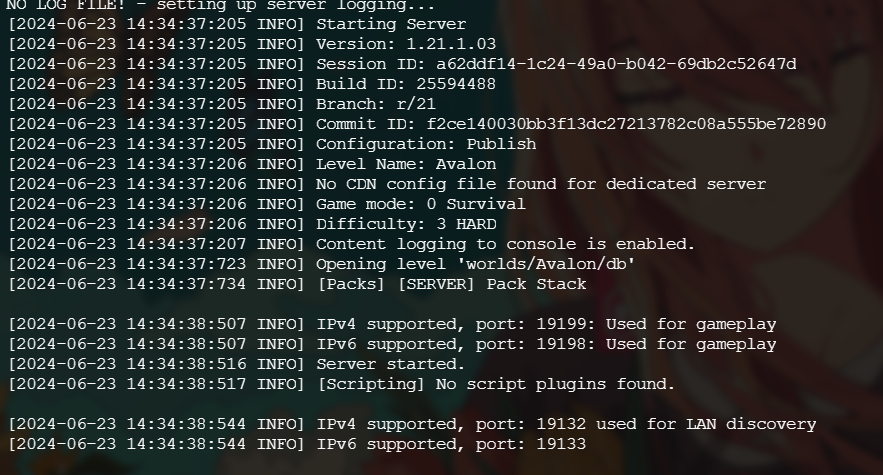
If I set a separate port (e.g., 19199), the server still uses 19132 for LAN discovery.
There is a workaround, such as not starting the server before modifying the server.properties file for the first time. This method works temporarily until I update the server (in my case, from 1.20.73 to 1.20.80), after which it starts using 19132 for LAN discovery again.
[2024-06-23 14:34:38:507 INFO] IPv4 supported, port: 19199: Used for gameplay
[2024-06-23 14:34:38:544 INFO] IPv4 supported, port: 19132 used for LAN discovery
I am using the Linux version of the Bedrock server. The expected behavior is to use the IPv4 port set in server.properties for LAN discovery, rather than falling back to the default 19132 port.
Environment
Linux / docker
Linked Issues
Attachments1

Comments1
History3

Added clones link: BDS-18213LAN discovery ignores port settingsIncomplete
Resolution: Unresolved → Works As Intended
Thank you for your report!
However, this issue is Working as Intended.
The report you have submitted is working as intended: see server.properties.
Please note, that mechanics of the game may change between updates.
Things such as graphics, sounds, world creation, biomes, redstone, villagers, and animals may not work the same in current versions.
Full Version History – Feature Requests and Suggestions
Quick Links:
📓 Bug Tracker Guidelines – 💬 Community Support – 📧 Mojang Support (Technical Issues) – 📧 Microsoft Support (Account Issues)
📓 Project Summary – ✍️ Feedback and Suggestions – 📖 Game Wiki