 BDS-16996
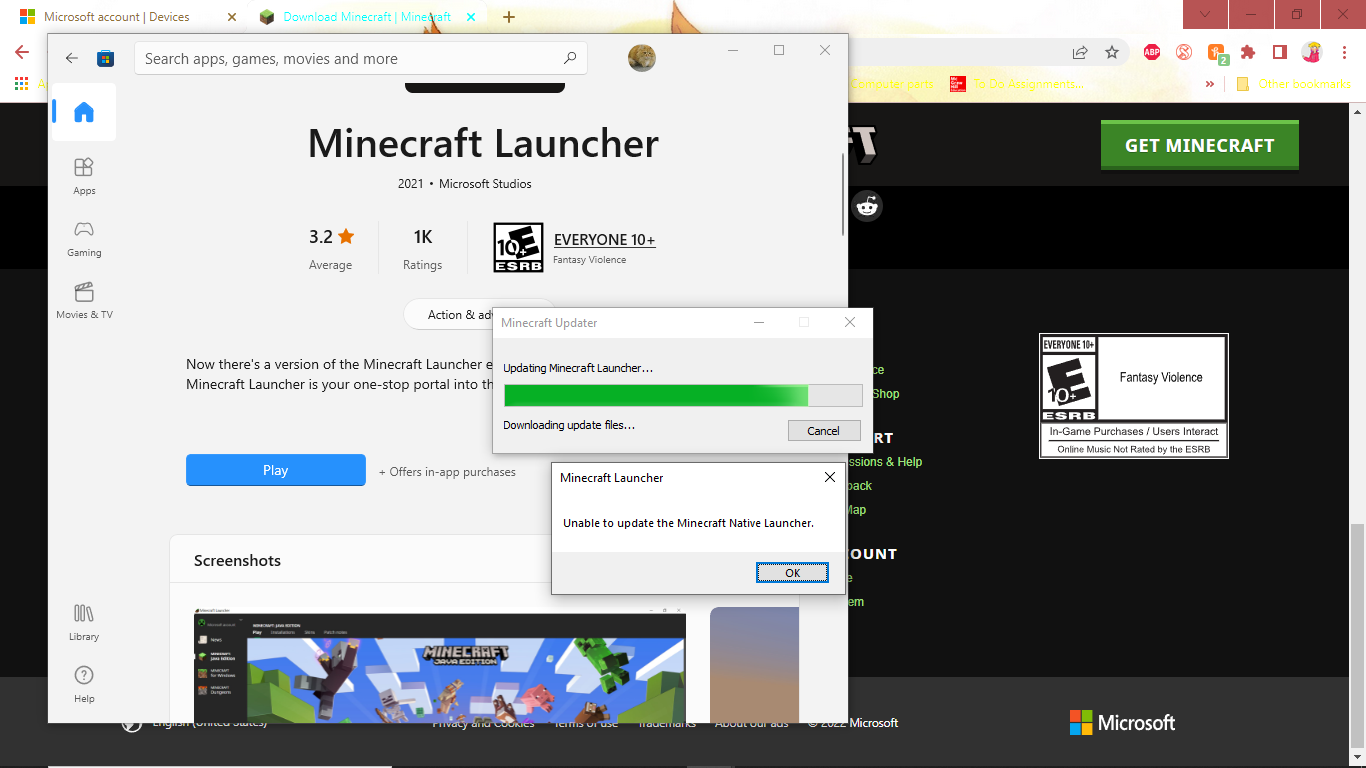
Unable to update Minecraft Native Browser
I went to launch minecraft today, however, everytime I try to launch it, it doesn't finish and it always says unable to update Native Browser. I have tried everything I could think of. I've tried uninstalling and reinstalling minecraft, opening with admin., restarting my pc, and even deleting the entire .minecraft folder. Nothing has worked, and I am honestly getting upset with this. I have been trying to fix this for the past 2 hours and nothing has worked. I would really appreciate if I could be told how to actually fix this issue.
Linked Issues
Attachments1

Comments2
History4

Added duplicates link: MCL-21461Unable to update Minecraft Native BrowserDuplicate
Resolution: Unresolved → Duplicate

Removed duplicates link: MCL-21461Unable to update Minecraft Native BrowserDuplicate
Added duplicates link: MCL-21425Unable to update the Minecraft Native LauncherFixed
This is under the wrong support, it was suppose to go under minecraft launcher sorry about that
Thank you for your report!
We're resolving and linking this ticket forward as a duplicate of
MCL-21461, as that ticket contains more detailed information and/or has already been triaged by Mojang.If you would like to add a vote and any extra information to the main ticket it would be appreciated.
Quick Links:
📓 Bug Tracker Guidelines – 💬 Community Support – 📧 Mojang Support
📓 Project Summary – ✍️ Feedback and Suggestions – 📖 BDS Wiki – 📖 FAQs
– I am a bot. This action was performed automatically! The ticket was resolved by one of our moderators, and I left this message to give more information to you.